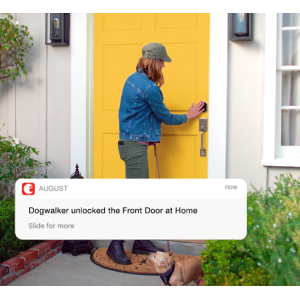
🔒 Upgrade your door, upgrade your lifestyle.
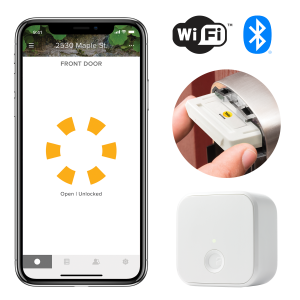
The Yale Security Wi-Fi and Bluetooth Upgrade Kit modernizes your first-generation Yale Assure Lock or Lever by adding seamless remote control via the Yale Access App, voice assistant compatibility, and real-time door status monitoring—all without needing an additional hub. Designed for easy installation, it enhances home security with bank-grade encryption and smart features like auto-unlock and battery alerts, making your entryway smarter and more connected.


| Brand | Yale |
| Item dimensions L x W x H | 4 x 2 x 4 inches |
| Lock Type | Biometric, Keypad |
| Material | Plastic |
| Recommended Uses For Product | Security |
| Special Feature | Works with any Yale Assure Lock or Lever |
G**8
Door Sense is Broken
Update — August has fixed door sense so updating stars. Giving this 3/5 for now since the Door Sense function is broken and not functional at all. Installing or calibrating door sense is a no go. The screen quickly closes. Door sense detects if the door is closed or not, which is pretty important. It may give a false sense of security if you leave the house and the door didn’t close. The August App will show that the door is locked (deadbolt is extended) but your door can potentially be wide open. It also makes the auto lock feature limited and sometimes annoying. If you have the door open long enough for the auto lock to engage, since August lock door sense doesn’t know recognize that the door is open, it will extend the bolt and try to lock the door. Unless you catch it, closing the door results in you banging the extended bolt on the door frame. Other than that the August app works fine and enables you to lock and unlock the door with your phone.
I**F
Easy Upgrade, Great Performance
The Yale Wi-Fi and Bluetooth Upgrade Kit has made my first-gen Assure Lock even more convenient and modern. The upgrade was simple to install, and it immediately added Wi-Fi and Bluetooth functionality to my existing lock, allowing me to control it remotely from my phone or other smart devices. I love the added convenience of being able to lock and unlock my door from anywhere, and the Bluetooth feature makes it easy to unlock when I’m nearby without using a key or code. It also works seamlessly with my smart home setup, giving me complete control over my security. The only thing to note is that this upgrade is not compatible with the Yale Assure Lock 2, so be sure to double-check your lock model before purchasing. Otherwise, the kit is well worth the investment, adding great features without needing to replace the whole lock. This product offers great value for money, excellent functionality, and is easy to use. If you’re looking to upgrade your first-gen Yale Assure Lock to a smart, Wi-Fi-enabled lock, I highly recommend this Yale Upgrade Kit! Highly recommend!
D**D
Issue pairing? Here's the definitive guide!
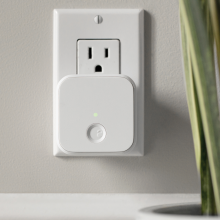
Like many, I initially struggled with getting this kit to pair with anything-- phone, Wi-Fi, etc. Keep reading for the definitive guide! Overview: August vs. Yale August was an early smart lock company that was purchased by Yale. Through that transition, August Connect became Yale Assist. Both apps look identical to me, and connected products SHOULD work in either environment. If you're new to the ecosystem, I recommend using the newer Yale branded experience (at some point I'd assume Yale would deprecate the August experience). In my case, I already had August devices and my family members were on the August app, so we stuck with the August ecosystem for now. Smart Module & Bridge This kit comes with two key pieces... the Smart Module that you install into your supported Yale Assure lock, and the white Bridge, which must be plugged into a nearby electrical outlet in order to "bridge" from the lock's Bluetooth lock to your network's Wi-Fi. There is also a small door sensor, but that is optional so will not be covered here as it's easy to setup once your lock is connected. The product images for this item show pictures of the WHITE August module, HOWEVER what you will receive is the BLACK Yale Assist module. So what is the difference? The older WHITE August branded module is Bluetooth-based and requires the Bridge to function. The newer BLACK Yale branded module adds native Wi-Fi, so the Bridge is not required - but likely recommended for most due to two key drawbacks of using the BLACK module's native Wi-Fi without the bridge: 1) some users report shorter battery life when using the BLACK module in direct Wi-Fi mode (bypassing the Bridge). 2) if you intend to use HomeKit, you must use the Bridge- due to security reasons, Apple does not support native Wi-Fi locks as of this writing. Getting Connected Here's where many, including me, got stuck. This system has the ability to scan a QR code into the Yale or August app. In theory, this should be the preferred way as it avoids lots of typing of long codes. In practice, it does not work and should be avoided in favor of the manual way. Detailed steps below: The Lock 1. Install Smart Module. Remove batteries from your lock and install smart module as instructed- it is a simple slide into place with a very slight click. I recommend you take a picture of the serial number at this time as you'll need it later. 2. Factory Reset Lock. You will also likely need to factory reset your lock- which will wipe out all settings on this lock if you have any. For Assure, the factory reset is done via a white button behind the main lock assembly. This is a pain to get to and requires the lock to be powered, so you'll have the battery assembly handing off the lock while still wired to the touchpad, your smart module is installed at this point, and you'll need to temporarily install the batteries to it. You can find details from Yale's on how to do this (Amazon blocked my original review for putting a link to that page). 3. (re)Set Master PIN. You'll know you got the reset right if when you power up the lock you are asked to enter a Master PIN. This your main 'admin' access to the lock, so make sure it's a number you can remember. After you enter the Master PIN, the lock will perform a quick test of locking the bolt before it's all ready. 4. Enable Wireless. Once you have installed the Smart Module, Factory Reset the lock, and set up your Master PIN, you can now reinstall everything on the lock. Once that is complete you can enable Wireless on the lock. Enter your Master PIN and press the Gear icon to enter the menu. Select option 7, which should be Wireless, then press the Gear to confirm. Select option 1, which should be enable wireless, then press the Gear to confirm. Press the back button to exit or wait for the timeout. The Bridge This needs to be installed close enough to the lock to have good communication, and also close enough to your Wi-Fi router/access. Before installing, I recommend you take a picture of the serial number on the back as you'll need it later. Installing this is super-easy, but I do recommend factory resetting it at the start. Press and hold the front button, and while still holding the button, plug it into your outlet and keep holding the button for about 10 seconds. You should see the LED flash red. Release the button then you should get a couple green LED blinks then a slow green blink meaning it's ready for pairing. Again, while the bridge is not required for basic operation on the newer BLACK smart module... it's still recommended for longer battery life, and required if you're planning to use HomeKit. Let's Get Connected Now that your lock and bridge are installed, let's get things connected. 1. QR codes-- don't use them! Yes, scanning these as instructed would be super easy and should work. But in my experience it did not-- at all. Skip the QR route and save yourself lots of headache. 2. Download the app. If you're new to the ecosystem the Yale Assist is recommended. If you're already using August then you can stick with that, or switch over. As of this writing the apps appear to be the same. Open your app and set up an account and location, if you don't already have one. 3. Get your serial numbers handy. Hopefully you took pics as noted above, if not they can be found on the outside of the small box for the Smart Module (or on the front of the module itself behind the battery door), and on the back of the Bridge (you have to unplug it to access). 4. Setting things up in the app. Note: you must pair the Lock and the Bridge separately. 4a. Pairing the Lock. In the app main menu, select "Set up a Device". Do NOT use the QR code, instead select Enter Serial Number Manually, then select Use Product Locator. Select "Yale", then "Yale Smart Module", then "Yale Access Upgrade Kit (CBA)". Then go through the steps to pair your Lock. Once this is complete, repeat the process to add the Bridge. 4b. Pairing the Bridge. In the app main menu, select "Set up a Device". Do NOT use the QR code, instead select Enter Serial Number Manually, then select Use Product Locator. Select "Yale" or "August", then "Accessory", then "Connect Wi-Fi Bridge (AC-R1)". Then go through the steps to pair your Bridge. At this point, you should be all set in the app and have avoided tons of frustration!!
S**Y
Works with YRC226 interconnected lock
I had an existing interconnected lockset, and wanted to keep that arrangement but get a keypad lock and hopefully a smart lock as well. The only model that seemed to meet my needs was the YRC226 interconnected lock, and it is hard to find this lockset as it is not really sold through consumer channels. The YRC model documentation is also really unclear on whether or not the interconnected models have the same network module compatibility as the standalone deadbolt (YRD) models and even the Connected by August compatibility list doesn't include the YRC models. (It would make sense that they work though, as from what I can tell, the interconnected models are the YRD deadbolt paired with an handleset, only the mechanical bits are different to pop open the deadbolt when you turn the handle, but ASSA ABLOY didn't want to confirm for me that network modules were compatible with the YRC models!) I was able to buy a YRC226 lock which came with a Z-Wave module, but I did not install it when installing the lock, and decided to try the Connected by August module instead. I had some hope as the install guide had directions for the Z-Wave, Zigbee, and iM1 modules, so I would have been really shocked if the Connected by August module *didn't* work. The good news is - it works! Remember to remove a battery before installing to avoid possibly shorting out the lock or module. I referred to the lock install directions, and after replacing the battery, while I tried to follow the directions for enabling the network module using the keypad, the "join" option was unavailable, just "forget", so it seems the module set itself up and didn't require any extra steps to enable it on the lock. Setting everything up in the August app was rather easy, the firmware updated quickly, although the bridge setup was annoying as the closest outlet to the door (about 7 feet) still has a rather weak Bluetooth signal and I had to move the bridge around to find the optimum location for it. Adding the lock to HomeKit failed at first, but worked after restarting my iPhone. Setup in the Alexa app was also very easy. I don't use Google Home, so I can't share any experiences with that. I also setup DoorSense while setting up the lock - since my door frame is metal, I mounted it externally, as you can see in my video. Right now auto-unlock isn't something I'll probably get to try, but these are software, not hardware, and the hardware seems to have been really easy to install and configure, and I'm pretty happy with the features that this module unlocked.
A**I
One of the worst tech items to set up I've ever experienced
When I first got this I was excited, the yale lock itself is wonderful but this piece of hardware was one of the worst tech setups I've ever experienced. The first time I set up this device. It took me roughly 4 hours of fighting with the application, which never properly cleans up the device. You manually have to disconnect it every time the setup fails. On top of that it uses an unsecured wifi network as the way you connect to the bridge, but if your phone has a security policy you may be blocked from connecting to it (however nothing in the app notes this, so enjoy googling all errors). After removing the policy and restarting it connected by failing successfully, where the app hung during setup but by closing it out it somehow connected in the background. After the painful setup it worked well enough, but there was always a good 45 second delay on opening the app and having it actually connect to the lock when it was going over the internet. My true mistake was thinking I could upgrade to a new router, namely Google wifi which apparently just hard breaks this device. Google wifi does an interesting thing where it names the 2.4ghz and 5ghz network the same network name (ssid) and assumes that the device is smart enough to connect to the right hand. From what I can tell, this just breaks how the bridge works entirely. As of now, I still can't get this working again and it's the only device I own that won't work with the new network. I think August could learn a lot from Google, ecobee and many others in how to make smart home device setup not be painful.
N**U
My Yale smart lock out did itself!
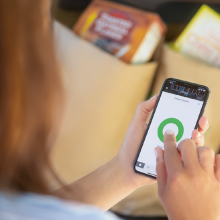
This lock is the cats Meow! (This shows my age). I wanted a smart lock to assist my wife who has Rheumatoid arthritis. She is challenged twisting things (ie: keys). This lock monitors a small zone. When we enter the zone it unlocks the door for her. No need to fumble for keys or even push numbers on the key pad. NOW you question, did I lock the door? Hmm. I just pull up the “Yale” app. It tells me if the door is closed and if it’s locked. If I left it unlocked I just tap the green button in a moment or two it turns red. Telling me it’s locked and secure. Oh your driving…just tell Alexa or Serrie to do it for you. Smart Lock? Oh yah!
S**T
Update - got it installed and working with the latest app update
Update 11/21/18: August support reached out to me a couple of days ago acknowledging some issues with the android app and the setup of the kit. They informed me that an app update was being deployed to resolve the issues. Once the app updated, I tried the setup again and it worked (save for a few app glitches and a crash during the firmware update). I am happy to say, however, that the setup was quick and the august module (and connects now works in my lock. As a side note, the yale chime tone confirmation on lock or unlock no longer plays when you lock or unlock the door. They do acknowledge during setup in the app that there may be some "issues" with android and that they are working to resolve them. I'm revising my review to 5 stars since it now works. Original review: This is not a plug and play install. I'm guessing iphone fan boy below already had the homekit enabled yale assure. For those of us with an existing zwave assure, and a grown up phone, i'm not sure this is gonna work. 3 androids later, 2 factory resets (1 each with zwave and August), numerous menu 7 network disconnect attempts, on 2 separate but identical yale assure sl zwave locks... and still get the same "unexpected error" with the new august module when trying to set it up in the app. The concept is certainly cool, but the execution is not ready for prime time. Gave up after an hour (including 30 minutes with support which tried their best). Sending the kit back and waiting for the kinks to be worked out before I re-order. As a side note, I love my yale assure locks with zwave. Just really wanted the bluetooth functionality (while not giving up automated locking) and the ability to send keys through august. Both yale assures are less than a month old.
A**B
Does work, sort-of eventually, but is a PITA to install.
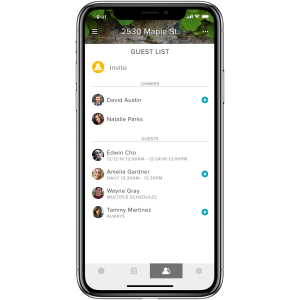
Got this to upgrade an older Yale assure to use for the back door. There's a newer Yale Assure on the front door and I wanted both doors automated so that I could create a routine to lock them both at night. There are zero installation instructions, so you're on your own. Couple that with the fact that the August software is garbage, and I had a frustrating hour or so getting it to work. (The physical install is trivial). It does not come with QR-code stickers for the hardware (only for Home integration), so write down the serial numbers for the module before you start. I'd also suggest doing a factory reset on the lock and starting from scratch. Install the lock module first, then the Connect. Doing that made the system remove the existing front-door connect, so reinstall that one too. The module has to be "registered" with the lock before it will work, so do that first (that's one of the reasons to do the factory reset, to force the registration process). I had to do a hard reset on my iPhone to get Home integration to work as well. Finally, though the app shows both locks (and entry codes) for me (in the "owner") position. When I added a "friend," it showed only one lock for the "friend." Removing the friend from the app got me two locks, but as soon as I selected one of them and installed an entry code, the other lock disappeared from the "friend." I removed it again, and then installed a code for the second lock, which again made the other lock disappear from the UI. The combinations do work in both locks, now, but the second lock never did reappear in the UI. This, of course, will be a continuing hassle if I need to add another "friend." The August software has always been cr***p and has not improved over time, so I don't expect problems like this to go away. Once you get everything set up, though, it all does work pretty well. Finally, don't expect the auto-unlock feature to be reliable. It fails outright about 10% of the time. The Yale lock has that nice keypad though (the August-lock keypad is also complete cr***p—cheaply made and constantly failing to work at all), so it's not a tragedy. Finally, if you're connecting this to Alexa, Alexa will not normally lock locks in location routines. To get it to lick when leaning your house, you need to add a "speak to alexa" item and tell it "lock the back door" rather than just adding a lock-door action. The one piece of software that *did* work is that August/Yale Alexa skill recognized the second lock automatically without my having to do anything.
Trustpilot
3 weeks ago
1 week ago