We remain fully operational. Our teams are working around the clock to ensure your deliveries continue safely.

DOWNLOAD THE APP


Customer Services
Copyright © 2025 Desertcart Holdings Limited
DOWNLOAD THE APP


🚀 Unlock your PC’s true speed with external SATA power!
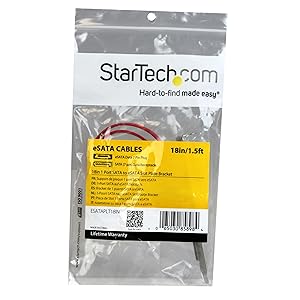
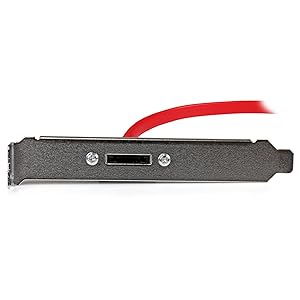
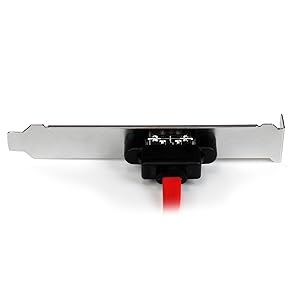
The StarTech.com 18in 1 Port SATA to eSATA Plate Adapter transforms an internal SATA connection into a high-speed external eSATA port, supporting full SATA 3.0 6Gbps bandwidth. With an 18-inch cable and easy installation, it’s ideal for professionals seeking faster, more reliable access to external drives and backups beyond traditional USB limitations.

| ASIN | B00MOENVOW |
| Best Sellers Rank | 94,869 in Computers & Accessories ( See Top 100 in Computers & Accessories ) 736 in SATA Cables |
| Department | Default Category |
| Guaranteed software updates until | unknown |
| Item model number | ESATAPLT18IN |
| Manufacturer | StarTech.com |
| Product Dimensions | 45.72 x 11.94 x 2.03 cm; 30 g |
D**S
Pleased with service, product and quality.
Pleased with service, product and quality.
P**Q
A very useful addition during a computer failure
Simple to set up, and it gives me two eSATA ports. What I wanted and what I got! SATA ports are more useful in accessing image backup & files than USB (as I found out!). Some programs just can't see USB flash drives, nor a USB connected HDD.
B**E
Ideal eSata Upgrade
This low profile (half-height) adapter is ideal for adding an eSATA port to your PC. Be aware that you do have to have a free internal SATA socket for the cable to plug into (sounds obvious but you'd be amazed!). Fitting the bracket was very easy but StarTech have been a bit miserly by only supplying about a foot of internal SATA cable so you may not have an option to route the wiring properly depending on where your SATA sockets are on your motherboard. Also the mounting screws that secure the SATA port to the mounting plate (bracket) were very loose and I had to tighten then with a screwdriver. Not a big hassle but I shouldn't have had to do this. Anyway a star is docked for the loose socket and the slightly mean length of cable, but otherwise it does the job exactly as advertised.
2**S
Great eSata connection solution
If you are looking for a reliable & inexpensive way of connecting your external SATA drives to your PC, this is the answer! Requires available SATA connections on the motherboard & does not have the RAID function of the much more expensive PCI card options. Easy to install, no external cables provided.
B**F
Works a treat
Easy installation. Upgraded my hard drive docking station from USB 2 to Esata with the resulting speed increase. 5 stars
U**R
StarTech.com 18in 1 Port SATA to eSATA Plate Adapter
Got a little worried when the reviews said the cable was short.,Dont worry , i have a big case (coolermaster cosmos 2) and had loads of room. It does what it says on the tin - Esata to Sata.
P**R
Longer Cables Required
My motherboard SATA ports are on the far side of the motherboard from the back of the case but luckily in line with the slot I intended to use. I had to plug the cables in before mounting the backplate as the cables only just reached. Ideally the cables need to be at least another 3cm longer.
A**O
did the work
Cables are too short, I manage to fit them but, they are really tight. Check the length before buy. I expected them to be longer.
S**G
Good product which performs as described. What would make it a 5-star product? *Rounded black cables which are sleeved together for the middle 2/3rds of cable length (so only separating at each other) *Longer cable length, another 25-50mm would have given me better cabling routing options
A**E
Funziona come desiderato. Nessun problema.
B**R
was easy to install. nice long eSata cord supplied, my machine saw it right away,, speeds were as advertised... good product, excellent price,, cheaper than from buying from the actual products main web site...
J**I
livraison rapide, c'est bien une prise eSATA. connexion SATA sur la carte mère. penser à activer le montage SATA à chaud dans le bios de la carte mère. fonctionne bien.
S**.
C'est adaptateur nous a permis de faire fonctionner une solution de backup serveur externe eSata, qui ne fonctionnait pas via une carte SAS d'origine avec un câble SAS-4 eSata. Nous avons plugé c'est adpatateur directement sur un port SATA disponible sur la carte mère et le tour était joué. Donnant de fait une solution backup externe à bas prix (puisque plus de carte PCI-e) et performante, vu le temps de lecture et d'écriture que nous donne l'interface eSata.
Trustpilot
5 days ago
2 months ago