
⌨️ Elevate your desk game with the Keychron K2 — where style meets unstoppable performance!
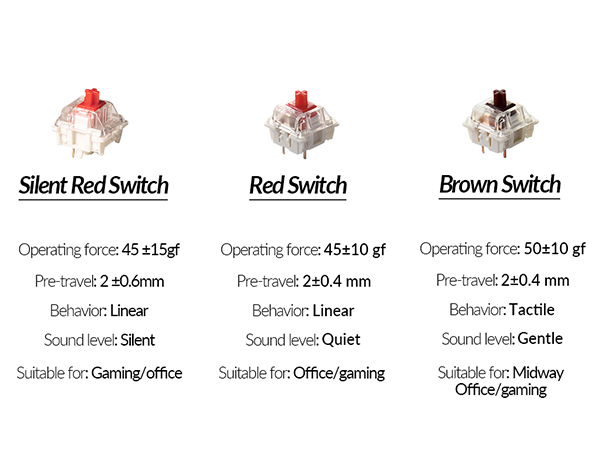
The Keychron K2 is a premium 75% mechanical keyboard featuring 84 keys with Mac and Windows compatibility. Equipped with Gateron Brown switches, it offers tactile precision and durability up to 50 million keystrokes. Its Bluetooth 5.1 chipset enables seamless connection to three devices, while a robust 4000mAh battery supports up to 7 days of use. The keyboard’s white LED backlighting and ergonomic inclined frame deliver both style and comfort, making it ideal for professionals, gamers, and multitaskers seeking a compact yet powerful typing experience.




| ASIN | B07QBPDWLS |
| Additional Features | Bluetooth USB C Wired dual mode, LED Backlit,Gateron Switch, Mac layout, Windows, Mechanical Keyboard |
| Antenna Location | Home,Office |
| Best Sellers Rank | #2,133 in Video Games ( See Top 100 in Video Games ) #13 in Mac Gaming Keyboards #186 in PC Gaming Keyboards |
| Brand | Keychron |
| Built-In Media | USB Cable |
| Button Quantity | 84 |
| Color | Brown Switch |
| Compatible Devices | Gaming Console |
| Connectivity Technology | Bluetooth, wired |
| Customer Reviews | 4.2 out of 5 stars 3,377 Reviews |
| Enclosure Material | Plastic |
| Generation | 2nd Generation |
| Hand Orientation | Ambidextrous |
| Is Electric | Yes |
| Item Dimensions L x W x H | 12.32"L x 4.84"W x 1.52"H |
| Item Height | 3.85 centimeters |
| Item Weight | 30.86 Ounces |
| Keyboard Backlighting Color Support | Single Color |
| Keyboard Description | Mechanical |
| Keyboard Layout | QWERTY |
| Language | English |
| Manufacturer | Keychron |
| Model Number | Keychron K2A3 |
| Number of Keys | 84 |
| Power Source | Battery Powered |
| Recommended Uses For Product | Home,Office |
| Series Number | 24174368456844 |
| Special Feature | Bluetooth USB C Wired dual mode, LED Backlit,Gateron Switch, Mac layout, Windows, Mechanical Keyboard Special Feature Bluetooth USB C Wired dual mode, LED Backlit,Gateron Switch, Mac layout, Windows, Mechanical Keyboard See more |
| Style Name | Modern |
| Switch Type | Gateron G Pro Mechanical Brown |
| UPC | 757450959289 |
| Unit Count | 1.0 Count |
| Water Resistance Level | Not Water Resistant |
M**Y
Awesome first time mechanical keyboard!
So first off, a few disclaimers. One, I am no mechanical keyboard expert so take everything I say as experience, not expertise. Two, this is my very first mechanical keyboard purchase so I have no other mechanical keyboards I can compare this to. Three, if you know nothing about mechanical keyboards - go and read at least a couple articles about what the different aspects to them are. Especially the different types of switches. Depending on what type of sound and feel you want, knowing the switches will potentially make the difference between a happy purchase and an unhappy one. I’m glad I did the research because I ended up very happy with both the sound and the feel. Ok, all that said… on to the review. After using my last keyboard for about three years, I decided it was time to replace it. I had been hearing a lot about mechanical keyboards for a while and had been talking to others about their experience. I decided it was time to take the plunge. The challenge here is that there are A LOT of options out there. Here’s how I chose. I’m a big fan of the folks at the Wirecutter (don’t love that they sold out to NYT, but whatevs). So I read their research and testing on best options. Their pick felt way over my head, both in terms of acquisition (had to go some mechanical keyboard online shop), costs, options, and wait time. Their budget pick, the Keychron C1 caught my eye. But this was a wired KB and I wanted wireless. I also noticed that their upgrade pick was also a Keychron - so when I found this one, I thought it couldn’t be too bad. Plus it had the two main features I wanted (bluetooth and backlight). Plus it looked pretty awesome. The overall package - I have to admit for a brand I had never heard of before, the whole package - keyboard and all - was made with a considerable amount of quality. The construction feels solid and sturdy. The instructions were understandable and clear. It included extra keycaps if you wanted to use this keyboard with a windows machine. You could even change the keys in the corner to gray or orange. Your choice. But the most important question - how does it feel to type? Mind you I’m not wildly picky nor a typing snob - but I thought it was great. I love the feel of it and it has just the right amount of feedback and sound. I got the brown switches for just this reason. Again, I will stress the importance of knowing what kind of switches you want. What I like - Typing feels awesome. It looks amazing on my desk and blends well with my Mac and all my accessories. Holds a charge for a long time. Lots of fun backlight options. Easy to configure. Can use as wired or wireless. Everything is high quality. What I don’t like - It goes to sleep a little too frequently for my taste. Mind you, this is configurable and you can change the amount of idle time before sleep or turn off auto sleep altogether.I tried this, but I think I got something wrong and now it seems to go to sleep even faster. But this is truly a PEBKAC and not a problem with the keyboard itself. Who would I recommend this for - I would definitely recommend this keyboard for anyone looking for their first foray into the mechanical world. Nothing to overthink here. Just pick the type of switches you want (thank goodness there are only three available as opposed to the dozen or so that are out there) and order and you’re on your way to clickety-clackety nirvana.
M**D
One of the best mechanical keyboards I have used
This is a review for the Keychron K2 with Gateron BLUE switches, though I have tried both the BROWN and RED. This is an excellent keyboard. I own several mechanical keyboards, the best of which are made by Daskeyboard, but I wanted a bluetooth with mechanical switches for pairing with my iPad for writing and decided to give all 3 Keychron models a try. Regardless of which switch you choose, the Keychron K2 keyboard quality is excellent, though of course we’ll have to see how well it holds up over time. It pairs easily with my Apple devices and so far has been flawless. There’s a switch on the side for Apple or Microsoft OS, as well as a button for your backlight preference. The keyboard is compact, but not crowded, and eliminating the number pad allows it to take up much less space than full keyboard. It types well flat and perhaps even better when elevated using the built in hinges or feet that fold open underneath. I chose BLUE switches because they feel the best for long sessions of typing. I found the build quality of the Keychron’s and tactile quality of the Gateron switches to be better than all the mechanicals I own with the exception of the full sized, non-bluetooth Daskeyboard with Cherry MX switches which is just slightly better owing to the spacing of the keys. However, it is a full sized keyboard and not bluetooth, and I’m not even sure if they make the same model anymore. Anyway, the Keychron with BLUE is such a close second that I am absolutely thrilled to have found it. As for the BROWN and RED models, I would say that if you have never owned a mechanical before you might be best served by the RED for general use as it is a little bit quieter and smoother than the others. For my taste, the RED is great for typing, though loud, but for a great general purpose bluetooth I would probably go with BROWN or GREEN instead. Then again, the BROWN might be more to your taste for typing with the slight bump as they key goes down. All 3 models are excellent; it all comes down to your preference. The bottom line is that I know of no better bluetooth model and am so happy with this one that I’m done looking for any more keyboards. A NOTE ON SHIPPING: Just beware that the estimated arrival date from this seller may be a day or two later than the Amazon estimate. I never had a problem receiving my keyboards, but the pre-shipping process is a little vague. Just be aware it may take more than 2 days to get it, though it never took more than 4 for any of mine.
C**C
Great price 75% mechanical keyboard but went back to the full-size keyboard by Keychron
This is a great 75% mechanical keyboard but after using it for a while. I like the feel when you press the keys so it works well for typical office use and also for CAD/design work. However, I realize that I prefer the full-size keyboard with the number pad attached. I have since bought that version and I love it. Battery life for these keyboards are awesome, and I like the fact that you can charge it and still use it at the same time.
P**R
A great keyboard if it fits your needs
I bought this for a home office that occupies a niche off the family living space and therefore should be as neat and minimal as possible. I especially want to avoid a tangle of cables. For years I used a Unicomp Model M at work, which I loved, but it was way too loud for home. I wondered how I would do with the Gateron blue switches, but in practice I like them just fine. The touch is lighter than the buckling springs of the Unicomp, but I have adjusted quickly and may soon prefer them. Anyway, after years of being forced much of the time to use laptop keyboards or the mushy junk at various offices this is quite satisfactory. I was also worried about using a Bluetooth connection, since other people have sometimes reported trouble, but it has worked like a charm. The connection was easy to establish and easy to restore after using the keyboard with other devices. I see no lag, no dropped characters, and no repeated characters. I don't game, so there may be a degree of responsiveness others need that I don't, but as far as I'm concerned each stroke has an instant result. It probably helps that I'm using this with a new NUC that has up-to-date Bluetooth 4.0. The keyboard goes to sleep after ten minutes and requires a keystroke to wake up. I realize that some sleep algorithm is necessary for battery life, but I wish that it were adjustable -- I would trade more frequent charging for longer wakefulness. However, I have quickly developed the habit of hitting the shift key after returning to typing. I was already acclimated to that from using laptops on dark airplanes to restore back-lighting. Speaking of which, I have found the back-lighting to be more useful than I thought I would. I got the model with the plain white LEDs and only the use the most boring, straightforward setting. I makes it easier to work in the dark, which I often do, and it serves as a reminder that the keyboard is asleep. The biggest bonus for me has been how well the keyboard works with other devices, like my iPhone and a smart Samsung television, filling a need I didn't know I had. I dislike typing long emails and texts with my thumbs. If the keyboard is in reach function-1, -2, or -3 quickly lets me switch with no problems. It has also spared me the tedium on text entry using the television remote when I am trying to search for a movie on Netflix or enter a password. My only objection to the keyboard is that, in practice, I don't love the form factor. That is not a design criticism. I thought I would, but now I think I would prefer a more expansive tenkeyless design, with the conventional layout for arrow keys and a little gap between the numbers and the function keys. This is perfectly designed for someone who wants to able to toss this in a backpack and use it in many places, but for pure keyboarding in one place, it is more compressed than I need. It also stands slightly higher than I would prefer, but that is really just a matter of the right wrist rest. The build quality is excellent, the keyboard feels solid and inflexible, and the weight (though far less than the good old Unicomp) is enough to keep it firmly in one place. I will definitely keep this keyboard, even if I end up buying a larger one for daily use. I know now how well Bluetooth and blue keys work for me. I recommend this to others for quality, but always subject to subjective preference and the job at hand.
G**F
I'm obsessed with keyboards
For me, appreciation of keyboards is like an artist's appreciation for pens. I've been hacking on keyboards since my IBM PC XT in the '80s, so I'm especially fond of good tactile feedback, and working in my own home office find the click of the blue switch to be quite satisfying when coding and writing. Things I love about this keyboard: - good solid weight to it - although plastic, it looks and feels like a quality product - I didn't feel the need to do anything to modify the keys as other reviewers have mentioned; for me the amount of travel, pressure, and feedback is perfect - this is my first keyboard that lets me effortlessly/instantly toggle between my iMac (fn+1), iPad (fn+2), and iPhone (fn+3) - suits my decor and looks awesome to me - while I don't care for all the light patterns that are available, I do like the subdued blue glow effect as you press each key; as far as I'm concerned they got this just right -- helpful in a dark environment, but not distracting to me at all (see video) Things I hate about the keyboard: - nothing Things that would make me love the keyboard even more: - I realize they optimized for wireless life, but dang I wish it had a USB port to plug in my security key for work (see second picture) - ok, yes, I'd sacrifice a bit of the heft of this keyboard to be able to lower it a few millimeters I thought about giving this only 4 stars because a truly perfect keyboard would also give me what's on my wishlist above, but I'm giving it a 5-star rating because I have spent hundreds of dollars per keyboard, like my happy hacking keyboard, and none has given me as much overall satisfaction as this one. For the price, this is truly a remarkable value. UPDATE after almost 2 months of use * The left the original review (above) after about a month of use. Nearing the end of the second month, I want to confirm I stand by the review and continue to be very happy with this keyboard. The only thing to be aware of is that people do find my blue switch to be quite loud when I'm in meetings, especially if I'm demoing something. So I've just been using the magic keyboard that came with my iMac Pro for demos, but I don't like switching to such a radically different feel. I've been reluctant to get o-ring dampeners, but I might have to go that route instead. But other than complaints from others around how audible the clicking sounds to them, I absolutely love the look, feel, sound, and features of this keyboard personally. UPDATE after half a year of use (Jan 8, 2021) * Still love the keyboard. Pressing Fn-1|2|3 to switch between my iMac, my iPad, and my PixelBook is awesome. * I did have to tame the audible click noise and finally added o-rings a couple of months ago. I consider my keyboard perfect and while I know it's an issue for others, it's height doesn't bother me at all. Just heard today the K3 might be thinner. If it feels as good as this has close to the same solid heft this one has, I might go for it, but I'm happy for now.
K**I
Lighting never works and keyboard has to be power cycled a lot to function properly.
the WORST thing about this keyboard is the fact that after being on for a while it doesn't light up. when working in a dim light video editing room, this is really annoying when you have to turn it off and on multiple times a day the time adds up. on my previous model Mark I the power switch ended up stopping working because of this I stupidly gave this company a second chance buying the Mark II. I tried to return this product but it was a couple days too late, so learn for me and save yourself the hassle. keyboard Disconnects when mac or PC goes to sleep causing you to have to reconnect the keyboard, but if you are on the login screen, you'll have to hardwire it to put in your password or you will have to use your laptop's keyboard if possible. this gets really annoying when it happens multiple times a day. once you do get your keyboard working again after sleep mode, you will now be on the default lighting setting which is a seizure inducing flashing. ridiculous lighting setting that no one would ever use unless they have a fetish for causing themselves seizures. you then have to proceed to push the lighting button a bunch of times until you get to probably the last setting in order which is a basic plane, solid lit up keyboard. and if you were wondering oh that would be cool because I could have different colors and everything. nope. this version Mark II of the keyboard does not have any different colors of lighting. just a bunch of stupid motion that does nothing but distract you while you are trying to work and it's all in a beautiful white color. This is a small thing but when added to the other inconveniences forcing you to think about your keyboard 5 to 10 times a day is ridiculous. My keyboard at work doesn't force me to ever have to think about it, I don't remember the last time I thought about my keyboard. When's the last time you thought about your keyboard? what if 5 to 10 times a day your keyboard made you deal with some s***? that would be hella annoying right? (Yes, I tried all the troubleshooting techniques and none of them worked.)
J**V
Great value very solid build quality won’t disappoint!
Wanted something wireless for my bedroom PC when I’m laying back in bed with the lady, this was the solution! The keyboard it self was very well packaged, almost like they cared. The board is very high quality feeling and doesn’t feel cheap and made with quality materials for its price point. I wanted a mechanical keyboard but without the loud mechanical sound, I opt’d for the red super switch as I wanted the quietest mechanical sound with out having to build a custom board. The board functions like every other board, nothing special about it, but to be fair I don’t use it as my daily driver to play games or any kind of task on any of my PCs, keys glide super smooth no stickiness to it what so ever, and the size of it is a plus, you can stash it any where and have it out of sight and out of the way. Overall extremely satisfied with my Keychron K2 experience, 10/10 recommend!
D**N
Quality Keyboard
Love the sound and the layout. First time buying a quality keyboard and I’ll definitely stick with this brand in the future.
Trustpilot
1 week ago
2 months ago



