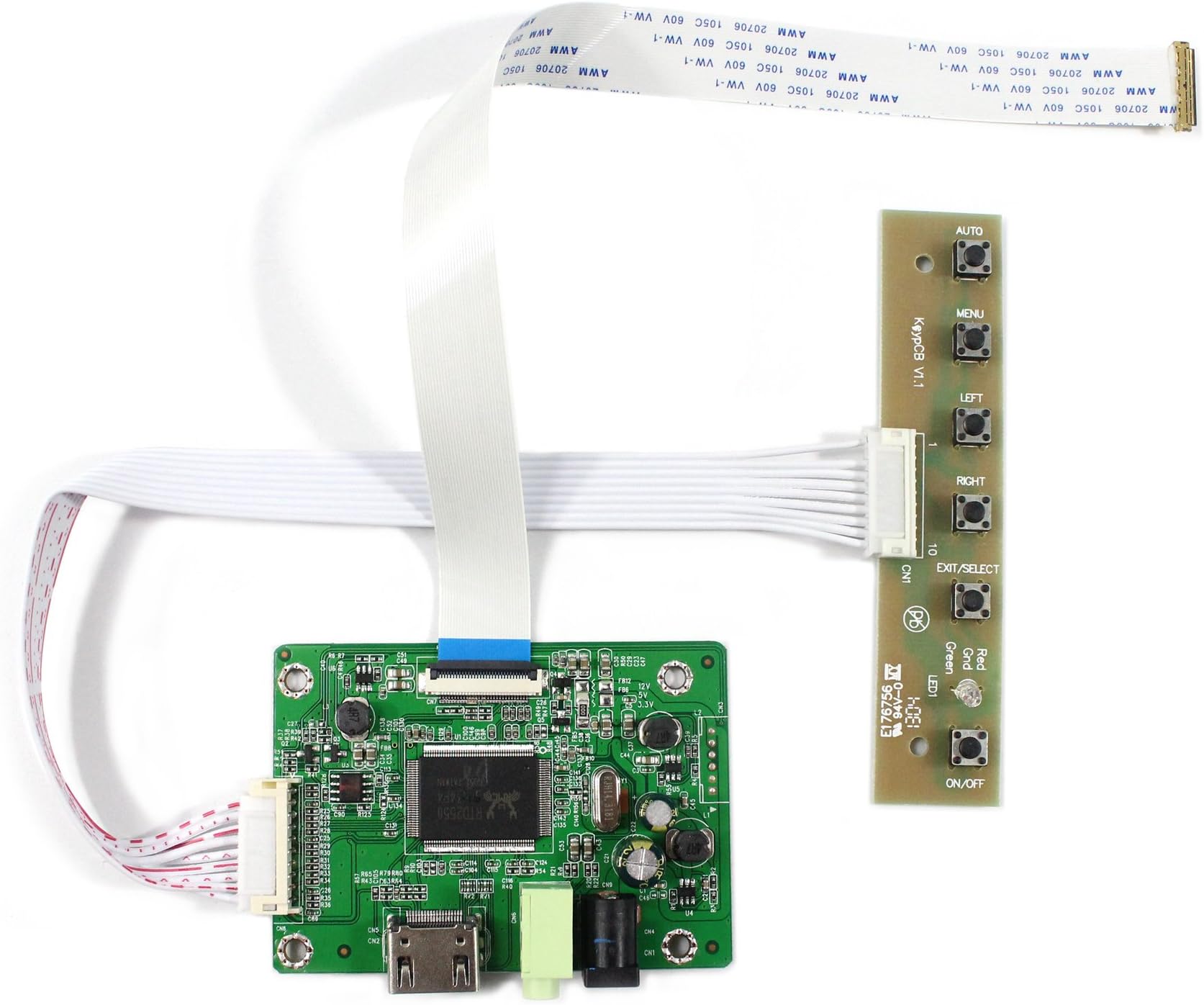
Controller Driver Board for 11.6'' 13.3'' 14'' 15.6'' 1920x1080 30 Pin eDP (not for 1366x768) LCD Screen
Product ID: 41123236
🎧Built-in audio output for earphones
🔌12V DC, 2A+ power input
🖥️Supports 1920x1080 30Pin eDP LCDs
Buy anything from 5,000+ international stores. One checkout price. No surprise fees. Join 2M+ shoppers on Desertcart.
Desertcart purchases this item on your behalf and handles shipping, customs, and support to Spain.
⚡ Revive, Repurpose, and Rule Your Display Game!
This Controller Driver Board is engineered for 30Pin eDP LCD screens with 1920x1080 resolution, supporting sizes from 11.6'' to 17.3''. It delivers stable 12V DC power (2A+), includes audio output, and features an energy-saving standby mode. Ideal for DIY monitor projects, it breathes new life into laptop panels, enabling professional-grade external displays or creative repurposing with plug-and-play simplicity.
| ASIN | B06W5DTGKC |
| Best Sellers Rank | #1,600 in Computer Monitor Accessories |
| Date First Available | February 21, 2017 |
| Is Discontinued By Manufacturer | No |
| Item Weight | 3.2 ounces |
| Item model number | 並行輸入品 |
| Manufacturer | LCDBOARD |
| Package Dimensions | 5.79 x 3.98 x 1.14 inches |
C**H
Works great with original ALP HD backglass for OTG
In the process of gutting my original arcade legends pinball machine HD’s parts. I still use the original backglass as my fullDMD screen, and figured I’d buy this to keep using it rather than putting more garbage in a landfill. Only thing I didn’t realize is the original 30 pin cable that came with the ALP doesn’t work with this board. It came with 2 cables that worked great, but I wasted 45min trying to get the original cable working when I should have just used one of the new ones.
D**N
Works for HP Elitebook 1040 G4 Notebook PC screen: N140HCE-GN2
Works for the screen that comes on an HP Elitebook 1040 G4 Notebook PC (Model Number: N140HCE-GN2). Simple as could be, just used the provided connector after removing the screen from the laptop. I thought I would have to rewire a couple of things but seems they're completely compatible. Now the broken laptop can be repurposed for a smart photo frame / external monitor / smart calendar project I'm working on. The instructions and links provided by the seller on how to ensure you are buying the correct board are incredibly valuable. Definitely follow them if you're using a different monitor, but I can confirm it works for this model. N140HCE-GN2, you hear that google!? Index this review so other people with a bunch of Elitebooks lying around don't go through my pain: N140HCE-GN2!!!!!!!!!!!!!!
A**D
Seems broken and filthy but ultimately displays a picture so I guess it works good enough
Mine arrived with blood on the conector that goes to the button board and none of the buttons seem to work except for exit/select that seems to turn the screen on and off. Ultimately it works I guess the screen displays a picture but it would have been nice to have some kind of options to adjust the picture.
T**E
Everything works, including brightness controls!
I have been experimenting with various LCD replacement screens and compatible LCD driver boards for the past year now. Playing with different sizes and form factors for different versions of a new invention. I have learned that this board is supremely reliable and the brightness actually changes the intensity of the backlight! (Duh. That's what it SHOULD do, right?) If you don't know, these boards are notorious for NOT actually adjusting the backlight intensity when you use the on-screen display controls to adjust the brightness. Instead, they do a photo-editing tactic to adjust the hue/brightness/coloring/saturating of the image being shown on the screen when you adjust the brightness on the monitor OSD control panel. (!!!!) Infuriating if you're hoping to build an actual, usable device and not just a toy. I have found this to be true even when buying "combos" where the screen and driver board come together. And when I message the seller and explain the problem, all I get back is a basic, "to adjust brightness use the buttons on your new monitor" kind of response, as if they do not understand the difference I am describing. At least in this case, it pairs nicely with a standard 17.3" LCD IPS FHD panel, it works as it should, making for an affordable, usable, attractive display. Do note that that button switches are so tiny that they will not protrude through any panel. I had to learn to de-solder the switches and then re-solder taller, compatible switches for the keyboard buttons to actually be user-accessible without exposing the circuit board. Also, the connectors are EXTREMELY fragile. In one I received, the connector was already broken. I've seen other reviews mention this as well. Remember to only unplug them if you have to during your build process, and then be VERY careful to gently pry off the connector itself. Never put push/pull force on the wires, just on the plastic connector housing.
D**R
Have had plenty of fun with this :)
I'm a form over function kind of guy.. so if you like things to be shiny and perfect, ignore my picture. I have a gaems case for my Xbox one. I was considering upgrading the screen. I was carefully prying off the screen cover and.. well.. you guessed it. I didn't know much about LCD control modules, if I even had heard of them. Honestly, it was last year. But I still use it very often. It's a plug and play item that just works. There's not a ton I can say about that. I just wish there was a little more formality to these kinds of products. You'll never really know who made them or anything of that nature. Not necessarily a big deal for most but, considering I'm now in the process of updating this case with a 19" screen from an Alienware and also building a custom screen attachment for my Xbox one x. I just like buying from a manufacturer I trust. You're gonna get a product that probably works well. But it's origins are mysterious. Okay, my reviews tend to go a little off topic but the thing works. I don't take particularly good care of my little rig and I've never once been worried about this. The soldering is good. The wires seemed fine. Good stuff.
H**Y
Works great even without the control buttons!
I wanted to use this to have a low profile display on the wall with this controller and a pi hiding in the wall. The buttons would have caused an issue with this so I left them unplugged. Works great! No issues at all. Fun product if you have a stash of old(or new) laptop displays laying around.
J**O
Works great with a SCREENARAMA New Screen Replacement for B156HAN02.1 HW:0A 1A, FHD 1920x1080
The display controller is connected to a Lebre Computer Board AML-S905X-CC, aka Le Potato, which is in the Raspberry Pi form factor running Armbian Linux. Two ribbon cables come with the driver board. The first cable failed to work but the second cable succeeded. There are no identification marks on the cables so I can only guess that the connections are mirrored. Otherwise, everything works. The menu system, like all on-screen-displays, takes a little getting used to. Pretty much plug and play. AC9NM
Y**Z
Funciona 100%
Trustpilot
2 weeks ago
2 weeks ago