We remain fully operational. Our teams are working around the clock to ensure your deliveries continue safely.

DOWNLOAD THE APP


Customer Services
Copyright © 2025 Desertcart Holdings Limited
DOWNLOAD THE APP

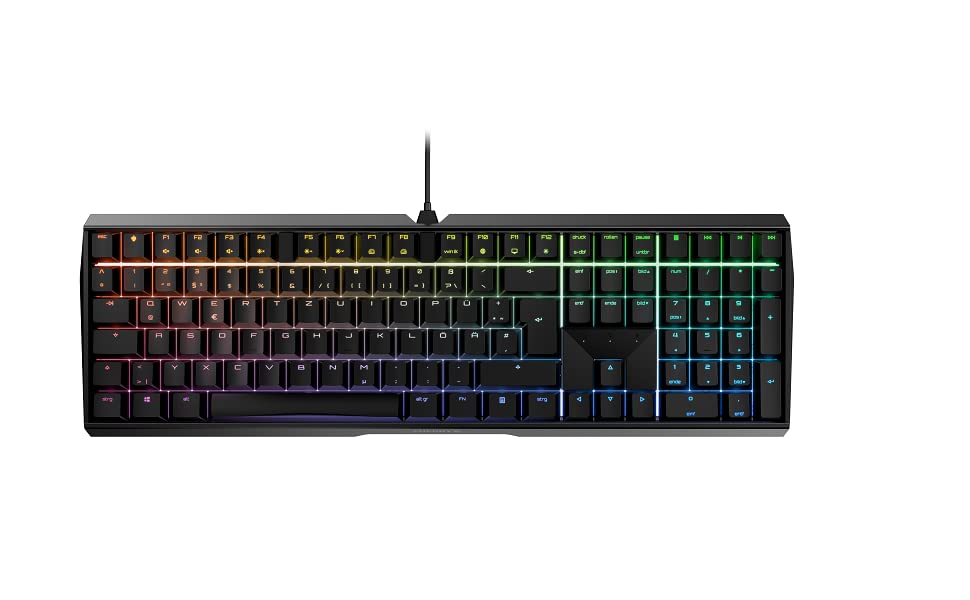
⌨️ Elevate your desk game with precision, power, and style!
The CHERRY MX BOARD 3.0 S is a premium wired mechanical keyboard featuring authentic German-engineered MX Red Silent switches for quiet, ultra-responsive typing. Its robust textured aluminum housing and screw-in metal legs provide unmatched stability, while customizable RGB lighting offers over 16 million colors and multiple illumination modes. Designed for professionals and gamers alike, it includes abrasion-resistant keycaps, full n-key rollover, anti-ghosting, and a detachable mini-USB cable for durable, long-lasting performance.




| ASIN | B08YRRLV25 |
| Are Batteries Included | No |
| Best Sellers Rank | #82,591 in Computers ( See Top 100 in Computers ) #2,440 in Computer Keyboards |
| Brand | Cherry |
| Color | Black |
| Customer Reviews | 4.6 4.6 out of 5 stars (305) |
| Date First Available | 1 December 2020 |
| Hardware Platform | PC |
| Item Weight | 1.03 Kilograms |
| Item model number | G80-3874LWAUS-2 |
| Manufacturer | CHERRY |
| Operating System | Windows 10, Windows 7, Windows 8 |
| Power Source | Corded Electric |
| Processor Count | 1 |
| Product Dimensions | 43 x 14 x 3.61 cm; 1.03 kg |
| Series | CHERRY MX BOARD 3.0 S |
G**J
The keyboard is sturdy and easy to use. Would recommend.
A**0
I really like the quality of the build. My only complaint is the ping noise I hear when typing.
D**S
My taste in keyboard feel runs toward mechanical key switches with a distinct tactile bump-through and an audible click, as with the Cherry MX Greens and Blues – but that click is for home, not for the office, where a good neighbor doesn’t use a clicky keyboard. Good office neighbors choose quiet key switches. So I used to use the rubber-dome-type keyboards, the best of which, in my experience, was the Logitech K740, quiet and with adequate tactile feel. But rubber-dome keys wear out (I’ve had three of those boards), and the K740 is now a collector’s item. Hence, I looked around for a mechanical keyboard using the Cherry MX Silent Red switches. In the good old days, I would have ordered a custom board from WASD Keyboards, but those folks, sadly, appear to be out of business. There are good-quality boards from many brands using other Cherry switches, but darned if I could find any others with the Silent Reds – the regular Reds, yes, but the Silent Reds are rare. That’s why I bought this board, one of Cherry’s own, and using the Silent Reds. (It’s available with other Cherry switches, too.) About these switches: I am informed that “linear” switches – no tactile bump, just a smooth swish to the bottom of travel – are preferred by many gamers. That’s not what I am, and as above, I like a tactile bump on the way down. But one learns by trying, so I’m getting used to the linear feel of these keys. How is the board otherwise? It’s metal-bodied, heavy, solid, and stays put. If one is used to relatively flat rubber-dome keyboards or laptop keys, one might want to add a wrist rest to use with this “taller” board, and if so, that’s easy. The board comes with optional screw-in metal feet to raise the rear edge slightly, if desired. But then there’s the blaring, candy-colored rainbow backlighting in the product description’s photos. In action, this actually moves, and it’s the out-of-the-box default. If you’re a kid trying to impress other kids, okay, that’ll do it. If you’re an adult and trying to concentrate on work, you’ll want to turn this into something else. Fortunately, the documentation explains that with a simple key combo you can cycle through many variants of colors and moving patterns, two of which, thankfully, are “off” and “just constant white backlighting, please.” I’ve included a couple photos of the keyboard with the latter turned on, and that’s how I run it at work. Reminds me of my WASD Code Mechanical board at home. (In the first photo, taken from directly above, some red is “leaking” around some of the keys. This seems odd, but it isn’t a factor when working with the keyboard from one’s normal viewing angle, as seen in the second photo.) Finally, are the Cherry Silent Red key switches actually silent? Well, no. When a key hits bottom there’s a subtle thump, and the keys have the usual mechanical freeplay. Office neighbors close by will know when you’re in action, albeit only if they are themselves bored. Suffice it to say that these Silent Reds are more quiet than other mechanical keys, even regular Reds or the stiffer Blacks, and also more quiet than the tactile-bump non-clickers such as the MX Browns. I should add that one can download some optional Cherry software that makes a wide range of customization possible. But that isn’t necessary for simply changing the color scheme, and I haven’t any use for customization, because I use several other machines and keyboards and so must be satisfied with the standard layout and function. So to sum up, this is a robust and solid board with mechanical key switches that, unlike rubber-dome types, will never wear out. The key feel is consistent across the board, every press the same. The key action is smooth and…almost Silent.
J**R
As a previous owner of multiple Razer, Steelseries and Corsair keyboards, this thing is like a breath of fresh air. The cherry red switches are as quiet as a membrane keyboard and I find myself making far less typos while speeding through typing. I honestly didn't think I would be nearly as impressed as I am with this little keyboard. No extra software, macro keys or any of that nonsense. Plug and play. The way it should be
B**E
If you like quiet, linear switches with a tight, high-quality feel, you won't do any better than this at the price point.
Trustpilot
2 weeks ago
1 day ago