
DOWNLOAD THE APP


Customer Services
Copyright © 2025 Desertcart Holdings Limited
DOWNLOAD THE APP
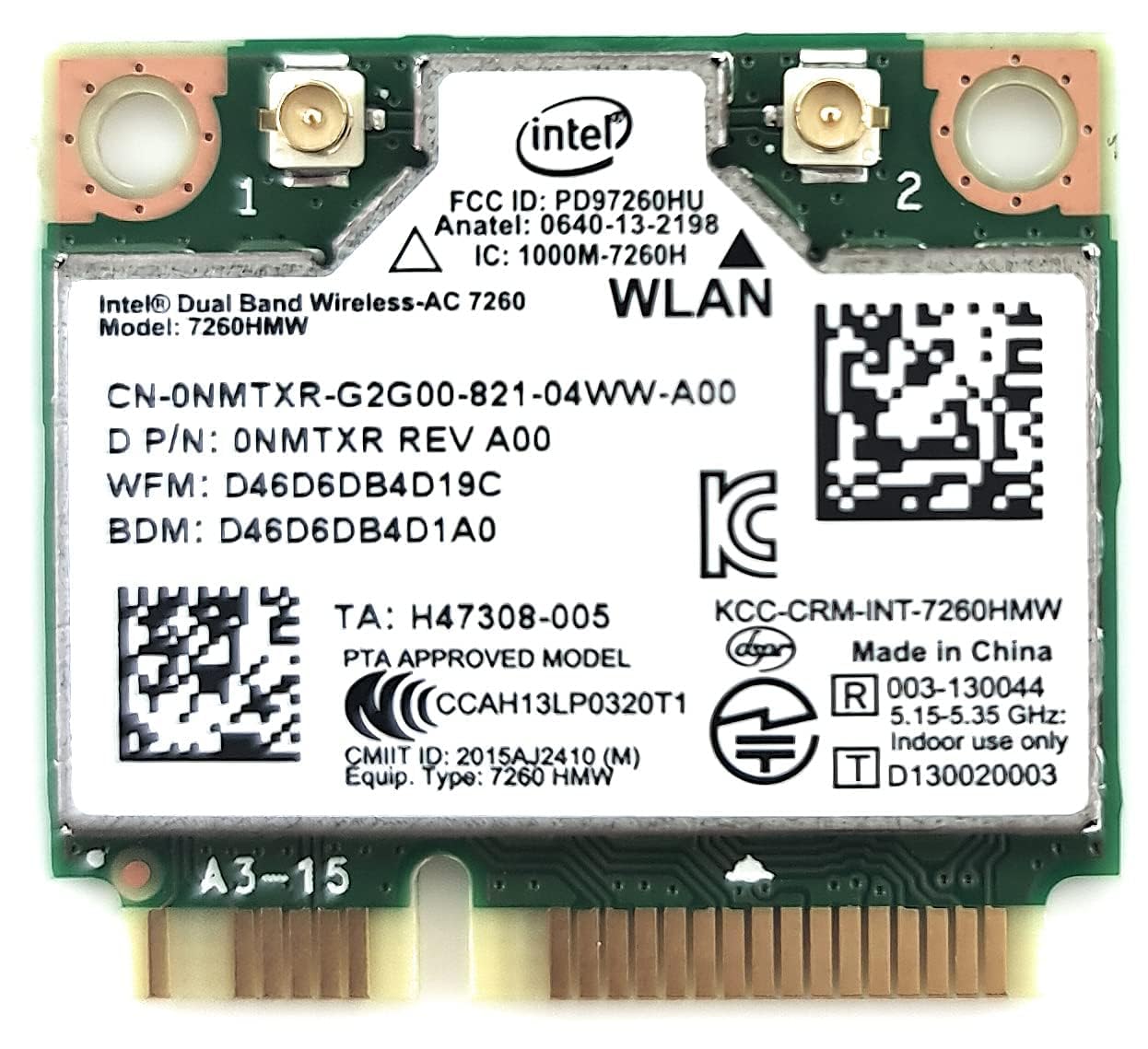
🚀 Stay ahead with ultra-fast, ultra-connected wireless power!
The Intel Wireless-N 7260 (7260HMW AN) is a compact PCIe Mini Card network adapter delivering dual-band 802.11ac Wi-Fi speeds up to 867 Mbps combined with Bluetooth 4.0. Designed for seamless integration with laptops, it offers enhanced wireless coverage, longer battery life, and reliable connectivity, making it an essential upgrade for professionals seeking fast, stable internet and device pairing.
| ASIN | B00N7474CS |
| Are Batteries Included | No |
| Brand | Intel |
| Color | green |
| Computer Memory Type | Unknown |
| Customer Reviews | 4.5 4.5 out of 5 stars (2,435) |
| Date First Available | 28 August 2014 |
| Form Factor | Network Interface Controller |
| Graphics Chipset Brand | Intel |
| Item Weight | 9.07 g |
| Item model number | 7260HMW AN |
| Manufacturer | Intel |
| Operating System | Linux |
| Processor Count | 1 |
| Product Dimensions | 6.99 x 6.1 x 0.05 cm; 9.07 g |
| Series | 7260HMW |
| Wireless Type | 5.8 GHz Radio Frequency |
M**M
Intel Wireless-N 7260
great ,dual band wireless . fast ,no any problems ,i advice all laptop users to buy order same product . thanks for supplier thanks for amazon now my laptop be faster than before .
B**N
perfectly great in terms of connectivity
product is great and its compatible with the old laptop like toshiba satellite l650 but it doesnt have a bluetooth.
D**V
The Intel Dual Band Wireless-AC 7260 Network + Bluetooth Adapter (7260.HMWWB.R) has completely transformed my connectivity experience, offering seamless Wi-Fi and Bluetooth capabilities. This 2x2 adapter combines exceptional performance with reliable Bluetooth connectivity, making it a versatile and essential addition to my devices. I am thrilled to provide a five-star review for this remarkable network adapter. Fast and Reliable Wi-Fi: One of the standout features of this network adapter is its fast and reliable Wi-Fi connectivity. It ensures that I have a strong and stable internet connection for all my online activities. Dual Band Support: The dual band support allows me to choose between 2.4 GHz and 5 GHz frequencies, optimizing my Wi-Fi connection for various tasks. Seamless Bluetooth Connectivity: The built-in Bluetooth adapter is seamless and reliable, providing a convenient way to connect my devices and peripherals. Exceptional Performance: The adapter's 2x2 design and Intel's high-quality engineering guarantee exceptional performance, reducing latency and enhancing data speeds. Compact Design: The compact design of this adapter ensures it can easily fit into various devices, making it a versatile choice for upgrading or adding wireless capabilities. In conclusion, the Intel Dual Band Wireless-AC 7260 Network + Bluetooth Adapter is a five-star solution for individuals seeking seamless connectivity and exceptional performance. With fast and reliable Wi-Fi, dual band support, seamless Bluetooth connectivity, and a compact design, this adapter offers everything you need to stay connected and efficient. Whether you're upgrading your laptop or adding Bluetooth capabilities to your desktop, this network adapter is a top-tier choice. I wholeheartedly recommend it to anyone in need of reliable and high-performance connectivity.
R**A
Ho comprato la Intel 7260 AC per sostituire la Ralink RT3290 presente sul mio HP Envy 15j-100el, la quale mi stava dando problemi da diverse settimane. Che dire, il pacco è arrivato con un ritardo di un giorno, ma per ragioni non dipendenti da Amazon, bensì dal corriere; e questa è l'unica nota negativa che devo fare. Per il resto ho installato la scheda in pochi minuti e funziona alla grande; rispetto alla vecchia Ralink, la scheda Intel ha una ricezione maggiore e il segnale è molto stabile. Non ci sono sostanziali guadagni di velocità, ma in compenso ci sono molte funzioni da poter personalizzare nella gestione dispositivi di Windows: consiglio agli utenti meno esperti di lasciare le impostazioni di default. Sebbene appena avviato il PC dopo la sostituzione, Windows avesse rilevato già la scheda e installato i driver generici della Microsoft, ho preferito farmi trovare preparato scaricando i driver appositi Intel dal loro sito. Basta cercare il modello della scheda e scaricare il pacchetto "driver only", in quanto ci viene offerto anche un software per la gestione della connettività, che a mio avviso è abbastanza inutile. Non dimenticate di scaricare anche i driver bluetooth! Installate entrambi i pacchetti in pochi click e riavviate per sicurezza il sistema; a me non è stato chiesto il riavvio ma ho preferito farlo per controllare che i cambiamenti risultassero effettivi. In definitiva, vale la pena spendere una trentina di euro (questo il prezzo a cui l'ho acquistata io) per sostituire una scheda di bassa qualità o difettosa; sui computer di fascia alta la sostituzione si può effettuare tranquillamente da soli aprendo il vano posteriore. Ci si impiega veramente due minuti e i risultati sono immediati; sicuramente è una soluzione migliore che non lasciare il computer in assistenza per chissà quanto tempo ed eventualmente sborsare una cifra molto più elevata. Vorrei dare un ultimo consiglio a chi sta pensando all'acquisto: prima di comprare questo o un altro modello di scheda per il vostro computer, verificate se il vostro produttore ha preimpostato una "whitelist" nel BIOS; molti produttori programmano il BIOS per impedire l'avvio del computer se rilevano una scheda wi-fi diversa da una di quelle presenti nella lista. Per controllare è sufficiente andare sul sito del produttore e cercare la guida alla manutenzione relativa alla vostra serie di computer; nel mio caso, ho trovato una guida valida per tutti i modelli HP Envy in cui, alla voce "WLAN Module" era presente un elenco ristretto di schede. Non era specificato esplicitamente che essa fosse una "whitelist" vincolante, ma ho preferito attenermi ad esso per evitare problemi, e la Intel 7260 AC era in elenco. Se non trovate la guida alla manutenzione, potete usare anche la sezione driver del sito del produttore; nel mio caso, alla sezione driver WLAN della HP per il modello del mio PC, ho potuto constatare che si potessero scaricare driver per diversi produttori, fra cui Intel. Ho scaricato il driver Intel e controllato nel file Readme l'elenco dei dispositivi supportati, nel quale figurava proprio la 7260 AC. È incredibile come sostituendo una piccolissima scheda possa cambiare l'esperienza di navigazione e download in modo così netto!
I**U
Definitely, A MONSTAAA!!! I decided to buy this little monster in order to replace my old crappy laptop's wireless adapter and I did the best thing I could do for my old, but still strong ASUS (X54HY-SX030D). At first, I was a bit reluctant as I'd done some research and I found out that it could be incompatible with some laptops. But I took the risk and now I'm among one of the happiest tech geeks - so, now, guys for those of you who still have an old K54 or X54 laptop, it works flawlessly. The Wi-Fi's signal has improved by a little edge - the most important factor here is the router/access point, the speeds went through the roof, but most importantly the connection is A LOT more stable than it used to be - no drops, more constant speed and reduced latency. In addition to all of these super benefits, you get Bluetooth 4.0 LE which is a lovely pleasure to use in combination with an excellent pair of wireless headphones - mine is Ausdom M05. Now, I can walk around my room with my headphones on without having to worry about an annoying wire hanging around
A**.
Bought this to replace an old Wi-Fi/BT chip that would overheat and stop working. My laptop is a HP Pavilion G6-2248CA from 2013 that we previously upgraded to Windows 10. The end result: computer now is operating amazing with full dual band AC WI-FI and Bluetooth 4 (old card was BT3 & single band N wifi and slow - when it used to work) when combined with fresh reinstall of Windows 10. Can't speak to the longevity but performed 2 days of heavy use with no malfunctioning of the card. Tips: Apparently there is a whitelist of cards (this wasn't listed as one of them) for older HP machines. I did a BIOS update (available on HP website) before installing the chip and perhaps that's what allowed this chip to work (or maybe it works anyway). Be sure to delete the drivers of the old card before swapping cards or be prepared to install a fresh copy of Windows 10. Card worked without deleting old drivers until I restarted computer and got a fatal error(could have been one of many factors though-i read somewhere that you should delete). I had already reinstalled Windows so doing so a second time wasnt a huge deal and now it works great. Installed newest drivers from Intel's website for good measure since the ones windows auto installs are about 5 years old. Easy install - 2 screws total in my case (one for plastic cover one for card) and just had to plug in antennae.
R**M
Se compro para un equipo lenovo G50-45. Pero no la reconocio, tuve que actualizar con un bios personalizado el cual incluia una lista blanca de tarjetas de red. El equipo opera de maravilla en ambientes donde se dispone de doble banda ya que en la banda de 5ghz hay menos saturacion y ruido, lo que le proporciona un internet muy estable y rapido.
Trustpilot
2 days ago
1 month ago