🎉 Game On-the-Go: Elevate your mobile gaming experience!
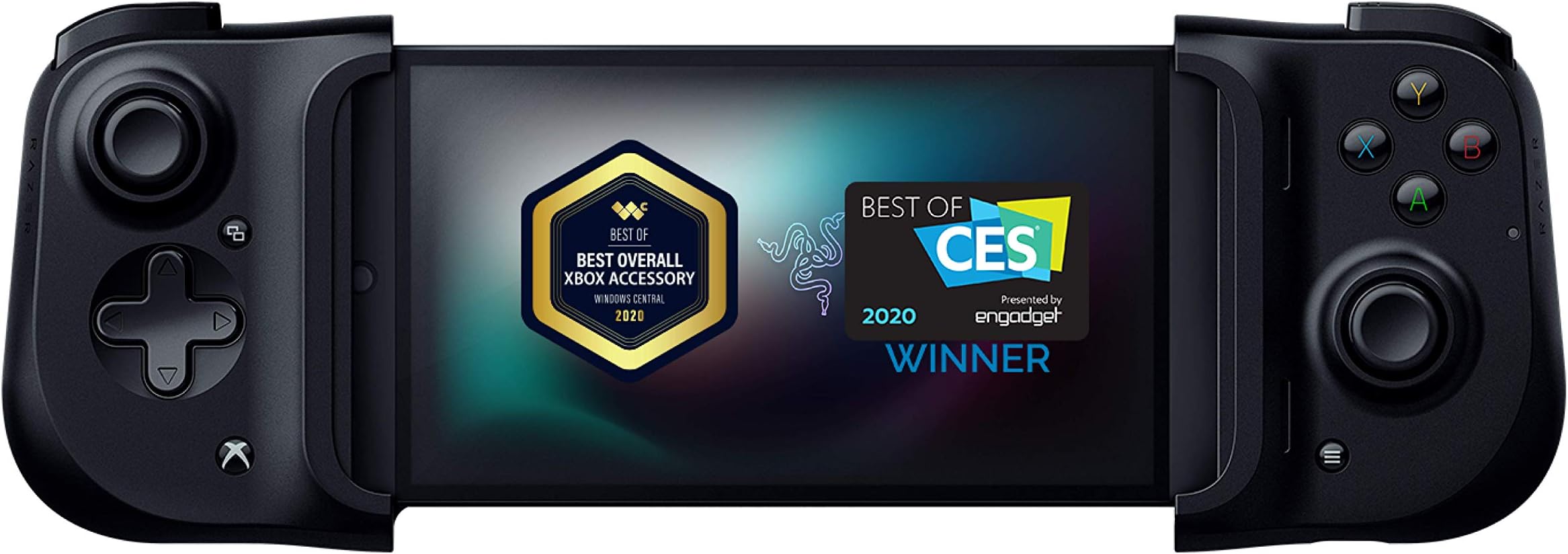
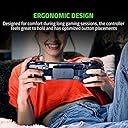
The Razer Kishi Mobile Game Controller is a universal gaming solution designed for Android devices, offering console-level control with zero latency. Compatible with major cloud gaming services and popular mobile games, it features an ergonomic design, clickable analog thumbsticks, and a USB-C charging port for uninterrupted gameplay.


| Button Quantity | 18 |
| Additional Features | Ergonomic |
| Power Source | Corded Electric |
| Hardware Platform | android |
| Controller Type | Gamepad |
| Connectivity Technology | Bluetooth |
| Compatible Devices | Andriod, Xbox |
| Item Dimensions | 5.28 x 3.7 x 1.46 inches |
| Package Quantity | 1 |
| Item Weight | 5.6 ounces |
| Color | Black |
J**M
Solid gaming console quality controller which plays like a Nintendo Switch
TL:DR: The Razer Kishi that I use for my iPhone 12 Pro is a solid console quality controller attachment that works excellent for iPhone gaming. I have played games from the Apple App Store and Apple Arcade to using the Playstation Remote app to play games through my PS5. Will drain battery fast if not plugged in. Pros -Comfortable to hold for extended periods of time. -Snug Fit to iPhone 12 Pro -Analog sticks and buttons are console controller quality -No battery to change -Lightening cable passthrough to charge while playing -Compact and portable -Direct connection so no button lag Cons -Drains battery fast if not plugged in I recently purchased a Nintendo Switch for my wife during the holidays and rediscovered how cool it was to have a portable gaming system. In the past, portable gaming with things like the Nintendo DS or PSP were “portable” gaming systems, but with the Nintendo Switch, it was a full fledge gaming console in your hands. This got me thinking as I love playing games on my iPhone and the iOS recently enabled controller support. I went to Amazon and did some research to see what my options were to add a controller to my iPhone. I knew I did not want a regular controller with a phone bracket above it as that seemed too gimmicky to me. I wanted to see if there was something like the Nintendo Switch. After a brief amount of searching, I came across the Razer Kishi. Comparing the cost of the Kishi to other bluetooth “bracket” style controllers, yes the Kishi is a little more expensive; however, how it fits to the phone and how well it works, in my opinion, is well worth the cost. The controller collapses into a small portable form factor which is easy to put into backpacks or purses without worry of damaging it. When you are ready to play, you just unlatch two little clips on the back, extend the controller out, and plug your phone in. Once you open a game, if the game supports a controller, it will just work! **Important note, the controller support and button configuration is per the game, not the controller. So if a game does not work as you might expect it, it is NOT Razer’s fault, but the way the game developer designed it** The gaming experience is excellent with the Kishi. It truly feels like a Nintendo Switch with the console quality controls. Every game I have played has been seamless. The controller IS NOT bluetooth, so you will be running on the phones battery. This does drain the battery much faster than a bluetooth controller, but on the flip side, there is no button lag, and you do not need to charge the controller so it is always ready to go. The controller has a lightening port on the bottom right that can be used as a passthrough to charge your phone while playing. If you are looking for a compact, solid console quality gaming controller, look no further. The Kishi has exceeded all of my expectations so far. There is even an iPhone app you can download to make sure the firmware is up to date and working properly which shows ongoing support for their already excellent product.
I**N
WOW. DON'T EVEN THINK ABOUT THIS PURCHASE HOLY MOLY THIS RULES
A lot people make money as professional gamers and tech reviewers. They are able to speak at length about different qualities of clicks and compare triggers and switches across platforms. that's fine when the controllers are all similar, but there is nothing like this anywhere. This is totally revolutionary. I am playing a AAAA title, cyberpunk, on my phone on stadia and it runs better over wifi than it does on a PC. Not able to get a PS5 so this is the only way I can get the game, and the best way in my opinion. My PIXL phone is now a high end ultra powerful console quality portable game device like a PS5 switch with an AMOLED screen! I couldn't care less about comparing the quality of the button clicks to PS, Xbox and nintendo. This rules and the buttons are great. quibbles with mushiness and clickiness are in the realm of stuff you won't notice at all. Do you really want to clip your phone onto the top of a regular controller? No. That would be really distracting I think and looks totally clumsy. This thing attaches easily to the sides of an android phone with USBC and works without latency. My PXL + Kishi is a way better gaming device than my nintendo switch overall. It really doesn't matter about preferences for buttons. they are fine. and the reviews that talk about it not being "heavy" like a quality controller? the weight is the battery and this doesn't have one. None of the critical reviews make any difference in gameplay. This rocks. Buy it. I am a dad and don't have time to sit in front of the tv and play a PS5 game without my kids, but I can sit on the couch and game while they watch cartoons. This is the first time I've gotten to play good video games since they were born! Thank you Razer this is amazing. ***update**** ok I have had this for a while now and after comparing to my stadia controller and switch pro controllers, yes I can see that buttons are kind of bad by comparison. the switch pro and stadia controller feel effortless and give a tiny tactile click that serves as player feedback. response on the Kishi feels gummy, especially on the dpad. overall it feels like the buttons maybe use a rubber overlay, and not mechanical switches. I don't know I'm not going to open this. The shoulder triggers also have a sort of scrapey feeling whereas on a pro controller feels effortless and has a mechanical tactile response. I think for the price point, which is greater than both my other pro controllers, razer could have made better switches, especially considering that without a lithium battery the cost of materials here isn't that much. I think I am going to deduct a star here since yeah the buttons could be better at the price point. However, I think the form factor is totally revolutionary and so much better than clipping your phone above a controller. I still recommend this but it definitely should have either much better switches or be 25 dollars less. **update 2*** I'm coming to appreciate the buttons a little more especially since the triggers are analog, which means they communicate how hard you press them. I restored back to 5 stars but I still don't see why this is 70 dollars, especially since it doesn't have a battery or a bluetooth module. however, there is virtually no competition in this form factor so still a must buy.
R**F
Pretty perfect
UPDATE: I wanted to come write an update after about two weeks of use. I did some investigating and found the issue I had with the controller not responding was the game I was playing having issues with controllers at those points in the game. So that has been solved. The only issue I've found slightly annoying is it can sometimes be difficult to get the phone I to the controller but that's a problem with bigger phones I believe and maybe the support for the phone could be a little more solid feeling. Other than that it's performed well and still feels like a solid controller. The trigger buttons could also use some click to them to give a feedback of when exactly the button is clicked. I would still give this a very strong four and half stars may be more inclined to look at the version 2 sometime in the future. I've had this the Kishi for almost a week now and I thought I could give it a fair review. The Kishi was one of only a couple different controls like this I could find, so I decided to gi e it a chance being razer and all. For the price of the controller it seems like a really good deal. It feels good in the hand and feels like just a good quality controller. The button layout is nice, the shoulder and the trigger buttons feel good too. It also surpringly feels really solid with the phone in it, not like there's any give to it or like it might fall out or anything. The controller instantly is recognized by the phone and there's literally no sort of set up or anything needed. The charging port that provides charge through to the phone through the controller seems like it works well too. My phone literally just barely fits in it, like stretching it as far apart as it can go and it's a note 9,so I was worried about the fit but it's perfect. Honestly, I have a switch and when using my Phone in the controller it feels comparable, if not more comfortable than the switch feels in my hands. It feels just like a hand held. This is only the first week so we'll see how it holds up with time and use but I'm fairly satisfied with it. The only couple issues I have is the charge through can seem a bit slower than normal, but that's expected. Also, maybe everyday I've used it, at least once a day, it'll seem to oddly disconnect for maybe less than five seconds than just start responding again. For seemingly no reason in particular. I saw there was a version 2 of the Kishi so maybe that's fixed or maybe it's just a personal problem. I thought about getting the version 2 but for almost twice the price i thought I'd see how this one works first. Having used this one, I can't possibly fathom what they changed to make it worth almost twice version 1. For all those reasons I give it four stars, honestly more four and a half but whatever. Maybe version 2 is better and they made crazy changes, I'll never know, who knows, hopefully this one holds up for a while still.
L**D
Perfect if you like to remote play your ps4.
I'm writing this review mainly for people who want to use this for ps4 remote play. (haven't tested it on ps5) This controller works amazingly on my Samsung Note 8. I was able to fit it and it worked right away. (plug and play) I will add that I had to purchase the 3rd party remote play app called PSPlay which is around $5. It was totally worth it since my phone is not at the correct OS for the official app to support controller use in general. (I have read that the official remote play app doesn't support this controller) The 3rd party app will immediately recognize the controller and already have all the buttons programmed for use. I think only the touch pad isn't there, but you can still use your phone touch screen for that at least. Now for what I wanted to use it the controller is perfect, but the controller itself does have some concerns. The D-Pad does feel a bit off when compared to a DS4, but so far I haven't had issues with it once I began to use it. Same thing with the button. The triggers feel odd to me, but I also got accustomed to then after a while of use. Eventually I got comfortable with the controller as a whole and have been playing Stray when I'm on break at work or some other forgiving single player game due to expected minor latency. Despite those minor initial concerns I got so used to them after a short time of playing that I no longer consider them issues, but others might. I've gotten use to many controllers in my life that just seemed too uncomfortable for others so I'm warning that my opinion is biased from me being able to adapt much easier in that issue than others. Hope this helped anyone who wanted to find a review relating solely on remote play stuff for the ps4.
O**Y
Perfect Controller: Extremely Difficult to Set up
*Update 2 So this is the second update to my initial review. I am bumping the stars up to 4 from 3 because I finally figured out how to get the left controller to stop freezing up in midgame. When you open the game...for instance COD....go in settings and enable "Fixed Joystick" and that solves the problem of the left joy stick freezing up midgame. Read update 1 below to see how to make this controller work for COD...PS I am using a Samsung S21. Now that I have fixed all issues this controller is the bomb.....I just wish it was ready to use right out the box. 4 stars because I think the developers should be aware of all the issues persons are facing and either release an update to address them or give sufficient set up instructions. Persons who are not very tech savvy are not going to be able to easily set this controller up and for that reason most of them are going to hate it. *Update 1 So I am upping my review from one star to three stars. I can't give five stars because this is still not an out of the box ready to use mobile controller and the seller does not tell you this. I decided for myself to Google for a fix and that's when I came across a YouTube video demonstrating that a third party app is required to be able to use this controller for games like COD. Go to YouTube and search for "Mantis gamepad Pro New update - Easy On-phone activation and follow the steps. Although I can now use the controller for games like COD it still gets three stars instead of four because sometimes the left joy stick freezes up when I'm in the middle of a mutiplayer battle and I usually have to rush to disconnect the phone, go in my settings to turn off the wireless debugging so I can continue playing the game with the onscreen controllers. Once the game is over I turn off all mobile settings for the controller and turn them back on and then reconnect the controller to continue using it. But that freezer up of the left controller happens top frequently so yea....three stars. If it wasn't for that freezing up this could have been a perfect mobile controller for not too bad a price. *First Review I bought this controller because I wanted to improve my COD game skills....they tell you this is a universal controller for most phones...what they don't tell you is that it's not a universal controller for most games. So I can't use it for Call of Duty...and based on other one star reviews Mario Cart and other popular games are not covered. They seem to have their own line up of games...i haven't tried any as yet...maybe I will....but I think they should make it clear that it will not work for some Android games from the play store and list what those are.....so this is probably gonna end up being a dust collector.
A**E
Works for a Pixel 4A & Fantastic Controller for Steam Link
To do a quick run down. It works on a Pixel 4A (4G version). Doesn't work for Genshin impact for Android (currently not supporting gamepad only apple) and doesn't work for nonsteam games when you include nonsteam game into your steam libary for steam link. Some android apps don't support gamepad while the desktop version does so you wanna do abit of research incase your game doesn't support it. [Tried putting genshin impact PC into steam libary and dont detect controller and touch control] PC build: Ryzen 5700g 4500mhz all 8 cores, 3070, ax200 (wifi) , 32gb 3200mhz cl14 ram, 970 pro plus m.2 Review: The controller is wonderful addition to my Pixel 4A with low latency between inputs and being able to quickly change keybindings without using the touch screen to include a keyboard for typing or puting items into AH and hold key function (Alt, Ctrl, shift) to gain access to additional skills in mmos. Love being able to access my computer [computer need to stay on for steam link to work] from my phone in bed and do misc. things like checking the Auction house or read guild chat before getting on. Additionally if you have solid internet and pc hardware it opens up alot of opportunity when using steam link. *Play games on higher settings + game filter on your phone which doesn't eat your battery life alive. *Access to your desktop directly *Gift this controller to a friend either it be nearby or long distance and have a blast playing single player game as if it had coop enable. (ended up buying two) Steam link "coop" unlike remote together which require games to have a local/online coop feature. this method allow your friend access to your steam libary or their own if you have their account set up with the added bonus of cloud saving it become very handy when wanting to carry where you last left off via pc to pc. My friend can't use her computer late at night so she uses my computer via steam link states away and I get to watch her play games in real time as well troll/add in my own inputs seemlessly. This makes for a fun interaction especially for platformers and give your "backseat gaming" friend who watches you play the ability to do it themselves (I ultimately regretted backseating one particular platform my friend was struggling on for a few min. I ended up suffering for hours with my friend sadistically laughing for all the time I backseated ) Note: this method is locked to "one dependent control" unlike coop where its independent for p1 and p2. this is if you like taking turns or for challenges have one person in control of abilities while the other does movement. Most games seemlessly go inbetween controller and keyboard inputs without delay. (Also Steam Link mobile now allow 120FPS) The controller is fun to use especially with the right hardware and internet.
[**]
Turns My Phone Into a Tiny Console
The Razer Kishi instantly made mobile gaming feel serious—no more fumbling on touchscreens, just crisp controls and real buttons that actually work. It clips on snugly, the passthrough charging is clutch, and games just feel better with it attached. Great for Xbox Cloud, Switch ports, and any game that actually supports physical controls. If you want to game on your phone without guilt, this is the move.
C**T
Not Really Impressed / Retro Gaming / Moto 5G
In my search for controller that would work well with my phone and also have the layout that I prefer, I went with this. I have a Motorolla 5g stylus phone which is about 173mm in length, and a lot of other controllers won't fit, and the ones that do, I don't like the controller layout. So I decided to try this. Luckily I found it as used for ~ $35. And seriously, that's the max for what I'd pay for it. I would never pay that original price of 90 - it's really not worth it. (If you can find it cheap, go for it.) I want to note here that the controller I received was in seriously like new condition. I mean it looked like it had barely or never been used. So keep that in mind when I mention stuff about the controls themselves. In the end, I don't see all the hype about it. I watched a bunch of videos and read reviews, and decided to give it a shot. In all fairness, it works well. I had to made some modifications - for one I needed to remove the rubber ends from each side, and buy a new slimmer case for my phone just so it would fit well without any jiggling. (Trying to use my phone without the case just made it feel somewhat loose and uneven.) Even still, it takes a little effort to use, and therefore not really a good 'on the go' type of gaming device. I mostly play with retro gaming, mostly stuff like PSP, GBA, and so on, and this has worked for my emulators out of the box. No issues there. It also works well out of the box for Steam Link. And again, I'm going to mention that I picked this controller for the layout, but still, I find that my hands become very tired pretty quickly. Even low action games I'd feel soreness in my hands in 30 minutes or so of gameplay. I'd prefer a better grip on the sides, instead of the flatness that this controller provides. It's just not egonomic for me, and I have tons of controllers as well as gaming devices and this is really not that comfortable. In fact, I think I prefer my 8BitDo Lite compared to this. * Another thing I find annoying about this is how tiny the analog sticks are. Seriously tiny. The height and movement is fine, but they are about ~ 13mm in width compared to the ~16 mm on other devices like a Switch or something. It might not seem that big of a deal unless you like to use grips, and then good luck finding some that fit because smaller grips like what fit on a Switch (and multiple other controllers) will pop right off this controller if you try to use them. As I said, the product I recieved was in like mint condition, so I don't think I'm far off for complaining that I found the triggers (R2 L2) to be not only mushy, but I can tell (by sound) that they rub on the casing of the controller. Sure, they work, but if you're familiar with a good (insert company name) controller, you will find these to be annoying. Did I mention it's a pain to fold back up? Yup. So you finish your gaming session, and you want to throw it in your bag, but the thing just won't fold up easily. The best way I found to do it is to put it flat on a table to get it to align properly so it snaps together in it's small easy to carry form. Something you can do on a bus? Nope. Forget that. And with it attached, forget about putting the whole thing in your pocket - better be carrying a backpack if you need to move quickly. (Shout out to all the people that use public transport here.) The tl;dr version? *It's easier for me to throw my 8BitDo Lite in my pocket with a simple fold stand than to carry this around for easy gaming sessions. It feels a bit flimsy and cheap and not worth the full price they ask. Either that or another type of mini handheld device like a Anbernic v90. (PS - I'm not affiliacted with 8BitDo or any other controller. this is just MHO.)
Trustpilot
1 month ago
2 weeks ago