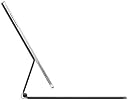
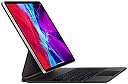
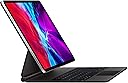
⌨️ Elevate your iPad Pro game — type, track, and charge like a boss!
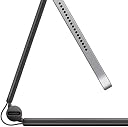
The Apple Magic Keyboard for 12.9-inch iPad Pro (3rd & 4th gen) combines a premium backlit keyboard, precision trackpad, and a magnetic floating cantilever design. It offers seamless USB-C pass-through charging and front/back protection, transforming your iPad Pro into a versatile, laptop-like powerhouse optimized for professional multitasking and productivity.
| Brand | Apple |
| Compatible Devices | iPad Pro 12.9-inch (3rd generation), iPad Pro 12.9-inch (4th generation) |
| Connectivity Technology | Bluetooth |
| Keyboard Description | Flexible, Integrated, Gaming, Mechanical, Multi Functinoal, Multimedia, Wireless |
| Special Feature | Backlit, Ergonomic, Foldable, Rechargeable |
J**H
Magic Keyboard with an iPad Pro 12.9” Generation 3 (2018)
Ordering the Magic Keyboard The Apple Magic Keyboard that I ordered through Amazon on July 15, 2020 arrived this evening about 5:15 p.m. I first ordered it through Apple with an arrival date of August 1, 2020, but then saw that it was $20 cheaper though Amazon with a three day shipment date. The shipment arrived through Amazon on July 18, 2020 as scheduled with no requirement that I be home to receive the product. With products that I have ordered through Apple there has generally been a requirement that someone be home to receive the product. Amazon doesn’t have that restriction, apparently assuming the risk of theft or loss through its delivery policy. I appreciate this feature of Amazon delivery, since I can’t always be home when it is convenient for the delivery person. Packaging The packaging was typical Apple and I have grown to expect no less. I’m like a kid when I open new Apple products and today was no different. The Amazon shipping carton contained the white box of the Apple packaging wrapped in a very thin folia within which was the product wrapped again in a translucent plastic sheet with a tab for removing it. There is a paper spacer between the keyboard and the magnet mounting surface with a special little compartment for the instructions, which I judiciously ignore. I do save all the packaging for a period of time just in case the product has to be returned for some reason. I opened the keyboard and placed my iPad Pro 2018 on the magnetic back and shifted the iPad to a position that I found comfortable. Many people have been impressed by how rigid the hinges work. I didn’t notice that at all, but did notice that the main large hinge snaps into one place and the secondary hinge then moves independently, but I was surprised by how little tilt the whole arrangement allows. Everyone, including Apple, mentions the maximum angle of 130 degrees, but I didn’t realize from reading how little that actually is. No big deal, because the “default” angle, and there is one, seems just about perfect. The weight is not a factor at all, though the set up is a little heavier than the Smart Keyboard set up. Realistically it takes two hands to carry the 12.9” iPad Pro and Magic Keyboard around while it is open, though if you wanted to prove a point you could probably do it with one hand. There is no problem closing the keyboard and carrying the iPad around closed, one hand or two. I compared holding my MacBook Pro 13” and the iPad Pro 12.9” with Magic Keyboard and the latter seemed slightly heavier. Granted this test was not scientific, but go figure. That’s the way it seemed to me. I’m not going to actually weigh each to get real data, for feel is more important than objective data in this regard. Typing on the Keyboard Once I started typing it took me a little while to get used to the action, and I’m still hitting a key wrong on occasion, but not often and not anymore than I do typing on either my 15” or 13” MacBook Pros or my Smart Keyboard for the iPad Pro. As has been noted in other reviews, the number keys are underneath the cantilevered iPad Pro and it takes a few minutes of typing to get used to that, but within minutes I had learned how to sneak my fingers into the cantilever gap and hit the numbers that I need to. I am a touch typist so the first thing that I did was turn the backlighting for the keys down as far as I could. I don’t look at them anyway, but it still leaves a very minimal amount of backlight on. From time to time would still hit my typing fingers on the bottom of the iPad Pro while trying to type numbers, but it really is nothing, and as I get used to this keyboard it won’t be a problem at all. Also, I notice that from time to time I don’t hit a key hard enough for it to register. It is not that one has to pound away on the keys, but if you have a very light touch you might have to get used to pressing a bit harder than one would on a well oiled MacBook Pro. Once again, this is just the newness of the feel of the keys. I also find that it helps a lot if I take a second to get the right posture at the keyboard with my fingers on the home keys, before I start hammering out sentences and paragraphs. The feel of the keys is definitely much nicer than Smart Cover Keyboard for the iPad Pro, but I wouldn’t say it is immeasurably better than the keyboard on a MacBook Pro. Unsurprisingly, the more I type on the Magic Keyboard the more I like the feel of the keys. Trackpad Let me just say right off that not having to use my clumsy fingers to move around most apps on the iPad screen itself is a game changer for me. The trackpad is good for this, but I broke down and also bought a Magic Mouse 2 to go with the new set up. I find myself using the mouse a lot more than the trackpad. It is simply more convenient, but I think that this is a matter of taste. I haven’t used a mouse with my MacBook Pros for years, relying solely on their trackpads. So I can use the trackpad with the Magic Keyboard. I just don’t. Note that when the Magic Mouse 2 is paired with another device (MacBook Pro) it will not work with the iPad Pro. In that case you have to use the trackpad on the keyboard to move around (or go back to your finger on the screen). Battery Life The iPad Pro did not lose much power when I left it off the charger over night. It had 100% when I went to sleep and 8 hours later it had 96%. That is about the same as when it has been attached to the Smart Keyboard. After 6 hours of steady use typing this review, answering emails, checking twitter and some news sites, and reading some pages on the web, the gauge is showing that I still have 68% battery left. Overall Impression So far I like the Magic Keyboard a lot. Perhaps even more than I thought I would. I’m glad that I bought it for two reasons. I like the cantilevered angle that the iPad sits at on the cover and raised position closer to eye height, and I like the feel of the keys. I can definitely type faster than I can on the Smart Cover. I’m glad I spent the money, but not everyone will find that the benefit to cost is worth it. I spend so much time in front of my iPad Pro that any improvement to the experience is well worth it. Does It Make the iPad Pro a Notebook? Not by a long shot, but not because of the hardware. If all one does is type reports and format them oneself, or surf the web, or watch movies then it is fine as a sole machine. However, I work with many different companies and they all have their own styles that they insist be used in documents. With Microsoft Word one can just take any report that uses the style and import it into any documents that have been properly set up using the the “Styles” feature of Word. My impression is that most people do not use the Styles feature in Microsoft Word, though I may be wrong about this. I’ve never taken a poll, but on different projects that I’ve worked on people don’t use the feature. I use it all the time, but the mobile Word App does not incorporate a “global” Styles feature. Also, there are accounting and tax programs for a notebook that don’t exist for tablets, or don’t have full functions for tablets. When I use a program or app I tend to learn how to use most of the features. I do not use a computer as a typewriter as many do. I employ most of the nifty innovations that word processing has introduced over the last thirty years, and they just aren’t there for a tablet. On one assignment overseas I brought only my iPad Pro 12.9 (2018) and did all my writing, research copying and pasting, and document management with the tablet. The split screen was a tremendous asset for legal analysis, having the law on one side and my report writing on the other. But ultimately I had to do all of the formatting on my MacBook Pro.
A**R
Suddenly: A Laptop
I’m writing this on the keyboard in question, which I’ve been using almost nonstop since i got it. It really has the feel and performance of a laptop keyboard, and a very very good one at that. The layout and spacing is great, with the only gripe being the lack of a dedicated ESC key. Still, using CMD . works too, and with one CMD on each side of the space bar, its no sweat. Again, while I’m still searching for an F5 key that isn’t there, I can accept it given how incredible this keyboard is. Complementing the keyboard is a trackpad that has a good feel and smooth multitouch performance. Lazily scrolling one-handed while watching tv is already a new guilty pleasure. It enhances an already impressive device, alongside the Apple Pencil, and really feels and performs like a dream. Part of that feel is the way the iPad is secured, and the dual-hinge design gives you huge freedom in viewing angles, while staying where you put it even when you’re taking your iPad off and popping it back on. I’ve tried this on a desk (perfection), a lap-desk (really feels like a good laptop), my lap (good, but had to work to get the right position), and on my folded legs covered in a comforter (fantastic, viewing angle and ergonomics are really good). All told this thing is extremely versatile, and when you consider that you can easily detach it and reattach it, it feels empowering in terms of what you can do weigh the iPad. The only downsides are: It is heavier than other cases and keyboards, but you wont be using this as a case for most of your needs that don’t involve typing, so you wont be holding it anyway. It can’t bend back over itself, so really while it can be used as a case, it is sort of a keyboard/trackpad and dock more than anything. With that in mind, and for a pretty sizable amount of money, you get a keyboard that makes the iPad Pro a really credible laptop that can, from moment to moment, become a tablet with digital pencil, and back to a laptop. It’s great!
D**.
A premium, worthwhile product, but do your research.
I'm puzzled by some of the negative reviews on here. You should know, before buying this, that there are no function keys, that it is heavy, and that it can be awkward to open in the usual way. Reports of excessive battery drain by the case are sporadic enough that I feel like they have to be the exception, not the rule; I've had no issues with this myself. Regarding the keyboard, I will compare this to the keys on the smart keyboard folio, a mid-2012 Macbook Air, and the bluetooth Magic Keyboard (second generation) from Apple, the latter two which also use the scissor switch mechanism. I had previously owned the folio keyboard, and enjoyed typing on it, but, no question, this keyboard feels far far superior, and I find myself able to type much faster and more accurately on it. As for the other two, you can definitely feel the difference in the redesigned scissor keys - the keys on my 2012 Air are fine, but slightly mushier compared to this; in contrast, the bluetooth Magic Keyboard's keys feel somehow sharper and more clackity compared to the iPad Pro Magic Keyboard. I think I like this keyboard slightly better. Where the scales tip, though, is the integration of the trackpad with the keyboard. With the folio, you'd have to interact with the screen directly for anything that couldn't be done using hotkeys (even if you remap the globe key as the Escape key, there are some limitations). But having a quick way to scroll, navigate the screen, and engage the usual swipe gestures right there by the keyboard eliminates most of these issues. So nice. Regarding the function keys, yes, it'd be nice if they were there, but it's not the issue some are making it out to be. The Escape key can be mapped to the globe key; the only other ones I really miss are volume and brightness control, and, using the trackpad, it's quite easy to click on the battery percentage indicator at the top right of the screen, which drops down the control center for easy adjustment of either setting. Not perfect, but more than good enough. Finally, the passthrough charging. I hadn't thought I'd care much about this, since I'm not using the side-port for anything now; what I hadn't considered was how this feature effectively gives the iPad a sort of wireless charging; leaving the keyboard case open and plugged in on the desk, I take the iPad off when I want to use it in tablet mode, and then just pop it back on when I'm done, and it's instantly charging. A few cons: I found that this keyboard isn't as enjoyable to use in the lap, compared to the smart folio; something about the number of moving parts makes it feel more shaky/less stable to type on, and the weight distribution is such that it wants to lean backwards when it's not on a stable foundation. That said, on a desk, it is superb. Also, when I first started using it, I ran into the issue of occasionally hitting my fingers against the bottom of the iPad while typing (especially when reaching for keys on the number row); I've gotten used to it now, but, some might find this annoying.
A**W
iPad Pro : Laptop Mode
The iPad Magic keyboard case is just another amazing product from Apple. Personally I’ve never used any type of accessories on phones or tablets however this one I had to get. Pros: Good back lit Keyboard. I’ve included a picture with a dark room to show the keyboard. Inclusion of a Cmd and Option key that allow for use of more short cuts to make using the keyboard more fun. However not all short cuts from the Mac work. Learning all the short cuts isn’t easy unless you’re iJustine however I recommend learning to use ones that can make your tablet experience better. The track pad is rather small but sufficient for me but I don’t speak for everyone. 2 in 1. The regular 2 in 1 laptop tablet combos you see from other brands usually involve motors or some type of mechanism to keep the tablet inside the keyboard portion. The Magic Keyboard connects to the iPad using magnets and the smart connector on the back. The magnets and connector make taking the tablet off the keyboard as simple as pulling it off. Extra USB C port. The USB C port on the case allows you to charge and is on the opposite of the iPad leaving the other side (iPad side) for another USB C accessory which leads to my next positive. This is more of personal preference thing but this case does allow for a minimalist set up using just a charging cable and a USB C dock. Definitely a possibility if an iPad is all you need out of a computer. Looks. This keyboard definitely looks better in my opinion than some of the other brands of keyboards that use clips or something else to hold in the case versus the magnets that the Magic Keyboard uses. The magnets allow the sides of the iPad to show completely instead of plastic clips holding it in. In my opinion this gives the case and iPad a cleaner look. Build Quality. The case is also well built consisting a metal, plastic, and rubber construction. The rubber is similar to that we’ve seen on other iPad cases. The overall case is sturdy and doesn’t bend at the keyboard while staying very thin. Cons: This one is sort of a con for some but not for me. The keyboard is pretty heavy about the same weight as the iPad itself. So together they’re about 2 iPads heavy. In certain cases putting the laptop in your... lap is hard and not sturdy however if you put this at a desk it’s not a problem. The overall weight doesn’t affect is portability it can be taken anywhere and can definitely fit inside backpack or be taken in hand. It weights a bit less than a MacBook. You eventually get used to the weight and it becomes easier to mange but can be a struggle at first. I would definitely recommend this case overall for its looks and usefulness. The Magic Keyboard could control the iPad entirely without you ever having to touch the screen. This keyboard has also made me consider switching to it full time compared to my computer.
K**E
Just buy it
So I wanted this iPad case immediately , as soon as it came out, but I thought the price was ridiculous and I HATED the fact that you couldn’t use it to write on while in this case. I do use my Apple Pencil a lot, so I didn’t buy it. I bought about four other cases and I mostly used the smart folio apple case. I finally caved and bought this one, promising to return it if I didn’t like it. Well, that is not happening. It pops off the case SO easy, drawing on it is a non issue. The mouse is a game changer, and because of it I am using my iPad 10x as much and I am actually using it for work as well, when I was not prior. My only regret is waiting so long to get it. If you have been going back and forth just try it. I love the pass through charging, the battery lasts. The keys are AMAZING. The mouse function is super intuitive. I love how easy it is to pop it out of the case. It seems really sturdy. People complain about the weight and that it is top heavy but for me, neither is an issue. I do type in my lap a lot and it is 100x more secure than the apple smart folio.
J**N
Great if you want to use your iPad pro like a laptop
This is the perfect product to turn your iPad pro into a Laptop. The keyboard is great to type on. It is very stable on a table or other flat surface. It works great on your lap as well. Makes your iPad much heavier. It is VERY easy to take off and put on. Extra USB C PD port which frees up the original iPad USB C port for other things. The touchpad is nice with the keyboard. PROS Works very well Easy to put on and Take off Extra USB C port Touch pad is a nice touch Keyboard is very easy to type on Keyboard is back lighted Very Sturdy Cons Difficult to use as a tablet with this attached Really difficult to use as a drawing tablet (but luckily it is very easy to remove) Too expensive unless you can get it on sale Touch pad is a bit small (but still very usable) Seems to eat up a lot of the battery on the iPad when using The keyboard is missing a lot of keys especially the Top row that many use for media control or brightness level Can only use in landscape mode. May be or not be an issue for you. Over all this is a great but expensive way to get a flawed laptop experience. A lot of this is due to iPad OS and not this hardware. But it DOES increase the functionality that the iPad provides without removing any of the original functionality such as the touch screen. This way you can have a tablet and a sort of laptop using the same device.
M**.
MAGIC KEYBOARD OR AN ILLUSION?
Being new to the Apple product line, I’ve taken every aspect of my experience with this product into consideration. It was purchased in concert with the IPad Pro 12.9; along with accessories including the Apple Pencil, Wireless Mouse and a few others. There was great expectation for the keyboard considering I’m a conventional laptop user; and didn’t want to sacrifice too much hardware familiarity by going with a new brand. The keyboard arrived in cleanly designed packaging; which was a plus for me as a new consumer of Apple products. After opening the packaging, the product was immediately available for utilization with a simple attachment of the IPad Pro. This was another plus. As some other reviews have detailed, it’s VERY solid. Key strokes feel very natural; and the USB-C charging port configuration is a design element that shouldn’t be undermined. The trackpad is responsive; which is a plus for a laptop user. The Magic Keyboard feels very secure while in use; and its weight doesn’t seem to be a hair past necessary. It’s not overwhelming; nor burdensome. It doesn’t leave you concerned about whether the Ipad is secure; which is a plus when considering the protection of your technological investment. There are (3) things in particular that can be addressed though: -The Ipad sits flesh with the face of the keyboard when closed; which leads to a flicking of the seam line around the keyboard when trying to re-open the unit. It would be a nice add-on if Apple were to include a finger indentation on the sides, or front, of the keyboard for easier opening. -The keyboard sits very flesh, or low, to surfaces on which it’s placed. This calls for a seemingly raised-hand typing posture; and not the relaxed posture that bulkier laptops or desktops tend to allow. However, this is more of a give and take in the design. A trade that’s not too bad. It just takes a bit of getting use to. -It would be great for Apple to offer keyboards of various colors; but this may be something in the works for future models. Overall, the product seems well built. It functions as intended while still giving you the feeling you’re using something designed with modernness and innovation in mind. The appearance of the tablet attached to the keyboard gives off the vibe that laptops and computers of bulk will soon fall out of grace with respect to portability, style and convenience. Views on the current price point are subjective; but will surely vary by user based on the degree of use the product receives in contrast with its “accessory” label. -MW
M**O
Disregard most negative reviews, it’s pretty great
A lot of the reviews I had read noted that their main issues with the magic keyboard was that it was too heavy and there wasn’t enough adjustability for your screen angle. Honestly, the keyboard is really not that heavy at all, it’s extremely sturdy, and comfortable to use on your lap or a flat surface. Regarding the screen angle, you’re able to adjust the angle that the iPad sits over the keyboard pretty nicely to any reasonable angle. There is not a whole lot of adjustability, but the amount that the keyboard offers allows for a comfortable viewing and usage experience regardless so it’s not something you really need to worry about. Most notably, I love how big the keys are, I’m someone that likes a larger keyboard and this one is a reasonable size for an iPad that still makes it significantly easier to carry around and use in place of a conventional laptop. I was surprised by how sensitive the trackpad is. Other trackpads I’ve used in the past require more effort to move the mouse where as this trackpad is fast, reliable, and easy. I wish there was a way to exit out of apps with the keyboard to make the experience completely touch less at times, but perhaps I haven’t discovered that function yet. I’m not sure why it’s a whopping $329 but this price was still cheaper than through apple and it’s a worthwhile keyboard if you’re looking to get the most out of your iPad Pro 12.9 in as a replacement of your laptop.
Trustpilot
2 days ago
1 week ago