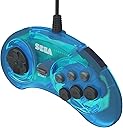
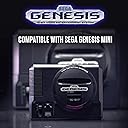
🎯 Level up your nostalgia game with official SEGA precision!
The Retro-Bit Official Sega Genesis USB Controller is a licensed, high-quality 6-button arcade pad designed for authentic retro gaming. Compatible across multiple platforms including Sega Genesis Mini, Nintendo Switch, PC, Mac, and more, it features a durable wired USB connection with switchable input modes for versatile use. Perfect for millennial pros craving classic gameplay with modern convenience.


| ASIN | B07SG8XMJM |
| Best Sellers Rank | #2,855 in Video Games ( See Top 100 in Video Games ) #5 in Sega Genesis Accessories #179 in PC Game Controllers |
| Brand | Retro-Bit |
| Color | Black |
| Customer Reviews | 4.6 4.6 out of 5 stars (1,060) |
| Date First Available | May 30, 2019 |
| Hardware Platform | pc |
| Item Weight | 10.2 ounces |
| Item model number | 849172010987 |
| Manufacturer | Retro-Bit |
| Operating System | Mac |
| Package Dimensions | 7.2 x 7.09 x 2.52 inches |
| Power Source | Corded Electric |
| Series | SEGA Genesis 6-button Arcade Pad |
C**R
Use it all the time
Solid wired controller that makes playing the old console games feel completely authentic. Very good compatibility on PC and a great value.
H**R
It's a really good controller
So this review is in 4 parts: Part 1 is my review. Part 2 addresses the A+Start issue. Part 3 is to help people that want to know how the controller should be mapped in Retroarch. Part 4 gives a list of games that utilizes the 3 extra buttons. Part 1: It just arrived a few hours ago for me, and I played a bunch of Sega Genesis games on my PC using Retroarch. The USB cord that it is attached to is really thick, seems durable, and is really long. Seems good quality to me, but only time will tell. Having said that, I don't play video games all the time, so I'm hoping it lasts a while. It's a pretty nice controller, and so far I really like it. Part 2 - The A+Start issue: I saw one reviewer comment that A+Start does not work in games for him, due to the designer's deciding to make that button combination do a particular thing on the Nintendo Switch, and the Steam game hub. I thought that what he said might not apply to people who are just using Retroarch, not with Steam. I tried A+Start during the cheat entry for Sonic 1. It didn't work for me either, but it's not a button combination I ever do. Part 3 - Button Mapping: The left side of the equals sign, =, represents the button on the controller, and the right side of the equals sign represents what you need to tell Retroarch the button is. X = Left Shoulder Y = X Z = Right Shoulder A = Y B = B C = A MODE = Select The arrow buttons are just the corresponding arrow buttons. Part 4 - The 6 Button Game List: *Art of Fighting *Batman Forever *Beyond Oasis (uses Mode button for weapon switching as MODE+B) *Boogerman: A Pick and Flick Adventure *Brutal: Paws of Fury *Clay Fighter *Coach K College Basketball *College Football's National Championship *Comix Zone *Contra Hard Corps *Cutthroat Island *Davis Cup Tennis *Dragon Ball Z: Buyuu Retsuden *Duke Nukem 3D *Dyna Brothers 2 *Eternal Champions *F1 World Championship Edition *Fatal Fury 2 *FIFA 98: Road to World Cup *FIFA Soccer 96 *FIFA Soccer 97 *Garfield: Caught in the Act *Greatest Heavyweights *Head-On Soccer *International Superstar Soccer Deluxe (uses Mode button to select strategy) *Jammit *Judge Dredd *Justice League Task Force *LHX: Attack Chopper *The Lost Vikings *Marsupilami *Mortal Kombat *Mortal Kombat 2 *Mortal Kombat 3 *NBA Action '94 *NBA Action '95 starring David Robinson *NCAA Final Four Basketball *NFL '95 *Phantom 2040 (uses Mode button to stand in place) *Pier Solar and the Great Architects *Power Instinct *Primal Rage *Ranger X *Rise of the Robots *Samurai Shodown *Shaq Fu *Skeleton Krew *Spider-Man & Venom: Maximum Carnage *Spider-Man & Venom: Separation Anxiety *Street Fighter II: Special Champion Edition *Street Racer *Streets of Rage 3 *Sub-terrania *Super Street Fighter II *TechnoClash *The Great Circus Mystery starring Mickey & Minnie *Turrican 3 *Ultimate Mortal Kombat 3 *Urban Strike *Virtua Fighter 2 *Virtua Racing *WeaponLord *World Series Baseball '95 *WWF WrestleMania: The Arcade Game *Yū Yū Hakusho: Makyō Tōitsusen *Zombies Ate My Neighbors
D**S
For the Genesis Mini
I got this for my retro gaming collection. I bought the Sega Genesis Mini which comes with one controller, so I needed a second. Works great.
J**O
Excellent Controller for the Sega Genesis Mini 2
I bought this as a second controller for my Sega Genesis Mini 2, as it only came with one. It has a long, thick cord that has an amazing length and connects into the Mini 2 perfectly. It performs exactly as the controller that came with the Mini 2, with responsive buttons and functionality, and I have not encountered any issues as of writing this review. It connects to the Mini 2 via USB and the box claims that it could also be used for PC, Mac, Steam, PS3, Switch, and the first Genesis Mini, but I have not tried it on anything other than the Mini 2. A great controller and I'm glad that I have two now for my Mini 2.
S**D
Could've been the definitive Genesis controller, except...
I never purchased the original six-button controllers for the Genesis back in the day, so while I can't comment on how exact it is to the original, it works well. It feels great, games are responsive, and it works great with the Genesis Mini and a PC. But I came across one issue that turns out to be a design oversight, and a bit of a major one if you ask me. Apparently, for Steam and Switch compatibility, they decided to implement a unique macro/command that would bring up the Home or Guide screens, which is initiated whenever you press A and Start together. However, this creates a conflict with any games that require you to press both buttons, such as the cheat codes for Sonic 1 and 2, which normally require you to press A+Start to access the level select menu after putting in a code. Since pressing A+Start initiates a separate command that these games won't recognize, they won't recognize any input on your end, preventing you from accessing the Level Select codes in those games and any others that use those to buttons together. I was able to pull it off once somehow with Sonic 1, but it was likely a fluke I haven't been able to replicate since. I had contacted Retro-bit regarding this and confirmed that it was a design choice and not the result of having a faulty controller. Interestingly enough, pressing X and Start as the same time on the Genesis Mini also brings up the menu, and since the Mode button already does that with a single button press, makes me wonder why the macro couldn't be assigned to Start+X instead. They also confirmed that this issue exists in all controllers with Switch compatibility, and since given that many of their upcoming Sega controllers will be Switch-compatible going forward, this will likely affect all of those as well. Playing the games on an emulator presents the same issue. Now of course, you could simply use the controller with the original 3-button ones that came with the Mini. But if you wanted to buy these for both the Mini and the PC like I did, hoping it would be the definitive Sega-branded Genesis/Mega Drive controller to use for both (and let's be real, that's the purpose of these), as much as I appreciate their efforts into making it identical to the originals as much as possible, and boy they absolutely nailed the look and feel of the controller, this one design oversight prevents it from being so. Any other games that don't use these buttons, it's great. But still, so close...
M**O
Radical
Works great - classic retro pad for old skool games. You may have to go into your emulator and adjust the pad settings when you fist plug it in.
M**I
this is AMAZING!
This controller does what it advertises! I like to occasionally play retro games and it works perfectly even if you don't have an emulator installed on your computer! You can use pages like gam.onl or pages like retrogames.cc without any problem! and you can use it with sega, nintendo, arcades, atari, in all of them! 100% recommended!!!
D**S
Just Like The Original
This looks, feels, and functions exactly like the original 6-button Sega controllers. The USB cord is nice and long. It's compatible with the Linux Orange Pi device I've been using it on, which means it's probably compatible with any PC. Works great with emulators.
L**.
pleasantly surprised on the quality... I like the feel of the buttons would use a slightly harder membrane for the D-pad though. I like it so much I purchased a second one. Sadly the second one had a flimsy start button didn’t have tactile feedback like the first one so I returned it. Also had the black one eight button version, Which was much lower quality than the six button blue version. Would recommend.... The 6 Button Blue Version.
U**I
Nice
中**晴
海外向けのパッケージなので多少不安でしたが、ジェネシスミニ2の2Pプレイの為に購入。特に問題なく使用できてますが、買ってからそれ程経っていないので耐久性が不明な為、星4です
R**D
I'm not good with technology so I figured I'd just buy one of these controls and see how it goes connecting to my Sega mini and it's great. Makes the fighting games so much better. Will be getting another one soon
G**I
Great feel. A very long cable. Brings back the 90s
Trustpilot
2 months ago
5 days ago