


⚡ Elevate your workflow with pro-speed storage that keeps pace with your ambition!
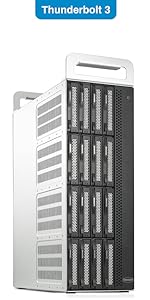
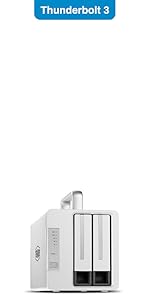
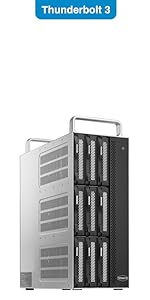
The TERRAMASTER TD2 is a professional-grade 2-bay external hard drive enclosure featuring dual 40Gbps Thunderbolt 3 ports, hardware RAID support (RAID 0/1/JBOD), and compatibility with 2.5" and 3.5" SATA drives. Designed for high-speed 4K video editing and demanding workflows, it supports up to 40TB of storage, multi-screen display setups, and offers laptop power delivery. Its robust aluminum shell and active cooling ensure reliable performance during intensive use.




| ASIN | B07PWM5TMX |
| Best Sellers Rank | #462 in Enclosures |
| Brand | TERRAMASTER |
| Color | White |
| Compatible Devices | Linux, Mac, Windows |
| Customer Reviews | 3.4 out of 5 stars 200 Reviews |
| Data Transfer Rate | 1600 Megabytes Per Second |
| Enclosure Material | Aluminum |
| Hard Disk Form Factor | 3.5 Inches |
| Hardware Interface | SATA 6.0 Gb/s, Thunderbolt 3 |
| Hardware Platform | Windows, Mac, Linux |
| Item Dimensions L x W x H | 8.9"L x 8.86"W x 6.81"H |
| Item Height | 4.79 inches |
| Item Weight | 1400 Grams |
| Manufacturer | TERRAMASTER |
| Supported Devices Quantity | 2 |
| Warranty Description | 2-year |
Z**E
Etremely Fast and Silent !
Moved from Slapple to WIndows and wanted to take advantage of Thunderbolt 3 - what a drive ! Support answered all my geeky questions quickly. I'm buying another ! UPDATE **** 2 years later.... I ended up selling both of these drives on eBay for several reasons: 1 - Apparently having two D5s attached to my GigaByte Z390 caused a problem with Windows 10 that made the drives unreliable 2 - I have two other editing systems running Windows 10; 2 have Promise Pegasus 3 R6s. Both of those machines go to sleep with no issues. The PC sleeps and the drives power down, starting up again when the system wakes. The D5 will go to sleep but when the system wakes up the RAID crashes and has to rebuild itself. I use RAID 5 and once while I was trying to figure out what was causing this, I lost 2 drives, so, the RAID could not be rebuilt. The drives were fine after a low level format but the D5 obviously did something catastrophic to them when it tried to wake up. I contacted TM support and was told all RAID drives could not sleep. Radio silence, when I informed them about the Pegasus. I realize the Pegasus is 4 times the cost of the D5, but you get what you pay for ! 3 - the HighPoint Tech Raid Utility is worthless, if you ask me, while the Promise Utility is smokin'. Our PCs are on all the time to do backups and and remote in, etc; but, if you never have your computer sleep, the performance isn't terrible on the D5 and would do the job but the D5 also consumes quite a bit of power ( .26 KWH ) with the PC off and .38 KWH when it's on. At our rate that's 3.5 cents and hour. Hey, it adds up in the TCO... TM support was polite albeit not offering any solutions for the driver or the sleep issue. We are very happy with the R6s and I wish I had not tried to save money on a budget enclosure...
B**R
NO SUPPORT. NONE.
Purchased in September 2023. Very little documentation to help with set up but not a big deal. Worked absolutely fine. Beginning of June 2024 a newish HDD failed. I have an older RAID with which I have swapped five drives over the years. Each time, after a long rebuild process, I was seamlessly back up and running. I expected the same with the Terramaster. I bouth a new drive, installed it and the rebuild light indicated everything was fine. I had almost 9TB to rebuild so I left it and came back the next day to find the rebuild finished, light on etc. But the RAID wasn't being recognized by the computer. Went through all the logical steps, turn it off, rebooted etc etc. THe RAID unit was seen as an unintialized drive. The RAID Manager Pro also showed the new drive and all the data etc. but still nothing on the computer. I contacted Terramaster and a first level SUpport person had me do all the things I had already done, to no avail. SHe then said she would take it up to an "Engineer". The "Engineer" came on chat and the very first thing he told me was that if the RAID was reading as uninitialized I should format it. I was stunned. How could someone purporting to be in IT tell a person to format a drive (Which is how Disk Management sees a raid)? I told him that a format would delete all my data which is the exact opposite of what I wanted and needed. It never got any better and he left me with the advice to get a Data Recovery Company to help me. I am extremely reluctant to write a bad review about electronic/computerstuff because there is so much room for mischief and innocent mistakes. However, my 100% advice in this case is to avoid this company at all costs. BTW: the 9TB represent all files for a full length Movie. I backed up about a month ago so it's not gonna be a total disaster but it will take me a good long week to replicate the edits I've done since the back up. I know- BACK UP! ANd for that I accept responsibility. However, my advice stands.
J**W
Large capacity, easy setup, mostly fast, expensive
I have it configured with 5 drives in RAID 5. Overall I'm happy with the storage unit. Mostly pros, some cons. Pros: - Easy to setup and configure with the RAID SW - Large capacity - Solid outside case - Fast sequential read/write performance - So far very reliable - Fans are quiet and temps adequately controlled - USB-A 3.0 port for connecting another device Cons: - Somewhat noisy. No apparent sound dampening, the drives click and chirp noticeably. Not terrible but can be distracting especially if you like quiet. - The handle on top can be convenient for moving, but would be much better if it were removable - The sequential R/W speed is very good, but random R/W is slow with RAID 5. - Limited to only Thunderbolt connectivity. There is a USB-A port but can't be used to connect the device to a computer. Having the USB option would be a plus. - Expensive compared to similar USB 3.0 enclosures.
N**N
Great Unit - Terra-Master Makes Solid Products!
This is my second Terra-Master unit (I also own a D5-300 5 Bay Unit). Before finding Terra-Master I went through several other well known manufacturers. With Terra-Master I have had no issues (where I had several with most of the other manufacturers), and received excellent support when needed. My use case for the D2 Thunderbolt 3 unit is to function as a timemachine & extended storage target for my new MacBook Pro. The package arrived in great condition, I found it to be packaged in a very safe way (see images). A couple of features I really love about the physical design of the unit are 1.) The Handle - We like to unhook and store our backup devices in a firesafe when we go on vacation. The handle really makes that easy and reduces the risk of dropping the unit in transit. 2.) The RAID selection switch on the back - LOVE This! It is very easy to set and change your RAID levels without the need of installed software (CAUTION - As with any disk system, changing the disk or RAID configuration will result in data loss). I wanted to test the unit out to see how it performed under different configurations, so I tested single disk config's (Solid State & Spinning Disk combinations), as well as RAID 0 & RAID 1 configs. The performance of the transfer speeds in all configurations was at disk speed (maxed out!) - very fast!. To setup and change the disk configuration & RAID levels was incredibly fast. Finally - This unit is quit! I couldn't hear it while in use, the loudest it got was when I performed a high volume file transfer with 3.5" drives connected (spinning not SSD) and I could hear the drives themselves, not the enclosure fan. I do have 2 constructive feedback items to share - 1.) There was no quick start guide included (instead there were instructions pointing me back to the Terra-Master website to download the quick start instructions). I initially had an issue navigating to the site, and found it was related to my VPN (I had to disable my VPN to navigate and download the instructions). 2.) The 4th hole for the 2.5" drives doesn't map to the 4th hole on any of my drives (see attached picture). It is the lower hole so I wouldn't cause physical stability issues over time.
C**N
A solid days work
I received the Terra Master D5 Thunderbolt 3 on February 28. That was the only day it worked properly. I set up a raid transferred some footage. Seemed solid and lighting fast. I wanted to add a drive to the RAID pool i followed the instructions. It said it would take many (like more and 40 hrs) to complete the addition so i left it to run over night. the next day nothing worked, and nothing has worked since. I have tried everything could find on their website, Reddit, and online tech support. I even stayed up late to get an appointment with the Chinese based tech support. nothing could get it back working. That was an extra headache because of an obvious language barrier. The unit flashed and made noise as if it was copying information constantly. Their RAID Manager Pro program locked me out so i could get no status on anything. There was no way to manually reset the enclosure. I did end up being able to format the enclosure, but then it would only see it as one big drive. This good looking well made hunk of metal is getting returned as i type this. too expensive to be such a hassle.
I**K
Afordable solution to have ordinal HDD works for FCPX
I'm very satisfied with this enclosure (TD2 plus, ) working in RAID0 mode ( strip, fastest unsafe mode ) . Sure HDD will not saturate Thunderbolt3 bandwidth of 40 Gbit, HDD are cheap comparing to large NVME and having RAID0 mode gives best performance. The only important note: please follow yellow sticker steps to change operation mode, it is not enough to just move dial, reset is really needed. I have two NAS grade HDD :Seagate Ironwolf 8TB 7200 RPM SATA III 6Gb/s 3.5" CMR, writing in parallel and were able to provide ~ 496 MByte Write and 500 MByte read speed ( please see attached screenshot). Tests done on MacBook Prod M2, with bative to MacOS file system. ( I didn't check Network or USB 3.X ) interfces.
B**A
drops connection
Well packed by Amazon, Terra-master packs this drive well. Not too heavy. Wish the hard drive cages were metal instead of plastic. The best part is this works well, is quiet, and the handle is handy for placement. The two fans in the back are very quiet. This thunderbolt 3 drive is fast. The validation took longer than the backup. Very pleased. 10/22/2020 Finding this disconnects from my thunderbolt and of course backups fail. Frustrating to have to delete the RAID and build a new RAID. Not the reliable drive I was hoping for. 10-25 returned to amazon, still drops connection and not reliable for backup.
D**S
Excellent hardware RAID controller, great speed, beautiful design
TerraMaster D5-Thunderbolt 3 hardware RAID controller. 4 stars for excellent design, flexibility and incredible time saving speed that will get your backups done rapidly. I love this RAID enclosure and controller. It certainly wins the good looks award for all of the DAS and NAS enclosures I looked at. For backups, I get write speeds of 160-220 mb/s with 5x12TB 7200 rpm Iron Wolf drives with RAID 0 via Thunderbolt 3. That's 4.5 TB of my Lightroom photo library backed up in 7 hrs- it used to take a day and a half, and with that painfully long time to backup via USB 3.1, backups did not get done nearly as often as is safe and prudent. My goal was to use a pair of D5T3s- as a main photo library drive in RAID 10 with hot spare and the other for backup in RAID 0. But the reason I did not give this unit a 5 star is that they have not worked out the daisy chaining of drives in Windows yet. It is supposedly smooth in Mac and they are working hard with Microsoft to get the Thunderbolt daisy chaining worked out. TerraMaster has excellent technical support and they spent many hours helping me get this set up. A non-geek can set this up and the RAID Controller software works well. But trying to get the daisy chain to work without frequent crashes was frustrating. I expect it can be resolved shortly since it worked relatively smoothly with a single LaCie T3 drive. I will update if that happens. The speeds noted above are with the D5T3 daisy chained with the single T3 drive reading to the D5T3 in RAID 0. In summary, this is a very good RAID unit with the very important RAID hardware [much better than Windows software RAID controller], beautiful design, and very fast Thunderbolt 3. When their daisy chaining for Thunderbolt 3 is ironed out, this will be the unit for both primary photo/video library and for backup. Remember, if you buy a RAID to be your primary library, you must have a backup. A RAID by itself is not backup!
Trustpilot
3 days ago
2 weeks ago



