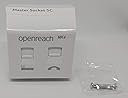
NTE5C MK2 + VDSL MK4 OpenReach Telephone Master Socket + Back Box
Product ID: 106414445
Details
- Answering system typeDigital
- Brandopenreach
- Caller identificationNo
- Colourblack
- Compatible devicesPSTN Answering
- Dialler typeSingle Keypad
⚡Boosts VDSL speeds by ~2Mbps
🔧Tool-less cam-lock connectors
🛡️Surge protection optimized for stability
€ 36.96
1
Sold byAmazon SpainDelivered byDesertcartCustomer service byDesertcartReturns14 days · 30 with PRO
Buyer Protection · Full refund if your order doesn't arrive as described.
Desertcart purchases this item on your behalf and handles shipping, customs, and support to Spain.
Secure transaction
Details
- Answering system typeDigital
- Brandopenreach
- Caller identificationNo
Description
⚡ Upgrade your home network with the socket that means business!
- EFFORTLESS INSTALLATION - Tool-free cam-lock connectors make setup a breeze—no electrician needed.
- NEXT LEVEL SPEED UPGRADE - Experience up to 2Mbps faster VDSL connections instantly.
- DURABLE RELIABLE DESIGN - Includes quality backbox and robust M3.5 screws for long-lasting performance.
- INTEGRATED ADSL FILTERING - Built-in filters eliminate the need for external devices, decluttering your setup.
- OPTIMIZED SIGNAL INTEGRITY - Improves signal-to-noise ratio by ~2dB for crystal-clear communication.
The NTE5C MK2 + VDSL MK4 OpenReach Telephone Master Socket with back box is a professional-grade, easy-to-install master socket designed to maximize VDSL and ADSL line performance. Featuring tool-less cam-lock connectors, integrated filtering, and optimized circuitry without surge protectors to enhance speed and signal quality, it’s the go-to choice for millennial professionals seeking reliable, high-speed home connectivity.
Specifications
| ASIN | B07LFMPVX4 |
| Answering System Type | Digital |
| Best Sellers Rank | 76,366 in Electronics & Photo ( See Top 100 in Electronics & Photo ) 2,136 in Telephones, VoIP & Accessories |
| Brand Name | openreach |
| Colour | black |
| Compatible Devices | PSTN, Answering Machines, Fax Machines |
| Customer Reviews | 4.5 4.5 out of 5 stars (662) |
| Dialer Type | Single Keypad |
| Enclosure Material | Plastic |
| Is there Caller ID | No |
| Manufacturer | openreach |
| Manufacturer Part Number | 2021-01FU-4-43022 |
| Model Number | 2021-01FU-4-43022 |
| Multiline Operation | Single-Line Operation |
| Number of Items | 1 |
| Power Source | Corded Electric |
| Telephone Type | Corded |
| Unit Count | 1.0 count |
Common Questions
Yes, all products are sourced directly from authorized retailers in the US, UK, UAE and India. We maintain strict quality control processes and verify each product before shipping. All items come with applicable manufacturer warranties and are covered by our standard return policy.
Delivery times vary by destination country, typically ranging from 3-9 business days. Each order is fully trackable through our system. We handle all customs clearance and use reliable courier partners for last-mile delivery. You'll receive regular updates about your order status via email and our app.
Desertcart is an international e-commerce platform operating since 2014. We securely process thousands of orders globally each day. Every product goes through our quality verification process before delivery, and we provide end-to-end order tracking, 24/7 customer support, and a comprehensive returns policy to ensure a safe shopping experience.
Our prices include the product cost, international shipping, import duties, customs clearance, and local delivery charges. We handle all customs and import procedures, ensuring there are no hidden fees upon delivery. PRO members receive additional benefits including free shipping.
Trustpilot
TrustScore 4.5 | 7,300+ reviews
Shop Global, Save with Desertcart
Value for Money
Competitive prices on a vast range of products
Shop Globally
Serving millions of shoppers across more than 100 countries
Enhanced Protection
Trusted payment options loved by worldwide shoppers
Customer Assurance
Trusted payment options loved by worldwide shoppers.
Desertcart App
Shop on the go, anytime, anywhere.