🎨 Print Bold, Label Smart — Own Your Organization!
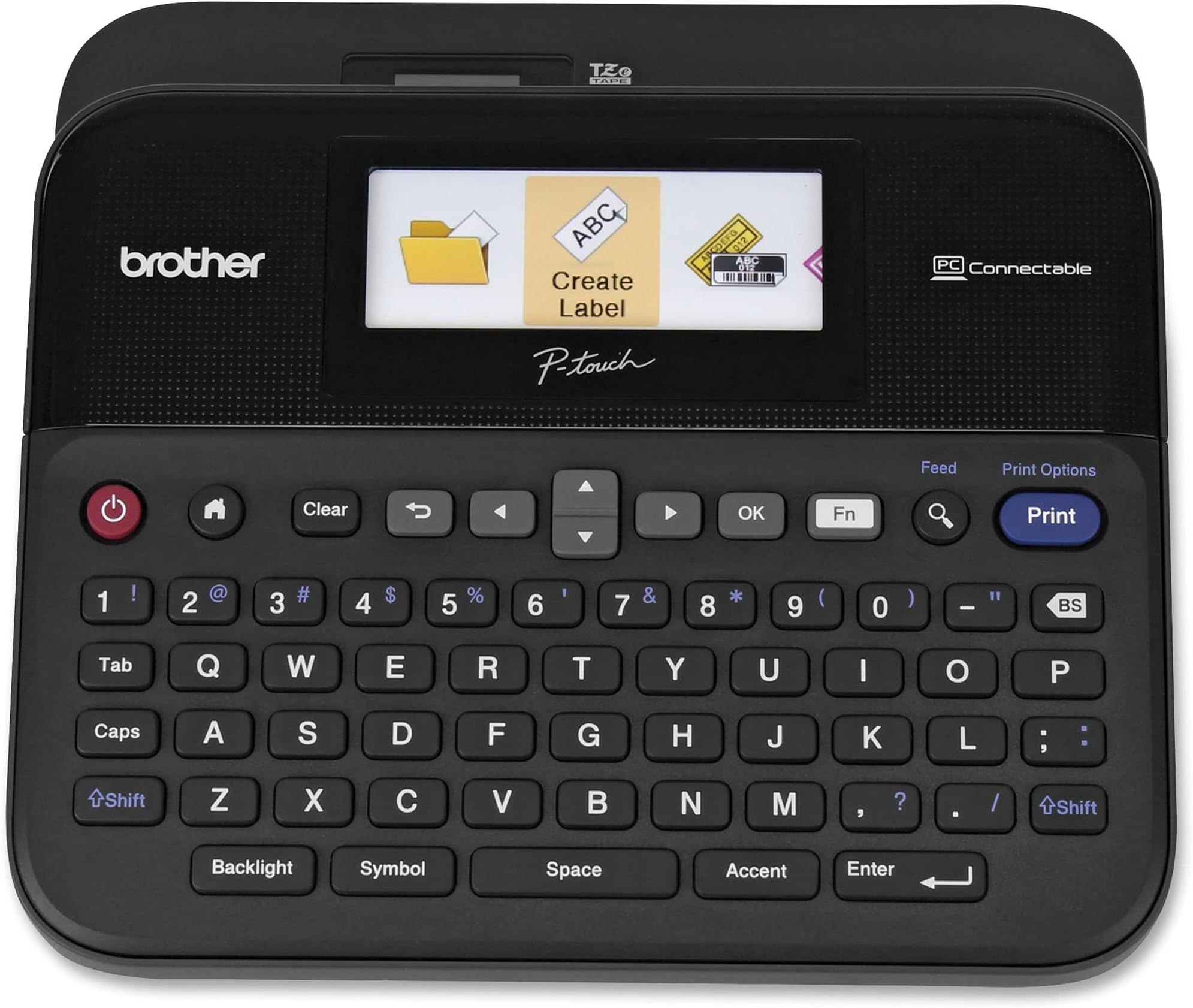
The Brother P-touch PTD600 is a professional-grade, PC-connectable label maker featuring a vibrant full-color backlit display, versatile tape compatibility, and high-resolution printing up to 400 dpi. Designed for both business and personal use, it offers seamless USB connectivity to PC/Mac, a large easy-type keyboard, and the ability to save 99 custom labels. Its durable laminated labels resist heat, water, and fading, making it the ultimate tool for stylish, efficient, and precise labeling that keeps you organized and ahead of the curve.


| ASIN | B00OCEKCB2 |
| Additional Printer functions | Print Only |
| Batteries | 1 AAA batteries required. |
| Best Sellers Rank | #60,278 in Office Products ( See Top 100 in Office Products ) #79 in Label Makers |
| Color Depth | 24 bpp |
| Compatible Devices | PC, Mac |
| Control Method | Touch |
| Controller Type | iOS |
| Customer Reviews | 4.7 4.7 out of 5 stars (5,244) |
| Date First Available | July 28, 2017 |
| Dual-sided printing | Yes |
| Duplex | Automatic |
| Global Trade Identification Number | 00012502639411, 00638084552537 |
| Hardware Interface | USB |
| Included Components | 0.94 in x 13.1 ft Black on White laminated inTZe in starter tape, AC Adapter, User fts Manual , USB Cable, P-touch Editor Software/Drivers for Windows/Mac, PC-Connectable Label Maker with Color Display |
| Ink Color | Multiple (black, red, blue, etc.) |
| Is Discontinued By Manufacturer | No |
| Item Weight | 2.1 pounds |
| Item model number | PTD600 |
| Manufacturer | Brother Printer |
| Max Input Sheet Capacity | 1 |
| Max copy resolution black-white | 400 dpi |
| Max copy resolution color | 300 dpi |
| Maximum Black and White Print Resolution | 400 dpi |
| Maximum Color Print Resolution | 300 dpi |
| Maximum Media Size | Paper Roll |
| Model Series | PTD |
| Number of Trays | 1 |
| Number of USB 2 Ports | 1 |
| Output sheet capacity | 1 |
| Print media | Labels |
| Printer Ink Type | Tape |
| Product Dimensions | 7.6"D x 7.9"W x 3.4"H |
| Sheet Size | 0.94 inches |
| Specific Uses For Product | versatile for both business and personal labeling needs |
| Total USB Ports | 1 |
| UPC | 125026394114 800188055577 638084552537 012502639411 |
| Warranty Type | limited warranty |
E**N
WOW I love this machine!
I tried one of the less expensive Brother label printers, but returned it because I could not read the non-backlit LCD. It was very low contrast, and I was very disappointed. I searched for one with a backlight, and ran across this one - with an LED screen - in full color, and graphical user interface. I have to say, it is almost an Apple experience using it! Very very nice interface, once you figure it out, and extremely easy to use. I love the fact that you can have ½", ¾" and 1" tape from the same machine, and that it automatically detects the tape and the color of the tape and ink, so the display looks exactly like what you will see. With the option for close cut, you only lose about ¾" of tape for each label, which is very good. I have poor eyesight, so their thick font on 1" tape works great in my lab - I can read them without having to get up close and put on my reading glasses. In theory, the unit runs off of 6 AA batteries. However, I would say only if they are very fresh. The printer draws too much juice if the batteries are not in absolutely great condition. My first effort with the printer was a small disaster. I did not know how the cartridges worked, and the first cartridge had the tape coming out wrong (not going around the little corner). So, instead of the tape going thru the cutter and out the side of the printer, it was going back into the printer! And of course - what a mess! I managed to get the cartridge out, and remove the tape - I had the tape loop out about 6" with separated clear tape, the backing tape, and the ink tape all out in loops. So, I called Brother for help. Frankly, the guy answering the phone was of absolutely no help, and could not think - he had to follow a script. One element on the script was "Is this a genuine Brother tape?" No. Sorry, can't help you. Not what I would call great customer support. So, I went on YouTube and looked for "what is inside a Brother tape cartridge" and "how to fix a Brother tape cartridge." Once armed with that, I realized I only had to pull out the excess tape and cut it off, making sure it came out where it was supposed to. Lost about 10" of tape, no big deal, and it worked fine. While I cannot recommend their technical support, I can certainly recommend the machine! It does a fantastic job, with all of the options offered. It also can be connected to your computer as a label printer, and you can download software to make even fancier labels with that - so far, I have not needed anything I can't do right out of the machine. LED display with graphical user interface, multiple tape size support - a great product!
R**.
A Very Useful Label Printer That Can Be Connected To A Computer To Make Labels
This printer replaced a 12 year-old Brother P-Touch printer that died. I like that fact that this one can be hooked up to a computer, and, by way of included software, and an included USB cable, can print labels by using my computer keyboard. The software allows the user to see how the label will look when printed. The user is able to select from about 10 fonts, font size, multiple borders, and even the ability to print UPC and EAN product barcodes, as well as other industrial barcodes. The printer also has the capability to print multiple lines of type, such as an address label., depending on the size of tape cartridge installed into the printer. The printer also has a relatively large color screen for easy reading, when the printer is not hooked-up the a computer I am a huge collector of movies on DVD and Blu-ray, and have run out of storage space, so I have to stack the movies in their factory cases, in alphabetical order, cover-side down, to make more room on the shelves. Originally, when video discs first were released , the plastic cases were all labeled across the top edge with the title and other information, pertinent to the movie, such as whether it was a "director's cut," or "widescreen," etc., but, I suppose, to save on production costs, more and more discs have been released without a title sticker attached to the top edge of the plastic case. So, with this Brother label printer, I am able to put titles and UPC barcodes on all of my movies and other videos in my collection, so I can find a particular video when i want to play it. The printer comes with a starter 11 millimeter tall TZe white tape cartridge (which is what I am using for my movie case tagging project), that is plenty big for most other projects around the house, such as labeling the contents of tool drawers and cabinets, etc., and a taller, 24 mm TZe tape cartridge that can print larger labels, such as tagging the individual circuit breakers for the house, or labeling storage boxes and crates. The version I bought, the PTD600VP, has a nice, heavy duty, black plastic carrying case that hold the printer, several printer tape cassettes, the USB and power cords, which is nice to have, should I ever need to use it away from home. Oh. and BTW, as much as I like this printer package, I have found that the aftermarket TZe-compatible tape cartridges, sold in bulk, here on Amazon, from various vendors, are just as high quality as those made by Brother. at a much more economical price. Except, maybe, for the cartridge color, and the omission of the Brother logo, they look and perform the same as the OEM tapes. I bought several 10-count packages of the Zencoma compatible TZe tapes for $28.99 each, compared to a 4-package of Brother tapes, which I bought at Costco, for over $45.00, or even more, bought individually at Office Depot or Staples.
P**A
Must have for people who love to organize. However, the tapes are expensive to buy
C**I
EL ENVIO FUE RAPIDO, AL CABO DE TRES DIAS YA LA TENIA, LA MAQUINA ESTABA MUY BIEN EMPAQUETADA, TODO PERFECTO
F**C
Au top utilisation avec ordi amusant
W**R
solo que necesita actualizar el software para nuevas versiones de sistemas operativos
C**K
Necesitaba una etiquetadora para algunos productos, así que compré esta después de revisar muchas marcas y estilos y leer muchas reseñas. Cuando llegó, había algunos rasguños en la pantalla y la carcasa de plástico, así que llamé a Amazon y me atendieron en un santiamén. ¡Gracias, Amazon por su generoso y rápido servicio! ¡Esta etiquetadora es un gran artilugio! Me gusta que se conecte a mi computadora y puedo enchufarlo para no tener que usar baterías. Tiene un tamaño agradable que se coloca discretamente al lado de mi computadora de escritorio. Descargué la aplicación para Mac para que sea más fácil hacer las etiquetas en una pantalla más grande y guardarlas en mi computadora. Me sorprendió el costo de las etiquetas de Brother, así que pedí un paquete de 5 etiquetas transparentes Anycolor (Amazon's Choice) a un precio más razonable. A los pocos días de la entrega, ya había etiquetado mis productos con marcos con volantes alrededor del texto y puse etiquetas simples en muchas cosas en la casa. Acabo de pedir otro paquete de 5 etiquetas blancas de la misma empresa para poder seguir etiquetando todo lo que tengo a la vista. Por extraño que parezca, recibir esta etiquetadora me animó a deshacerme de algunas pertenencias y hacer una organización seria. ¡Es un poco adictivo en realidad! Creo que finalmente voy a poner mi casa en orden, simplemente porque es muy divertido usar esta rotuladora. Lo recomiendo altamente.
Trustpilot
1 week ago
2 months ago