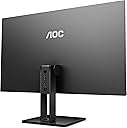
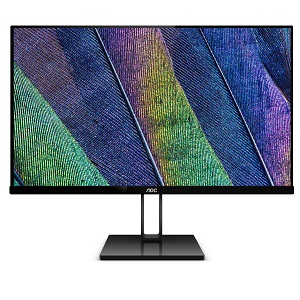
Elevate Your Viewing Experience! 🌟
The AOC 22V2H is a 22-inch Full HD monitor featuring a sleek, frameless design and advanced eye care technologies. With a rapid 5ms response time and 75Hz refresh rate, it ensures smooth visuals for both work and play. Equipped with versatile HDMI and VGA inputs, this monitor is perfect for any setup.


| ASIN | B07GF4S4B8 |
| Adaptive Sync | FreeSync |
| Additional Features | Anti Glare Screen, Blue Light Filter, Flicker-Free, Frameless, Tilt Adjustment |
| Aspect Ratio | 16:9 |
| Best Sellers Rank | #924,933 in Electronics ( See Top 100 in Electronics ) #17,266 in Computer Monitors |
| Brand | AOC |
| Built-In Media | 21.5" Monitor, HDMI cable, Power Adapter, Power Cord, Quick Start Guide |
| Color | Black |
| Connectivity Technology | hdmi vga |
| Contrast Ratio | 20,000,000:1 |
| Customer Reviews | 4.6 out of 5 stars 1,547 Reviews |
| Display Resolution Maximum | 1920 x 1080 Pixels |
| Display Technology | LED |
| Display Type | LED |
| Global Trade Identification Number | 00685417717682 |
| Hardware Connectivity | HDMI, VGA |
| Has Color Screen | Yes |
| Image Contrast Ratio | 20,000,000:1 |
| Item Type Name | computer monitor |
| Item Weight | 6.03 Pounds |
| Manufacturer | Envision Peripherals |
| Model Name | V2 |
| Model Number | 22V2H |
| Mounting Type | VESA Mountable |
| Native Resolution | 1920x1080 |
| Number of Component Outputs | 2 |
| Picture Quality Enhancement Technology | AOC Flicker-Free, AOC Lowblue Light |
| Refresh Rate | 75 Hz |
| Resolution | FHD 1080p |
| Response Time | 5 Milliseconds |
| Screen Finish | Glossy |
| Screen Size | 22 Inches |
| Screen Surface Description | Glossy |
| Specific Uses For Product | Gaming, Multimedia, Personal |
| Total Number of HDMI Ports | 1 |
| Total Usb Ports | 1 |
| UPC | 685417717682 |
| Unit Count | 1.0 Count |
| Warranty Description | 3 Year Parts and Labor |
| Warranty Type | Three-year manufacturer's warranty |
L**E
Excellent monitor - worth every penny!
LOVE this monitor. I was a little skeptical of buying this one at first because of how cheap it was compared to other monitors I was looking at, but I’m super impressed! The screen is very bright, the colors are true, and I haven’t noticed any lag or anything. It’s super easy to connect my laptop (although I didn’t need a adapter for my laptop because it’s only got that silly protector port, no HDMI). The frameless look is cool, and it’s light so I haven’t had problems moving it around my house as I changed where I work. This monitor feels and looks like a fancy monitor, but at an economical price.
A**R
Awesome monitor
This monitor kicks ass. Pros: - Great picture quality - It has an IPS panel - it's super slim with slim bezels - it's 23.8" which is the perfect size for 1080p - It's lightweight, only 6.95 lbs - Very nice looking - 75hz - Perfect settings out of the box Cons: - No vesa mounting holes, but you can just get a non-vesa mount adapter - It has a vga port, but you can just get an hdmi male to vga male cable so basically no cons Buy this monitor now.
D**V
Great Monitor for the Price
Pros: First impressions are that the stand is very good for the price point. The 27-inch 1080p display with a refresh rate of 75Hz definitely makes this monitor stand out when compared to others at a similar price. While the display is not exactly "frameless", it is pretty close with a bezel of about 0.19 of an inch on the top and the sides and a larger bottom chin sitting at about 0.7 of an inch. Overall, the design does look very sleek and I especially picture quality of the display. Bright colors show up nicely without blowing out everything else on the screen and its brightness and color temp settings make it very easy to look at in low-light environments. Cons: It's been mentioned in other reviews, but the display input ports are located directly on the monitor stand itself. This is somewhat of an awkward placement. However, depending on your application, it may or may not be an issue. The biggest downside to this is that you can not use a monitor mount with this display, the stand must be connected at all times. Additionally, if you're planning on placing this monitor up against a wall, you're going to need a 90 degree HDMI cable as the port facing directly outside the back of the stand. Overall: A great monitor for the price and I definitely recommend it. Great for gaming and for everyday use. Just keep in mind the lack of VESA compatibility and the other limitations regarding the monitor stand.
B**5
Good performance, beautiful image quality.
10/10 Monitor. It was super cheap at that time $69.99 plus tax but I'd buy it again for a hundred bucks. I just wanted a second monitor that could handle my AMD RX570 and I kept it as my primary. After almost one year of use (bought it on October, 2019) I could say that: This is the best monitor for people who has a low-mid profile gaming PC, if you want to have a good performing monitor for gaming but still have and IPS display with excellent image quality. But this is not enough I have so much more to say: Is almost frameless so it looks so pretty if you look at it from the front or even from the sides because is super thin... The fact that it has the HDMI and DP in the back of the arm was perfect, it helped me organise my cables in a way it seems like there's no cables connected at all. It was not an issue for me. Check your graphics settings and make sure your refresh rate is set to 75 Hz. After 4 months of use I find out that my monitor was running at 60 Hz (this is set by default). Change it, there is a noticeable difference in performance and quality. Is FreeSync compatible if someone is looking for that. It can be safely overclocked to 100 Hz, but keep it at 90 Hz if you're a scaredy cat. Don't ask me how I know 😂. Realiable AOC monitor, super cheap I could say, not a single issue, I'm happy and satisfied with my monitor 😊. My next acquisition is going to be from that brand.
J**Y
Good value basic monitors
I bought two a couple of weeks ago when it was a little over $100 from Amazon for the 24" version. We have two virtual iterns at home this summer, so more screens were necessary. For the price they work well, have good picture quality and are great work style monitors. Note they have HDMI and VGA inputs only, if you have a laptop/desktop with a DP port you will need a convertor or a convertor cable. I bought a twin pack of convertors for just over $10 so it's hardly a big expense. They do come with HDMI cables.
C**S
Great Monitor for home or office use. See UPDATE
Great Upgrade from what I had. Wouldn’t suggest it for gaming due to its specs. I have been using it as a secondary monitor and it’s great. No issues so far. A little bland on the colors compared to the newest monitor I purchased. Could be a settings issue. UPDATE: Today, when I booted my PC, there was a weird rectangle in the top left corner where the colors were brighter. Called the support for my computer itself first, and it wasn’t my PC. Called Amazon Support and they discounted my item. It’s the day after my return window of course. Since it’s my secondary monitor, I’m personally okay with it. Will probably upgrade again soon though. Was pleased with the promptness of Amazon’s Support though.
A**R
I see one other review for an inexplicable problem with their monitor; perhaps this will help!
Bought the first for my partner, and then ordered a second to replace my own monitor. A year in I'm still impressed. At this price point I don't see another brand / model that can compete. UPDATE: Shortly after posting my review above, my Partner's Monitor developed a glitch! In the picture you can see a shaded rectangle that appeared on the screen as soon as the OS was initialized, and was visible on any window that I opened (e.g. Web Browser, Program, Application) in full screen. Being an IT Tech, I have many Computers, Graphics Cards, Monitors and Software (OS) available to "swap out" components when something goes wrong. This condition only existed with this Monitor, regardless of which Computer or Graphics Card or OS I used. I was in the process of placing a Warranty Claim with AOC when I took one more stab at trying to determine what the flaw was with this Monitor. I went through all the settings for the Monitor until I stumbled upon the one that FIXED THE PROBLEM. The Monitor has a setting for DCR (Dynamic Contrast Ratio) that I had set to "disable". When I switched this to "enable" the shaded rectangle disappeared. When I switched back to "disable" the shaded rectangle was no longer visible. This is likely caused by bad coding as all my computers are on "clean power" and are not abused. Perhaps AOC will provide a Firmware Update, but if they do not, try my FIX. It might work for you too.
R**E
Great looking display even for Mac's
UPDATE 9/8/19: To my ignorance, I must explain. I was very frustrated initially with this display and my Macbook Air 2012, 5,1. I was unable to correctly scale and get the crisp visuals just like the computer; until today. I added a new picture showing the setting I use. Basically I set the 22V2WG5 display as the main display and the resolution as default for the display. and it worked. Both look great no issues. Well packaged display. In the box are power brick and cord, HDMI cable and a set of instructions. The monitor attaches to the base with a small screw that has a flip-up tab to use without a Phillips head screwdriver. The base is a mirrored finished plastic; fingerprint magnet! I wouldn't recommend to a Mac laptop user do to the displays settings of 16x9, 1080p, 1080i or 720p. None of these resolutions are what my Macbook Air is and this makes everything a little grainy; certainly not a crisp as the laptop screen. Use this monitor with a mac if it's maxed resolutions is one's of the four listed above. UPDATE 9/8/19: To my ignorance, I must explain. I was very frustrated initially with this display and my Macbook Air 2012, 5,1. I was unable to correctly scale and get the crisp visuals just like the computer; until today. I added a new picture showing the setting I use. Basically I set the 22V2WG5 display as the main display and the resolution as default for the display. and it worked. Both look great no issues.
O**J
Best Bang for you $$
Just got the AOC 22" for my PS4 and using for my Macbook Pro 16" 2019 and it works with no issues lag or drop in image when cables are moved. the Display Having a "Matte" finish also helped with the glare. No issues Gaming with Call of duty for 150~ tax in CAD was the best option for dollar. I have yet to test any photo editing. Overall construction is definitely sturdy. The Only thing to get use to is the control panel for changing the settings of the display panel. It takes some getting use to
B**Y
Great budget monitor for home office work, and light video watching.
Got this monitor for my home office. Needed another screen to attach to my macbook in order to increase productivity. It does the job, very happy with it. Bright screen, with great modes to change to when you want something that is less intense on the eyes in the night. However, wish there was an automation for that, since i have to manually change it. Light video watching for casual entertainment is great too! Does the job. I really like the slim bezels, makes it look super modern and stylish, that is fitting to my room's decor.
A**X
Great Monitor!!
It’s an amazing monitor and MAN it is indeed slim. I’m honestly shocked at how slim it is. The base is also really stable and a really good size. There is an aux port so you can hook up your headphones or a speaker. My speaker works great with it. It’s easy to fix the light. It has a eco mode too. You can adjust the colour to any way you want. It’s automatic setting is pretty bright but you can adjust it. It turns on automatically when I press the home button on my switch joycon. Another thing is it’s tilt is really good. I’m happy so far :)
M**O
Calidad, precio, tamaño, diseño, entrega rápida
El producto me llego en muy buenas condiciones sin ningún fallo.. Ensamblando muy rápido, sus entradas HDMI y el vga aunque ya no se utilicen mucho tambirn el contar con la salida de audio auxiliar 3.5 mm. Es un buen agregado.. Muy buenas funciones para calibrado de imagen, ya solo falta probar con la pc con una tarjeta de video de gama media..
J**N
Awesome for work, great value.
Bought two of these for use at work. I absolutely love them. Thin bezels, good image, super easy to put together! Spring loaded strong clips at the bottom instead of needing screws was a nice touch that I appreciate.
Trustpilot
3 weeks ago
1 week ago