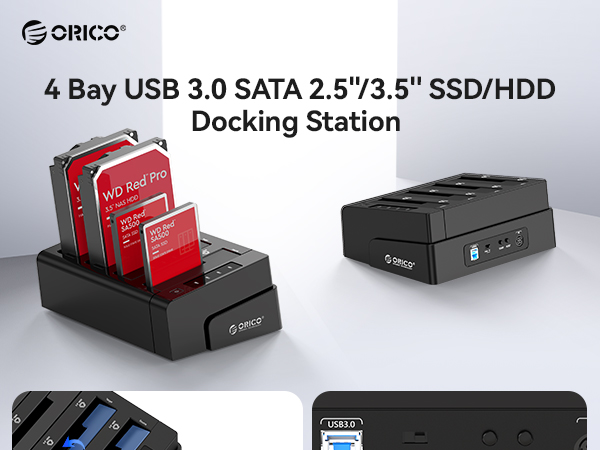
![ORICO 4 Bay External Hard Drive Docking Station USB 3.0 to SATA I/II/III for 2.5''/3.5'' HDD SSD with Hard Drive Clone Function Slope Design Support UASP [4 x 20TB]-6648US3](https://m.media-amazon.com/images/I/613BaLo8lYL._AC_SL3840_.jpg)



💼 Elevate your storage game—because your data deserves the VIP treatment.
The ORICO 4 Bay External Hard Drive Docking Station supports up to 80TB of SATA HDD/SSD storage with USB 3.0 SuperSpeed (5 Gbps) connectivity. Featuring a one-button offline cloning function, a smart slope design for enhanced heat dissipation, and broad OS compatibility, it’s engineered for professionals needing fast, reliable, and versatile multi-drive management.


| ASIN | B07G2WRB97 |
| Best Sellers Rank | #93 in Hard Drive Docking Stations |
| Brand | ORICO |
| Built-In Media | 1* 12V Power Adapter, 1* 1M USB 3.0 Type-A Data Cable, 1* 4 BAY Hard Drive Docking Station, 1* User Manual |
| Color | Black |
| Compatible Devices | Desktop, Laptop, PS4, Router, Xbox |
| Connectivity Technology | SATA, USB |
| Customer Reviews | 4.1 out of 5 stars 350 Reviews |
| Data Transfer Rate | 5 Gigabits Per Second |
| Enclosure Material | Composite |
| Hard Disk Form Factor | 3.5 Inches |
| Hardware Interface | USB 3.0 |
| Hardware Platform | PC |
| Manufacturer | ORICO Technologies Co.,Ltd |
| Material | Composite |
| Memory Storage Capacity | 80 TB |
| Mfr Part Number | ORICO 6648US3-C-V1-BK-US |
| Model Number | ORICO 6648US3-C-V1-BK-US |
| Supported Devices Quantity | 4 |
| Warranty Description | 2-Year |
M**L
Amazing Dock.
This has been by far the best dock I owned, while it was a little pricey, it was well worth it and works perfectly every time I use it and after unboxing it, I had everything ready to go and installed within 5 minutes, upon testing the device I found that the speeds are better than my previous 2 slot dock, the cloning is great and never had any issues with this dock, however I have only used the cloning a few times as the last dock I had wiped out a source and target partition table upon cloning so I am more on edge about using it to do direct clones, but the low priority drives I did do cloning on had zero issue so for the time being I love it. Overall I would recommend this over the competitors, it's a bit more expensive but well worth it.
R**B
Works well
I've only had it for 8 hours but it's working great so far. I've tried it with about a dozen hard drives transferring data solely between the drives in this enclosure. I've probably transferred and deleted about 15TB of data so far without any issues with any of the hard drives that I have used. My only knock and it would be the same for any enclosure with spinning disks is that the drives get pretty warm. Since it is an open air system, I just point a small fan at the drives and life is good. I've owned several 2 drive enclosures from Orico and they have all worked well for me. The oldest enclosure that this new one replaced was 4 years old. No issues other than it only holds 2 drives. The intended use of this unit is to keep 2 drives in constantly with the 2 other slots being used as needed. This particular model is an improvement over the the 2 slot one since the power switch is on the top right as opposed to the back of the 2 slot version. I also like the drive access lights that represent each of the drives inserted in the system.
C**7
Good External drive dock
I’ve used this unit with multiple drives, including a couple of 6TB SATA drives and a couple of 8TB SATA drives, and overall it has performed well. Connecting the drives and getting everything set up is very straightforward, making it easy to start using right away. I also tested the cloning feature. It works, but it took a little time to get started, which may require some patience during the initial setup. Once running, though, it functions as expected. One thing I noticed is that when installing a new drive, the existing drives may temporarily disappear for a few seconds while the system recognizes the new hardware. This isn’t a major issue, but it can be a bit surprising if you’re not expecting it. Another minor drawback is how the unit behaves after a power outage—you may need to manually press the power button to get it active again, rather than it automatically powering back on. On the positive side, the copying speeds are solid and consistent, which is important when working with larger drives like these. Overall, it’s a reliable and easy-to-use unit with good performance, though there are a few small quirks to be aware of.
R**S
Any plan expecting high performance from SDD device might need to be adjusted
The ORICO 4 Bay External Hard Drive Docking Station is the best thing since sliced bread. It permits USB 3.0 fast access to 4 physical devices from my PC. A small problem may happen when participating hard drives are partitioned. Window 10 can get confused during mounting and users get confused when using. A very well defined naming convention helps to reduce this confusion. The duplicator/cloning feature is a bonus. I have not tested the cloning feature. I have tested many magnetic disk (HDD) drives but only one SSD drive. The testing of the mounted SSD device was both surprising and disappointing. I found that the read/write performance characteristics were no better than an HDD device. Repeated testing and formatting changed nothing and I became concerned about the new SDD device. However, after the SDD disk was installed into the intended PC target, the performance characteristics were better than expected. Windows 10 reported more than double the values experienced in ORICO dock. I do not have another SDD to continue testing the ORICO Docking Station but my intention of use for this device may need to be altered. The advertised 5 Gbps Transfer Speeds may be physically divided into the 4 bays leaving little more than 1 Gbps per bay. I like what I have purchased and I think it has much value. I cannot explain the limitations demonstrated by the SDD disk.
T**S
Poor performance and reliability for all but the lightest workloads...
For basic usage, I suppose these USB drive docks might be OK. For intensive use, like backing up a ZFS pool on TrueNAS, avoid these at all costs. I have the same problems with both units that I own. Pros: 1. They are great hard drive holders. Cons: 1. The USB cables that are included are unreliable garbage. Literally any random USB 3 type B cable you have stashed in a drawer would be better. 2. They don't pass through drive serial numbers correctly. TrueNAS will only recognize them in the ZFS CLI, but not the web interface as a result. (You will have to use partitions instead of the raw drives.) 3. They have have very little bandwidth and IO. Even sequential IO is poor unless you store data with a large block size like 1MB. Expect speeds of about 30 MB/s to maybe 80 MB/s per drive in real wold usage. I have compared performance against internal SATA ports and also a SAS controller. Something is not right with the design of this drive dock. I understand that USB 3 limits total bandwidth to about 400 MB/s (about 100 per drive), but you should see much better performance than 30 MB/s on sequential workloads!
R**Z
As Advertised
As advertised
R**C
Absolute garbage as a cloner
I need to clone about 30 1Tb ssd drives and possibly more after a month so I purchased 30 of the exact same ssd here from amazon and purchased a nice StarTech (https://www.amazon.com/dp/B019Y4JE22) and it works great, shows a 4 segment progress bar 25%/50%/75%/100% of leds that blink as it progresses. It takes 1 1/2 for each clone to complete so it's going to take some time. I bought this one as it had pretty decent reviews and touts I can clone 1 ssd to 3 ssd's simultaneously. It was less than the StarTech 1 to 1 cloner so I took a chance based on the reviews. This is why I'm writing this, to stop anyone from purchasing this as a cloning station. First attempt I tried to clone 1 ssd to 3 ssd and I stopped it after 3 hours thinking it was taking way too long. as I had created 2 clones on the StarTech and was already cloning a 3rd. I formatted the 3 attempted clones and wiped out partitions so I see it was trying to clone the source. Put 3 more ssd's (formatted in windows per the instructions) and started another cloning of 1 ssd to 3 ssd's. Remember, all the same ssd, all brand new. I had just cloned the source ssd on the StarTech. I waited and waited and waited. 4 1/2 hours later it beeped and said they were done. I did boot from them and verified they worked and seemed fine but 4 1/2 hours? I thought ok, maybe it was just like the StarTech, 1 1/2 hours per drive so no speed savings over 1:1 cloning. Then I tried a test. I cloned 1 ssd to 1 ssd and left 2 bays empty. Hoped it would completed in 1 1/2 hours like the StarTech. Nope. 1:1 cloning took 4 hours! Unbelievable! I'm churning out 2 1/2 clones on the single StarTech in the time it took to clone 1 ssd on this garbage. Since I had a job to do, I kept cloning away with 1 ssd to 3 ssd clones at 4 1/2 hours a pop. The only benefit is that you can go to bed and wake up to 3 clones without cycling the ssd targets like the StarTech. I am returning it and I bought a 2nd StarTech so I can at least make 2 at a time every 1 1/2 hours. One more thing. The StarTech has the progress bar albeit in 25% intervals. At least you can see there is progress as the 25% led goes solid, the 50% led goes solid etc. This cloner just blinks incessantly and you have no clue if it's working or if it will ever complete. It's nerve wracking to keep checking on it blinking with no feed back for 4 1/2 hours!
T**N
Very Useful For Data Work/Neat Trick With A Case Fan
So a little trick here, you can fit a 140mm by 25mm fan in one of the drive bays & keep your hard drives cool under load. Also, keep in mind that the data speed is shared for all drives. This means that if you're performing wiping on all 4 plugged in drives, you'll be limited by the slowest drives write speed. Example would be if one of the drives is bad then the other drives will slow down to a crawl. Besides that? It's been very helpful with my data management across many SATA Hard Drives! :D
H**O
Excelente compra
Tenía un par de años pensando en hacerme de mi "base duplicadora" hasta que pude comprarla de nuevo, no la he usado mucho pero se ve de gran calidad y durabilidad
U**1
good
good
P**E
Extremely useful and versatile docking station.
I have several multi bay drive boxes, each with 5 drives in it. While they have served well over the years, the cost of living crisis means I am unable to run these bays as often as I would like and I find myself having to try to plan which box I will have on and when. This is not a good situation. As they are all, solid bays it is a pain to remove and mount drives when I need them. The solution of course, is something like this, where I can plug in the drives I want on any particular day, and get on with tasks without struggling. Plus, being able to have between one and four drives helps my hugely. I can carry out basic maintenance and move stuff around from active to storage media. Also, and this is the big thing for me, I can reduce to cost of using the drives. So instead of having two stations with 10 drives running, I can now have one station - with 1-4 drives running, and only the drives I actually want to use at the time. Swapping out drives is as simple as waiting for activity to stop, turning the dock off, switching out drives, and turning it back on again. A matter of seconds where before I could be looking at up to an hour to switch things around. Plus, the other drive bays I was using, don't like not to be full. This one doesn't care. I does not object if I just have one or two drives mounted and running. Another big plus for this unit is it is so quiet. No fans spinning, no grinding, no hammering. Just nice quiet drives ticking away doing their thing. Heat is an issue though, This unit has no cooling facility, so no fans drawing the heat away, it is entirely reliant on air cooling as the large part of the hard drives are exposed. I've found a small USB desk fan that is extremely quiet and have that running blowing air over the drive to keep their temperature within tolerances. The cost of running the bays before became prohibitive over the 2022-23 winter, as electricity prices spiralled ever upwards. I wish to heck I had bought this then, as it would have enabled me to continue working without having to worry about the smart metre celebrating another lottery win. This unit would have saved me time, money and effort and I feel kinda stupid for not thinking of it before. I have used Orico products for the lasts six years and have found them to be reliable, well made and no frills units. No wizzy buttons or doodads, just basic functional tools and essential parts. I have only had a problem with one unit a couple years ago, and I still don't know what was wrong with it, but it was replaced without argument. This reliability and concentration on function rather than toys is why I decided to buy this dock instead of another, and because it is Orico and I'm happy with the products I already own. My only regret is not buying this earlier. It is simple, functional, well made, clean and efficient. It works precisely how you would expect and without fuss. A nice touch is the ability to clone drives for archiving and storing. That was always a chore in the past. While cloning is not quick, it is reliable and I don't have to spend time attending to the unit to make sure it's working. This one just works. Data transfer between drives is fast, smooth and problem free. I have managed to clean and organise several large drives without any fuss at all. Admittedly having a bunch of loose drives around is a nuisance, but I have now bought a proper fire-proof storage box for them which should make mirror and back up drives safer and my desk tidier. For me, this was definitely the best buy this year. Money well spent on a nicely made, clean and "works as advertised" piece of kit I should have got a while back. Thank you Orico, great piece of kit that will save me some serious money.
A**.
Not worth the price 😔☹️
It’s took forever to clone a 750GB HDD more than 5 hours, and it’s not function like what the user manual said. For mounting disks it’s not that fast as the advertised for transferring data. After all for this price you can get better options…
R**L
Organizacion
En general bien, pero después de no usar alguna de las bahías se apaga el disco y ya no responde, de ahí en fuera todo bie
Trustpilot
2 months ago
3 weeks ago