Buy anything from 5,000+ international stores. One checkout price. No surprise fees. Join 2M+ shoppers on Desertcart.
Desertcart purchases this item on your behalf and handles shipping, customs, and support to Spain.
๐ Connect, Control, Conquer: The Ultimate USB-C KVM Switch for Power Users
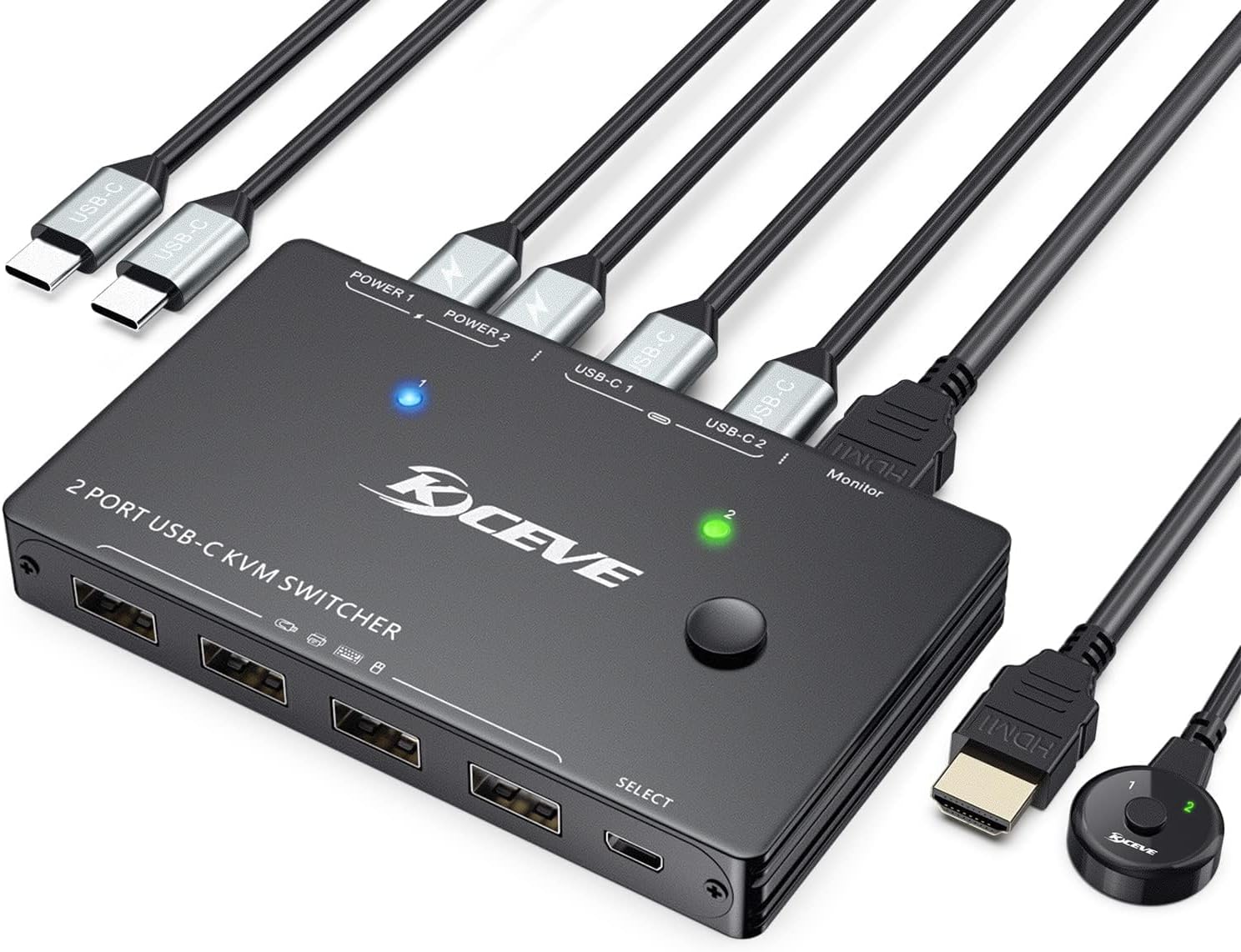
The ANGEET USB C KVM Switch is a compact, aluminum-built device that enables seamless switching between two USB-C laptops sharing a single 4K@60Hz HDMI monitor and up to four USB peripherals. It supports fast 80W power delivery to keep laptops charged during use, offers plug-and-play compatibility across Windows, MacOS, Linux, and Thunderbolt 3, and includes a wired remote for effortless switching. Ideal for professionals seeking a clutter-free, efficient dual-computer setup.


| ASIN | B0GK6RVSLR |
| Best Sellers Rank | #182 in KVM Switches |
| Brand | ANGEET |
| Brand Name | ANGEET |
| Circuit Type | 2-way |
| Compatible Devices | Laptops with USB-C DP Alt Mode and Thunderbolt 3 support (Windows, Mac OS, Linux) |
| Connector Type | Plug In |
| Contact Material | Aluminum |
| Contact Type | Normally Open |
| Control Method | Push Button, Remote |
| Control Type | Full Control |
| Current Rating | 2 Amps |
| Customer Reviews | 4.4 out of 5 stars 43 Reviews |
| International Protection Rating | IP54 |
| Item Dimensions | 4.53 x 2.56 x 0.55 inches |
| Item Weight | 108 Grams |
| Manufacturer | ANGEET |
| Material Type | Aluminum |
| Model | USB C KVM Switch |
| Mounting Type | Surface Mount |
| Number of Positions | 2 |
| Operating Voltage | 5 Volts |
| Operation Mode | ON-ON |
| Part Number | USB C KVM Switch |
| Smart Home Compatibility | Not Smart Home Compatible |
| Switch Type | Push Button |
| UPC | 760319256153 |
| Unit Count | 1.0 Count |
| Upper Temperature Rating | 70 Degrees Celsius |
| Warranty Description | 1 years warranty |
| Wattage | 100 watts |
V**H
Works as expected
Must be a first world problen to have to switch between laptops. When setting up I had to switch inputs for somereason to get everything working correctly. Be sure to give it time when switching to a docking station.
L**E
Works exactly as it should
The test item I received says its a variation of the device in this listing, but specifically for what I received and not for what you may get. I picked this up because I was having problems with my other device switcher. My monitor kept shutting off and I couldn't get it to wake from a screensaver. I thought perhaps it was the switch device, but after utilizing this one and having the same results, I determined it is not. I have absolutely zero issues with this device and it has been holing strong and steady for nearly 4 months now. I use it ALL the time as I swap between my work laptop and my home laptop about 10x per workday, so its getting a lot of use. I no longer have it set up, but my favorite thing about this device when I did have it set up was I could put a finger print scanner via usb into this device, mounted it to my keyboard and used it as a fingerprint unlock for both devices, which is a fantastic lift in consistency of the peripheal setup. I haven't had any problems with video output when switching, its all been very clean, except for the not waking up from standby issue. On that note - its is for certain not related to the switching devices as I have found there's both a defect in my monitor and potentially also the HDMI cable going between this device and my monitor and/or personal laptop. Given the "issue" is consistent between two different switchers of two different brands, I feel confident saying this is a great device, given my time with it so far.
A**E
Handy KVM Switch with One Small Compatibility Catch
I like how this KVM organizes my dual-laptop workspace and makes switching between them straightforward. The build is sturdy, cables are decent length, and it supports my monitor resolution without issues. Switching via button or keyboard shortcut works most of the time and keeps things productive. The only downside is itโs not entirely seamless with my Mac laptops paired with a Logitech wireless keyboard and mouseโsometimes thereโs a tiny lag or the peripherals need a quick re-pair after switching computers. Everything else performs well, so Iโm keeping it and working around the minor quirks. Good value and functional for most users.
O**K
Keeps the Desk Clean
Picked this up to share a keyboard and mouse between two machines without dealing with a full KVM setup, and it handles that job well. Setup was plug-and-play on both Windows and macOS โ no drivers, no fuss. The wired remote is the standout feature. Being able to tuck the main unit out of sight and still switch with a single button press makes a real difference for desk clutter. The LED indicators make it obvious which machine is active. The 10Gbps transfer speed is a nice bonus when using external drives, and there's no noticeable lag with peripherals. The mix of USB-A and USB-C ports covers most setups without needing adapters. Worth noting: this is a USB data switch only, not a video switch. If you just need clean, reliable peripheral sharing between two computers, it's a solid choice.
M**R
Works as it should.
I use this for my home automation raspberry pi set up so I can share a keyboard and monitor and mouse between that and my normal mini PC. Works great! Does exactly what you would expected to do without any hiccups, at least so far.
J**E
Love this to build an optimal system for office or home use!
A USB Type-C KVM switch for use between 2 compatible devices sharing 1 HDMI monitor and 4 USB peripherals such as wired/wireless keyboard, mouse, printer, etc. 2 Type-C input and 1 HDMI output. 4K Ultra HD USB-C KVM Switch that supports 4K@60Hz, 1080P@120Hz or lower resolutions. This item provides vivid, sharp, detailed picture. Kit comes with 1 x KVM switch USB C, 2 x USB-C Cables, 1 x HDMI2.0 cable, and 1 x user manual, with 24-hour customer service. Easy to install and connect. Durable, sturdy, well made, and works very well. Home office system is set up very well with this. No lag or glitches. Affordable.
R**.
High-Speed 10Gbps Switching โ The Perfect "Hidden" Desk Setup!
This USB 3.2 Switch has been an incredibly handy addition to my workspace. It is a much more affordable and practical alternative to a full KVM switch. Since most modern monitors already have multiple input sources, using this to share a single keyboard and mouse between two systems is a total game-changer for desk decluttering. Performance & Versatility Unlike older USB 2.0 or 3.0 switches, this model supports 10Gbps transfer speeds. This makes a massive difference if you use the extra ports to transfer files between computers via a thumb drive or portable SSD. It features a great mix of ports, including one USB-C and three USB-A ports, allowing you to connect a variety of newer and legacy peripherals. Smart Design & Setup The standout feature for me is the wired remote control. The 1.5m cable is long enough that I can tuck the main hub and all the messy wiring behind my PC or under the desk, leaving only the small switch button within reach. The build quality is impressive, featuring a sturdy aluminum housing with integrated fins for heat dissipation, so it stays cool even during heavy data transfers. User Experience It worked right out of the box with no drivers needed on both my Windows machines. The LED indicators on the unit (Blue for PC1, Green for PC2) make it very clear which system is currently active. Pros: Blazing Fast: Supports USB 3.2 Gen 2 speeds up to 10Gbps. Clean Desk: Wired remote allows you to hide the main unit. Complete Kit: Comes with two USB-C data cables included. Broad Compatibility: Works with Windows, macOS, Linux, and Chrome OS. Note: Just keep in mind that this is strictly a USB data switch; it does not support video output to a monitor. I highly recommend this to anyone looking for a reliable, high-speed way to share peripherals without the bulk or cost of a traditional KVM!
M**K
Video only - not input devices.
This device has a problem with switching video + input devices. If your keyboard and mouse are plugged into your monitor's usb hub, this device will NOT include those input devices - only your video will be passed through the switch. There may be a use case for this type of setup but if a device says it's a KVM switch - It's usually safe to assume it can be used to connect a keyboard and mouse to 2 PCs. I would return it but it's not worth the hassle. it is bound for the garbage.
Trustpilot
2 weeks ago
1 month ago