Desertcart purchases this item on your behalf and handles shipping, customs, and support to Spain.
๐ Elevate your Mac mini M4 with the ultimate speed and storage powerhouse!
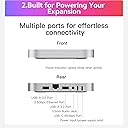
The BEELINK EX Mate Mini-A is a premium aluminum alloy dock designed specifically for the Mac mini M4, featuring a pre-installed 2TB NVMe SSD expandable to 16TB via dual M.2 PCIe slots. It delivers ultra-fast 80Gbps Thunderbolt 5 data transfer, a 2.5G Ethernet port, USB-A 3.0, USB-C PD 3.0, and SD4.0 connectivity in a sleek 16mm form factor. This dock not only expands your Mac miniโs storage and ports but also offers reliable power delivery and dedicated customer support, making it an essential upgrade for professionals seeking speed, capacity, and style.
| ASIN | B0FNW68DJC |
| Brand | BEELINK EX |
| Brand Name | BEELINK EX |
| Colour | Frost Silver |
| Compatible Devices | Mac mini m4/m4 pro |
| Compatible devices | Mac mini m4/m4 pro |
| Customer Reviews | 4.2 out of 5 stars 16 Reviews |
| Hardware Interface | USB Type C |
| Hardware interface | USB Type C |
| Item Dimensions L x W x H | 42L x 44W x 19H millimetres |
| Manufacturer | Shenzhen AZW Technology Co., Ltd, |
| Number of Ports | 7 |
| Product dimensions | 42L x 44W x 19H millimetres |
| Smart Home Compatibility | Not Smart Home Compatible |
| Total USB Ports | 4 |
| Total USB ports | 4 |
| UPC | 810180174176 |
| Unit Count | 1.0 count |
| Wattage | 15 |
B**S
Quickly and easily expand the SSD storage of your M4 Mac Mini
This seems to be the best external SSD for the M4 Mac Mini that includes existing storage. I found other units that had m.2 slots, but then youโd have to buy separate SSDs to plug into them, which I didnโt want to do. I also like the USB-C/Thunderbolt attachment that is made out of hardware, instead of a cable. The only feature I wish it had was a somewhat different shape case that would help keep the Mac Mini in better alignment. Maybe with depressions on the top for the Mac Mini to fit into, or something. But I might just put a big rubber band around it and the Mac Mini and then leave it at that. The rubber band wonโt be as good or pretty of a solution, but it will work.
B**R
Fast and Reliable M4 Mac Mini Dock with 2TB NVMe SSD
There are a lot of choices in the market when it comes to docks and external drives for the M4 Mac Mini. There are two reasons that won me over for choosing BEELINK EX's Mate Mini over competing docks. First, my past experience with BEELINK's customer support when I ran into a memory issue with one of their Mini PCs under warranty is a positive one. They were fast and responsive in resolving my issue with replacement parts, which isn't the case for a lot of the companies I've dealt with that produce products like these. Secondly, given the current cost of SSD drives at the time of my order, this Mate Mini with 2TB SSD storage pre-installed is probably one of the best bargains to be found when it comes to docks with internal storage. Setup is pretty straightforward. My personal preference would be to sit the Mac Mini on top of the Mate Mini; however, the placement of the M4 Mac Mini's power button at the bottom makes this unrealistic. I think most people will do as I do and place the Mate Mini on top of the Mac Mini. My USB-A peripheral devices that I connected to the Mate Mini have their own power supply, so I didn't need to worry about needing to use the PD port (although it's nice to see this as an option). It's very nice that this Mate Mini focused on providing ports that the Mac Mini doesn't have, including two USB-A 3 ports, a 2.5G Ethernet port, and the SD 4.0 card slot. As I use an external DAC to deliver audio to my speakers, I didn't utilize the headphone jack so I can't speak for the sound quality coming out of the jack. Once you have everything connected, the first thing you'll likely want to do is reformat the Mate Mini's SSD drive from FAT to Apple's preferred APFS file format. It is a little strange that for a device intended to be paired with an Apple product, it isn't formatted with APFS in the first place, but from a security perspective, it's good to reformat any new drive you introduce to your system anyway. When transferring files over to the Mate Mini's SSD drive, I did run into some initial file transfer errors. After I rebooted my Mac Mini, I didn't run into any issues, so it's hard to say whether this was an Apple issue or a BEELINK EX issue. The Mate Mini did get extremely warm when I transferred over 1TB of data at once to it, but since then, temperatures on the casing have been much more reasonable. If there was anything that I would change, it is perhaps the hard cased USB-C/Thunderbolt connector, which is perhaps too rigid and doesn't allow a lot of flexibility in movement between the Mac Mini and the Mate Mini. I know this stiffness is by design and intended to keep the two devices stacked on top of each other, but I'm somewhat worried about bumping the Mate Mini off the Mac Mini and severing the connection. Down the road, I plan to buy a short USB 4/Thunderbolt 5 "patch cable" and see if that is more to my liking. In summary, I really like this Mate Mini as it functions well and has allowed me to expand my Mac Mini's storage space from 0.5 TB to 2.5 TB. The appearance, fit, finish, and material used in the Mate Mini are all good design choices and come across as a device that appreciates Apple's DNA for product design that we all have come to like. I have no regrets of ordering the Mate Mini and highly recommend it to other M4 Mac Mini owners needing to expand both storage and ports in their system.
C**E
Overall, quite satisfied.
Well packaged and securely boxed for shipment. Fairly easy setup, but the markings on the USB connectors were not clear cut. Had to result to a trial/error method which was a bit frustrating. Once connected and recognized it has worked great so far. I also like the fact that with the second empty hard drive slot it is available for the future. I would definitely suggest this as a storage upgrade solution to a friend!
A**E
fast reliable easy and the value is awesome with the included 2TB drive included.
So far so good. This has been reliable and FAST over the 3 weeks I've owned it. I'm just a home user using photoshop after effects, premier and logic but i've had no issues and it was easy to set up. I do all of my work from this drive and use my internal mac drive for apps and downloads etc. Make sure you're looking into exactly how many thunderbolt 4 inputs youre gonna need in the future because when you hook this drive up to your mac mini youre losing one of youre thunderbolt inputs by hooking it into this drive. For me it was ok because most of my peripherals, roland v drums, roland keyboard, older audio interface etc. only use usb-c anyways.
G**M
Needs a way to securely physically attach to Mac Mini. Otherwise appears to be well built.
This appears to be a well constructed unit but.... If using the included rigid Thunderbolt 5 interconnect, you will need to find a way to physically attach the Beelink Mate Mini to your Mac Mini. Otherwise there are no index pins or other means to keep the two units from sliding on each other and breaking the Thunderbolt plugs or jacks. If the manufacturer provided an inexpensive collar or clip mechanism, it would be one possible solution. This is particularly important if you will be using the I/O ports (i.e. plugging and unplugging from the units). I've also noted that the power switch for the Mac Mini is on the bottom which necessitates lifting the units up to use the switch. (Note: because of the Mac's power switch location, it makes more sense for me to mount the Beelink on top of the Mac Mini instead of the Mac on top of the Beelink). For the time being, I'll be using metalic duct tape to keep the two units from slipping (see photo). Some 2-sided tape between the units may also work. The unit is connected to my Mac Mini M4 Pro and is performing very well. Blackmagic disk speed test shows Write and Read speeds of around 5000 MB/second, which is about the same as, or even a little faster (write) than the built-in system drive. Very satisfied so far!
Trustpilot
3 weeks ago
1 month ago