We remain fully operational. Our teams are working around the clock to ensure your deliveries continue safely.

DOWNLOAD THE APP


Customer Services
Copyright © 2025 Desertcart Holdings Limited
DOWNLOAD THE APP


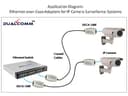


🔌 Upgrade your network without the overhaul – Ethernet over coax made simple!
The PAIRTEK DECA-100 Ethernet Over Coax Adapter Kit enables 100Mbps Ethernet transmission over existing coaxial cables up to 800 feet (RG6). Ideal for upgrading analog surveillance systems to IP cameras or expanding home networks without new wiring, this passive, plug-and-play solution offers a cost-effective, reliable way to modernize connectivity using your current infrastructure.
| ASIN | B009AGCLVG |
| Best Sellers Rank | #232 in Powerline Network Adapters |
| Brand | Dualcomm |
| Compatible Devices | TV |
| Customer Reviews | 3.7 3.7 out of 5 stars (124) |
| Data Link Protocol | Ethernet 10/100Base-T |
| Data Transfer Rate | 100 Megabits Per Second |
| Hardware Interface | Ethernet |
| Item Weight | 0.05 Pounds |
| Manufacturer | DUALCOMM (PAIRTEK) |
| Mfr Part Number | FBA_DECA-100 |
| Model Number | FBA_DECA-100 |
| UPC | 804879443506 |
T**S
Pricy but perfect
Absolutely spectacular! Fast and easy! If only they cost half as much, they would be perfect. My main router is in the basement, where my office is, and where the cable, internet and phone wiring enters the house. Even with an awesome and expensive wireless router, the signal two floors above was a bit slow. I did not want to run an Ethernet cable either through the walls or on the outside of the house (it's just such a pain in the neck), but noticed some extra, unused coax wiring that went from the basement to the second floor. So first, I set up a satellite router in the basement just to make sure that I had everything configured correctly. Then I bought these adapters, screwed them to both ends of an existing wire, connected one end to the existing router, and connected the other end going to the satellite router. It worked instantaneously and fabulously. I never even looked to see if there were any documentation, as it was completely unnecessary. The only possible problem that I can see anyone running into would involve the satellite router. If you are plugging from the primary router directly to a PC, it seems quite foolproof to me. Oh, and the speed is outstanding, even going from PC to wireless router to RG45 cable to Dualcomm Ethernet Adapter to coax cable to the other Dualcomm Ethernet Adapter to another RG45 cable to the base router to a cable modem to the world. I am getting 45 Mbps without breaking a sweat, with no perceivable start-up lag time.
N**Y
This device cause my home network to totally fail
I thought that this product was exactly what I needed. I had a bedroom that only had a TV coax outlet, but no ethernet outlet for the Internet. I added the device to both ends of the coaxial cable using only 1' of CAT5 cabling. This was in accordance with the email I received from Dualcomm a couple of days after receiving the product. They warned that the CAT5 cable length was critical and should be as short as possible. As soon as a installed the two adapters and connected the destination port to a netbook, it seemed to work. But shortly later the streaming video function (amazon.com prime) quit in the living room. There are 5 computers, one media center, one printer & nine cameras on the network. The computers would no longer connect to the Internet. The adapter was connected to an ethernet switch. So I moved it to connect directly to the router. Within 10 seconds the streaming video quit. I am well versed in network technology and I have never seen anything like this failure before in 25 years. Do not buy this device. The network topology where this adapter (upper right hand corner to basement switch LAN7) was connected is shown in the attachment.
T**N
Surprisingly simple and amazing performance for streaming HDTV and/or gaming console data
The performance of these actually surprised me. I honestly didn't have very high expectations when I purchased these, knowing I could return them if I was disappointed. Well, it has been severals months until I finally got around to test them for streaming HDTV to our master bedroom. WOW, when I tested these with the Media Center Network Tuning Wizard I was AMAZED that the bandwidth was off the scale - more than is required for HDTV I needed (wired) Ethernet for one of TV adapters in the master bedroom b/c the ethernet jack is on the OTHER side of the room and I didn't want to lay a cable across the room. So I found these to use the (unused) coax connector that happens to terminate in the wiring closet in the basement adjacent to a multi-port Ethernet hub. Installation was a joke, b/c there is no installation. You literally just screw one end onto the cable jack and plug your ethernet cable into the other end. No batteries, no power adapters, NOTHING! And you're done!
R**K
Worked out of the box, one weird issue
I got the EoC adapters, did some creative jumpering in my junction box and I had Ethernet at the switch in my office. The results of speed tests show that there was no significant difference with the addition of 60 or so feet of co-ax, which is pretty impressive and, of course, it is much faster than wifi. I have three devices connected to a switch at the far end of the EoC connection: A PC, a Mac and a VoIP phone. The PC and the VoIP phone have worked perfectly since I turned on the EoC a few days ago, but the Mac is periodically unhappy and won't see the Internet. I don't know what the issue is, and it's possibly due to something unrelated that I've done to the Mac rather than a bigger issue with the EoC adapters, but the problem goes away if I run a CAT-5 cable across the floor, bypassing the EoC connection.
D**.
Works perfectly
A freaking game changer. These converters need no power source to operate and converted my Coax cable running through my walls to Ethernet. If you have an older house that doesn’t have Ethernet, but has coax, you need this.
J**E
Not Working wih Split-er
I try in my home and it is not working with at least 2 split-er one on each end. It does worked in direct without split-er. .
K**W
Works up to some distance without additional devices, but over longer distances, needs to be powered up by additional devices.
I bought 2 pairs, for the purpose of providing internet to different locations in the house. Coaxial length 20m: First pair is connected from the modem to the ethernet port of the PC; works well., PC reports 100 mbps. Coaxial length 50m: Tried to connect from the modem to the ethernet port of the PC. Most of the time, no connection available. Ocassionally, PC reports 10 mbps internet for very short periods. Added a switch between the modem and DECA-100; continuous internet but at 10 mbps. Put the switch between DECA-100 and PC; continuous internet at 100 mbps. As far as internet connection is concerned, considering the price plus the cost of the switch, it is still cheaper than powered EoC devices. A plus point is that they are easy to handle, small and light. Being passive, don't require any power supply socket.
J**F
Das Produkt tut genau was es soll. Vorteile: keine Stromversorgung nötig, passiver Adapter, SMA Anschluß für SAT Antennenkabel. Leider nur 100MB/s erreichbar, aber das reicht mir aus. Das ist ein echter Problemlöser für die Ethernetverkabelung, wenn kein Ethernetkabel verlegt werden kann, aber ein SAT-Antennenkabel vorhanden ist.
T**O
Had some coax line already running in the walls of my house. Wanted to convert it to CAT5. These did the trick. A bit pricey but sure was easier that running network cable in the walls.
Trustpilot
2 weeks ago
1 week ago