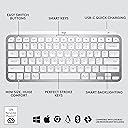
⌨️ Elevate your workspace with the compact keyboard that works as hard as you do.
The Logitech MX Keys Mini is a compact, wireless illuminated keyboard designed for professionals who demand precision and portability. Compatible across multiple OS platforms, it features smart backlit keys that adapt to your environment, multi-device Bluetooth connectivity, and a rechargeable battery lasting up to 10 days. Crafted with recycled materials and certified carbon neutral, it combines sustainability with cutting-edge tech, enhanced by exclusive Adobe Creative Cloud access for creators on the go.

| ASIN | B098JCTY32 |
| Batteries | 1 Lithium Polymer batteries required. (included) |
| Batteries Included | Yes |
| Batteries Required | Yes |
| Battery cell composition | Lithium Polymer |
| Brand | Logitech |
| Compatible Devices | Laptop |
| Connector Type | USB |
| Country of Origin | China |
| Customer Reviews | 4.3 4.3 out of 5 stars (709) |
| Date First Available | 28 September 2021 |
| Does it contain liquid? | No |
| Hand Orientation | Ambidextrous |
| Hardware Interface | Bluetooth |
| Hardware Platform | Windows, macOS,Chrome OS, Linux, iOS, iPadOS, Android |
| Has an attached light | Yes |
| Item Dimensions LxWxH | 13.2 x 29.6 x 2.1 Centimeters |
| Item Weight | 680 g |
| Item model number | 920-010473 |
| Keyboard Description | Membrane |
| Manufacturer | Logitech |
| Material | Metal |
| Model | 920-010473 |
| Model Name | Logitech MX Keys Mini |
| Mounting Hardware | Charging cable, Important Information Document, Keyboard |
| Number of items | 1 |
| Operating System | Windows 10, 11 or later, Linux, Chrome OS, macOS, iPadOS, Android |
| Power Source | Battery Powered |
| Product Dimensions | 13.19 x 29.6 x 2.1 cm; 680.39 g |
| Special Features | Backlit, Rechargeable |
S**D
Nice product
J**G
The white keyboard isn't visible when the back-light are on. So better use it without back-light. I'm sure it would be better with a black keyboard
S**S
You will receive Mac key layout version
D**P
I bought the pale gray MX Keys Mini keyboard to replace my Logitech K380 keyboard, not because the K380 is no longer working but because I like the keyboard feel, keyboard keys, and overall ergonomics of the MX Keys Mini over the K380. The K380 is one of the best, if not the best, compact, multi-device Bluetooth keyboard in its price range currently available on the market. I simply like the MX Keys Mini more and will move the K380 to a different workstation setup. Pairing the MX Keys Mini with my Windows 11 Pro PC and my M2 MacBook Air was a breeze. It paired just like all of the other Logitech keyboards I own, very quickly and reliably. Switching between devices is a single button press on the MX Keys Mini keyboard. It would be kind of nice if my MX Master 3 mouse could be slaved to the MX Keys Mini device selection, but both devices do switch over to the other device very quickly and with a single button press on each MX device. Since my two devices/computers are sharing the same monitor, switching the input source on the monitor takes a lot more time than does switching the two Logitech MX devices. The Logi Options+ application recognized my MX Keys Mini immediately. All of the controls, settings, and user interface workflow for the MX Keys Mini in the application were very familiar since I have used Logi Options+ with many of my other PC and Mac Logitech devices. This is my first experience using a separate keyboard with backlighting. I am relieved that the backlighting is restricted to white hues only. I often use a monitor light bar that is mounted on the top of my monitor to illuminate my workstation area, including the keyboard and mouse. I discovered that my monitor light bar and the MX Keys Mini backlight functionality are ergonomically incompatible with one another, at least for my setup. When my monitor light bar is illuminated, even at the dimmest setting, the adaptive backlight functionality on the gray/silver MX Keys Mini adjusts the backlighting based on the ambient light to the where the white backlit characters on the white keys become nearly invisible to see. I was greatly relieved to discover that I could simply adjust the brightness level of the MX Keys Mini all the way down to the point where the key characters are black. This completely solved my problem when using the MX Keys Mini with my monitor light bar. I will definitely encounter situations in the future where I do not use my monitor light bar and can simply increase the brightness level on the MX Keys Mini to take advantage of the backlighting feature. I have not encountered any compatibility issues while using the MX Keys Mini with either my PC or my Mac. The MX Keys Mini seems to be conforming very nicely to the functional and quality standards that I've come to expect with all Logitech products I've owned, dating back to my first 3-button C7 mouse. So far I am very pleased with my purchase of the MX Keys Mini.
Z**L
The mini is a great keyboard, the best typing experience I have used. It is very slim, build quality is great, the battery last forever, backlighting works perfect. I've had no issues in the 9 months of use so far, previously used the MX keys full size for several years without issue. The downside (hopefully Logitech reads this): The exclusion of a bolt adapter is annoying. The tiny arrow keys (for the love of god make them full size, at least left and right). The F1/F2/F3 by default are set to switch devices instead of the function keys, most companies don't allow your software so I have to use the FN + F2 to perform an action I do way too many times a day. Fixing those few things would make this a perfect purchase and worth the price tag. If I didn't already own the mini, the B1 pro from Keychron answers my issues for far cheaper.
Trustpilot
1 week ago
2 weeks ago