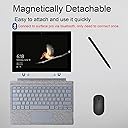
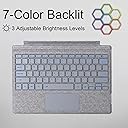
⌨️ Elevate your Surface Pro game with style and power — never miss a keystroke!
The Zoof Type Cover is a premium ultra-slim wireless keyboard designed for Microsoft Surface Pro 3 through 7 Plus (12.3 inch). Featuring Bluetooth auto-reconnect, magnetic detachable design, backlit keys, and fast Type-C charging with over 3 months standby, it combines portability with professional-grade functionality. Ideal for millennial managers seeking sleek, reliable productivity on the go.


| ASIN | B0DP8FMK4Z |
| Batteries | 1 AAA batteries required. (included) |
| Best Sellers Rank | #93 in Tablet Keyboards |
| Customer Reviews | 3.8 3.8 out of 5 stars (182) |
| Date First Available | November 29, 2024 |
| Item Weight | 1.41 pounds |
| Manufacturer | Zoof |
| Package Dimensions | 12.91 x 9.09 x 0.87 inches |
G**S
Nice Keyboard
Fits perfectly and was easy to set up! Love the look of it and how it lights up.
T**D
LOVE IT,
Just like the OG MS brand if not better, I love that i was able to get a burgundy color. And the keys are slightly backlit just enough to type in the dark. I enjoy that it has 4-5 colors to choose from. They keys have a great feel and touch when typing. I has all the same functions as MS brand. Super quick charging. My one thing i need to adjust to is the auto sleep when closing the tablet, but i have the setting to turn off display when not in use lowered. I love that its the fraction of the cost as the name brand.Touch pad is super responsive and has all the functions. This seller is the only one i found that has the burgundy color that would match my case that i have installed. Keys have a great medium print and is easy to read the seller was on pointe on making sure i will receive the correct color and my shipment with no damage in the process.
T**E
Decent alternative when you can’t get the original manufacturer model
I’ve had my surface for 10 years now and I’m just now needing to replace the keyboard and while I initially hoped that I wouldn’t have to use the Bluetooth function because I thought it was gonna connect into the computer the same way it seems to be decent although I don’t like that they keyboard sometimes Knocks itself out for a little while if it’s not being used frequently enough.
D**A
Keyboard randomly turns off and does not turn back on, despite having full battery
I have been using this keyboard for the past few months and it has been turning off out of nowhere at the oddest and most inconvenient of times, and simply switching it on and off doesn't fix it. It's not a Bluetooth connection issue, it's a hardware issue. It's not a battery issue either because it has full charge, and I continuously charge it everyday, even during use sometimes, because the last thing I want is for it to die on me when I am in the middle of work. I never let it run out of charge. This has been frustrating me to no end. I should not have bought this keyboard for its cheaper price. I should have just sucked it up and bought the more expensive one from Microsoft. At least that one lasted me 7 years before causing me problems. This one is only a couple months in and giving me grief.
R**X
Poor connectivity
When it works it works great. But continues to lose Bluetooth connection and is a pain to reconnect
Z**Z
Good
Works perfectly as intended, and has many light options!
A**R
will disconnect other items-no battery % indicator
I have a surface pro and got this keyboard because i liked the aspect of it being bluetooth connected and I'd be able to adjust my set up based on the tasks i was doing. limited desk space so i liked the fact that the keyboard didn't have to be connected physically in order to use it. however, the downside to this is that if you also have a bluetooth connected mouse... you can't have both connected at the same time :( unfortunately i prefer the mouse over the mousepad as i am able to complete tasks quicker(excel spreadsheets) i wish i had known this at first because i would not have purchased it. The keyboard will also randomly disconnect from the laptop and another thing is that there's no indicator of how much batery it has left. you could be at 98% or you could be at 10% and without checking, it'll die on you 1/2 way through your task, but then again, if you plut it in if it's at60% then it can affect the battery life as well :(
M**T
It looks good!
The keyboard was completely dead out the box, so I will have to give an update on its functionality and battery life at a later date. It came with an instruction manual and a quick start guide sticker, which was very helpful. It came with a charging cable that appears to be USB-C. Physically it is pretty sturdy and has a thin, sleek, smooth design. It connects magnetically to the Surface Pro and closes carefully without being obstructed by the case.
Trustpilot
3 weeks ago
1 month ago