

Desertcart purchases this item on your behalf and handles shipping, customs, and support to Spain.
๐ฎ Upgrade your game with drift-free precision and style!
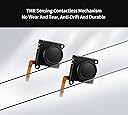
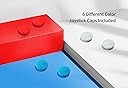
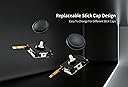
GuliKitโs Switch Joystick Replacement leverages advanced patented TMR magnetic sensing technology to eliminate drift and enhance stability. Compatible with Switch LCD/OLED Joy-Con and Switch Lite, it features a modular design for easy installation and includes four interchangeable stick caps for personalized aesthetics. This upgrade offers lower power consumption, improved durability, and precise control, making it the essential fix for gamers seeking a premium, reliable joystick experience.


| ASIN | B0DSJ5JDK9 |
| Best Sellers Rank | #1,656 in Video Games ( See Top 100 in Video Games ) #57 in Nintendo Switch Controllers |
| Brand Name | GuliKit |
| Color | Black |
| Compatible Devices | Nintendo Switch |
| Customer Reviews | 4.2 4.2 out of 5 stars (414) |
| Global Trade Identification Number | 06977836850120 |
| Hardware Platform | Nintendo Switch |
| Item Dimensions | 0.8 x 1.2 x 0.8 inches |
| Item Weight | 18 g |
| Manufacturer | GuliKit |
| Manufacturer Part Number | NS40T |
| Model Number | NS40T |
| Warranty Description | 1 Year |
K**Y
These are my go-to replacements now (Tiny defect in one of mine however)
TL;DR - These are the replacement sticks you want for the Joy-Con. Drifting or just want something that feels a little better, get the GuliKit TMR sticks. Putting an edit here early: At first I thought I had a faulty unit, and perhaps I do, but it's something I can easily work around. See, sometimes when I turn the Switch on, the stick in my left Joy-Con seems to want to flick left. No matter how much I calibrate it always does this intermittently but always happens. I've taken it apart, cleaned it to within an inch of its life, reinstalled it, and still had the problem. I connected my Joy-Cons to PC and found there is ever so slightly an amount of drift. How did I fix it? You're not gonna believe this...I moved the stick around a little bit. Then the problem went away. That's why I never saw it in the Switch calibration screen, it requires tilting the stick to go into the menu that shows actual stick readings which seems to fix the problem. Even on PC with a Joy-Con tool program, this fixed the problem. So if you're having some kind of weird drift on startup/wake despite calibration, just get in the habit of rotating the sticks when you turn the Switch on. You shouldn't see the problem anymore? I can't say if this totally fixes the problem, and it's a weird issue that shouldn't exist, but maybe it's an issue with this particular Joy-Con model or a slightly faulty stick module. But doing this feel surprisingly natural and I haven't had it do weird things since. Might be worth a try for you before you deal with a return/exchange (Especially if you installed these on a Switch Lite, god help you). If such a fix helps you, it's a minor annoyance but better than a broken stick that always drifts. Hopefully you don't have this problem for what this costs but it's such a small issue to me that I can't justify knocking any stars off and will for sure buy another pair for my secondary Switch Lite (Either when those OEM sticks start to fail or when these go on discount again). I dread taking apart the Switch Lite for that but these sticks do feel that much better than OEM where I will do it (For the love of god follow an iFixIt guide and reference a teardown video if necessary if you take apart the Joy-Con/Lite to do this yourself. These aren't too hard to take apart but all the tiny ribbons get really annoying really fast and you need to be prepared for how to deal with them). First a bit of history - I had gotten some Gulikit Hall Effect sticks (Not these ones) for the Joy-Con before and thought they were great, until I played games that required some precision with the sticks. Namely Assassin's Creed II and Shadow Generations. Then I noticed they were really bad. The sticks didnt seem to have a circular gate, but more of a teardrop shape with a point in a lower corner, and it's like I could feel all the mechanisms inside the assembly fighting each other. On top of that, trying to move the stick straight up would cause the game to read it as more of a curved line, making Ezio and Shadow turn a bit to the left before going forward, which is problematic at many points. I know when I just have a skill issue and this wasn't it, I've played both games before picking them up on Switch. I recalibrated dozens of times and nothing helped. It was clear I lost the stick lottery on those original Hall Effect sticks (And didnt notice before the return window so I guess I'm SOL on those. Oh well). So I replaced them with these. Major upgrade. These sticks feel smooth, with just the right amount of resistance to them. They feel a little tighter than the original OEM Joy-Con sticks and push back against your thumb just a bit more. Normally I like control sticks to have a frictionless feel but for small sticks with very little travel like the ones on the Joy-Cons, this is perfect. I dont even need a stick cap to extend the stick length and make the angles better for accuracy, they feel perfectly usable as-is with the regular OEM-style caps (Your mileage may vary but I went from using rubber caps on top of the OEM/Hall sticks to just regular out-of-the-box with these TMR sticks. Experiment for yourself but that was my experience). The stick has a proper circular gate rather than wanting to snap into a corner, and I dont feel any of the internal gears and cradles knocking into each other. And, most importantly, the directional readings are accurate, Ezio and Shadow stopped veering to the left during a forward input. This is exactly what I wanted to replace the drifting OEM sticks and then some, having a better feel and some customizability with the cap colors. Good stuff. The only downside to these are the install process and that's not a fault of the product itself. Just pay attention to the iFixIt guide for replacing Joy-Con sticks, have a little patience, and handle it as if it's a delicate expensive controller (which it is) and it should be okay. You do so at your own risk but it's not as scary as taking apart a 3DS, especially if you have expedience with ribbon cables already. Otherwise, if you're uncomfortable doing it yourself, you might be able to pay a small fee to have someone do it for you (Secondhand game shops might be willing to do it for you within a day if you bring them the controller and the parts and ask nicely. Especially if they already offer console/controller repair services). And it's a "flaw" you never have to think about again once the sticks are installed and function correctly, something that goes for any repair but always worth mentioning for those who arent expecting it. Adding an edit to these because ever since placing them in my joycons, sometimes in the Switch menus I'll get a stray left-input from the left joycon (I know it's that one since I see it do that on the controller connection screen). Idk if this is caused by the stick because the calibration screen shows that the stick centers properly with not deviation at rest (I've even recalibrated several times to make sure), and I've never noticed any issues in games. There's no stray button presses as far as I can tell either. I've taken it apart and cleaned every ribbon connector to see if it was that and the issue still persists. Still better than a drifting stick or one that reads incorrect directions while tilting in one direction, but still sad I didnt notice this until after the return/exchange window. Again, I dont even know if this is the stick itself, but the issue didnt happen until I replaced the stick with this one. The right joycon is completely fine. The only fix I have for it if to give the left joycon a good whack on the palm (Not directly on the stick, just on the side of the controller) and that makes it settle down. Still leaving the review at 5 stars but if I had the option, I would knock it down half a star because other than this issue, it seems perfect. Hopefully this is just a small case of bad luck on my end. I would still get these sticks again when it comes time to replace the modules in my Switch Lite.
T**L
Pray You Don't Get USED STICKS!!! (But they will make it right if you do!!!)
Update: 5/8/2025 In an update to this post, there WAS a mistake and a mix-up took place and I received USED sticks instead of proper NEW sticks. Having brought this to the attention of Gulikit they were quick to respond and correct the mistake by resending a NEW set. Gulikit is great! And their mistake didn't change my feeling on Gulikit being a great company! Their quick action only makes deeper my support for them and their products. I strongly advise buying from Gulikit! Previously: I bought an order of 2sets for 2respective sets of my Joy-Cons! In my first installation, it went great and the sticks functioned as expected! Sticks will click when pressed and rotate great! When I moved on to my second set... PROBLEMS I installed a stick in my left Joy-Con and realized...the stick didn't click. Then when I attempted to calibrate the stick, it had no left and right movement. IT WAS BROKEN. The same for the second stick in the package! It also did not click and I didn't even bother attempting to install the stick! This was not a mix up on my end. I did not accidentally install my previous stick by mistake. Even still, my previous stick has click and rotation and was OEM with a cap that could not pop off. Looking closely at the second stick in the pack, the ribbon cable was not flat!! It had a bend. These connectors should be FLAT! All things point to this second box containing USED STICKS! Not NEW! I think GuliKit was scammed in a previous RETURN SERVICE and these broken sticks got mixed up with my order! Likely a fluke, mishaps, happen. Looking at the GOOD box, it's listed as NEW! Looking at the BAD box, it is not listed NEW. Ultimately I'd buy from Gulikit again. Give Gulikit a chance, but I simply can't give this specific purchase a glowing review. I bought a set of broken used sticks...๐
V**C
Really bad drift made it almost unusable - had to return!!
My OEM joycons haven't developed any drift yet, but I figured I would just replace them now after my friend recommended this brand. The left joycon had REALLY bad left-sided drift, to the point where it was unusable. It would drift left so hard, that even when pushing right as far as possible on the home page, I couldn't scroll past the 2nd game without it immediately jumping back to the current game I was playing. I could barely make it past the 'News' or 'Nintendo eShop' icons on the bottom of the home page before it went straight back to the 'Nintendo Switch Online' icon. The drift would go away after jiggling the left joycon/clicking it repeatedly. After that I calibrated multiple times and the issue seemed to be fixed... until I put the Switch to sleep. Just like many others have said in their reviews, the drift came back every time after I woke my Switch up. Really really annoying to deal with. I just returned them and put my old OEM joycons in - no drift. Everything works perfectly, so it wasn't an installation problem.
G**M
Great sticks that solve drift
Saves money on buying new joycons. The color matches the original joysticks. Installation is tricky at first, but there are step-by-step videos on youtube to guide and this kit comes with all the tools. After installation I have no stick drift. They quality of these sticks are A+ and they feel very durable. This is the kit to get an is highly recommended on Reddit and Youtube
S**6
+1 Joystick Drift after Waking Switch from Sleep
Video tutorial provided with the kit is fantastic, though from an abundance of caution I referenced a few other videos anyway. I STILL ended up relying on Gullikit's the most, so thank you Gullikit for making such a helpful guide! This is the first upgrade I'd attempted and it couldn't have gone more smoothly! Other than me forgetting to reconnect a ribbon plug. But I eventually caught my mistake. The reason for 4 stars instead of 5 is that like my review title says, I get joystick drift basically every time I wake up my Switch from sleep, and it's kind of annoying. Strangely, this can be fixed by simply visiting the joystick calibration screen for each individual Joycon. Sometimes the joystick will just appear normal as if nothing had ever been wrong, though occasionally I'll see a joystick spazzing out like crazy. But simply pressing a button while in this screen (or entering the screen to begin calibration for real, even if just to cancel out of it) will make the spazzing stop. It's annoying to deal with as someone accustomed to playing on my Switch in a stop-and-go manner, yet I think it's also true that these joysticks take up way less power. My Switch seems to last a lot longer on undocked mode due to Joycons draining less power from the Switch itself, but it's not as if I'd run any tests to actually prove this. Given other reviews mentioning stick drift after waking up the Switch from sleep, it might be a quality control issue. If my Joycons ever reach a state of being near unusable, Gulikit at least makes the replacement bearable enough!
C**G
Good OEM Quality Replacement that Will Last for Years to Come!
Works great, made my Nintendo Switch Joy-Cons feel like new. They feel better than the originals and look OEM when installed.
I**S
Good Replacement!
This is a must have for anyone who doesn't like drifting Joycons. I've bought two sets of these for my Joycons so far and they've both worked great and haven't had any issues with them yet they have more resistance to them than the normal Thumbsticks which in my opinion is better but you may or may not like it
A**Z
Fixed my drift and made the sticks feel brand new
These GuliKit replacement joysticks brought my Switch controller back to life after the original sticks started drifting. Installation takes a bit of patience, but once theyโre in, the movement is smooth and precise with no dead zones or random drift. They feel solid and responsive in games, like a quality upgrade instead of just a cheap fix. If your sticks are acting up, this is way cheaper and better than buying a whole new controller.
C**N
Parfait
Ma switch est de nouveau comme neuve , fonctionne parfaitement
H**N
Value for Money! Made my Old Joycons Better than new
works perfectly
A**ใผ
็ดๆญฃใฎๆไฝๆใ่ถ ใใ
ๅฎ็งใงใใ ๆไฝๆใซใคใใฆ้ๅๆใๆใใใจใฎใณใกใณใใใใฃใใฎใงไธๅฎใงใใใใ่ชๅใฏๅ จใๆใใชใใฉใใใใ็ดๆญฃใใๅใใซ่ฝใก็ใใจๆปใใใใใใใใใฃใกใฎๆนใไฝฟใๅฟๅฐใ่ฏใใงใ ใใใใณใฌใใตใคใณใผใงใ ๅฃใใฆใชใใฆใไบ้ฒไบคๆใใๅงใใใใใงใ
H**Y
Great Technology, Average Build Quality
No drift to be found with these sticks. My units have a fairly common issue where they do not register at centre when the controllers first turn on, requiring a jiggle to fix. Gulikit is reportedly very good at offering replacements for this, but they are really fiddly to install, so I have just left them in. My biggest problem is the TERRIBLE joystick caps. They're friction fit, not threaded, so expect them to fly across the room playing Wario Ware, and come off when you put your controller in your bag. If you don't play with your fingers directly on the dome of the sticks (like a maniac) you will undoubtedly flick them off playing something movement intensive like Smash Bros or Hollow Knight. I've gone through two sets of the caps in 6 months from the plastic snapping after being flicked off, and I'm approaching the point that I'm considering gluing them on so I can actually use my controllers properly. Overall, impressed with the technology, not the build quality.
D**.
Precisi, affidabili, di eccellente fattura.
Perfetti, facili da installare (fate attenzione ai flat quando aprite i joycon, aiutatevi con uno strumento non tagliente) e dal feeling eccezionale. Affidabili e precisi.
Trustpilot
2 months ago
2 weeks ago