![[Bluetooth 5.0 Accelerometer+Inclinometer] WT9011DCL MPU9250 High-precision 9-axis Gyroscope+Angle(XY 0.2ยฐ Accuracy)+Magnetometer with Kalman Filter, Low-power 3-axis AHRS IMU Sensor for Arduino](https://m.media-amazon.com/images/I/51P2Z1ByfHL._AC_SL3840_.jpg)
Buy anything from 5,000+ international stores. One checkout price. No surprise fees. Join 2M+ shoppers on Desertcart.
Desertcart purchases this item on your behalf and handles shipping, customs, and support to Spain.
๐ Elevate your motion sensing game with pinpoint precision and wireless freedom!
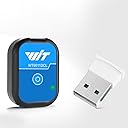
The WT9011DCL is a high-precision 9-axis IMU sensor integrating accelerometer, gyroscope, and magnetometer data with Bluetooth 5.0 wireless transmission. Featuring 0.2ยฐ angle accuracy and a low-power design offering up to 10 hours of battery life, it supports multi-sensor connections and dynamic Kalman filtering for stable, noise-reduced output. Ideal for professional-grade Arduino projects and real-time motion tracking, it comes with Type-C connectivity and dedicated customer support.


| ASIN | B0BQ9QTS4D |
| Brand Name | WITMOTION |
| Customer Reviews | 3.7 3.7 out of 5 stars (69) |
| Item Dimensions | 32 x 23 x 11 millimeters |
| Item Weight | 30 Grams |
| Manufacturer | WitMotion Shenzhen Co.,Ltd |
| Material Type | iron |
| Measurement Accuracy | High |
| Model | WT9011DCL |
| Mounting Type | Flange Mount |
| Part Number | 1 |
| Style Name | Type-C |
| UPC | 604787286772 |
M**Y
The sensor works great, USB-C to charge, lasts all day it seems. Connects via bluetooth and its simple. The software that comes with it (via google drive) is good. The company support is great. I had different needs on the scales in the graphing software and they updated the software and sent me a personal link with the update I needed. You can't beat that. The output can be several container types and I can import that sensor data to most other software no problem via CSV or txt, etc, and even Open Office reads it fine in SpreadSheets for custom graphing as needed (images included). Their custom software has great features (see my first image of all the real time data streaming in and graphing). I use this to measure acceleration changes to understand relationships of vibration and coupling as a form of tactile response with audio and transducers.
A**.
Got it for a hobby project. The hardware device works well. Setting up the phone app was easy. Documentation is pretty lacking and the PC software was a little hard to set up, but i eventually got it. I was able to write a simple python program to connect via bluetooth and extract the data feed in real time.
M**G
Good sensor for acceleration but up to now, I haven't found a way to augment the resolution for the vibration I need to monitor.
J**E
Took off 1-star because App needs further work when it comes to display's chosen language. Too much is still in Mandarin, even when English is selected as language. As accelerometer it works in all 3-axis XYZ and rotation around those 3-axis. Not sure about what one menu selection is trying to show when it comes to moving differentiation.
A**R
Very easy to use, great battery life, and pretty accurate too. Make sure you set sampling rate and other settings within the app before use. To use these accelerometers with your phone, follow the below instructions: 1. Install the WITMOTION ap 2. Turn on the device(s) 3. Open the app and click the link icon in the top right. This will show you the list of devices the phone sees. Connect to your devices. 4. Navigate to the tab of interest (ex. The 'Acc' tab is for viewing acceleration). If you have multiple of these devices connected, you will see multiple data plots if you scroll down 6. Make sure you click the settings button for EACH DEVICE PLOT. Here you can adjust things like bandwidth and sampling rate. The max sampling rate is 200 hz. 7. Hit the red record button when you want to record. Make sure your phone is nearby the devices, as the bluetooth range is not very strong. 8. When you stop the recording, you will have the option to save the file to your device or upload it to the cloud, like Google drive. Tip: When handling large data files, I have had better luck pasting the CSVs into VScode rather than excel or google sheets. It tends to handle the format better. From VScode, it's also easy to use AI coding tools (claude code, github copilot) to process your data.
Trustpilot
1 month ago
1 month ago