We remain fully operational. Our teams are working around the clock to ensure your deliveries continue safely.

DOWNLOAD THE APP


Copyright © 2025 Desertcart Holdings Limited
DOWNLOAD THE APP
Buy anything from 5,000+ international stores. One checkout price. No surprise fees. Join 2M+ shoppers on Desertcart.
Desertcart purchases this item on your behalf and handles shipping, customs, and support to Spain.
❄️ Stay cool, stay ahead — the ultimate smart cooling pad for power users.
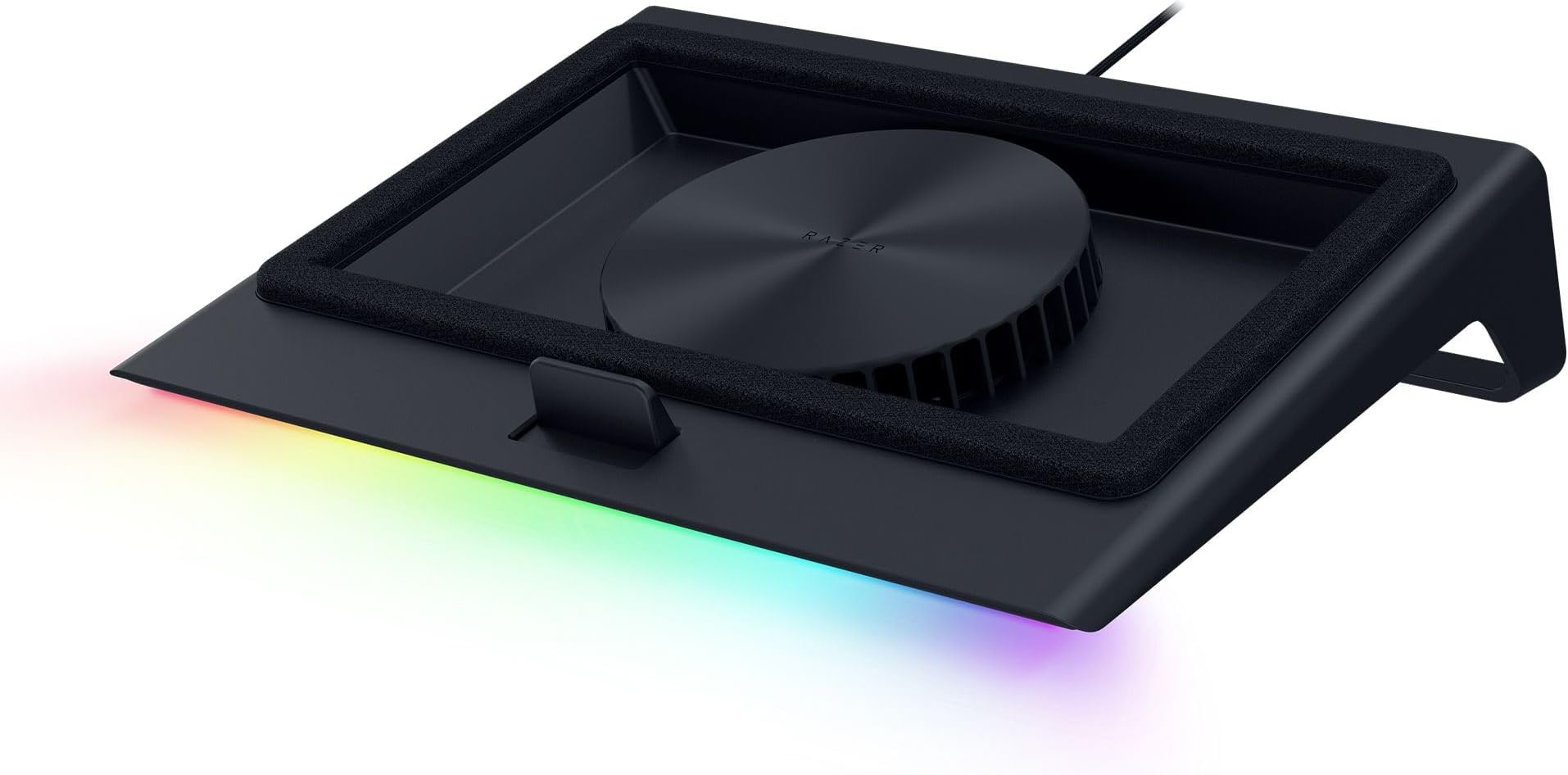
The Razer Laptop Cooling Pad features a high-speed 140mm brushless fan with airtight pressure chamber technology to significantly reduce laptop temperatures. It supports laptops from 14” to 18” with magnetic frames for optimal airflow, customizable fan curves via Razer Synapse software, and a 3-port USB Type-A hub for expanded connectivity. Designed for professionals and gamers alike, it combines smart cooling with versatile controls and vibrant Chroma RGB lighting, backed by a 2-year warranty.


| ASIN | B0DJDWWHTV |
| Best Sellers Rank | #483 in Computers & Accessories ( See Top 100 in Computers & Accessories ) #15 in Laptop Cooling Pads |
| Brand | Razer |
| Built-In Media | User manual |
| Color | Black |
| Cooling Method | Air |
| Customer Reviews | 4.3 4.3 out of 5 stars (493) |
| EU Spare Part Availability Duration | 2 Years |
| Enclosure Material | Plastic |
| Item Dimensions L x W x H | 15.6"L x 11.5"W x 4.49"H |
| Item Weight | 2.61 Kilograms |
| Manufacturer | Razer |
| Mfr Part Number | RC21-02300100-R3UC |
| Model Number | RC21-02300100-R3UC |
| Number of Fans | 1 |
| UPC | 840272914793 |
| Unit Count | 1.0 Count |
| Warranty Description | 2 Year Manufacturer |
F**K
Works exactly as it should
I got this Razer laptop cooling pad for my 18" Acer Predator Helios. I will say it isn't a perfect fit. However, it does work and keep my laptop cooler. Setup was quick and easy, and that included a firmware update. Just follow the on-screen instructions and reboot. 6 month update: this cooler has worked great. I cleaned the filter and its been keeping my laptop cooler clean. Software works great and controls are too. Overall happy. Only con is I think its overpriced but my main reason was keep all my peripherals Razer since all of them have been flawless. Leds are only on the front. It would have been cool to see more Leds around the side, but that doesn't negativity affect anything. I did need to update my Synapse 3 to Synapse 4. I believe the main reason is they separated Chroma from Synapse. My auto fan works great, and the profiles for low/med/high are adjustable. I made two small tweaks to the low and medium profiles just to make it dead silent when no load is on gpu/cpu. You can control the fans and lights via the buttons on the side of the cooler, or within the software. The software also gives you a basic look or an advance look for fan profiles. It's pretty cool. I play DayZ and with my Nvidia monitor I went from roughly 80*C @ 100% load to about 68-72*C and around 60-80% load. Based on that pretty sure I was getting thermally throttled. FPS is better also. I use a Razer Tartarus V2 because the height of the laptop keyboard is higher and for me is less comfortable while gaming. The Tartarus pairs up nice. There is an intake fan dust cover, so hopefully that does a good job as my house with multiple kids and animals gets pretty dusty. Currently very happy. It works just as advertised. And I'm happy with it not fitting 100% so it may work better for you and get even better results with temperature. Again, I'm using an Acer laptop, not a Razer so it's my own fault but it does work with non-Razer laptops. The cooler does have its own AC power adaptor which powers the cooler. There are also 3 usb ports on the rear, and they're setup for my Tartarus V2, JBL Quantum One headset and my charging cable for my Balilisk V3 Pro mouse. The pass thru works great, and I have no performance or audio issues.
A**S
Cooling Beast
Before I purchased this cooling pad I had a cheap Chinese pad with four fans and zero software. I ran the Chinese pad on max all the time but it barely made a difference. There was nothing in the way of dust filtration in the Chinese pad. Razer has outdone themselves concerning the design of this cooling pad. The plastic is very sturdy and the stand is at a perfect angle. This cooling pad also doubles as a USB-A hub, with appropriate space for cables underneath the pad. The foam serves to insulate the underside of a laptop from dust, and there is dust filtration on the fan as well. While gaming this cooling pad offers significant performance gains. The fan will easily go up to full speed and generate a substantial amount of noise. I can hear this noise occasionally through headphones but it doesn't bother me too much. The game soundtrack should cover up the fan noise as well. The software allows you to see temps, manually set the fan speed, set the fan to adaptive mode, and control the LED bar on the bottom of the pad. I use the fan on adaptive mode since it usually runs slowly enough that I cannot hear it or I have tuned it out. I have the LED set to Razer green, but you can easily turn it off. You can also use a plethora of LED modes like "breathe" or "rainbow". Overall the cooling pad is worth the cost. Razer may have added a little "brand tax" but this cooling pad is reliably performant. There are cheaper cooling pads from China that serve the same purpose, but they do not usually offer the gains this pad delivers. The build quality is also lacking in many of the cheaper options.
A**X
Cools well and looks cool doing it
This thing is louder than expected, even in quiet mode, but it is great overall. Laptop stays cool for sure, and the lighting is great. I am a little razer biased as I've always liked their peripherals, but this thing is better than every cooling stand I've had. Unfortunately, doesn't break down or collapse so it's not very travel friendly, but great for a long term setup. It also utilizes its own power source so it doesn't pull from the laptop power supply, so make sure you've got an extra outlet available.
J**N
Worthwhile unless you need it for travel.
This has been amazing, not only does it actually as a cooler it also gives my laptop a lift so Im not staring down all day it also has a USB hub so I can connect my devices cleanly. Runs in different modes depending on your needs from quiet to hyper cooling (quite loud) and you can change the light settings or turn them off completely. Seems a little flimsy at first but it has been holding up well. It is a little bulky so transporting it frequently would be a hassle.
J**A
It is worth the investment. Great product with a lot of features and high quality materials. It connects to your laptop or pc and with the Razer you can actually see the internal temperature of your rpocessor. You can choose between quiet, balanced, and high performance mode. It comes with different apps if you choose to install, they are related to gaming forums, store, community creations, and more. Highly recommended product.
C**L
Didn’t get Australian plug with this.
A**I
“I’m extremely impressed with the Razer laptop cooling solution! It’s sleek, well-designed, and highly effective at keeping my laptop cool during intense gaming or heavy workloads. The build quality is outstanding, and the cooling performance has noticeably improved my laptop’s efficiency and comfort. Highly recommend this for anyone looking to protect their device and enhance performance!”
J**M
El mayor inconveniente que tiene es el precio, aunque después de validar sus características se observa que está basado en la funcionalidad que ofrece, todo es configurable a través de su software razer synapse, se pueden crear curvas personalizadas (por temperatura o RPM) y asignárselas a juegos según se requiera el nivel de enfriamiento. Se puede modificar el RGB, incluso se le puede agregar otra funcionalidad diferente a los botones de RGB y RPM de la base, respecto al apagado se sincroniza con la laptop y cuando esta se apaga el ventilador entra en reposo, lo mismo en el encendido, el ventilador toma la última configuración de RPM para funcionar. La construcción es de muy buena calidad e incluye 3 marcos magnéticos para usar según las dimensiones de la laptop, el cable de alimentación para consumo de 36w (muy buen consumo de energía) Respecto al funcionamiento, el ventilador tiene un mínimo de 500 RPM y puede llegar hasta los 3200 RPM, lo cual ofrece un buen nivel de enfriamiento, aunque también a mayores revoluciones incrementa el ruido generado (haciendo pruebas el nivel aceptable de ruido es con 1700 RMP, en adelante se recomienda usar audífonos). A nivel personal observo que favorece más al lado derecho de la laptop manteniendo una temperatura no mayor a los 70 grados en la gráfica usándola al 100% en juegos de alto rendimiento y al procesador en ocasiones no le ha llegado a impactar. Otro de los factores que se debe considerar es el uso de los marcos herméticos para poder concentrar el mayor posible aire fresco, con el marco liso el aire se escapa y la laptop no recupera el aire suficiente para enfriar. finalmente, el hub de 3 puerto UBS es muy bueno y mínimo cubre el puerto USB de la laptop que se estaría ocupando. Si bien puede tener algunos detalles a mi consideración y al momento es la mejor base que se puede llegar a adquirir, las configuraciones que se pueden realizar, la potencia y el mantener mi laptop en las condiciones adecuadas de funcionamiento es lo que le otorgar valor a la base.
T**7
I got the Razer Laptop Cooling Pad: Adaptive Smart, and honestly, it’s one of the best cooling pads out there. The intelligent fan control and airtight pressure chamber make a huge difference, keeping my laptop much cooler even under heavy loads. The preset & custom fan curves are a great feature, allowing for precise cooling adjustments. Plus, the RGB lighting adds that classic Razer touch. That said, I did have to pay import fees, which bumped the price to $250, making it quite expensive. But considering the build quality, performance, and extra USB ports, I’d say it’s still worth the investment if you need serious cooling. If you’re a gamer, content creator, or heavy laptop user, this cooling pad does the job perfectly!
Trustpilot
1 week ago
1 week ago