

Buy anything from 5,000+ international stores. One checkout price. No surprise fees. Join 2M+ shoppers on Desertcart.
Desertcart purchases this item on your behalf and handles shipping, customs, and support to Spain.
🎬 Elevate Your Streaming Game!
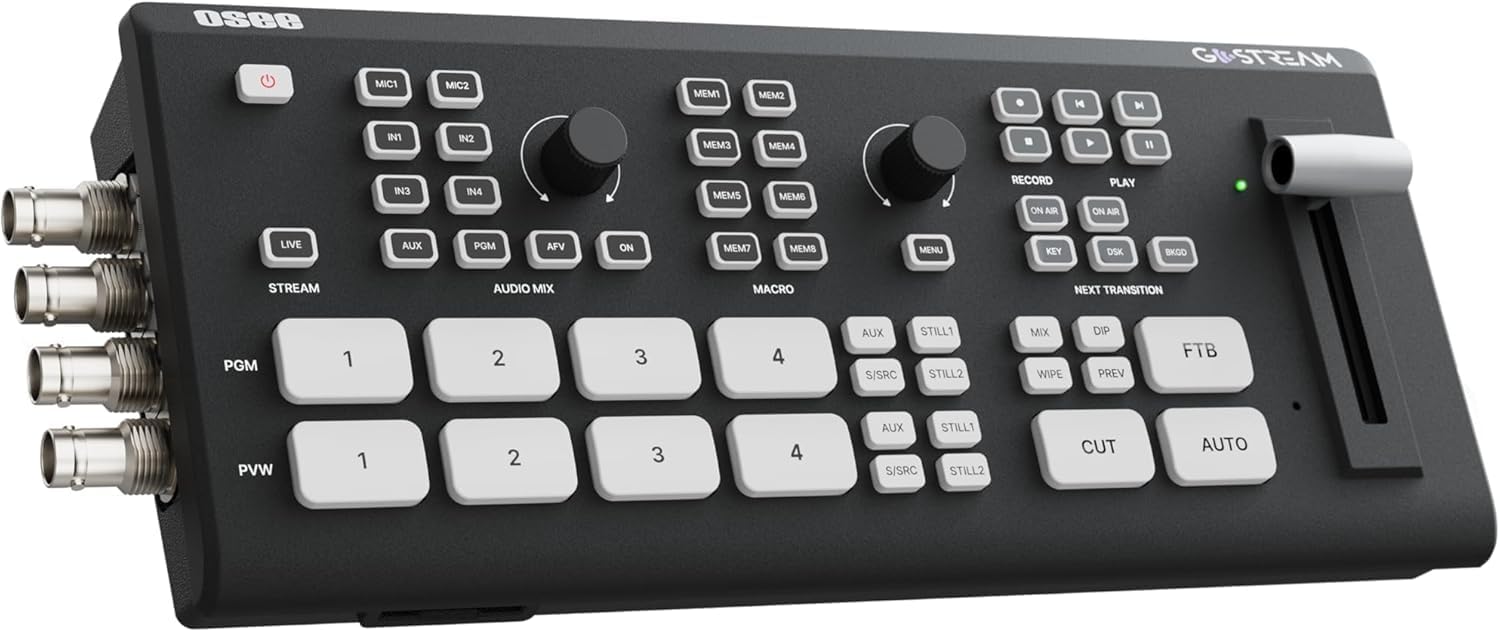
The Osee GoStream Duet Video Switch is a versatile video mixer designed for professional livestreaming, featuring multiple input options, intuitive control methods, and advanced effects, making it an affordable all-in-one solution for content creators.
| ASIN | B0CZ97V8D9 |
| Best Sellers Rank | #59,427 in Electronics ( See Top 100 in Electronics ) #156 in Audio & Video Selector Boxes |
| Brand | osee |
| Built-In Media | 1 |
| Cable Type | SDI, HDMI |
| Compatible Devices | Camera |
| Connector Type Used on Cable | SDI, HDMI, USB Type-C |
| Customer Reviews | 4.4 4.4 out of 5 stars (33) |
| Manufacturer | osee |
| Number of Ports | 9 |
| UPC | 769293552763 |
W**R
Osee Gostream Duet - ein multifunktionaler Videomischer der im Preis/Leistungsverhältnis absolut überzeugt. Ich war eigentlich immer ein Nutzer von Blackmagic Video Mischern - auch von der ATEM Mini Serie- aber seitdem ich die ersten Videos der Osee Gostream Duet aus den USA gesehen habe, bin ich hellhörig geworden. Und nun gibt es sie endlich in Deutschland. Als Tech Geek hatte ich mir sofort eines hier auf Amazon bestellt und einen Tag später war es bei mir. Der Osee Gostream Duet hält absolut was er verspricht. Der Mischer ist gut durchdacht, sehr ausgelegt auf ein schnelles pragmatisches Arbeiten für die unterschiedlichsten SetUps, auch gerne mal ohne PC oder Notebook. Sei es für die Remote Produktion, Multistreaming zu 3 Plattformen, ohne PC Encoder Einsatz, oder für die Produktion kleiner Veranstaltungen jeglicher Art. Auch im Bereich Remote Tutorials via Videokonferenz Programme wie geschaffen. Ich bin begeistert und bin froh, dass ich das Teil sofort bestellt habe. Meine persönlichen Favoriten Tools: volle Programmeinstellung ohne PC möglich - Multiview & Programm Ausgang - Multi Livestreaming zu 3 Plattformen ohne PC möglich - Recording der Produktion auf SD Card - NDI.
B**Z
È molto versatile, 4 input HDMI o SDI + 1 webcam o 1 flusso NDI ma devi pagare la licenza. Uscite solo HDMI: program e preview, multimonitor o un qualsiasi fonte. Tutta la configurazione é modificabile direttamente dal menù sul mixer, non serve un computer collegato e questa è una grande comodità (gli ATEM della Backmagik non lo fanno). Non scalda eccessivamente, al contrario di quello che ho letto su altre recensioni, ma ho avuto l'accortezza di sollevarlo leggermente dal piano di appoggio per favorire la circolazione dell'aria. Ho diversi mixer Atem della Backmagik ma questo lo travo decisamente più comodo e versatile. Sono pienamente soddisfatto Perde 1 stella perché avrei gradito la licenza NDI già attiva magari aggiungendo qualche euro al prezzo di acqusto.
J**O
Na jarenlang met verschillende video mixers te hebben gewerkt – waaronder ook duurdere modellen – kan ik eerlijk zeggen dat dit een van de beste is die ik tot nu toe heb gebruikt. En dat voor deze prijs. De bediening is overzichtelijk en betrouwbaar. Zowel SDI als HDMI schakelen werkt soepel, en voor live streaming is dit apparaat echt zeer geschikt. Alle essentiële functies die je nodig hebt voor professionele producties zitten erin. Wat ik vooral waardeer is de stabiliteit tijdens live-evenementen. Geen onverwachte problemen, geen signaalonderbrekingen. Dat geeft vertrouwen tijdens belangrijke producties. Eerlijk gezegd vind ik het jammer dat ik dit model niet eerder heb ontdekt. Ik heb eerder duurdere mixers gekocht die uiteindelijk niet beter presteerden. Inmiddels heb ik er zelfs een tweede aangeschaft als back-up voor mijn producties. Voor wie een betrouwbare en betaalbare video mixer zoekt: dit is absoluut een aanrader.
V**1
It's great just as a switcher to cut and mix cameras and if you buy it primarily for that you will be happy. Basic picture quality is excellent and it is worth the money for that. Now the downsides... There are issues with colour in chromakey. When you key on pure green, bright yellow in the foreground scene turns dark orange. Cyan turns to a dark blue. So if a person is wearing a bright yellow t-shirt it will turn orange. If you key with chromakey blue, cyan in the foreground turns into a pastel green. Not good if you want to switch between key and non-key shots of the same scene... This seems to create bright edge colours around the keyed area in some places. You will see a slight cyan, yellow or white halo. This also means that the GoStream gives a poor result when chromakeying titles. It's below what is normal for chromakey these days. For instance the chromakey filter in the free OBS Studio gives a much cleaner and easier key with none of these colour issues. The thing to note is that no amount of tweaking of the key settings changes this. Osee has known about this issue since summer 2024 and seems to have no intention of fixing it, if that is even possible. Interestingly, none of the YouTube reviewers seemed to spot it. Which suggests they didn't test the Osee GoStream very thoroughly. On a more positive note, titles can be keyed very nicely using lumakey with PNGs that have transparency, or by creating titles that have a zero levels black background and then making blacks in the visible title a very dark grey. The image store section is fiddly. You have two slots for images available. In the accompanying software you have to select the images from a drop down box. No drag and drop here! It's fine if you only need one or two beginning and end credits but you won't be doing any slide shows from this interface. The HDMI output to your monitor will be the same as the video output of the GoStream. If you set the video output to 24 or 25 frames per second you will very likely find that your monitor doesn't work with that refresh rate and needs 50 or 60. Fine if you always stream at 50 or 60fps... The available wipes are the sort that have been possible in TV since the 1950s. The picture itself doesn't move. Semi-pro mixers from Panasonic did more than this thirty years ago. Picture In Picture works quite well but positioning scenes using SuperSource is limited to a couple of different percentages sizes: 50%/50%, 33%/77% etc. If you put a border around the frames you will end up with a double border between the two. Streaming works great. You can go live on YouTube at the touch of a button. Is it worth the money? Yes despite the limitations and if you mainly want it to cut and mix between cameras with the occasional title and Picture In Picture and to stream easily.
A**R
Very happy with the product, I use it to for streaming our church services via Ethernet output, using two PTZ cameras connected via SDI and lyrics sent via HDMI input using Luma key. A short intro film runs from the SD card using Aux input and we still have two additional inputs available for future, in case we want to expand the setup. Two HDMI outputs are more than enough (one for Multiview, one for streaming the program via HDMI to another location, plus the UVC output in case we need it). While streaming, we can still record and backup to the SD card. The community support is excellent (you just need to join the user's Facebook group). If I were to have some slight complains would be the fan which can be a bit noisy (only if you stand near the mixer, but you can set it to Low if you use a cooling pad) and that you cannot configure UVC output differently from the streaming output (e.g. you cannot have UVC as Multiview and streaming for Program, they are both the same), but this is a HW limitation that I can understand. All in all, a definite recommendation, you get more than what you pay for.
Trustpilot
5 days ago
1 week ago