🚀 Power your productivity with the ultimate mini powerhouse!
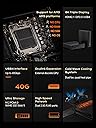
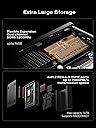
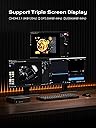
The MINISFORUM MS-A1 Mini Workstation is a compact barebone PC designed for professionals craving high performance and expandability. Supporting AMD AM5 CPUs and DDR5 RAM, it features four M.2 NVMe SSD slots, dual 2.5G Ethernet ports, WiFi 6E, and multiple display outputs including HDMI, DP, and USB-C. This mini PC offers a perfect blend of cutting-edge connectivity and powerful processing in a sleek, space-saving design—ready for your custom build.


| Brand | MINISFORUM |
| Package Dimensions | 25.2 x 25.1 x 19.89 cm; 3.6 kg |
| Item model number | MS-A1 |
| Manufacturer | Micro Computer (HK) Tech Limited |
| Series | MS-A1 |
| Colour | Black |
| Form Factor | Small Form Factor |
| Screen Resolution | 3840 x 2160 |
| Resolution | 3840x2160 |
| Processor Brand | AMD |
| Processor Type | AMD Ryzen 7 |
| Processor Speed | 4.19 GHz |
| Processor Socket | Socket F |
| Processor Count | 1 |
| Memory Technology | DDR4 |
| Computer Memory Type | DDR5 RAM |
| Hard Disk Description | SSD |
| Hard Drive Interface | Serial ATA-600 |
| Hard Disk Rotational Speed | 7200 |
| Graphics Coprocessor | AMD AM5 Integrated Graphics |
| Graphics Chipset Brand | AMD |
| Graphics Card Description | Integrated |
| Graphics RAM Type | GDDR4 |
| Graphics Card Interface | Integrated |
| Connectivity Type | Wi-Fi |
| Number of HDMI Ports | 1 |
| Operating System | OS |
| Are Batteries Included | No |
| Item Weight | 3.6 kg |
| Guaranteed software updates until | unknown |
J**.
La PC funcionaba bien, hasta que
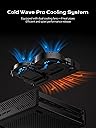
He tenido problemas con el ventilador principal, ya que tiene 2 y el más grande que es el que disipa la mayoría del calor se desactiva de la nada, al principio crei que era mal contacto pero no, simplemente deja de funcionar, tengo que apagar la computadora y volver a encenderla, este problema hace que todo el chasis se caliente y termine afectando la temperatura del SSD y supongo que de otros componentes también, quiero esta PC para usarla desatendida y via Remota, pero este problema es de tomar en cuenta de que tengo que estar verificando qué no tenga este fallo
R**N
Ultimate home lab starter server
The Minisforum MS-01 is hands-down the best mini PC I’ve ever used for a home lab/server setup, and I’ve gone through more than a few (N100 minis, old Intel NUCs, used ThinkCentre tinies, etc.). This thing is a beast in a ridiculously small package. What makes it the “ultimate” for homelabbers: • CPU: The i9-13900H (or 12900H version) absolutely flies. Running Proxmox with a dozen VMs and LXCs (Pi-hole, Home Assistant, Plex, Nextcloud, WireGuard, etc.) and it barely breaks a sweat. Pass-through of the iGPU to a Jellyfin/Immich VM works flawlessly for hardware transcoding. • I/O is insane: Dual 10GbE SFP+ ports AND dual 2.5GbE RJ45. Finally a mini PC that doesn’t choke my network. The PCIe 4.0 x16 slot (x4 electrically) let me drop in a real quad-port 10GbE NIC without any compromises. • Expansion: Two M.2 2280 slots + one M.2 22110 + a U.2 NVMe connector. I’m running 12 TB of fast storage inside with zero external drives. Hot-tier, warm-tier, cold-tier—all in one tiny box. • Build quality & thermals: Surprisingly quiet under normal load, and even when I push all cores it never thermal throttles. The cooling solution is clearly over-engineered in the best way. • Power draw: Idle at ~18-22 W with everything running (Proxmox + services). That’s stupidly efficient for this much performance. Minor nitpicks (because nothing is perfect): • It’s not exactly cheap, but you get what you pay for. • The internal USB header situation is a little awkward if you want to run a Coral TPU or something similar. • BIOS is still getting updates—some early quirks with sleep/resume are mostly fixed now. If you’re tired of outgrowing every “mini PC” after six months and don’t want to run a loud 1U rack server in your apartment, the MS-01 is pretty much the endgame. I wish I bought two. Highly recommended for anyone serious about self-hosting or building a compact, high-performance home lab. 11/10 would buy again. Lots of ports,games ok, fast speed and easy to setup
A**R
Excellent for a home server, beware of LGA curse
I bought three of these for a "small" Proxmox cluster and sadly, one of them came with a mangled socket on account of its own protector coming loose while in transit and hitting the pins. I asked for a refund and proceeded to buy a new unit. However, the new unit had a different cooler on the back, there was no heatsink for the main NVMe and instead it came with a cooler for the VRM, which IMO is not as useful as the previous one. Also, the new unit did not come with the U.2 adapter, which is just unacceptable. All in all, these perform quite well, they come with 2 PCIEx4 NVMe slots (at least per the manual), allowing me to create a 6-drive Ceph cluster. They do support 96GB of RAM, but could not find the option inside the BIOS to make it run at 5600Mts, as advertised; I'm limited to 5200Mts.
J**A
Rare Gem with flaws (update)
((((update - swapped out my indium foil on the amd 9600x cpu in minisforum ms-a1 chassis with thicker foil 8-10c lower at idle, 7-10c lower at load 66c igpu without extra fans 63.8c igpu with extra fans 80-83c cpu temp (core) not bad for such a iffy cooler / heat block design for full socket going to try it in my ms-a1 that has a 7950x3D next - end update)))))) rare setup. very attractive. Pros: * cpu socket * removeable wifi/bluetooth chip * runs old win10 and many *nix os * amazing connectivity port options * bios reset button is hidden for basic security * bios battery wires have a connector to disconnect current to hard reset bios * extreme mobility * barebones option * price Cons: * bios lacks maturity * bios lacks features * bios will not properly reboot after conflicting option changes, meaning you need to take the front flash cover off to access the bios reset button * bios battery appears to be hard to replace as it has some plastic shrink wrap around it. wires might be soldered. idk. * minisforum website drivers appear to only work for win11. there are win10 amd drivers for cpu igpu that work on old win10 * heat sink sucks. 9600x idles around 78 celsius with indium foil, even at 30 watt limited ppd, 7950x3D idles around 90 celsius with a low quality thermal pad from amazon. i aim to customize mine for the new ice giant 360 cooler coming june 2025. however, amd software reports the gpu side of the 9600x to idle at 58 celsius. i ran furmark 2 and Prime95 stress tests for 20 minutes each. igpu max temp 78-80 celcius, cpu max temp 91-92 avg 90 celsius. i think since the igpu reads lower temps on the same die as cpu heat sensor that cpu temp might be a core temp. however amd did say the 9950x3D would have a revised layout so some heat generating parts wont overheat the chip by placing them closest to the surface of the chip... so who knows this heat issue could partly be the combined fault of amd, the bios, and the cooler. custom solution required or dont buy. * many linux distros dont have compatible firmware for network card or graphics, etc. some do though. including older versions of distros oddly. * as ive read online updating the bios is a chore and not for averagw users who have never touched a command line overall, for what it is, i highly value this unique product. it is for niche users, but i own 2.. one from amazon and one ordered from minisforum website. 5 Stars given, but i would deduct 1 for bios and drivers, especially linux drivers and old win10 driver availability. the heat issue deserves 1 star deduction but since i will customize i will allow a pass.
W**G
The specs hit all my needs, works great!
Very impressed! Hits all my requirements with 3x M.2 slots, Oculink connection, 2x 2.5 GbE ports, and fast ports for an external drive. Installation was easy and it seems to run cool though I haven't pressed it under load yet. Works perfectly for my needs.
Trustpilot
2 weeks ago
1 month ago