Desertcart purchases this item on your behalf and handles shipping, customs, and support to Spain.
🎮 Elevate your game with precision, power, and personalization — don’t just play, dominate!
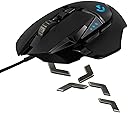
The Logitech G502 Proteus Core is a high-performance gaming mouse featuring a 12,000 DPI optical sensor with on-the-fly DPI shifting, customizable weight tuning with five 3.6g weights, and 11 programmable buttons. It offers advanced surface calibration for optimal tracking on any mouse pad and a dual-mode hyperfast scroll wheel for precision and speed. Designed ergonomically for right-handed users, it combines durability, customizable RGB lighting, and robust software for profile and button management, making it a top choice for serious gamers and professionals seeking precision and personalization.
| ASIN | B00IRHE892 |
| Additional Features | Ergonomic Design, Programmable Buttons |
| Antenna Location | Gaming |
| Battery Average Life | 48 hours |
| Best Sellers Rank | #40,318 in Video Games ( See Top 100 in Video Games ) #290 in Mac Gaming Mice #1,272 in PC Gaming Mice |
| Brand | Logitech G |
| Button Quantity | 11 |
| Color | black |
| Connectivity Technology | USB |
| Customer Reviews | 4.6 out of 5 stars 3,603 Reviews |
| Enclosure Material | Plastic |
| Finish | Glossy |
| Global Trade Identification Number | 00097855105073 |
| Hand Orientation | Ambidextrous, Right |
| Hardware Platform | PC |
| Item Weight | 5.92 ounces |
| Manufacturer | Logitech |
| Mfr Part Number | 910-004074 |
| Model Name | G502 |
| Model Number | 910-004074 |
| Mouse Maximum Sensitivity | 12000 dots_per_inch |
| Movement Detection | Optical |
| Movement Detection Technology | Optical |
| Number of Batteries | 1 A batteries required. |
| Number of Buttons | 11 |
| Operating System | Windows (with possible compatibility with other operating systems) |
| Power Source | Battery Powered |
| Range | feet |
| Special Feature | Ergonomic Design, Programmable Buttons |
| Style Name | Blue LED |
| UPC | 097855066565 617407426533 488117759712 705554848701 097855107077 801940717528 809394592371 804904109650 097855105073 667649398600 808112945192 801940481818 804067306224 651231759719 |
| Unit Count | 1 Count |
| Warranty Description | 1 Year |
S**N
Very solid mouse, even after a Year's Usage
Re-edited version of old review after about a year of Usage. So you know what I'm comparing my experience to in terms of quality, I've also used the Utech Smart MMO mouse, Sharkk mmo mouse, Razer naga 2012, and 2014. Build Quality: The build of this mouse is very solid. I do find it slightly uncomfortable for a palm grip user such as myself, but it didn't hinder the experience too much. I have medium sized hands, so I was able to reach all the buttons easily as well. As mentioned, I've been using this mouse for over a year now through extensive gaming, and the mouse body has held up very well. The mechanical buttons are still very responsive, and the sensor is still perfectly precise. However, we'll talk more on that in a bit when we get into specifics. 1) Sensor: This sensor is incredibly accurate. I run it at 12,000 DPI, never picking up the mouse and it has never skipped on me or failed. It is by far one of the most accurate sensors I've ever used, and will not fail you no matter the game you're playing. 2) Mechanical Buttons: This are still tactile even after a year's usage. I find most of them rather easy to reach for anything I am doing. I've used this mouse in all genres including MMO's and it's been flawless. All the buttons require no click pressure at all to click, so your fingers will not be fatigued. However, the scroll wheel might be slightly slippery to use for those who get sweaty fingers due to its metal texture. The DPI shift button (which can be reprogrammed for other things) is also a really nice feature that works flawlessly. 3) Teflon Feet: After a year's usage, the feet are slightly warn but the mouse will still glide across my Reflex Extended mouse pad. They are in well thought out spots and it has no drag. 4) Weight System: The weight system is very nice, not all gamers enjoy heavy mice or super light mice. I find the weights very easy to customize on the fly by easily removing the bottom panel. Software: The Logitech software is incredibly easy to set up and get the hang of. However, the biggest complaint some may have is the fact that there is only 3 profiles to use. Conclusion: For the price, this mouse is superb. It's not ideal for those who only play MMO's but its a very well rounded mouse.
M**E
Excellent mouse, great find at $60, 1 Day shipping from UPS is fantastic
1 Day shipping was fantastic. Significantly superior to the (Sure/Smart)post 2 day delivery, in which packages get swapped to the Postal Service, increasing delivery times and likelyhood of it getting lost, or just not delivered because the Postal Service does not deliver everywhere. Just received my G502. Retired my MX518 for this mouse. MX518 had begun to separate the mouse from the cord after 4.5 years of service. The cord breaking is frequently the case for the MX518, lifespan ranges from 3-7 years. All weights are referred to without the cable. MX518 was 107 grams, much fewer buttons (LClick, RC, MC, , 1 scroll setting. A good, basic mouse. DPI was low though, like sub 2000. The G502 at 120 grams is significantly heavier by default than the MX518 (which was extremely light). Comes with 5 weights, 3.6 grams each, to customize the mouse, via the bottom of the mouse (blue tab by the thumb opens it.) This gives you the weight options of 120g, (+1)123.6g, (+2)127.2g, (+3)130.8g, (+4)134.4g, (+5)138g. There are 12 locations to place the 5 weights, with a maximum of 5 being able to be occupied at a time. The furthest to the front a weight can be placed is before the shift-thumb button (front most). The default configuration seems to be heavier on the fingertips. The location closest to the wrist is a tight squeeze in. There are 6 locations around the sensor to place weights, only 3 may be occupied at a time. Wristside, there are 6 locations for weights (mid, bottom, thumbside out, thumbside in, pinkyside out, pinkyside in), only 2 locations may be occupied at a time. I setup 2 weights, thumbside in, and pinkyside in, to account for the perceived weight difference front-to-rear, while accounting for the left right difference of the weights, which were not likely to be perfectly centered, for the mid and bottom weights. The mouse's scroll wheel is typically a sorespot for reviews. The button beneath the wheel is a locking mechanism. Unlocked, it's a free rolling wheel, and very nicely design. Locked, it's tight. The wheel takes a bit to get used to, so use it outside of games for a bit to get used to it. Left-Right tilt clicks from the scroll wheel has a gap. This isn't an issue, so much as to be aware of it. You may notice it shift left and right when the mouse moves hard (or you shake it). The button beneath the scroll wheel, and the scroll lock, is a profile toggle switch (programmable). The mouse tilts to the right moreso than the MX518. I noticed early on a pinky drag, despite having smaller hands, and a tiny pinky, for a man. Resting your left and middle knuckles and palm against the mouse will have the drag, it seems that they designed the mouse not to have a full palm grip. Thumb does not drag, as it has the tab to rest your thumb. Thumb has 3 buttons. Thumb shift cordside allows for a quick switch between sensitivities, for sniping. Front thumb and rear thumb nicely placed, right where you can knucle the rear, and tip the front. The sensitivity buttons are left of the left click, was curious about this placement, as with the MX518, they stradle front and back of the mousewheel. G502's location is more convenient for gaming. Cable is braided, good length, has a velcro strap the moves up and down to keep things tidy. I used it to keep the keyboard and mouse cable together, and prevent any slack in the cord from dropping behind my desk, and hopefully preventing my mouse from falling off the front of my desk. Cable has a rubber piece at the connection to (hopefully) prevent the separation issue that occurred with the MX518. Software allows you to customize the buttons. Each are numbered (G9, G5 etc). Allows you to set how many sensitivities you have, and create profiles so that you can have them set up for different kinds of gaming. The Logitech site has the mouse under "Gaming Mice", instead of corded mice, etc. You can download the software there. Takes a couple minutes to install. Sensitivity lets you set it between 200 and 12,000 DPI. MX518 only went up to 1800. You can assign a default sensitivity, for when you startup windows, and set which setting will be activated for your thumb-shift. Polling rates (reports per second) are either 125, 250, 500, or 1000. Defaults to 1000. 5 sensitivities saved. Mine are set to 1350, 2800, 4600 (Default), 6950, 8500. I could adjust my windows settings if I wanted a larger range, I suppose. The G does in fact glow on the mouse. The thumb and pinky sides have grips. The scroll wheel, in unlocked mode, spun for roughly 13 seconds with my pointer finger giving it a spin, hand resting on the mouse as if I was using it, to give you an idea of how nice the bearing is.
D**.
The perfect mouse for me and most likely anyone else.
Please note, this is my initial review of this mouse; I've only been using it for about an hour. I'll post another review once I've got settled with this mouse, and used it a lot. (TL;DR and pros and cons at the bottom) I honestly don't think I've used a mouse as good as this one. My prior mouse was a MadCatz R.A.T. 3, and I have had that same mouse since 2013. The R.A.T. worked fine, and served me well; in fact, I thought it was a good and well built mouse. Unfortunately, the middle mouse button broke on it, and it needed to be replaced as I used the middle mouse button more than your average person, I mean it's a really useful tool. My friend recommended this mouse to me, and it was on sale, so I said "Why not." Upon plugging this mouse in and booting up my OS, I instantly noticed a drastic improvement from my former mouse. Many things are configurable on this mouse, and I haven't really even scratched the surface. You can use software to tune your DPI in 50d increments, meaning you can find the perfect sensitivity for your liking. Another thing I'm keen on with this mouse, is the weights that you can put in the bottom. Personally I like to have all but one of the weights in the mouse, as I like a heavy mouse to avoid unintentional movement, however to each their own with this mouse. The second part of this mouse I love is the build quality. In comparison to any mouse I've ever owned in my life, hands down this thing is excellently crafted. Though, it is plastic(of course) it has that heft you expect in a quality product. From the materials to the mouse sensor itself, this thing is absolutely perfect. Each click is what I would describe as typing on a mechanical keyboard - as compared to a membrane keyboard. I'm absolutely in love with this mouse. It's beautiful, well made, and functionally excellent. I would recommend this product hands down to anyone searching for a new mouse. The only issue with it, however, is the lack of ambidextrous functionality, but this isn't a problem for me, as I'm right handed. Pros: -Excellent build quality -Beautiful aesthetics -Highly configurable -Precise -Great material choices -Trusted brand Cons: -May not match certain colour schemes(Doesn't go so well with my green backlit Razer BlackWiddow -Large and heavy, some people may not prefer this TL;DR review: It's an excellently built and highly functional and configurable mouse, I'd recommend it to anybody.
C**C
Very Nice
I purchased this to replace my old Razer Naga Epic. Frankly - I got sick of the Synapse software always wanting an update (and then wanting a reboot after that), and the thumb buttons lacked definition. Obviously there's fewer buttons. That Naga had something like 17 buttons on it. The G502 only has 11. But I don't find myself missing those extra buttons on the Naga much. That whole thumpad was just very hard to use, and I didn't wind up mapping too many actions to it. The buttons on the G502 are all very well-defined. It's taking me a little bit to get used to the two buttons hanging out up by Mouse1... They default to DPI+/DPI-, but I re-mapped them pretty quickly since I don't normally need to shift my DPI on-the-fly. I'm used to most of my mice adding the extra buttons around the thumb, and it's a little odd to be hitting extra buttons with my index finger. But it works. They're easy to reach, and easy to differentiate from the other buttons. I'm not hitting them by accident. It's just that I sometimes forget they're available. There's three buttons around my thumb - they default to forward, back, and DPI-shift. Again, forward and back got re-mapped right away. But I'm actually finding DPI-shift somewhat useful. The DPI-shift button lets you switch to a different DPI preset just while it's held down, and then reverts to the default when you release it. This is actually proving fairly useful in some of my shooters, which surprised me, because I've never really leveraged the DPI options in a mouse before. Mouse1, Mouse2, and Mouse3 all work pretty much exactly the way you'd expect them to... And there's a mechanical switch to toggle the scroll-wheel between a clicky and free-wheeling mode. The clicky mode is pretty much all I use. I'm not entirely sure why you'd want a free-wheeling mode... Maybe just to quickly scroll through a lot of text? The toggle switch is a purely mechanical device that can't be re-mapped to anything else, it just controls how the scroll-wheel works. There's also another button hanging out near that scroll-wheel toggle. It defaults to switching between mouse profiles, and I haven't figured out what to do with it yet. I don't generally switch profiles... But it's in kind of an awkward position to hit it quickly. The mouse is all-kinds of customizable. There's a wide range of DPI sensitivity... There's several weights you can add to adjust the weight and balance of the mouse... There's even a calibration option to tune it specifically to the mousing surface you've got. You can store three profiles in the mouse itself. These profiles will work even without the driver software. And they remain stored in the mouse even when it loses power. Could be handy for gaming on-the-go... But I've never really felt the need to pack up my mouse and haul it over to a friend's house, so I'm not sure how useful this will be. The driver software itself offers the usual options for a gaming mouse - including the ability to automatically switch profiles to match the software you're running. All things considered, I'm pretty happy with the G502. It works just as well as the Naga did for the games I'm playing, and so far it's proving to be far less annoying. The only feature I really miss from my Naga is the ability to change the color - it was a simple way to tell which profile my mouse was in.
R**G
Finally a mouse I can settle on
Some background first: I have a Logitech G9x that I've been trying to replace for about a year now. Prior to that I used a MX518. I bought a G700 first. Initially I enjoyed having the extra buttons and the awesome scroll wheel, but I just couldn't get used to the size and weight, both corded and cordless. Then, I got a Roccat Savu which gave me the control I was looking for, but I got hand pains after a couple hours of use because of the weird thumb cavity. I use a fingertip grip. Medium hand size. RTS/FPS player. Things I like: - Patterned side grips. I control the mouse with my fingertips only. Having the extra friction on the sides is very helpful. The mouse has yet to slip - Extra buttons. The only thing that made me keep the G700 around was having the extra buttons. The G502's buttons aren't quite on the G700 level, but they're good enough that I don't miss the G700 anymore. - Scroll wheel. Some people don't like the metallic finish. I think it's great. Having the freescroll button on top and not underneath like the G9x is also a plus. - Sensor. Best sensor on the planet. I only use it at 800 dpi, but so far it's been tracking true and smooth on a Razer Goliathus Speed mousepad. - Form. I do miss the low profile of the G9x, but the G502 makes a good compromise for the palm grippers out there. I do prefer smaller, flatter mice, but the G502's profile does not bother me at all. The thumb rest is also a nice addition. - Left/Right click. The OMRON switches in the primary buttons are very responsive. The rest of the buttons, unfortunately, are not. I'll get to those in a bit. Things I didn't like: - Software. Logitech software is mediocre. I admit it does work better with the G502 than it did with the G700, which was a total disaster. Still, it can be much improved. For example, creating multiple DPI levels is a chore, since it immediately switches to the new DPI as soon as you select it. Giving us an "apply" button would make it much easier. - Non-primary button switches. Logitech chose not to use OMRON switches in their extra buttons. Normally this isn't an issue, but the G502's side buttons feel mushy to me, especially compared to the Savu or G700 buttons. - General design. This is subjective, of course, but I'm not a fan of the Tron-esque design. I prefer a simpler, more subdued look, but hey, this is a GAMER mouse right? That being said, I do like the blue color and the triangular textural patterns. - Lights. Both the G9x and Savu could display multiple colors which was helpful in determining which profile was active at a quick glance. The G502 only has blue as far as I can tell. It's not a huge deal, but I thought it's worth pointing out. Also, the big "G" logo is insanely bright, so I turned it off immediately. Weight: Some users have mentioned that the mouse is too heavy. It is definitely heavier than any corded mouse I've ever used, but I've gotten used to the weight. I do not use any added weights. I would have preferred a lighter mouse initially and then use some of the additional weights, but would a lighter mouse have been made out of cheaper materials? Possibly, but I don't know. Overall I think the G502 is a superb mouse. The pros far outweigh any cons I could nitpick, and I will likely keep using the G502 for several years like I did with the MX518 and G9x.
A**R
Casual/Dedicated Gamer review Honest and non-endorsed review.
It's a great mouse, I have been using it for a week now, and my old mouse was the Logitech g5. my favourite feature with the mouse is that is has weights on it, because personally, I love heavy mice. Playing games with it in my opinion is a dream, The quality screams out Logitech (because Logitech never fails to make great products for the consumer. The software, is ok, but I tried to download it on my windows 7 laptop, but it says it doesn't work, but it runs just fine on my gaming pc. The dpi settings range from 200 to I think it's 12,800 dpi, I personally think that's a bit excessive, because the farthest I have ever gone is 10,050 dpi, but everyone can enjoy the dpi range, because I love my mouse settings at super high settings. The cable feels great, but eventually everyone's cable will get wear and tear. The scroll wheel, is the best scroll wheel I have ever used, the scroll wheel itself makes me wish there was a 6/5 option, it has a free scroll option and a non-free scroll option, I love this, because I get sick and tired of scrolling and scrolling all day just to get a little down the page, and the metal frame of the scroll wheel feels industrious and it will impress any critic. The clicking on the mouse feels great, compared to other mice I have used, and I love that it's more quiet, because clicky mouse keys annoy me greatly. There are 11 programmable buttons on the mouse, which is a bit over the top in my opinion, but that means you can do almost anything with the mouse, as all the buttons on the mouse are fully programmable. There is also a sniper button, where you can program it to lower the dpi or heighten the dpi whenever you click it, it's for people who use sniper rifles in video games, of course, hence the name. I love to use this mouse as a casual and gaming mouse, in both departments it dominates. I recommend anyone who loves a good mouse, I would be surprised if anyone wouldn't like it
S**D
So the moment I pulled it out of the box I knew this was going to be something awesome. Right out of the box this mouse is ...
I wanted to use this for quite some time before posting a review. I really wanted to do this one justice. So let's get into it. So the moment I pulled it out of the box I knew this was going to be something awesome. Right out of the box this mouse is futuristic looking, and fits the hand well. I used it for about an hour before I realized that there were weights you could add to the mouse. This turned out to be a great thing being as I didn't really like how light the mouse was(just didn't feel right.) You can customize the position of your weights. so if you like to have one side heavier than the rest you can do that. Personally I just took all of the weights and put them in ( it's already a very balanced mouse) and now it has that premium weight that I like. The claw grip style works really well here. It's comfortable, and the textured sides help keep your hands from slipping off of the mouse. My favorite thing about this mouse is the smooth scroll toggle. The little button directly below the mouse wheel toggles it on and off. With it on the mouse wheel spins freely with no tactile bumps and is smooth as butter. With the toggle in the off position it turns it into a standard scroll wheel with the tactile feedback you'd expect one step at a time. This mouse also has plenty of buttons for those that like to remap game functions to your mouse. I believe every key besides the dpi change button( located on the thumb rest) is changeable. Which leaves you with 4 extra buttons on the left side of the mouse and two different buttons on the scroll wheel( tilts left or right for alternate clicks) And one behind the smooth scroll toggle for a total of 7 remappable buttons. Great for just about any game type I can think of. This mouse was also a steal for me. $60 on sale. So the big question. If something were to happen to this mouse tomorrow, would I go out and buy another one? The answer is absolutely, this is a feature rich mouse. It's software works very well and is easy to use. The mouse looks and feels premium in the hand. And on top of that it's a pretty decent deal whether it's on sale or not. Comfort: 4.5/5 Design: 4.5/5 aesthetics: 4/5 just needs more color options Value 5/5
D**L
Great Mouse At Any Price!
I've always loved Logitech products, but have never owned any mouse that's been labeled as a gaming mouse as I never really thought that I had any use for the extra buttons or DPI settings. Well, I finally came to the conclusion that it was time jump aboard the gaming mouse train and seeing as this mouse was down to $40, I just couldn't pass. Now, keep in mind this is NOT the RGB version as that one was listed as being available again in 1-2 months and RGB isn't that serious to me. Regardless, the initial impressions of this mouse have been very good. Being able to change the DPI on the fly is great, as is the ability to shift between three different profiles on the fly. The buttons are laid-out well and easy for me to reach and don't feel flimsy in any way. The scroll wheel is a bit different as it's more metallic, but you can control with the push of a button whether it free scrolls are is more clicky. The Logitech software allows to you customize things more, set up your DPI profiles, turn on the lighting for the Logitech G logo, and a few more bells and whistles. The mouse also comes with a set of weights that you can position to make the mouse heavier as you see fit. As with anything else, whether you use them and how you use them is entirely up to how you feel. It's the same with DPI. I've learned I actually prefer a higher DPI setting than I originally thought and will likely be fiddling with the profiles a bit more. I highly recommend this or the RGB version of the mouse, especially if it's on sale. It feels good and while I don't generally like wired mice, the braided cord actually makes me forget there's a cord attached in the first place.
A**O
Excelente
Todo perfecto, hubo problemas con el envío pero el proveedor supo solucionarlos eficientemente, sin duda es de confianza la tienda.
2**9
頻繫にポインタが飛んだり止まったり...
ゲーム用に未使用品を購入。 説明の通り、使用された形跡も無く、外箱も比較的いい状態で満足していたのですが.... 使ってみるとセンサーの調子が悪いらしく結構頻繫にポインタが飛んだり止まったりして使いづらいです。 少し残念な買い物でした。
S**N
Simply Superb!
I waited a while before writing this review because I wanted to use this mouse over some time in order to get used to it. I have owned plenty a mouse in my time, and this by far is the best I have ever owned. I'm seriously considering ordering another one. The feel of the G502 is perfect for my medium hand size, very comfortable. I use a claw/palm grip. The tracking is superb. I love the fact that you can unlock the scroll wheel so it moves freely for super fast scrolling through long documents (there's also side scrolling). The amount of buttons (all you would ever need IMO) and their arrangement I feel is perfect, plus no accidental clicking of buttons while gaming. The mouse comes with 5 weights if you prefer a heavier feel; very easy to install, but for myself, I find it to be the perfect weight, so I don't use the weights. I also love how the mouse glides so smoothly and effortlessly across the mouse pad. The letter 'G' on the mouse is illuminated, but you can shut this off, which I prefer. So far, I haven't found any cons with the G502. It totally puts to shame though every other previous model or brand I have ever owed. Highly recommended! Edit: Well it's been over 6 months now since I ordered this mouse. It is so awesome, I just ordered another one, though the G502 I've been using is still like new. I'm a hardcore gamer though, so you never know when something may fail.
C**)
The Ultimate Gaming/Professional Mouse with loads of features!! [Full Review]
Time Taken for Delivery : 5 Days [Chennai, India] Cost while i bought : 4900 Rs ------------------------------------------------ ■ In the box: ------------------------------------------------ 1. Logitech Proteus Core Mouse 2. Additional weight blocks (3.6 grams X 5 = 18 grams) ------------------------------------------------ ✔ Pros: ------------------------------------------------ 1. Has 6 Usable additional buttons on mouse. a. DPI Shift button (reduces dpi while holding with thumb - used for sniping or doing precise work) b. G4 & G5 buttons (can be clicked with thumb - used for Back/Forward in webpages or in music tracks) c. G7 & G8 buttons (can be clicked with index finger - can rotate the dpi from predefined 5 levels [200-12000], G7 to reduce dpi and G8 to increase dpi) Also this 5 dpi setting from low to high can be seen with 3 blue led light on mouse to see which level it's presently locked. d. G9 button (can be clicked with index finger - i use it for Mute/Unmute) 2. And the most useful feature of this mouse is, flywheel, press the button below scroll wheel to lock unlock flywheel, when its locked, it'll click and rotate wheel like normal mouse, when its unlocked, the scroll wheel will rotate infinitely for long time, this is extremely used to scroll long documents or web pages!!! 3. Also the scroll wheel has one more additional feature, you can bend/lean the scroll wheel left/right, to scroll horizontally left/right in image/webpage/documents/excel etc ! 4. Left/Right click is clicky and very nice and also rated for 20 million (2 Crore) clicks, which is exceptionally durable and generally last for 5+ years without any problem to the most used button in the mouse 5. Feature for loading additional weights to the mouse is a good feature (3.6g x 5 = 18g) 6. Big thanks to logitech for designing colorless/invisible laser below, so that it's less annoying while playing in night/dark, and also consumes less energy (though it's wired and not uses energy from battery, in future wireless mouse would benefit a lot from this technology) 7. The logitech gaming software is really great, which bring all the logitech products into one single app from mouse, keyboard, headset to speakers which is really great and has lots of customizations !! ------------------------------------------------ ✖ Cons: ------------------------------------------------ 1. The most important problem i need to highlight is the Scroll wheel click, which feels very heavy/tight, you need to give a lot of pressure to click the scroll wheel button (which is frequently used for closing/opening new tabs from browsers) 2. The left side of the mouse has many buttons, but the right side is fully empty, logitech could had loaded at least 4 buttons to the right side of the mouse, which would be very useful for the gamers and power users 3. The braided wires are very heavy and stiff, when gaming the wire is heavy and pulls the mouse below, so i run through a loop which makes the mouse wire go straight without bending with support for some distance to neutralize the effect I hope Logitech will make the wire very light in future to avoid this problem 4. Though the default weight of the mouse is 168g without additional weights, i still prefer even lighter mouse and lots of additional weights, so that people will have wider range to adjust the weight of the mouse from ultra feather light to very heavy mouse 5. Though cycling through 5 dpi modes (Set in Logitech Gaming Software) is more than enough for normal users, power users will need at least 10 dpi modes to shift dynamically with buttons while working on different applications to gaming Logitech really needs to look into this feature in future! 6. Instead of just glowing the 3 led lights and G logo, in future logitech might glow the led lines on mouse for better perfecting looks ------------------------------------------------ ፨ Additional Information: ------------------------------------------------ 1. The weight of the mouse is 168 grams, and as i used wired cheap mouse before (very weight less at around 100 grams), this already feels very slightly heavy, so i am not using any additional weights which came with the mouse Generally only the people who used wireless mouse with AA battery (200+ grams - extremely heavy), used to load the additional weights to the mouse Heavy mouse is literally useless and tough to play FPS or any shooting games which needs very quick movement and reflex of mouse, so i suggest not to load any weights to the mouse 2. Though the laser below the mouse is invisible, it's only invisible to human eye, but the light waves still emits, so don't look into the back of that laser closely as it might damage your eyes in long term. I seriously think, logitech should notify this to user in bright red font at the back of the mouse as warning 3. I use this mouse with Steelseries QCK Mass to avoid CTS (Carpal Tunnel Syndrome) which causes pain on wrist after using mouse for long time (which needs surgery to correct, if you keep on causing pain for your palm in long term), as this mouse pad i am using is about 1 cm thick, i feel relaxed while using mouse for long time SteelSeries 63010 Qck Mass Mousepad- Black ------------------------------------------------------------------------------- Chandraprakash [சந்த்ரப்பிரகாஷ்] Please give a Thumbs up [YES BUTTON] below if you got any info from my review.
S**R
the king of all mice
The Logitech G502 Proteus Core is the best mouse I've had the pleasure of using. I've held off on posting a review for a few weeks so I have enough time to really put this mouse through its works, and by golly, it's taken everything I threw at it (office work, casual browsing, intense gaming sessions that utilize all of its buttons) and was fantastic for every use case. I would wholeheartedly recommend it to anyone (unless, perhaps, you have really really huge hands.... but even then, I think this mouse would be worth a shot anyway). -- Buttons -- All of the buttons on this mouse feel SO nice. This mouse features fully mechancial microswitches for each mousebutton, and you can really feel the difference. Each click, each button press feels so crisp and responsive. The buttons require little effort to press, but have enough initial resistance so that you won't press or click by accident. ... I'm somewhat obsessed with mechanical keyboards, so it makes a huge difference to me that my mouse also has mechanical switches! Seriously, though, these buttons feel wonderful (even coming from a Razer Mamba, which I previously thought was the best in terms of mouse click feel-goods). Button placement is great. Each button is within reach. This aspect really depends on the size of your hand and how you hold a mouse, so your mileage may vary. -- Scroll Wheel -- I was really skeptical of the mouse wheel at first. Like many other Logitech mice, the G502 Proteus Core features two different kinds of scrolling - a stepped scroll that is much like other scroll wheels, where you can turn the wheel at measured intervals, and a 'free-wheel' with little friction - one flick and it can keep spinning for ~35 seconds. In my experience with other Logitech mice, the stepped scrolling didn't feel as precise or 'tight' as I would have liked, but I considered it a tradeoff for the handy 'free-wheel' feature. However, I found that there is NO such tradeoff with this mouse. I think stepped scrolling is perfect. It feels just as precise as any other mouse. The 'free-wheel' is just as awesome and spinny as other Logitech models. It's apparent that the guys at Logitech put a lot of effort in to perfecting the dual-mode scroll wheel, and it really shows. I can't imagine a scroll wheel getting any better than this. Right and left tilt on the scroll wheel is also very well implemented - precise and tight. There's no way you will accidentally tilt the scroll wheel when you mean to middle click and vice versa. The scroll wheel is made of metal and feels super solid. I was concerned that it's not rubberized like most other scroll wheels, but I've never had an issue with the scroll wheel feeling slippery at all, thanks to the textured grooves on the scroll wheel. -- Tracking -- I have had 0 issues with the tracking on this mouse. The sensor can be calibrated and customized for the surface you're mousing on to ensure that this mouse will track amazingly well no matter what you're mousing on. More on this below in the Software section. The tracking quality of a mouse isn't something you notice until it's gone. My previous (3) mice, the Razer Mamba, was great but had intermittent issues with tracking that rendered it unreliable (and therefore, completely useless as a gaming mouse). No issues with the G502 Proteus Core. It tracks very well on all the mouse pads I've tried it on (including: Razer Destructor 2, Razer Kabuto, Artisan Shiden, Artisan Hien, Artisan Hayate...) -- Comfort -- This mouse fits my hand like a glove. I love its shape, especially the slightly extended lip that supports the thumb. The textured, hardened rubber on the right and left sides feel great to the touch, and seem to resist getting sweaty gunk on them (which was an annoying issue with Razer mice - crusty nasty stuff accumulated so quickly on those things). -- Weights -- I LOVE the way the adjustable weights are implemented on this mouse. The lid to get to the weights is magnetized, so they are easy to get to (unlike the Roccat Kone XTD mouse, with which it's a battle every time you want to adjust the weights...). You can arrange the weights in a variety of formations so you can really customize the mouse to make it YOURS. After some experimentation, I decided that I prefer my mouse with a bit of heft, but with the weight towards the butt of the mouse so that my palm takes care of the heavier pushing. Other weight formations felt alright, too, but this was ultimately what I decided felt the best to me. In my experience, mice with adjustable weights can feel awkward when only some of the weights are on, which is disappointing -- the Roccat Kone XTD mouse, in particular, was only useable with the weights either all in or all out, so I appreciate the level of customizeablity the G502 offers. -- Software -- The Logitech gaming software is the best I've used. It is extremely fast; writing profiles to a mouse is instant, and it has never crashed on me once yet. This is a vast improvement over the Roccat and Razer peripheral softwares -- the Roccat Software crashed on me multiple times, and writing new settings to the mouse takes like 30 seconds. The Razer software, in my experience is buggy, crashes frequently, and also has a delay when writing settings to a mouse. Logitech's software is flawless, and I really appreciate the level of polish on their software. -- G-Shift -- The Logitech software sports a features called G-Shift. It allows you to set a mouse button to act as a 'shift key' for the mouse; when that button is held down, the other buttons have a different function, and the DPI or sensitivity of the mouse can be temporarily shifted as well (think - sniper mode). This feature is very easy to set up and a joy to use. I have it set so that when my G-Shift button is held down, the middle click play/pauses music, and the left and right scroll buttons seek tracks back and forward. There are a lot of creative ways to use this feature, and I'm excited that Logitech implemented this system in an elegant manner. -- Surface Tuning -- The Logitech software features surface tuning - it allows you to calibrate your mouse to work best with the mousing surface you use. It is easy to use - you turn on the software, hold down a mousebutton, and move your mouse in a figure 8 for a short while, and the software does the rest. I initially thought this was a marketing gimmick, but it REALLY does make a difference. I calibrated on a cloth mousemat (the Razer Kabuto) that usually doesn't track too well; after tuning the G502 with this mousepad, it tracked flawlessly, much better than the Razer Mamba that is in the same brand of peripherals! However, when I used this tuned setting on another mouse pad, the tracking was weird and super jumpy. This confirms that this feature does do something. The tuning didn't make as significant of a difference on a hard gaming mouse pad. -- Lighting -- Lighting for this mouse is very simple, which is how I prefer it -- the G logo on the mouse is the only thing that lights up. This can be customized to be made dimmer or brighter and have a breathing effect. Simple. -- Cord -- This mouse has the best cord I've seen on a mouse - it is braided and feels very durable, but is still flexible. It comes packaged in a loose circle, so there are no kinks in the wires out of the box. It also comes with a handy velcro fastener that can be used to keep the cable together - a nice touch that I appreciate. -- Looks -- This is the only aspect of the mouse I have any *minor* complaints about... it looks kind of uglyish and something out of the future. And that's the best I can do to fault this fantastic mouse. -- OVERALL -- Best mouse at any price. I think it's a steal at less than <Rs 5000, which is much less than I paid for my Razer Mamba that I found to be inferior in many ways. I highly recommend you give the Logitech G502 Proteus Core a shot - it could be everything you'll ever need from a mouse.
Trustpilot
3 weeks ago
2 months ago