Buy anything from 5,000+ international stores. One checkout price. No surprise fees. Join 2M+ shoppers on Desertcart.
Desertcart purchases this item on your behalf and handles shipping, customs, and support to Spain.
🎮 Dominate Every Frame with LG UltraGear OLED – Where Speed Meets Stunning
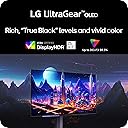
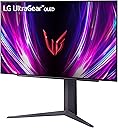
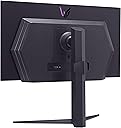
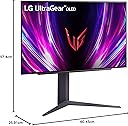
The LG 27GS93QE is a 27-inch OLED gaming monitor boasting a blazing 240Hz refresh rate and ultra-low 0.03ms response time for elite competitive play. Certified VESA DisplayHDR True Black 400, it delivers exceptional contrast and deep blacks with a 1.5M:1 ratio. Equipped with NVIDIA G-SYNC Compatible and AMD FreeSync Premium Pro, it ensures tear-free, smooth visuals. Its ergonomic stand offers tilt, height, and pivot adjustments, while HDMI 2.1 and DisplayPort 1.4 connectivity support high-resolution 2K QHD gaming at peak performance. Designed for serious gamers craving immersive, lag-free experiences with vibrant color accuracy and sleek, borderless aesthetics.


| ASIN | B0DF786923 |
| Adaptive Sync | G-Sync |
| Aspect Ratio | 16:9 |
| Aspect ratio | 16:9 |
| Box Contents | Monitor, Power Adapter |
| Brand | LG |
| Brand Name | LG |
| Colour | Black |
| Compatible Devices | Gaming Consoles, Laptops, Desktops |
| Contrast Ratio | 1,500,000:1 |
| Customer Reviews | 4.3 out of 5 stars 1,224 Reviews |
| Display Technology | OLED |
| Display Type | OLED |
| Hardware Connectivity | DisplayPort, HDMI |
| Has Color Screen | Yes |
| Image Brightness | 400 nits |
| Image contrast ratio | 1,500,000:1 |
| Item Dimensions D x W x H | 25.9D x 60.5W x 57.4H centimetres |
| Item Weight | 6.71 kg |
| Manufacturer | LG |
| Maximum Display Resolution | 2560 x 1440 Pixels |
| Model Name | 27GS93QE-B.AUS |
| Model Number | 27GS93QE-B.AUS |
| Native Resolution | 2560x1440 |
| Network Connectivity Technology | DisplayPort, HDMI |
| Picture Quality Enhancement Technology | LG OLED |
| Pixel Pitch | 0.233 |
| Power Consumption Size | 36.7 Watts |
| Product Features | Dynamic Action Sync, Height Adjustment, Pivot Adjustment, Tilt Adjustment |
| Refresh Rate | 240 Hz |
| Resolution | QHD Wide 1440p |
| Response Time | 0.03 Milliseconds |
| Screen Finish Type | Matte |
| Screen Size | 27 Inches |
| Screen size | 27 Inches |
| Screen surface description | Matte |
| Shape | widescreen |
| Specific Uses For Product | Gaming |
| Total HDMI Port | 2 |
| Total USB 3.0 Ports | 3 |
| Total USB Ports | 3 |
| Total Video Out Ports | 2 |
| UPC | 195174097571 |
| Unit Count | 1.0 count |
| Viewing Angle | 178 Degrees |
| Voltage | 230 Volts |
A**Y
INCREDIBLE!
M**I
ممتازه جدا
اخذتها ب 3500 .. شاشه ماشاء الله تبارك الله ماعليها كلام .. طبعا تابع مقاطع وشلون تحافظ ع بكسلاتها .. واغراضها كامله معها وامورها الحمد لله تمام التمام .. بس حط ببالك السلك الي يجي معها الظاهر الامريكي مااعرف نوعه بس مو مثل الي عندنا البريطاني يعني هات لك توصيله او فيش صغير الي يركب عليه اي نوع فيش وامورك تمام باذن الله فيه شي بعد ابغى اضيفه بالنسبه للي يبغى يبث او يسجل مقاطع بالعموم ماتصلح للتسجيل والبث الا اذا عدلت على الابعاد حقتها او الريزلوشن المهم من الشاشه بالزر الخلفي اختار اعدادات ثم مدخل ثم نسبه الابعاد ثم اختار الاصلي او مجرد مسح .. ماادري وش الفرق بينهم عموما بعد ماتختارها تعدل على اعدادات كرت الشاشه عندك انا عندي amd فمن اعدادات amd اختار display ثم اختار شاشه LG شوف تحت مكتوب custom resolution اضغط على الزر الي جنبه create new بتفتح لك نافذه حط باول خيار على اليسار 3840 وعلى اليمين 2160 تحتها معدل التحديث 240 الي الشاشه تدعمه ماراح تضبط معك انا خليتها 100 فريم وبالنسبه لخيار timing standard على كلام chatgpt يقول اختار cvt - reduced blanking قال الاسباب بس ناسي بس اذكر كانه خيار يحافظ لك على الشاشه شي زي كذا وبس اذا خلصت سو حفظ ورح لاعدادات العرض بالويندوز وغير دقه عرض الجهاز الى 3840×2160 راح تصغر الشاشه لان ماتقدر تجيبها على الشاشه كامله .. الشاشه ابعادها 21 وجودة 4k ابعادها 16:9 تقدر تشوف مقاطعي على اليوتيوب مصورها بالطريقه هذي اسم قناتي zolan_play
M**.
Presque parfait
Passant d'un 32 pouce QHD à ce moniteur 39 pouces, la hauteur étant la même, la résolution relativement identique sur la hauteur aussi, je ne vois pas une si grosse différence au niveau du DPI tel que plusieurs l'on mentionné. La technologie OLED semble avoir une tendance à rendre les caractères d'écriture un peu moins précis, mais cela ne me dérange nullement, ce moniteur me sert à 80% pour le gaming. Coté gaming, tout est parfait, noir profond, latence très basse en mode gamer 1 et 2, rafraichissement de 244hz, courbure très prononcé, je suis un fan, je l'adore, mais surtout, le gros avantage, c'est qu'il ne tire qu'environs 30% de plus de jus à ma carte graphique que mon moniteur 32 pouces traditionnel ce qui est très raisonnable pour une immersion totale. Le 4k serait idéal mais pour cela, il faut une carte graphique vraiment à la hauteur, et jouer en 2K sur un écran 4K, c'est tout de même assez décevant. Je recommande donc ce moniteur natif en 2K, pour ceux à la recherche d'un moniteur de plus de 34 pouces et qui n'est pas 4K, mais je crois tout de même que nous sommes à la limite pour un QHD, le 45 pouces doit être plus décevant en terme de DPI.
K**E
The best monitor I have ever owned!
J**N
Fantastic Gaming Monitor! Very Meh Working/Productivity Monitor
Trustpilot
5 days ago
3 weeks ago