Buy anything from 5,000+ international stores. One checkout price. No surprise fees. Join 2M+ shoppers on Desertcart.
Desertcart purchases this item on your behalf and handles shipping, customs, and support to Spain.
🖥️ Elevate Your Workspace, Command Your Day
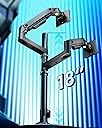
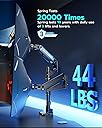
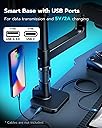
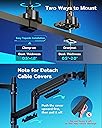
This heavy-duty dual monitor arm supports ultrawide curved monitors from 17" to 49" weighing up to 44 lbs, featuring industrial-grade gas springs for smooth, precise adjustments. It offers extensive ergonomic flexibility with tilt, swivel, and rotation, plus integrated USB-C and USB-A ports for convenient device charging. Designed for easy installation on desks up to 2" thick, it comes backed by a 3-year warranty, making it the ultimate upgrade for professionals craving a sleek, powerful multi-monitor setup.


| ASIN | B0D2KH4V8H |
| Best Sellers Rank | #85,758 in Computers ( See Top 100 in Computers ) #612 in Computer Monitor Arms |
| Brand | ARES WING |
| Color | Black with USB |
| Colour | Black with USB |
| Compatible Devices | Monitor |
| Compatible devices | Monitor |
| Customer Reviews | 4.3 out of 5 stars 495 Reviews |
| EU Spare Part Availability Duration | 3 Years |
| Enclosure Material | Aluminum |
| Manufacturer | ARES WING |
| Material | Aluminum |
| Maximum Tilt Angle | 50 Degrees |
| Maximum-Supported Screen Size | 49 Inches |
| Minimum-Supported Screen Size | 17 Inches |
| Model Number | GDT1004UCP-2BK |
| Mounting Type | Desk Mount |
| Mounting type | Desk Mount |
| Movement Type | Rotate, Swivel, Tilt |
| Movement type | Rotate, Swivel , Tilt |
| Unit Count | 1.0 Count |
A**E
Secret Labs should learn from ARES
20 December 2025: I am writing this immediately after setting everything up, so there is a possibility that this review may change and I will indicate if I ever make an edit to this, but I am thrilled. First paragraph is the story, second is the performance comparison, the third is the TL;DR for anyone in a hurry I have set the "ARES WING Dual Monitor Arm for Ultrawide Heavy Duty..." on my Secretlab MAGNUS Pro XL desk. I initially purchased one of the Secretlab (SL) single monitor arms to test out the feeling between monitor stand vs arm; now, without talking trash, the SL arm failed miserably. To add insult to injury I had to spend more than half the cost of the price of the SL arm to return it to the company because they do not cover return shipping fees. On the SL arm, I was supposed to be able to trust it to hold my monitor (Optix MPG321QRF QD) as it only weighs 16lbs (15.43lbs exactly) and the max weight on the SL arm is stated as 17lbs. Forgive my lengthy comparison between my experiences with the arms. I'm an educator and a nerd, so this one is for the people with the same level of OCD and anxiety as myself. SL ARM - In terms of the translational motion (that's the x, y, and z): motion along x (left to right), y (up and down), and z (backward and forward) felt jerky while repositioning the monitor. ARES - feels nearly fluid and and easily controlled. That's strike one for SL and plus for ARES. SL ARM - In terms of pitch (tilting up or down about the x axis) and yaw (swiveling left or right about the y axis): these were, at best, adequate, but weak; it holds, yet feels under supported and prone to drift under load. There was considerable force needed to change the pitch regardless of adjustments made to the screws and for a monitor that has very little to grab onto, this is, yet another strike. ARES - Sturdy and controlled, plus for ARES. SL ARM - In terms of the roll (tilting the monitor about the z axis): the display rolls off to either side and does not stay squared. the SL could not reliably hold a level horizon. ARES - No difficulties. That's three strikes for SL and three pluses for ARES. TL;DR: Mounted this to my MAGNUS Pro XL, it's sturdy, motion of the arms is fluid and stable, holds my screens without issue.
K**M
A solid monitor mount for big ultra wide displays
This new dual monitor has been a awesome upgrade to my workspace. It's taken my two Lenovo 45" monitors and stacked them with unlimited adjustment options like tilt and extending forward. The build quality is very solid and sturdy, holding both monitors securely without any wobble, even when adjusting the height or angle. Installation was pretty easy to follow and took about 30 minutes to put together. The additions of the cable-management system and built-in USB extension in the base is a nice touch. Overall, it’s a well-designed, reliable stand that significantly improves comfort, productivity, and desk space. I would recommend this to others.
I**C
Worth the Price, Perfect Dual Monitor Arm!
I've been hunting for a good dual-arm monitor mount for a while, and after looking at a few different options on Amazon, I decided to go with this one. It's definitely a bit more expensive, but honestly, the quality makes it totally worth it. At first, I was a little worried the installation would be a hassle, but it turned out to be super easy. The instructions were clear, and there's even a QR code that links to an installation video, which made everything even smoother. The arms are solid and stable—no wobble at all. My monitors are nice and secure, and the setup has been perfect for my work. Plus, it's saved me a ton of desk space, which is a big win. All in all, I'm really happy with this purchase!
A**J
Great with Apple Displays - Surprisingly amazing quality
I ordered a bunch of arms to set my Apple Displays up how I wanted them. I'm a graphics professional and these monitors are basically my main tools for work year in and year out, so I care a LOT how they are set up and where they are set up and ultimately what's holding them. I was tired of stands on my desk so I wanted to run some arms. I tried HumanScale, Ergotron, Knoll, etc - I set them all up and, for me, (quite surprisingly) these relatively cheap arms were the winners. I'm pretty snobish about my gear and I wish the more bougie brands were the winner, but I can't deny how grea these are. They were the most solid / no wobble vs the other options. They also look the best vs the others. No branding, subtle smiley face adjustment indicators, white VESA covers and a small but safe base. Ergotron had an ugly VESA plate and ugly clamp, HS arms were kind of bulky and too terminator-metallic (and sheesh the price). These are the cleanest looking, most solid arms out of the many that I tried. They do, in fact, tilt forward. You apply a light amount of pressure and then tighten them forward, works great. My top Studio Display is tilted forward. The cord management on these arms also SMOKED the $415 Ergotron options, way cleaner. My only semi-gripe (and someone else posted it about this arm) is that you *do* have to take the whole thing down to move it around on your desk. I see this as kind of a non-issue long term through because once my monitors are up its usually a LONG time before they need to be moved (rearranging my office or moving or something, I usually don't just move the arm around all the time. Also if you are doing it via grommet that's how it's going to work out anyway). It's a small pain in the beginning when you are setting up. Lastly, the set screws on the arms are chrome and if they were white, that'd be a nice touch to blend them into the arms better. Super small nit pick though. I'd buy these again any day.
A**R
Seriously worth the money, one trivial issue
Ill start off by saying, I havegone through 3 mounts for my set up. From wall mounted to standing on the desk. I typically buy 80-100$ ones because im cheap. I decided to bite the bullet and try this expensive mount. Boy am I impressed. I have two 34 inch alienware monitors on this stand, and the stand itself is attached to my magnus XL pro desk. Everything fits very well. I can adjust the monitors like they are feathers, its so amazing. The one trivial issue is that the USB C does not recognize in my computer when I plug a flash drive into it. So its basically just a crappy charger. I didnt buy the stand for the ports anyway so im not stressed. 5 stars regardless. If you have two ultrawides stop looking around, this mount is the solution.
Trustpilot
2 weeks ago
2 weeks ago