Buy anything from 5,000+ international stores. One checkout price. No surprise fees. Join 2M+ shoppers on Desertcart.
Desertcart purchases this item on your behalf and handles shipping, customs, and support to Spain.
🌍 Stay connected everywhere, anytime — your pocket-sized global WiFi powerhouse!
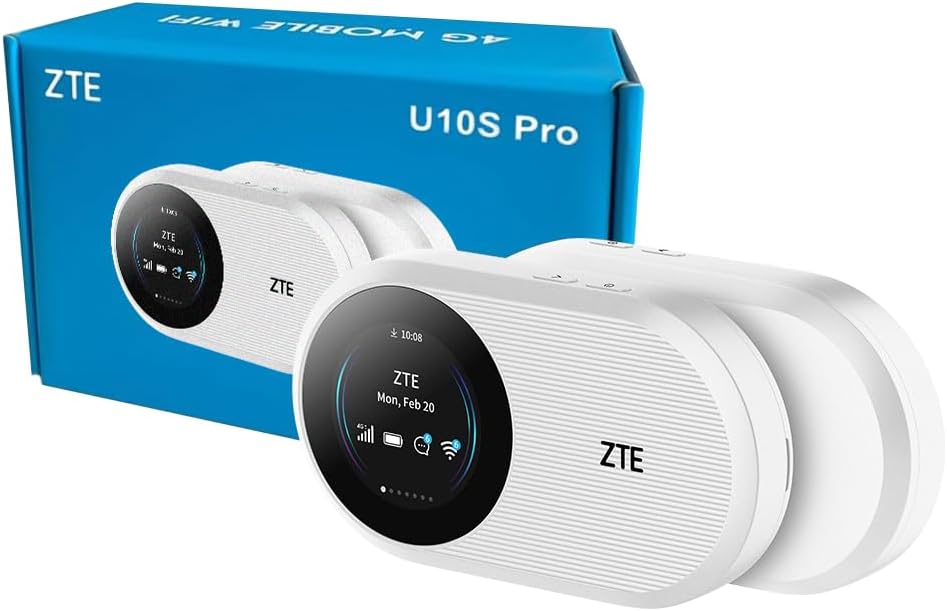
The ZTE U10S Pro is a sleek, unlocked 4G+ LTE mobile Wi-Fi hotspot designed for global travelers and professionals. It supports up to 32 devices simultaneously, delivers speeds up to 300Mbps, and features a powerful 3000mAh battery offering up to 10 hours of continuous use. With no configuration required and compatibility with worldwide networks, it ensures seamless, reliable internet access wherever you go.


| ASIN | B0DFZ1MPPT |
| Antenna Location | Travel, fun |
| Antenna Type | Internal |
| Best Sellers Rank | 3,465 in Computers & Accessories ( See Top 100 in Computers & Accessories ) 8 in Mobile Broadband Devices |
| Box Contents | Battery, Quick Start Guide, ZTE U10S PRO |
| Brand | ZTE |
| Brand Name | ZTE |
| Colour | White |
| Compatible Devices | [A broad range of Wi-Fi enabled devices including tablets, mobile phones, laptops, and game consoles from various brands] |
| Compatible devices | [A broad range of Wi-Fi enabled devices including tablets, mobile phones, laptops, and game consoles from various brands] Compatible devices [A broad range of Wi-Fi enabled devices including tablets, mobile phones, laptops, and game consoles from various brands] See more |
| Connectivity Protocol | Wi-Fi, Bluetooth, USB, LTE |
| Connectivity Technology | Bluetooth, LTE, USB, Wi-Fi |
| Control Method | Touch |
| Controller Type | Touch screen |
| Coverage | Global |
| Customer Reviews | 4.0 out of 5 stars 2,300 Reviews |
| Data Transfer Rate | 300 Megabits Per Second |
| Frequency | 2.4 GHz |
| Frequency Band Class | Dual-Band |
| Frequency band class | Dual-Band |
| Has Internet Connectivity | Yes |
| Has Security Updates | Yes |
| Is Modem Compatible | No |
| LAN Port Bandwidth | 300 megabits_per_second |
| Manufacturer | ZTE |
| Manufacturer Part Number | U10S PRO |
| Maximum Upstream Data Transfer Rate | 300 Megabits Per Second |
| Model Name | U10S PRO |
| Model Number | U10S PRO |
| Model name | U10S PRO |
| Number of Antennas | 2 |
| Operating System | Linux |
| Other Special Features of the Product | Wi-Fi 6, Screen, 4G+, 10 Hour Battery Life, Parental Control |
| Product Warranty | 2 Year Manufacturer |
| Router Network Type | Wireless router (Wi-Fi and cellular) |
| Security Protocol | WPA2, WPA3 |
| Special feature | Wi-Fi 6, Screen, 4G+, 10 Hour Battery Life, Parental Control |
| Wi-Fi Generation | Wi-Fi 6 |
| Wireless Compability | 802.11ax |
| Wireless communication standard | 802.11ax |
P**S
Early impressions positive but only after some key lessons learnt during the set up stage
Please note this review is for the ZTE MF920U, CAT4/4G LTE Mobile Wi-Fi device and not any of the other ZTE models you can find on Amazon. Secondly, I am not a computer / technology nerd, so my review is based on my experience of setting up this portable hotspot device and is meant to help others who may consider themselves less technically inclined avoid some of the pitfalls I encountered. I initially bought this device as I had recently acquired a general use SIM (i.e. one can use in a mobile phone for making calls, texting and having data for accessing the internet) from a well known brand to use with my old portable hotspot or in my Samsung Galaxy S6 Lite tablet. Sadly this general use SIM didn't work in my unlocked devices, so I decided to buy this ZTE device as it offered a 4g/LTE service. However, I then discovered the general sim didn't work in it either (i.e. it wouldn't give me internet access when I tried to link my Amazon Kindle, Windows 10 laptop or Samsung tablet to it). Further research and contact with the helpful folks at the general SIM provider led to a suggestion I should change the APN settings in the ZTE device but this also proved unsuccessful. Lesson 1: Use an appropriate 'data only' SIM (that for me meant one that offers a 4g/LTE service which is what this particular ZTE model and my Samsung need). Funnily enough, Smarty offer a 'data only' option for the free Smarty SIM provided with this device! Assuming you can get a good coverage from Smarty in your area (this can be checked on their website) and before you can use it in this device, you need to create an account with Smarty and select a data only sim package via the Smarty website. Once you have created an account you then need to activate the SIM which took just 10 minutes (but you are warned it could take up to two hours). Lesson 2: This ZTE device uses a 'micro' SIM (the Smarty SIM card comes in a standard size but it is easy to punch out a micro or nano sized SIM from it using the perforations provided). Do not try to fit a nano SIM in the device as you will probably have difficulty extracting it when you discover it doesn't work). Lesson 3: The activated Smarty SIM worked first time in the ZTE device and there was no need to change any APN or other settings. An Internet connection was immediately available on my laptop, kindle and tablet once I looked to see what wifi networks were available. Please note that I am not advocating that only a Smarty SIM will work in this device, as I suspect that other 4g/LTE data only SIMS offered by other mainstream providers will probably work too, but after my experiences, I would be a little cautious about trying to use a more 'general' sim that offers phone and text services in addition to data. So now the ZTE is up and running smoothly, and my stress levels have receded, I am finding this ZTE device a delight to use. It is still early days, but so far so good. I am getting a good signal where I live with reasonably fast download speeds that are good enough to live stream television programmes, etc. In Summary: I hadn't realised how careful one needs to be when selecting a mobile wifi pocket hotspot and pairing it up with an appropriate SIM, so I hope this review is helpful if you are considering buying the ZTE MF920U, CAT4/4G LTE Mobile Wi-Fi device.
R**B
Exceeds expectations
Small and smart looking 110x65x18 mm light weight and pocket sized. What looks like the screen is simply a shiny black panel with 4 LED indicators down one side. Came with over 50% charge so was no delay in setting up. Micro sim fits easily in the covered slot on the base. There is a WPS button and an ON/OFF button on the base - both are activated by pushing for 5 seconds. With an activated sim in the router the turn on to internet connection takes only about 30 seconds. I dumped the DATA only SMARTY sim and used one I already own. The passwords for wifi and router access are on the label on the back - I used my PC to access the setup in USB mode - 192.168.0.1 and enter the router password - once into the admin page changed router password, wifi password and SSID. WIFI can be turned off if USB mode only is needed. In my front room at peak times I get around 8 Mb/s download over USB - with the router in an upstairs window and with the shiny black panel pointed at the cell tower I get between 20 and 35Mb/s download over the 2.4Ghz wifi. I don't know how long a battery charge lasts but is stated at 10 hours - time will tell. Only negative points so far are the shape - it is not so good for standing on its base and can't be stood on its base with USB cable attached - I 3D printed a stand in PETG that I found on thingiverse which acts as a stable stand with USB access and easy orientation towards a cell tower. (search ZTE) Not sure how many wifi devices can be attached to the router as I only use one PC with wifi. For the money this little USB modem router is very good One thing to be aware of - if using Windows 11 or 10 in USB mode the device loads software onto your PC - I found this to be a problem so restored my W11 PC and now only use the wifi to connect. In Linux Mint the device works in USB mode with no issues.
M**N
Excellent for the price
Had a little Wi-Fi internet dongle ages ago, 3g, eventually gave up with it as everything had moved on and I wasn't really using it. I have unlimited data on my mobile so why would I need one? Well I work in Cumbria and often my phone signal is non existent or very poor, I also work at a place with a fantastic EE mast that everyone uses so you can get a full 5 bar signal and no data or phone, my alternative was to visit 3 and see about a Wi-Fi dongle again, I now have a 120gb data sim for little money a month but the cost of the dongle was prohibitive. I thought this was worth a try, and it's well worth the price. Set up was easy, put card into slot, charge and turn on, getting into the setting also easy and everything worked. So I used it to help out with coverage of a no rules football game on Tuesday night, it worked. But it did have to be re-set at one point as it froze, and by the end of the night even with wireless strength turned down to maximise the battery it was almost done after 4.5 hours. all in all an excellent bit of kit for the price.
M**Y
Worked well initially but poor long term life.
I bought this a while ago. I only used it a handful of times mainly when I traveled abroad during the summer holidays. It worked flawlessly initially. No disconntion. Multiple devices connected. Good speeds and good battery life. Couldn't ask for anything more. Last time I tried to use it , it doesn't detect the sim card no matte what I tried. I tried different sim cards from different providers. The SIM mechanism in this device is very old school push to click which is known to break easily. I am sure that's the issue. Bottom line is this is a good device but won't last or withstand heavy use particularly if you keep switching SIM cards like when going on holidays.
M**R
Absolute Lifesaver
I needed a mobile hotspot that allowed multiple devices to connect at once in a hurry as my internet went off at 7am on Saturday morning and I was scheduled to work from home that evening and my son was on call for his Tech Support job. No way we could have worked without internet and as our ISP advised it was an infrastructure fault and would not be fixed for several days it was a moment of sheer panic (finally got our internet back Tuesday at 5pm). This little device certainly came in clutch and proved surprisingly powerful. We live in a two bedroom terraced house built in 1905 so has substantial walls and floors/ceilings. Set this up in my sons room and we had no issue connecting his laptop and desktop PC, my laptop and the husband's desktop. This allowed my husband to stream films whilst I worked, allowed me to take and make phone calls over VOIP and dial in to the office server and perform all my tasks, all whilst my son did whatever he was doing online whilst waiting for a work call. The connection to the devices was simple and strong with little to no drop out. We used the included SIM card and adding unlimited data was quick, easy and surprisingly cheap. Signal strength on the network for our area was good and easily coped with everything we were doing. Wish I had got one before now for when we go on holiday as hotel wifi can be notoriously patchy. Now we have this little device that is never going to be a problem again. Even better we are going to keep this charged with data and make sure the battery is charged then if there is a power cut we can still connect devices and get online quickly and easily (providing they have charge of course). Don't wait for the worst to happen to you (like it did to us) be prepared!
M**T
A good device, but ditch the Smarty sim
I moved house in the UK and my internet provider couldn't connect me for a week after I arrived, so I needed something to bridge the gap. This seemed like a good deal so I took it. This review might seem unfair to this seller as it is more about Smarty than the device. The device worked well for me, but the smarty sim did not. I registered the Smarty sim and put it in the device, but I consistently got a 'No SIM Card or SIM Card invalid!' message in the web interface (pictured). To see if the device was at fault, I took my regular sim out of my phone to put it in there, and it worked immediately. I asked Smarty for a replacement sim and I got 3 in the post a few days later. It was inconvenient to have to wait since I only needed the sim for a week, but I had no choice. I got the same results with these sims. To be fair to Smarty, customer service were helpful and their sim did seem to work when it was put into my phone, but I needed the smarty sim to work in the device, which it didn't. They suggested I try to edit the APN settings on the device, but this is impossible as you won't be able to access the part of the interface that manages these settings until a sim is recognized and a connection is established - which never happened for me with any of the smarty sims. The only reason I knew this is by putting my Sky mobile sim in there. Smarty have processed a refund but I won't receive it until the end of my billing period, which is about a month away. I was very sure to turn off automatic payments to them, which seems to be on by default when you sign up. As a workaround for my issue, I used my regular phone sim (Sky mobile) in the router, which had my internet running and stable when the mobile router was plugged into my regular router via USB. But this was a bit of a hassle as I couldn't receive calls and texts on my phone as long as the sim was in there. My advice to anyone who buys this and expects to use the Smarty sim in the device: ditch the smarty sim and get a pay as you go data sim from someone else. A final note: there seems to be some confusion about the way the sim inserts into the device. If you are looking at the front of the device, the metal part should be facing you with the diagonal edge of the sim going in first. I have added a picture for reference. Hope this helps someone in a similar situation.
C**S
Great solution if you can’t get regular wifi!
I’ve been in a talktalk contract for over a year, which has been nothing but trouble - countless engineer visits, drop outs and despite their guarantee my average speed was 6mbps (and of course I was paying full price for all of this). Having finally gotten out of my contract with them, I needed a solution that wouldn’t force me into another 12-18 month contract. Although this effectively just works as hot spotting a phone, it feels a little more reliable, but is of course an extra cost (although compared to a dodgy wifi contract the upfront device cost is worth it). I can access wifi on this halfway down the road (wifi had meant I couldn’t access it outside the front door). I ended up getting a few sims - it’s a bit annoying you can’t properly check the signal prior to activating (and paying for a month) with most suppliers, but I bit the bullet and got the 200GB with Smarty. So far it’s been great! I can finally watch videos and they don’t look like they were filmed in 2005! I can load websites and send emails, I can stream - the only thing I haven’t really tried is gaming (console or PC) over the connection - but the speed has been around 51Mbps at quiet times and 31Mbps weekends and evenings. A vast improvement from what I would’ve been getting if my wifi had worked! The only real issues I’ve had is it really doesn’t seem to have an 8 hour battery life (even new). It’s fine for me as I’m only using it at home so it’ll stay plugged in most of the time, but it certainly doesn’t seem to last a full work day. I’d certainly recommend it for keeping out of contracts that tie you in to a location for a long time and charge a fortune to leave early - you can amend this as needs be. The only thing to bear in mind is, with the smarty sim you’ll need to commit to a package before you can check what the signal is like (I got lucky as in my somewhat remote location, it’s actually better than O2 or Vodafone). I really hope it keeps working as it’s a great solution. It was also very simple to setup and start using.
M**N
Decent
Definitely feels good quality. You may need to pick up a giffgaff/O2 sim, an EE sim and a Vodaphone sim to test them out. A 'free' sim is nonsense.....they are all free if you order them directly with credit. The thing about 3 mobile is coverage is patchy at best The range is fine, I need it for zoom in a community hall. Set up is extremely easy, the signal strength is actually slightly better when not attached via usb to my laptop. I'm using a lebara/vodaphone sim, and in my area that seems to be the right combination. At home, 3 mobile is fine, at work we are in a 3 mobile blackspot. You can do basic email and facebook with 3 mobile/Smarty/ID mobile, but it's not a service you can rely on for travelling around. Vodaphone probably have the most coverage, but networks vary wherever you are. If you are using it for business you need several sim cards, that's just the way it is. if you are using it in a static location you cycle through the various networks unti you find one that works the best. You can, obviously, get an old smartphone and it will do the same job, but if you are regularly in a meeting with a few people this is an ideal solution. You are not suddenly going to get a call, leave the room and everyone else loses their internet. It's much smaller than a mobile phone as well. I'd, cautiously, recommend it if you simply want something you can hit a button and everyone can log on to wifi. It's not, technically, servicing a real 'need'....there are much cheaper ways to do that. In my mind it's value is £10-£15 worth of gear as it will be obsolete in 2 years time, but my business will get use out of it. I'm getting around 30mbps - 40mbps download speed....which is faster than my home broadband, so it's not junk and does what it says on the tin. If you only need a hotspot because you are going on holiday, use your phone, and spend the money on sim cards. For business it's worth overpaying for this kind of device. Mobile networks are now heading towards being cheaper than home broadband with unlimited data. It's the future, but the future isn't quite yet. I love little flash gadgets, and this is a cheaper solution than running a line between two buildings. If we add a fee of £1 for optional internet in our hall it will pay for itself and a contract. It'll be locked in a cupboard and we'll just switch it on and be done with it. Walls don't seem to worry it so it gets a thumbs up from me
Trustpilot
3 weeks ago
3 days ago