Desertcart purchases this item on your behalf and handles shipping, customs, and support to Spain.
🎬 One remote to rule them all—control your entire entertainment universe effortlessly!
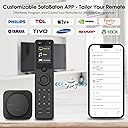
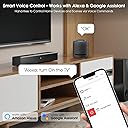
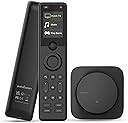
The SofaBaton X1S Universal Remote is a cutting-edge all-in-one controller supporting over 500,000 devices across 6,000+ brands via IR, Bluetooth, and Wi-Fi. Featuring one-touch activity commands, voice control integration with Alexa and Google Assistant, and a customizable app interface, it streamlines your home entertainment setup. Its powerful hub ensures reliable 360-degree coverage, while backlit buttons and raise-to-wake functionality guarantee ease of use anytime. Perfect for professionals seeking a sleek, efficient, and future-proof remote solution.


| ASIN | B0D4VCSK12 |
| Additional Features | Raise to Wake, Pre Programmed universal remote, Voice Search, Rechargeable |
| Battery Type | Lithium-Ion |
| Best Sellers Rank | #135,809 in Electronics ( See Top 100 in Electronics ) #10,173 in Remote Controls (Electronics) |
| Brand | SofaBaton |
| Button Quantity | 20 |
| Color | Black |
| Compatible Devices | Television, Streaming Device, DVD/Blu-ray Player, Home Theater, Soundbar |
| Connectivity Technology | Bluetooth, Infrared , Wi-Fi |
| Controller Type | Button Control, Voice Control |
| Customer Reviews | 3.7 out of 5 stars 95 Reviews |
| Item Dimensions L x W x H | 1.8"L x 0.7"W x 7.4"H |
| Item Highlight | One-Touch Activities, Compatible with IR/Bluetooth/WiFi Devices, Works with Alexa/Google Assistant, Raise to Wake |
| Item Weight | 3.84 ounces |
| Manufacturer | SofaBaton |
| Max Number of Supported Devices | 60 |
| Maximum Number of Supported Devices | 60 |
| Maximum Range | 40 feet |
| Mfr Part Number | HGL-X1S-US02 |
| Model Name | HGL-X1S-US02 |
| Model Number | HGL-X1S-US02 |
| Number of Batteries | 1 Lithium Ion batteries required. |
| Number of Items | 1 |
| Number of Packs | 1 |
| Special Feature | Raise to Wake, Pre Programmed universal remote, Voice Search, Rechargeable |
| UPC | 741421609587 |
| Warranty Description | 1 Year Manufacturer |
R**Z
Once Set Up, the SofaBaton X1S is a Game-Changer for My Living Room
After spending way too long juggling four remotes (and occasionally losing my mind in the process), I finally bit the bullet and picked up the SofaBaton X1S Universal Remote with Hub. I use it with an Apple TV, a vSeeBox V3 Plus, a Sonos ARC soundbar, and a Samsung OLED TV. Now that it’s up and running, I can honestly say this thing has completely streamlined my home theater setup. It’s not perfect out of the box, but once configured, it delivers exactly what you’d hope for in a universal remote — and then some. Initial Impressions Right out of the box, the build quality was better than I expected. The remote itself feels solid, sleek, and surprisingly premium. The charging dock is minimal and clean. The included hub and IR blasters are low-profile and easy to tuck away. It’s also nice that the remote uses Bluetooth and Wi-Fi in addition to IR, which gives it the ability to control newer devices like the Apple TV and Sonos. Setup Experience Here’s where I hit a few bumps. Setting up the devices individually was straightforward. The SofaBaton app detected my Samsung OLED, Sonos ARC, Apple TV, and even the vSeeBox V3 Plus (which I was surprised by, since it’s more niche). However, configuring the Activities section took some trial and error. If you’re not familiar with how macros and power-on sequencing work, you might get frustrated at first like I did. For example, getting the “Watch TV” activity to correctly power on the Samsung OLED, switch the input, turn on the vSeeBox, and activate the Sonos ARC took a few tweaks. The initial setup didn’t always switch inputs correctly or would leave the soundbar off. But after some fiddling with device delays, input settings, and testing sequences, I got it working exactly the way I wanted. The good news is — once it’s dialed in, it just works. Daily Use Now that it’s set up properly, the SofaBaton X1S is a joy to use. I hit one button and everything powers up in sync. It switches inputs, sets audio correctly, and I never have to touch another remote. The remote layout is intuitive, and the scroll wheel at the top actually feels useful (not gimmicky). The backlit buttons are great for nighttime use, and the overall response time is quick. No lag when controlling devices — especially noticeable with the Apple TV and vSeeBox. The hub makes a big difference too. I can control devices even when the cabinet doors are closed, and the signal is reliable. Also, the app control feature is handy for times when the remote isn’t nearby — like when I’m on the couch and my phone’s in my hand already. Pros and Cons Pros: • Controls Bluetooth, IR, and Wi-Fi devices all in one • Works seamlessly with Apple TV, Sonos ARC, Samsung OLED, and vSeeBox • Hub allows for closed-cabinet or line-of-sight-free setups • One-touch Activities work beautifully once configured • Remote has great build quality and responsive buttons • App-based customization and updates are solid Cons: • Activity setup is a little finicky and has a learning curve • Some UI elements in the app could be more intuitive • Occasional trial-and-error required for niche devices (like vSeeBox) • No physical number pad if you prefer that for channel entry Final Thoughts If you’re willing to spend a little time on setup, the SofaBaton X1S is easily one of the best universal remote solutions on the market right now — especially for those with a mix of newer smart devices and older equipment. It’s clean, modern, powerful, and customizable. I haven’t touched my Apple TV, Samsung, Sonos, or vSeeBox remotes since I finished configuring this thing, and that alone makes it worth every penny. Final Verdict: 9/10. Small learning curve, big payoff. This remote earned a permanent spot on my coffee table.
D**H
An excellent product
I purchased the X1S in September of 2024. This is the second Sofabaton X1 I've had; I bought the first X1 version a little more than a year ago, and I have been very, very pleased with both models. I use the X1S for our main sound and video system, and the original X1 with an auxiliary TV. The codes for operating several hundred thousands of devices from several thousand brands are easily download from Sofabaton's data base, or the codes from your original remote controls can be learned by the X1S. A relatively simple scripting language lets you control and operate multiple devices with one operation or "activity", so the multiple remote control devices that you would normally have to use with the various devices in your A-V setup can all be consolidated and run on one remote, the X1S, with the press of one button. The setup is relatively easy. The device is well made and feels solid in your hand. After the X1S was configured and programmed, it has operated flawlessly for the past seven months -- this has also been the case with my original X1. The X1S remote controls your various A-V devices by communicating with a "hub" using RF signals, so the remote does not have to be pointed at the device; it can be pointed anywhere, and it has an impressive range. I recently did a major equipment and carrier switch involving one of my A-V setups, replacing several Comcast cable boxes for internet, phone, and tv, with one Xfinity unit. I simply added the Xfinity box to the main "activity" I'd programmed into the X1S, which automatically included the new device into the existing program and continued to function normally with no further requirements. I am sincerely impressed with Sofabaton's products. I could ask for the moon, I suppose, but I really can't think of much more I would want in a remote control device. Having said that, I do have one suggestion that I think would make the X1S an even more flexible device, which is to add an If-Then construct to the scripting language. Here's an example of how such a construct might be used: you can easily switch input sources from within an Activity, for example, from cable tv, to Netflex, or Youtube, etc. However, depending on your equipment, the key bindings for doing things like navigating up, down, right, and left, for example, may use different codes for different devices -- the arrow keys used when watching cable TV may use one set of codes, whereas if you switch to watching Netflix within the same Activity, there is no way to also automatically switch the navigation key bindings from those used by cable TV, to those needed by Netflix. The workaround is to create separate Activities for live cable tv and streaming sources. This is a wish list item; it would be nice to have, but it doesn't impact my general satisfaction with this product.
J**N
Don’t try it
I got a replacement, for 1 it will not shut down my denon avr-x4700h, 2 it will not work with apple 4k tv, 3 it will not work with xbox series X, 4 it will not work with direct tv c61-700, 4 it will not even have code to download LGTV 65 inch oled65c1pub and no I will not spend $3000 on new oled tv just to get $200 remote to work and the tv is not that old and still looks perfect. The remote is very hard to program, enter like 100 steps just to get it to work with 6 devices, if you do buy it be ready to spend 6 or more hours just to program it, not easy like Logitech that is a fact, No customer service number, chat is impossible to get help, email is just to slow to fix so many issues with this kind of remote you better have a doctorates degree in java to learn the code because it is very flaky, try to fix so many issues with email, heck I emailed them so many times with issues and takes them 2 days to reply, that is not support
J**4
It does work but it has a lot of fails
Pros - It does work. Cons - Difficult to configure. I identify the make and model of the device I want to control - why is it asking me about the power button? it is just an opportunity to make a mistake. Hours of trial and error... Watch the YouTube videos by users - they are helpful. - As of this writing I've had this remote about 4 weeks and I've had to charge it 4 times. Give me an option to turn off the light and save some battery - The ergonomics of this are horrible. The buttons you use most are at the bottom of the remote. I tend to hold a remote with one hand and use my thumb to push the buttons. However if you hold the remote at the bottom, the buttons you will mostly need (channel & volume) are behind your thumb which is impossible to reach. No matter where you hold the remote you can not reach the buttons with your thumb. I've gone as far as holding the remote upside down so I can reach the buttons I need.
S**S
Until the Harmony remote returns in some form: this remote is decent enough replacement for now
We are a harmony family and we decided it was time to try a new brand that could come close to the Harmony remote. Unfortunately, this seems still ‘behind’ in the excellent harmony product. However, it is second best, but not equal to or better than the harmony remote, We have 5 key activities we had to set up. The setup is via an app on the phone [app not available on ipad]. You do need to be slightly technical as a) activity has to be specially created or b) function didn’t quite work as expected. You don’t need to have experienced with harmony to set up, fairly intuitive up to a point, but some features or activity may require some technical background. Because there is no touch screen and just a manual ball: we set up specific channels we watch a lot to easily toggle to via the ball. We hope that the touch screen feature can come in future feature. Otherwise, painful to change channels. Slippery and could help with a texture to allow better grip. We find it interesting that isn’t an easy replacement to Harmony remote, and that we still have to ‘regress’. It does make us wonder no one bought the patent of the Harmony. There is so many of us who love our Harmony and willing to pay a little more!
Z**K
Easy Setup - Increasingly Useful
Adding devices in the app is really straightforward, and so is setting up macros; which Sofabaton has dubbed "Activities." One push of a button will turn on your television, turn on your receiver, and set the correct inputs. Then map the volume, channel, etc buttons to the correct devices. You know, the whole reason you're looking at this device. Activities are where many people seem to report problems that are, frankly, not problems. Every setup is different. One of the things the Sofabaton has going for it is the customizability. Your activity may not work as expected on the first try. Maybe your TV needs a few extra milliseconds after it powers on, before it's ready to receive other commands, like which input to use. Good news! You can customize this. I had the original X1 for just under a year. Like many people, I bought it to replace a defunct Logitech Harmony. I was a little disappointed to find that it had no support for one of my devices, but not surprised. It's an old Sony HD radio tuner. It wasn't very popular when it was new, and it's far from new today. Imagine my surprise to find it, when I set up the X1S! Once you get through the setup process, this device simply does the job. The UI is intuitive. The remote rarely needs any attention. I charge it every week or so, and otherwise don't even think about it. Which might be why it's taken me so long to write a review. Finally, the reason I have an X1S. Support. I had to engage them for a problem with my X1 remote. I waited in the chat queue for barely any time at all. When I was connected with an agent, i found them to be helpful, and empathetic. It took about half an hour, but they did ultimately solve my problem. It was a very positive experience overall. It's nice to know help is there when you need it. Sofabaton has continually improved its app, and its device database since it's release, and their customer support is fantastic. I hope they keep up the good work.
C**A
Don't understand the hate. Awesome product.
Coming from a Harmony Pro I was skeptical. However, the install and setup was simple. Build qualtis fantastic especially at the lower price point. Using it with an Integra receiver, Sonos and Roku Ultra 2024. Only complaint would be lack of IR in the remote itself. I resolved this using a Sewell repeater which does a phenomenal job, but would have been nice to have it built in asy components are in a closet and the IR from the hub isn't able to be fired at the TV. Other option would be Sofabaton opening up more WIFI control than the limited amount of devices available. LG can be controlled over IP and that would have resolved issue of no IR at the remote. Outside of that it just works. Easy to setup, wickedly fast compared to the Logitech products I've own and easily customizable for actions etc. No touch screen isn't a big deal and I understand why no touch screen at this price point. Overall they might have had bumps in the beginning but they are definitely making massive strides to be a valid replacement for the upper tier Harmony line. Might not work for everyone but for me with streaming being king now it's the perfect replacement.
P**R
Has great potential. Quality not up to Harmony standards.
I want to give a higher rating because this is truly the ONLY accessible option out there for Harmony users whose remotes are finally past their prime. If you're a said Harmony user, you'll find the software interface manageable. As with your Harmony remote, you'll have to spend time dialing things in. The Sofabaton software has many idiosyncrasies that can cause frustration until you sort them out. Not impossible, but there is clearly room for improvement. After some time, I got my remote to work essentially as I liked, and for most circumstances, it runs reasonably error-free. When a problem does arise, it is normally easy to correct. All good so far. Using a hub can also create some issues, but again, higher-end Harmony remote users have already solved that, so no worse for wear. Additionally, the remote layout is overall intuitive and simple to use. All good things. So why only 3-stars? I dropped the rating 2-stars because the actual build quality/durability of the remote has proven to be sub-par. After only three weeks of use, the N/S/E/W command button began to crunch and squeak noticeably, feeling and sounding like a garbage $10 remote. Absolutely unacceptable at this price range, and does not instill confidence that the remote will last very long with average use. I sent mine back, got a new one, and all buttons are quiet and feel solid as they did when I got my first one. I am hoping my initial remotes lack of durability was a fluke. If the new remote proves more durable, then I'll update this review and raise the rating. We'll see. Bottom line: the X1S has a bucket-load of potential and a few software tweaks will really help improve the setup experience. I am hoping my replacement remote will prove more durable. If not, then Sofabaton will really need to step up their game for the price they are charging. We shall see...
Trustpilot
2 months ago
3 days ago