Buy anything from 5,000+ international stores. One checkout price. No surprise fees. Join 2M+ shoppers on Desertcart.
Desertcart purchases this item on your behalf and handles shipping, customs, and support to Spain.
🚀 Elevate your Wi-Fi game — never settle for dead zones again!
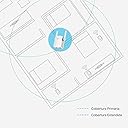
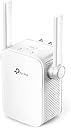
The TP-Link TL-WA855RE is a compact yet powerful Wi-Fi range extender delivering up to 300Mbps on 2.4GHz with dual external MIMO antennas. Covering up to 500 sq.ft, it boosts your existing network effortlessly via plug-and-play and WPS button. Featuring Access Point mode, a smart LED indicator for optimal placement, and power-saving scheduling, it’s designed for seamless, reliable connectivity across all your devices.


| ASIN | B0195Y0A42 |
| Antenna Location | Home |
| Antenna Type | Internal |
| Best Sellers Rank | #43,087 in Computers & Accessories ( See Top 100 in Computers & Accessories ) #136 in Repeaters & Extenders |
| Box Contents | Wi-Fi Range Extender |
| Brand | TP-Link |
| Brand Name | TP-Link |
| Colour | White |
| Compatible Devices | Smartphone |
| Connectivity Protocol | Wi-Fi |
| Connectivity Range | 500 Square Feet |
| Connectivity Technology | Wireless |
| Control Method | Touch |
| Controller Type | App Control |
| Coverage | 500 square feet |
| Customer Reviews | 4.1 out of 5 stars 115,696 Reviews |
| Data Transfer Rate | 300 Megabits Per Second |
| Frequency | 2.4 GHz |
| Frequency Band Class | Single-Band |
| Global Trade Identification Number | 00845973093853, 00882492783049 |
| Importer Contact Information | TP-LINK India Private Limited,Green Industrial Park, Dongri Pada, Poman, Kaman-Bhiwandi Road, Vasai East, Palghar, Maharashtra – 401208 |
| Is Modem Compatible | No |
| Item Dimensions L x W x H | 8L x 7.8W x 7.7H Centimeters |
| Item Type Name | Range Extender |
| Item Weight Unit of Measure | 0.12 Kilograms |
| LAN Port Bandwidth | 100 Mbps |
| Manufacturer | TP-LINK, TP-Link Technologies Co., Ltd, South Building, No.5 Keyuan Road, Central Zone, Science & Technology Park, Nanshan, Shenzhen, P.R. China |
| Manufacturer Contact Information | TP-Link Technologies Co., Ltd, South Building, No.5 Keyuan Road, Central Zone, Science & Technology Park, Nanshan, Shenzhen, P.R. China |
| Manufacturer Part Number | TL-WA855RE |
| Maximum Upstream Data Transfer Rate | 300 Megabits Per Second |
| Model Name | Computers & Accessories/Categories/Networking Devices/Wireless Access Points (1375440031);Computers & Accessories/Categories/Networking Devices/Repeaters & Extenders (1375438031) Model Name Computers & Accessories/Categories/Networking Devices/Wireless Access Points (1375440031);Computers & Accessories/Categories/Networking Devices/Repeaters & Extenders (1375438031) See more |
| Model Number | TL-WA855RE V3.0 |
| Number of Ports | 1 |
| Operating System | Windows |
| Other Special Features of the Product | Access Point Mode, LED Indicator, Remote Access, WPS |
| Packer Contact Information | TP-Link Technologies Co., Ltd, South Building, No.5 Keyuan Road, Central Zone, Science & Technology Park, Nanshan, Shenzhen, P.R. China |
| Security Protocol | 64/128-Bit Wep, Wpa/Wpa2, Wpa-Psk/Wpa2-Psk |
| Special Feature | Access Point Mode, LED Indicator, Remote Access, WPS |
| UPC | 882492783049 845973093853 845973099305 |
| Unit Count | 1 Count |
| Warranty Description | 3 years Manufacturers Warranty |
| Wi-Fi Generation | Wi-Fi 4 |
| Wireless Communication Standard | 802.11n |
| Wireless Compability | 802.11n |
A**R
Awesome, Just does what it says.
First of all product is different from the pics. But working all fine.. didnt connected via wps but no issue when connected via pc. Took only 2 mins to setup. Now No problem in connection. Also my all devices connected to it without any password because it shows the same one as router. Just one problem tht product is different from picture... see for yourself in pic i uploaded. Besided tht great product and working flawless and good range.Thats why all 5 star, not gonna take 1 star down for how its looked, because product is newer version, but amazon should update photos of the product on website too. Thanks for quick delivery and for awesome product.
A**M
Better Build Quality But Not An Easy Setup
This review is for the non-techies who want to know what they are buying. After trying out and using the more popular and slightly more expensive Netgear WN3000RP-200INS Universal Wifi Range Extender (Cream White) , I have bought this TP Link Range Extender which has a better build quality especially the buttons when compared with Netgear WN3000RP-200INS Wi-Fi Range Extender What you want to understand is Range Extenders provide internet access in dead-spots in your house but at a price being - loss of internet speed. Range Extenders will not serve as a replacement for routers. Let me try and explain how this works. Range Extenders work at a speed that is 1/3rd your original speed. If you're on a 100Mbps plan with a decent wireless router, that gets you 80Mbps speed, your Range extender would probably get a max speed of 35 - 40Mbps. With lower speed connection (<20Mbps), it may not even be possible to stream HD videos Internet Speed Loss Using Range Extender is it not a myth. Range extenders such as this one usually cut the bandwidth in half, but that is for the link speed (Speed of the router you connect to). There is a reason for this. Extenders have to communicate both sides at the same time, they communicate with the PC first, get the data, then transmit it to the router. It then has to wait for the router to respond, then send the response back to the PC. That adds a lot of overhead, generally cutting bandwidth in half. If you have a weak signal, from the WiFi router to the extender, or from the extender to your computer, then your speed can be even less. On top of this you are sharing bandwidth with all other wireless devices in your house. What you could do to improve this is to use dual channel extenders where they transmit to the client on 2.4ghz but talk to the wifi router on GHz, and the WiFi router talks to its clients on GHz. This eliminates the 1/2 throughput problem with normal repeaters. They are a bit more expensive. INSTALLATION It took 10minutes to setup and I had to manually do it with an ethernet cable connected through a laptop which was really annoying. The setup was not easy when compared to NetGear's where I had to simply switch on and connect/setup through a wireless device Note: Rename the TP Link range extender to the same name as your base router if you plan on using devices that access both locations. That way devices will automatically switch to the stronger signal. It works like a charm. Plug in the device next to your router or close by. Wait for the power light to turn green from amber. It takes about 2 minutes before the power light to turn green from amber. The devices in proximity to the extender will receive a better WiFi signal while the Range Exender itself is getting a decent strength from the router. VERDICT Once again - It does the job that is get you access to internet in dead spots and there will be loss of speed. I found this one a little more difficult to install/setup but the build quality is a lot better. Considering the price (which is about 3/4th the price of Netgear) and the build quality, I'm giving a 3.5 rounded off to 4/5
A**R
A Comprehensive Review !
I have seen quite a bit of negative reviews which stem from the misinformation about this Range Extender (or any other Range Extender for that matter), so I decided to share my experience with this one. This review will be a long one, so read patiently and at the end I hope you'll be able to make a decision whether you need a Range Extender or not. So, let's begin ! 1) Do you even need a device to increase the range of your wifi? a) If you're not getting a good enough wifi coverage at your home, first thing you need to do is to figure out the optimum place for the router. It should be at the centre of your home and away from electronics such as microwave. There are plenty of videos regarding this on youtube, so I won't be wasting your time here. b) If that doesn't solve your problem, invest in a decent router. I for one, use iBall Baton iB-WRD12EN 1200M router, which was the cheapest dual band router at the time I bought it. I got it for ₹999, which is a steal for that router. There are many more routers out there, some are better than this one so, choose according to your need and budget. c) If you are still facing issues regarding the range, you should continue reading. 2) Range Extender or Access Point ? There are two options by which you can increase the range of your wifi network. Both of these have some pros and cons as follows : a) Range Extender Pros: It is very easy to install, it takes hardly 5 minutes. It doesn't take much space. There's no hassle of running a cable from router to the range extender. Cons: There is some drop in speed, which is to be expected. There's also a slight increase in latency, which is hardly noticeable if there are less number of devices connected to the range extender. b) Access Point Pros: No drop in speed, negligible increase in latency as the connection is wired. Cons: Running a cable from router to the Access Point is quite a hassle. Without a doubt, an Access Point is much better than a Range Extender. Nowadays, most of the routers come with an Access Point mode, too. But if you're like me who doesn't like the hassle of installing an Access Point and is perfectly fine with a slight decrease in speed (depending on how you position the range extender) then sure, you should pick a Range Extender. 3) Now, after you've bought a Range Extender, (let's assume this one) it's time to set it up. Upon reading the reviews, I chose to set it up via the browser method as it is the most effective one. You just need to follow simple instructions. 4) Now comes the tricky part, the placement of the Range Extender. You should place your range extender in such a place that it catches a good signal and it distributes it to the desired place in your home. Use an extension cable and run speed tests by placing the Range Extender in most likely places where there's good wifi coverage. You can use wifi analysing apps to find out the spots of good wifi coverage, too. If there isn't a power outlet at the optimum location, invest in one. Let me tell you what I did. I live in a duplex home. My router is downstairs, so there was absolutely no signal in upper bedrooms. I relocated the router by mounting it at the top centre of the ground floor and placed the Range Extender exactly above it but at 3-4 feet height from the ground of the second floor. The distance between the two is hardly 6 feet. I have a 50 mbps connection and I get 30+ mbps speed from the Range Extender which is to be expected. I have attached screenshots for reference. There's no way the Range Extender will give the full speed. It's not logically possible. 5) My experience with this Range Extender: It's been more than 2 months since I started using this device. Throughout this period, I didn't encounter any deal breaking problems at all. On one occasion, my phone refused to connect to it, but upon restarting it, the issue didn't resurface. Apart from that, it's been a fantastic experience. The wifi signal range is also really good. There's a one more version of this Range Extender with the internal antennae. Apart from that the two are basically same, internal hardware- wise. I bought this because of the external antennae. If you're concerned more about the aesthetics, then go for the other one, it's TL-WA850RE. To conclude, I would like to say that if you need to extend the wifi coverage in your home, you should consider an Access Point primarily. If the simplicity of a Range Extender outweighs its flaws for you, only then you should consider it. To be honest, I think all these Range Extenders don't deserve their price tags. For example, this model should've been priced at somewhere around ₹800. Nonetheless, I hope this helped you to make your decision. Have a nice day ! Edit:- In the month of July 2021, there was some electricity maintenance work going on in my area. Now, ideally during such programs, one should switch off any electronic appliances in his home. I forgot that. Suddenly, for about 10 minutes the voltage reached approximately 800 volts which should've melted the innards of this device. But surprisingly, it was working, just not in a good way. There were frequent disconnections. I raised a replacement request to TP - Link and was given a brand new replacement device on the same day! Now that's what you call an after sales service.
R**E
Awesome product!!
Great product and tried in the last point where I have almost zero signal - WiFi signal is amazing through this as I have red light means it’s very poor but this booster took that poor network and boosted again . Very easy to instal and it took hardly 3 mins for me . Don’t go with anyone’s review as you have to experience it , I bought from Amazon after spending so much time in understanding the product . Attached screenshot where my speed is good when in this place I was never getting WiFi at phone or laptop while working from home . I sit on first floor to work and my wife at ground floor . Go for it without any second chance as it’s amazing product .
N**A
Works like a charm
N 300 Performance wireless WI FI range extender works like a charm.. Our wifi router is in the main building ...the guest house wasn't receiving the signal earlier ...this wifi Extender has boosted the coverage efficiently to deliver fast and reliable connectivity over an area of 500 square yards. Full marks for the product 👌 However the seller sent a used product and it came without any product literature.... it was configured by the previous buyer and returned I guess...I had to reset it ... but since it was working alright I decided to keep it...bad business ethics.
S**T
Poor Performance
I have purchased the device to extend the wi-fi signals as the router placed in a other room. The wall cuts down the signals. Thought to keep the extender in between, so did it accordingly. Set up was easy, hardly took 5 mins. Then signals was absolutely fine, then found the low signals of router was giving better speed as compare to the full signals from extender. Speed was almost half from extender. Then someone was standing between my laptop and extender, I have realised all signals have gone, then I have tested again, by placing my self between extender and my laptop. OMG !! this is something I can't expect from a device of TP Link. I have realized to that 1) If someone come between extender and receiver device if the distance between these 2 devices are 1 meter then also it won't work. My learning is that DO NOT BUY THIS KIND OF DEVICE.
G**U
Works great! Good device worth buying.
Good product. Really nice and compact. Ordered a days back and got it today. Installation takes only few minutes. Two options given to configure the extender Option 1 - is easy method but it's not properly working, i.e switching on wps button in router and then in the extender. I Googled and found out many had the same problem. Avoid this method & directly use option 2. Option 2 - Plug in the extender to a power source & wait till you get solid red light. In your laptop or pc disconnect your lan/wifi and connect to the extender wifi network. Goto browser and type the extender ip to goto the configuration page and do as instructed. So anyone buying this device can directly use 2nd option to configure. This will prevent you from unwanted doubt regarding whether this device works or not. I use 4mb (both upload & download) unlimited plan. Now I'm getting the same speed with this device in the location where i didn't get enough signal before. I've attached the pics in which u can see the device connected, speedtest & the wifi signal strength red is router signal & blue is extender signal.
A**A
Works great, but only at 2.4 GHz
Even in my apartment I have a slight dead zone at the farthest end of my apartment. I’ve tried using a router to extend my connection in the past, but they’ve all required a wired connection to the device itself. With the TP-LINK N300 you simply need to connect it to your wireless router and then plug it into the wall within range. It can then send out a unique SSID (the default) or attempt to use the same SSID as the wireless signal you’re trying to extend. It does feature the ability to plug a wired device in, however, it doesn’t require a wired connection to work. And it does seem to work rather well. The initial setup is pretty easy. You connect into the device using a wireless device and then pull up the administrative interface. You’ll immediately need to create a new username and password, and can then connect to the wireless signal you want to extend. Unfortunately I did run into an issue where I was attempting to use spaces in the password and while I was getting an error message it wasn’t telling me what was wrong. Only after removing the spaces (I also had punctuation which was fine) was I able to proceed. This device only works in the 2.4 GHz space, however, which means that as 5 GHz continues to be the lowest common denominator you’ll get slightly less use from this as time goes by. The device can be plugged into a standard outlet in either position, which means that you’ll still have access to the second plug, and you could put it into the top position if you needed to plug a brick into the lower one. I put this into a bedroom and the amount of light that comes off of the device is pretty minimal. Thus far the only real dig I have against the TP-LINK N300 Wi-Fi Range Extender (TL-WA855RE) is that it doesn’t support the 5 GHz spectrum, which means that speeds will slightly suffer. However, it’s easy to use, and an improved signal is better than no signal at all.
M**E
Fast delivery
After using this product, there is an improvement of Wifi signal strength. But internet is still slow. I supposed that could be due to my network issues.
M**9
الجودة ونطاق الاتصال ممتاز
H**Y
Me encantó!
Super!! Llevo ya usándolo un buen tiempo y no he tenido temas con la señal. Super óptimo y eficaz, sin variación y muy fácil de instalar y acoplar con el router de casa.
F**0
da restituire
non so se è il mio che ha dei problemi ma mi sto trovando malissimo. la configurazione senza vps con il modem telecom è da impazzire, col pc ha funzionato una singola volta per una mezz'oretta e poi ha smesso, con un galaxy s8 mai visto. il tasto reset sembra non funzionare sempre. inoltre la presa della corrente non è orientabile cosi che le antenne sono sempre rivolte in basso e in alto facendo si che la potenza del segnale vada per i vari piani invece che diffondersi nel piano. mi spiace ma pessimo acquisto anche concettualmente parlando
S**R
Easy Installation - Performs as Expected
It's important to understand how this device is intended to work so that your expectations are properly set. An inexpensive extender of this type receives the signal from your main wifi router, and rebroadcasts the wifi data on a different signal, with its own SSID (the name for the signal you see on your cell phone when you search for a wifi signal in Settings>Wifi). This device creates that new SSID by appending _EXT to the name of your main wifi SSID. You'll often see both SSIDs; you should pick the one that will do the best for you depending on where you are in your house. Your phone might change between the two signals on its own, but you'll soon learn which signal covers best in each location in your house. Key to the operation of devices like this is that it be placed in a location that 1) allows it to receive a decent signal from the main router, and 2) covers the area of your house that is not covered well by the main router. If instead you locate the extender directly in the area with poor coverage, it will receive a poor signal from the main router just like your phone does. It won't be able to efficiently transfer data from the main router in that location. Think instead of placing the extender half-way between the main router and the area you want the extender to cover. You should experiment with different locations, bearing in mind how many walls, floors, or other obstructions lie between the extender and the main wifi router, and also between the extender and the area you wish to improve. The second important point to understand is that extenders of this type operate in a "half duplex" mode, meaning that at best, the data rate from the extender will be half of that provided by your main router. If you are already using most of the data capacity of your main wifi router to a certain device, it's unlikely that you'll be happy with the extender signal. In my case, I saw around 50 MBps from my main router when I was near the extender, and around 25 Mbps from the extender itself. This is more than enough for my casual web surfing, and youtube watching. Your results may be different. Of course, for significantly more $, you can change out your existing wifi router for two or more "mesh" routers. These routers are able to move full speed data between each other, and you can add units until you have the coverage you require. You'll see only one SSID, and your phone should move easily from unit to unit. But at this extender's price point, I got the coverage on my deck and in the corner of the family room that I needed. This item does not incorporate the fastest wi-fi specification. If your needs are more data speed intensive, you might go for a model with higher specs, for a modest increase in price. Setup was very easy. I used the PC method because I'm loath to put another app on my old 16GB cell phone. For that reason, I can't comment on the app.
Trustpilot
2 days ago
1 month ago