Buy anything from 5,000+ international stores. One checkout price. No surprise fees. Join 2M+ shoppers on Desertcart.
Desertcart purchases this item on your behalf and handles shipping, customs, and support to Spain.
๐ฎ Dominate your digital realm with the Acer Predator Z57 โ where epic meets ultra-wide!
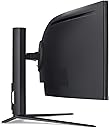
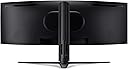
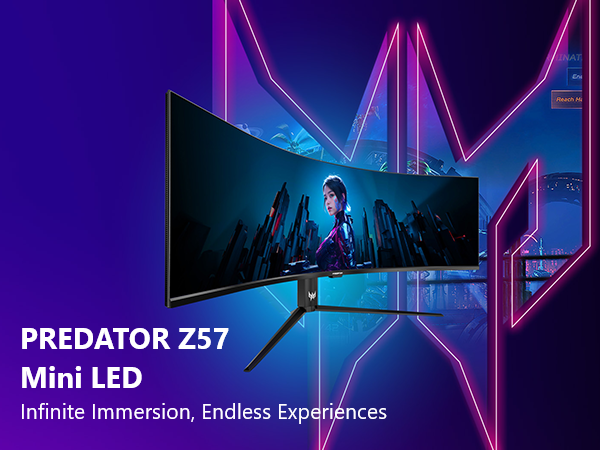
The Acer Predator Z57 is a 57-inch curved gaming monitor featuring an ultra-high DUHD 7680x2160 Mini LED display with 2304 local dimming zones. It boasts a 1000R curvature and 32:9 aspect ratio for immersive viewing, a blazing 120Hz refresh rate with 1ms response time, and AMD FreeSync Premium for tear-free gaming. Equipped with VESA DisplayHDR 1000 and 98% DCI-P3 color accuracy, it delivers vivid, lifelike visuals. Connectivity includes USB Type-C with 90W power delivery, DisplayPort 1.4, dual HDMI 2.1 ports, and a built-in KVM switch, making it a future-proof powerhouse for professional gamers and creators alike.


| ASIN | B0D1LHC9QP |
| Adaptive Sync | FreeSync Premium |
| Additional Features | Curved, Height Adjustment, Swivel Adjustment, Tilt Adjustment |
| Aspect Ratio | 32:9 |
| Best Sellers Rank | #86,561 in Electronics ( See Top 100 in Electronics ) |
| Brand | Acer |
| Brightness | 1000 nits |
| Built-In Media | Display, Power Cord, Stand, USB Type-C, HDMI & USB Cables |
| Color | Black |
| Compatible Devices | Gaming Consoles, Laptops, Desktops, potentially Smartphones and Tablets |
| Connectivity Technology | DisplayPort, HDMI, USB Type C |
| Contrast Ratio | 1000:1+ |
| Customer Reviews | 4.0 out of 5 stars 204 Reviews |
| Display Resolution Maximum | 7680 x 2160 |
| Display Technology | LCD |
| Display Type | LED |
| Hardware Connectivity | 3.5mm Audio, DisplayPort, HDMI, USB 3.2 Gen 2 |
| Has Color Screen | Yes |
| Image Contrast Ratio | 1000:1+ |
| Item Dimensions D x W x H | 21.46"D x 51.73"W x 23"H |
| Manufacturer | Acer |
| Model Name | Acer Predator Z57 bmiiphuzx |
| Model Number | UM.NZ7AA.001 |
| Mounting Type | Wall Mount |
| Native Resolution | 7680x2160 |
| Picture Quality Enhancement Technology | VESA DisplayHDR 1000, DCI-P3 98%, Mini LED |
| Processor Count | 1 |
| Refresh Rate | 120 KHz |
| Resolution | 5K UHD 2160p Ultra Wide |
| Response Time | 1 Milliseconds |
| Screen Finish | Matte |
| Screen Size | 57 Inches |
| Screen Surface Description | Matte |
| Shape | Curved |
| Specific Uses For Product | Business, Gaming, Personal |
| Total Number of HDMI Ports | 2 |
| Total Usb Ports | 5 |
| UPC | 195133245975 |
| Viewing Angle | 178 Degrees |
| Warranty Description | 3 year parts and labor |
| Warranty Type | 3 Years Manufacturer Warranty |
A**.
Gaming on it is a blast.
This review is for Z35P bmiphz 35inch 3440x1440p Screen. Quick History. I love Gaming, fast refresh rates, Gsync and a quest for ultimate monitor has been my holy grail. That being said here is the list of screens I currently have and a bit of comparison. Acer XB280HK bprz 28 - First Gsync 4k Screen that I jumped on the Gsync wagon with. Used this for about 6 months had a few issues with screen just going black in full screen mode and just could not come to terms with TN panel and 60hz. Color shifts and washed out color got me to pass this down to my son. Acer Predator XB271HU bmiprz 27 - After doing tons of research I finally took a plunge on this bad boy and donโt get me wrong probably one of the best 27 inch monitors out there. Full IPS 2560x1440p, Gsync, 165hz Refresh rate. Personally, I had no issues with it. Used this for almost 2 years until my wifeโs screen went out and opportunity presented itself. Acer Predator Z35P bmiphz 35inch - Now the main review of this monster and what compelled me to get this model. As well as pros and cons. Let's look at it from the gamers point of view. Pros: -3440x1440p resolution? Check -As close to IPS as you can get with wide viewing angles? Check -Overclock able to 120Hz? Check -Gsync? Check -35 inches of curved beauty? Check Screen arrived well packaged, no damage. Used a DP cable to hook it up to my 1080 at first when I turned it on had some light bleed in all 4 corners to be expected for VA panel. Desktop looked a bit washed out compared to IPS panel no biggie there. Googled โz35p color management profileโ and there is a reddit thread with a nicely calibrated profile, after applying color profile and setting gamma to gaming mode the colors are as close to IPS as you can get. Turned on overclock and set refresh to 120hz under gaming section. Just to mention the built in speakers are decent enough to watch movies with the family. Nothing beats a good quality headset though. (currently one of my favorites for long term gaming Sennheiser 506080 GAME ONE) Cons: - light strobing in upper left and right corner. Not a deal breaker, but it's there if you pay attention to it. - Bezel a little thick compared to modern screens. I don't ever actually notice. - Not an IPS panel. - Some games don't support 3440x1440p or you have to tinker with settings get them running properly. - Not really a con but getting used to 21:9 FOV in some titles can be different experience than 16:9 All that being said itโs a solid screen. Gaming on it is a blast. Programming on it is fantastic. Other thoughts - The only way for me to go up from here is to Nvidia BFGD
A**E
So far, it's incredible
Update: The monitor is still incredible. But the 100 dollar price drop after only being out for a few months is a kick in the teeth. Obviously, I would have waited. I'd dock stars but that would just screw up the ratings for new buyers. In reality, it has gotten better. It was worth it at 1100. It is definitely worth it now. I was pretty anxious about buying it because of the mediocre reviews on Amazon. It's clear this panel has had significant quality control issues as the AOC version has similar reviews. All I can say is that so far, it's been jaw-dropping in every regard. The colors are great and it comes decently calibrated out of the box. The blacks are particularly good and the backlight bleed is effectively nonexistent if you're sitting where a normal person would be sitting. It had one dead pixel at first but the gentlest of figure pushes got rid of it. Gaming is where it really shines obviously. I have a 1080 TI and with g-sync on and the monitor set to `120hz, it's incredible. The one obvious drawback is the ridiculous price. IT'S 100$ CHEAPER AT NEWEGG! I only bought it here because I needed to use an Amazon credit card. Plus I didn't know about the price difference until two days after I unpacked it. For most people, I'd say get the AOC for 899$. It has basically the same potential problems as the Z35P as they use identical panels. I wanted that extra 20hz but frankly, 300$ is an obscene amount of money to pay for that. However, I already had a graphics card that could take advantage of those 20hz and in a year or so, after they've come out with faster monitors all around, I think I'll be glad I got the nicest one I could get at the time. Unless you're going to be gaming and your graphics card is fast enough to break 100fps at 3440x1440 on decent settings with an NVidia card, you don't need this. BTW, if you have an AMD card, you shouldn't even be looking at this or any gsync monitor. Get a PIXIO! They sell a 34 inch ultrawide freesync PVA panel for 599$. Just type PIXIO into the Amazon search bar. It's also way better rated than any of the big brand 30+ inch ultrawides. If I was building a new computer, I'd probably go AMD GPU because freesync monitors are SO MUCH CHEAPER. The PIXIO version of the Z35P is 700 (600 if NEWEGG) dollars cheaper and the SAMSUNG panel it uses doesn't have any of the QOC issues that the ACER and ASUS ones do. Still, I'm reviewing one the one I got and I was aware of the high price so I'm not going to knock it for that. Assuming it works when it arrives, the Z35P is the best gaming monitor money can buy. But buy it somewhere else. Amazon is the only place selling it for 1200.
P**K
Extremely unsatisfied and not trusting of monitor manufactures at this point.
So I ended up getting a replacement from Amazon, and the replacement was worse than the first one I got. The first monitor had one dead pixel, I would have been willing to live with the dead pixel until the ghosting began. Ghosting occurred with the UFO test on every color scheme. When I did finally play around with the OSD settings to minimize the ghosting on the UFO test, as soon as I went in game it seemed to make no difference. I of course tried to play with all conceivable OSD settings (while in game) to reduce/eliminate ghosting, but nothing worked. I also tried different refresh rates, all modes of overdrive, overclocking on/off, dark boosts, blue lights, adaptive contrast, Colour Temps, tried to adjust colors... all wastes of time. Here are the games I tested this on to confirm ghosting: Mass Effect Andromeda, Crysis 3, Titan Fall 2, Dragon Age Inquisition, Far Cry 3 / Primal... Every game ghosts (AAA Titles seem to be more noticeable than older games but ghosting is everywhere), even scrolling through web pages ghosts... the most noticeable ghost trail was in the Ge-force Experience game optimization feature list scrolling down. I tried to ignore it but it was borderline making me feel sick after a while. I assumed that maybe the panel having a dead pixel meant it was defective and was why I was seeing such bad ghosting. So I had Amazon send me a replacement. The replacement showed up with another dead pixel in a different spot and the ghosting was worse! I actually opted to call Acer support to see if there was a firmware update or some type of OSD tweak they knew to be effective in fixing this issue. The rep had me try all three DisplayPorts on my GTX 1080ti FTW3 Hybrid, all gave me the same exact ghosting issue. He then had me try the HDMI cable / port and the ghosting just multiplied by three. He then lead me to their support section of their website and had me enter in my SNID# which lead me to a user manual for the Z35 (version that is 2560 x 1080) and he basically told me to read through the manual to find some sort of GPU specific related data. I cannot find a user manual specifically for the Z35P anywhere and I'm not wasting my time talking to their support or messing around with this monitor anymore. As I type this review the screen is now flickering. I read a few reviews on here of people saying they had no ghosting issues, meaning that both units I received are defective and both having dead pixels. I was sure based on the specs of this monitor it was 100% the way I wanted to go, now once I get a refund I have 0 idea as to which 21:9 monitor I want to get to replace it. Not sure if anything is on the market that I feel comfortable buying at this point based on my experience here. My 39" LG TV (1080p @ 60hz) that's 5 years old may have less resolution, no GSync and isn't curved but at least it didn't cause a giant smear of color when in game. I'll take screen tearing over smearing of colors any day. I did my research and read a lot of things about the Quality Assurance of Acer Displays and how it was hit or miss, I feel like a fool for having trusted them after everything I read.
G**D
Colors are a bit washed out, out of the box.
Awesome monitor for the lower price it's at now. Games look fantastic, although I have to run it in 16:9 mode with black bars on the sides as I don't have a rig fast enough to drive this thing to full potential at the moment. The packaging was great and easy to unbox. The monitor has a handle on the top for easy moving. The stand is very sturdy. Out of the box, the colors were a bit washed out at the bottom of the screen to the angle of my eyes looking at it. Using an ICM profile and other settings I found on Reddit seems to have mostly fixed this for me, although the other colors in the center are really vibrant now. Looking side to side the color shift isn't as apparent, perhaps due to the curved screen. I haven't had a problem with ghosting (running at 100hz) or excessive back light bleed. Coming from dual 24" panels, having a single screen desktop again is fantastic.
J**N
System Malfunctioned after only 5 months. Support was awful
Product is nice and picture was clean and crisp however,...... monitor started to flickedr at top after only a few months. Support wants me to pay to ship this ttian of a monitor to them to have it repaired. After only 5 months of use me having to pay for this to be repaired is just ridiculous. Do yourself a favor and look at samsung or Asus. Similar products better quality ansd support.
B**N
Buy It! You don't know what you're missing! 0_0
Phenomenal monitor! 35" Curved 120Hz G-Sync 1440p. You'll notice EVERY one of these features. It's amazing how quickly you will become spoiled by 120Hz gaming, and you'll be fiddling with your graphics settings to maintain the frame rate. Even the difference between 100Hz and 120Hz is noticeable to me, which makes me a little worried that there's still further smoothness to be had above 120Hz, but come on... you have to draw the line somewhere and just be happy with the experience. G-Sync is awesome too. I am a believer. Even 40fps feels playable because of how responsive everything is due to the lack of stutter & input lag that would be otherwise be incurred if you were using V-Sync. I notice no color-shifting, per say, but the most extreme 2" of the screen do shift in contrast (they wash out a little) due to viewing angle, when viewing the monitor as you would normally. It's hardly noticeable though since these areas are in your peripheral. This is just a consequence of the VA panel I believe. Not a deal-breaker for me, especially coming from a TN panel from 2010 where I had color & contrast shifting at the top and bottom of the monitor. No backlight bleed, but the issue described above can be seen here and there on a black screen, where certain areas are not as black as others. Why do I not call this blacklight bleed, even though the effect might be similar? Because if you move your head all around, you'll see that these lighter areas shift to a proper black, as they are only a consequence of the viewing angle. For anyone claiming ghosting issues: In addition to the refresh rate settings accessed via the panel inputs themselves, be sure to ALSO change the monitor refresh rate to 120Hz in the *display adapter settings* via the display settings in Windows. Otherwise, the monitor will use 60Hz while you're in Windows and the 60Hz will 'look' like ghosting. Bottomline: Take the plunge, set it up, dial it in, and try to talk yourself into returning it. You won't be able to. I have a 970 GTX, which is arguable way underpowered for this resolution and refresh rate, and I'm still loving it. I will be upgrading to a Ryzen & 1080 Ti build soon I think, but I'm still very impressed with just how great the gaming experience already is, thanks to this monitor.
K**N
Dead Pixel, What happened to QC?
Although others have had issues with Acer monitor quality in the past, I have not. So when my XB271HU was damaged, I tried monitors from a few other brands and all had issues. Finally, decided to give Acer another shot but within just moments of unboxing, noticed an obviously dead pixel and subpixel. This is probably the first device with a screen that I've owned in over 10 years to arrive with a dead pixel - I thought we were past that point in display technology. At this point, I've been through too much hassle returning displays - not sure what I'll go for next. In terms of other details, the display is pretty nice. Solid uniformity, lack of IPS glow is a plus. Ghosting with Normal overdrive is about as bad as IPS panel ghosting with no Overdrive enabled - so it's there and if it bothers you, stay away. EDIT: After using the monitor a bit longer, I've decided it isn't for me. During most content at the default 100Hz refresh rate, faint horizontal lines can be seen on solid colors. This is apparently an issue of high refresh rate on VA panels and it gives the entire screen an ugly look. This, combined with the dead pixels means I'm returning it. One problem or the other and I may have kept it. Disappointed in Acer quality.
E**0
This monitor spoiled me in less than a day. I can't go back to standard wide screen gaming any more
Once you have experience games in ultra wide screen, you can't go back. I went from a 144hz TN panel to a 120hz VA panel (this one) and I have used many IPS and OLED devices. If you are concerned with VA panels being subpar compared to that of IPS, well at least with this one, you won't be able to tell the difference. OLED still beats it at color quality, but OLED panels make this beast look cheap, and typically don't offer the refresh rate or response time that VA has. WARNING: Get a VESA MOUNT or GET A BIG DESK. This monster will eat up a lot of desk space to support its size. The pre-installed stand is actually amazing. All metal with swivel, height and tilt, and because all the gamer-y stuff that people are getting a little tired of is well hidden. This should be common sense to anyone who is looking at a wide screen monitor, but it is still worth noting. The speakers that are built in are surprisingly good, but not good enough for a descent set of desktop speakers. Consider them as an added bonus. I cannot recommend this monitor enough. However there are a few issues. 1. The power port and video ports are annoying to get to. This is normally a 1 time annoyance, but an annoyance none the less. 2. Can no one make an easy to navigate monitor menu? Calibrating this thing like most monitors is highly frustrating because of the 6 poorly labelled buttons on the bottom right side. I know this is industry standard, but you think that if you are spending this amount of money that Acer would consider the user experience in all aspects. If you are in the market for a gaming or video production ultra wide monitor STOP this is a great pick. AMD Users, look for one with Freesync. I cannot go back to 16:9 any more.
J**S
3440*1440 ultrawide monitor, great for gaming, minimal ghosting
This is an incredible monitor. Ultrawide, 3440*1440 with NO dead pixels, which is rare for monitors in general... I go over the entire monitor on different settings to make sure all pixels are alive. There is MINIMAL ghosting, you must remember to set the refresh rate on your PC to match the monitor. Ultrawide monitors in general have issues with ghosting, but this one is very minimal compared to others. Make sure overdrive is set to NORMAL or you will have coronas (basically ghosting).
P**O
Bien
Bien
S**A
Best 120 kHz panel
One of the best monitor no back light bleed and if your graphic card can overclock to support 120khz then go for ot I'm running in two zotac gtx 1080ti amp extreme
J**N
Nice Product
I like that is almost 4k resolution, and up to 120hz i like the ultra wideness to it
M**A
Awesome monitor
Very good quality
Trustpilot
1 month ago
3 weeks ago