Buy anything from 5,000+ international stores. One checkout price. No surprise fees. Join 2M+ shoppers on Desertcart.
Desertcart purchases this item on your behalf and handles shipping, customs, and support to Spain.
๐ฎ Game on with precision, power, and styleโbecause your gameplay deserves the Kaleid edge!
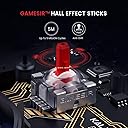
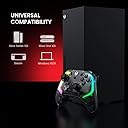
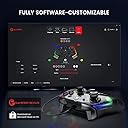
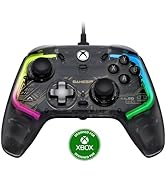
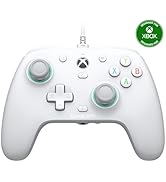
The GameSir Kaleid Wired Controller is a high-performance, wired gamepad designed for Xbox Series X|S, Xbox One, Windows 10/11, and Steam. Featuring Hall Effect joysticks and triggers for anti-drift precision, a detachable 3m USB-C cable for hassle-free connectivity, and four vibration motors for immersive feedback, it combines durability with ergonomic comfort. Customizable RGB lighting and ultra-low input lag (up to 1000Hz polling rate) make it a top-tier choice for serious gamers seeking reliability and style without battery worries.


| ASIN | B0CY1PJ2CN |
| Additional Features | Ergonomic |
| Best Sellers Rank | #3,262 in Video Games ( See Top 100 in Video Games ) #34 in Xbox One Gamepads & Standard Controllers #64 in PC Gamepads & Standard Controllers #68 in Xbox Series X & S Controllers |
| Brand Name | GameSir |
| Button Quantity | 1 |
| Color | Black |
| Compatible Devices | PC, Windows, Xbox One, Xbox Series X |
| Compatible Video Game Console Models | Microsoft Xbox One, Microsoft Xbox One S, Microsoft Xbox One X, Microsoft Xbox SERIES X |
| Connectivity Technology | USB C |
| Controller Type | Controller |
| Customer Reviews | 4.3 4.3 out of 5 stars (11,465) |
| Hardware Platform | PC, Xbox, Xbox One, Xbox Series X |
| Item Dimensions | 7.87 x 1.97 x 1.97 inches |
| Item Weight | 430 Grams |
| Manufacturer | GameSir |
| Manufacturer Part Number | B0CY1PJ2CN |
| Model Name | GameSir Kaleid |
| Model Number | Kaleid |
| Package Quantity | 1 |
| Power Source | Corded Electric |
T**E
GameSir?? YES SIR!!!!
- UPDATE!! The latest firmware and app version allow for setting the polling rate up to 1000hz!! This means the input delay can be shaved down to sub 1ms!! Best value PC gamepad on the market hands down!! - The T4 Kaleid is a great gamepad for many reasons, and not just because that sexy black PCB and clear shell! There are so many great features this gamepad has to offer as well as long lasting components and low input delay for a responsive experience. - The controller is recognized as an Xbox 360 gamepad in Windows 11 (XB1 in Steam) (X360 in reWASD) - 4ms(250hz) consistent input delay in PC mode (8ms gyroscope) - 8ms(125hz) consistent input delay in Switch mode (used reWASD to emulate X360 gamepad to measure) - Overclocking this gamepad did nothing as the jitter is already non-existent and polling rate locked - I did not test the other input modes for the gamepad - The hall effect joysticks in this gamepad are not made by GuliKit but feel very similar to the ones found on the 8-BitDo Ultimate and less like the KingKong 2 Pro - There are no anti-friction rings but the plastic around my joysticks is very smooth not catching at all - Using the software, you have total control over the deadzones of both joysticks - You can set the joysticks to raw mode through the software and completely disable the outer deadzone offering more precision however this will affect the circularity of the joysticks in both PC and Switch mode (PC mode turns from a circle to a circular square and Switch mode turns completely square) - With the outer deadzones capped to 95% I was getting near perfect circularity readings - Face buttons are super long lasting but will be subjective, I wish the plastic was matte, not glossy but I enjoy that they are cushioned and offer a satisfying click much like a mouse (they take getting used to because there is no feeling of bottoming out) - Capture button is only detected when in Switch mode - While I do prefer symmetrical joystick layouts like the DualSense offers, this gamepad is very comfortable for long periods of gaming (very lightweight and ergonomic) - The gamepad is wired only, but for me this was no issue as I grew up in the 90s and offers longevity as well as reduces e-waste - The included cable is very decent quality, thick and braided but keep in mind that the hole on the gamepad where the cable goes will only accept oval shapes - The D-pad is not terrible and for single inputs is very accurate however I still prefer the membrane ones found on the 8-BitDo Ultimate especially for games like Mario and Donkey Kong - The back buttons are limited to being mapped as the other controller buttons which is expected, but they are very easy to change on the fly without the use of software - Lighting effects have presets and brightness levels that can be adjusted on the controller without need for software - Vibration levels can be adjusted without software - ABXY layout can be swapped on the fly without software - You can easily change between input modes by holding the GameSir logo button and ABXY buttons (by default my controller goes into Switch mode when booting into Windows so requires me to manually change it or unplug and re-plug) - Can set hair trigger mode without the use of software (hold M button + L or R trigger for about 4 seconds) however this does not work in Switch mode probably due to Switch using digital triggers - The triggers are also hall effect and feel very smooth and can be completely adjusted using the software - Contrary to other people, I had only 1 issue where the software crashed when I was changing lighting effects on the controller and personally I love that the software is easy to use and not bloated like something you might find by Razer or Logitech - Overall, I just can't think of a better gamepad for this price point. I own a KingKong 2 Pro, 8-Bitdo Ultimate, and have upgraded 3 sets of joy-cons with GuliKit replacement joysticks, and these are the best feeling hall effect sticks on the market right now in my opinion. I've tried to go back to my DualSense Edge a few times since my purchase and I just can't, and for the price of just 2 replacement pot sticks from Sony you could be the proud owner of this masterpiece! Keep up the great work GameSir!
A**.
It's great. I've ordered another one so I can have two.
I've had the GameSir Kaleid since December 2024. I love it. I love the micro-switch face buttons and the Hall Effect sticks. I mostly use it to play third-person shooters and action RPGs. I set my dead zones on the sticks to 0.0 and I have no drift. It's a wired-only controller but I'd rather have a wired controller than deal with batteries and the cord is a nice length. Because I wore the pads off of the thumbsticks on my previous Microsoft Xbox One controller that I used on PC (and my Xbox 360 controllers on Xbox360 before that), I also picked up some GameSir thumbstick caps when I bought this controller so I don't wear out my thumbstick pads. I've never actually used it without the thumbstick caps so I can't speak to how well the thumbstick pads wear. I find the controller very comfortable for long play sessions and so far it has held-up well to the stress I put on it. (I play a lot.) I've been thinking about ordering a second one for awhile--I buy things I like as though they're going out of style--so when I saw yesterday that Amazon had it for a lower price than I paid before, I placed my order for another one. There's nothing wrong with the first one, I just want a spare for the future. Aside from connecting it to a family member's Windows 11 laptop once to update the firmware on the controller when I got it, I've been using the controller on Linux Mint. The below information relates to my experience using the controller on Linux Mint. I'm using it via Steam Input on Linux Mint 22.2 to play Steam games. On Linux I currently have no control of the RGB, but it's fine; I just forget about it most of the time. I didn't buy it for the RGB, I bought it for the Hall Effect sticks and triggers, and the micro-switch buttons and D-pad. After booting my Linux Mint system, the Xbox logo button is not lit-up and the analog sticks on the controller are not detected until I disconnect it and reconnect it. Then the Xbox logo button lights up and the analog sticks are detected until the next reboot. (The other buttons, oddly, continue to work fine whether I re-plug it or not, it's just the analog sticks.) Linux Mint doesn't see the controller inputs outside of Steam (I might be able to fix that but haven't bothered since I don't play any games outside of Steam) but Mint does see the headphone/microphone jack on the controller as a sound device when the controller is plugged in. I often use it as my preferred headphone jack since the controller has a long cord. (Holding the M button while pressing the D-pad up or down adjust volume.) Anyway, it's a great controller so I'm buying a second one.
G**A
Connection and Platform Compatibility
I purchased the GameSir T4 Pro because I already had a GameSir G3W and really liked the build quality, but wanted something wireless. I also wanted a full-sized controller with a few extra buttons. The two additional trigger buttons under the controller work well for N64 and Genesis emulation, as well as FPS games. Personally, I wish the controller were a little bigger. I previously purchased a SteelSeries Nimbus I returned almost immediately because it was far too small to fit my hands. Comparatively, the GameSir T4 Pro is more comfortable. Back when I was a teenager, I used to really dislike huge controllers - like the Dreamcast, original Xbox, and Sega Saturn controllers. They all felt like unwieldy platters I'd sooner eat off of than use as game pads, but even back when I had smaller hands, I could get used to them. As an adult, there's no getting used to controllers which are too small; the result is always accidental button presses and impercise control. While the GameSir T4 has required some getting-used-to, inaccuracy hasn't been a problem. Build quality is excellent - just like the G3W. The plastic is thick and the controller doesn't bend under stress. The button action is smooth, analog sticks are solid and don't drift, and the Dpad is very high quality. One thing I've always noticed with most 3rd party controllers is that the buttons generally slide around or stick in place. That's not a problem on Gamesir controllers. My only two gripes are that the RB and LB shoulder buttons are placed a little too high for easy access, and the M1 and M2 buttons underneath the controller are very clicky. Okay, I have one more gripe actually; Compatibility. I purchased the M4 to pair with an Nvidia Shield TV Pro, and while it does connect, it's pretty finicky. While the T4 Pro does list compatibility with Windows, Mac, Android, and Nintendo Switch, each connection is achieved in different ways, which can be a bit complicated. It actually comes with a radio frequency USB dongle that has to be plugged into Android devices to connect. That's not an issue with my Nvidia Shield because it features standard USB ports, but compatibility over Bluetooth will highly depend on which version of Android your device runs, and the included USB dongle may be troublesome for folks wanting to use the T4 Pro with a smartphone running a recent version of Android. I've also noticed that despite a full battery and connection to the RF dongle, disconnects are pretty frequent. If you set the controller down for more than a couple of minutes between game titles, it'll completely disconnect and need to be resynced. That wouldn't be an issue if the controller featured a quick-connect button, but GameSir has opted to use cryptic button combos to turn on the controller and connect it with various platforms. Each platform requires a different button combination, and it's tough to keep those memorized when swapping between Android, Windows, and game consoles like the Nintendo Switch. I think it's pretty rad the T4 Pro is compatible with so many different platforms, but getting the controller connected and keeping it connected are a bit of an annoyance. I've got to say, though - I was surprised when I opened the box and found out the T4 Pro does indeed include a USB-C charging cable. That's one of the many reasons I've returned previous controllers. If I'm spending $35-50 on a game controller, I don't want to make a second trip to the store for an additional $20 charging cable. Kudos, GameSir! Thank you for being considerate! The Gist: All things considered, I think the GameSir T4 Pro is an incredibly well-built controller and features an attention to detail rarely found in other 3rd party game pads. I could easily be fooled into thinking the T4 Pro was manufactured by a 1st party company like Nintendo, Sony, or Microsoft; it feels that good. Connecting the controller could be easier, and it'd be nice if the RF could work across the 5GHz band since 2.4GHz is usually pretty saturated in tech-savvy households, but I can't say I've ever experienced a disconnect mid-game. I have noticed some input lag on specific platforms like Android, but I believe that has more to do with my Android devices then the controller itself. It's neat that the T4 Pro supports built-in button-remapping on specific platforms, but good luck doing that without reading the manual every time. I would suspect most players are going to opt for a software remapping solution instead. I do find it a bit troublesome that there's a potentiality slipping and hitting the wrong combination of buttons while in a game could result in accidental button remapping. What's worse is that once the controller is accidentally reprogrammed, there's no simple button combination to reverse the effect. If you're on-the-fence about a purchase, I would highly recommend GameSir's entire product line; not just the T4 Pro. I've purchased multiple controllers from GameSir, and they've all been a joy to use.
R**N
No regrets. Will buy again if needed.
Totally worth it. Better than console brand controllers in every way. Be sure to download the Gamesir nexus app and update the firmware and you won't have any issues. You can also calibrate the joysticks and triggers easily in the app. My primary use is only on Windows 11 gaming PC. Pros: - Responsive and spam able x,y,a,b buttons. - Triggers and joystick can be calibrated to avoid dead zones via the Gamesir Nexus app - Triggers are accurate as advertised. You can even test it in the app, down to 1% pressure/usage. - Price is better than overpriced console controller - LED's look great - USB cord is long - Great vibrations. Just as good as console controller. No noticeable difference. May even be better. Cons (if any): - I personally don't like buttons behind the controller which I accidentally hit while holding but is an added feature that some people may find use. - Can be a new experience for those used to console controllers. Not sure if these buttons are exactly mechanical but they are as responsive. Some may confuse this with cheap feeling (chiclet style?) x, y, a, b buttons.
T**X
Built to last..... literally
It's 2026, I've purchased since this gamesir a mamba with hall sticks, 8-bit snes and Xbox controllers, PB tails...still till this day this game sir blows everything out the water, yes there is not hall effect sticks but for the amount of stress I put on the controller from assestto to street fighter..still works like new I use the gamesir as a main for my steam deck which I use daily and as a second controller for my pc
B**Y
It's not terrible, but it's not perfect either. Switch mode can be a bit disappointing
This review was rewritten 6 months after purchase, to add the benefit of hindsight and also to edit down for conciseness and clarity FUNCTIONALITY: 5/5 There is nothing fundamentally wrong with any of the parts on the controller. In particular it has a very good D-Pad, which is a part that is often neglected and doesn't work well in most cheap controllers. Its D-pad operates precisely and has a "clicky" feel that gives good tactile feedback. If you use the D-Pad heavily and need precision, this may be a selling point. DURABILITY: 4/5 One of its main selling point uses a Hall Sensor instead of a potentiometer in the analog sticks and triggers, preventing drift and greatly extending the lifespan of those components. Does that mean the controller is super durable? Well, unfortunately a chain is only as strong as its weakest link, and the face buttons seem to have unexceptional (though not terrible) durability. Six months in they still work, but A and B are starting to feel and sound noticeably "creaky". This creaky feeling is a sure sign they're starting to wear out and it's only a matter of time before they stop working right. I'm still giving it 4/5 in this category since it did survive 6 months of one of the most button-intensive workloads a controller can be subjected to (modded Celeste). So maybe 6 months is all that could be reasonably expected, and games that don't use the face buttons as heavily probably won't wear it out nearly this fast. NINTENDO SWITCH COMPATIBILITY: 3/5 I mean... it can connect to the Switch. And it even has a functioning gyroscope, so it can technically play any switch game the Nintendo Pro Controller can. HOWEVER, the T4 has analog triggers similar to an Xbox style controller instead of simple button-triggers like a Switch controller. For times when this is unnecessary and gets in the way, the T4 normally offers a "hair trigger mode" that disables analog functionality in favor of making the triggers as sensitive as possible... except, the hair trigger mode DOES NOT WORK AT ALL in Switch mode. Attempting to apply the "enable hair trigger input" as described in the manual will fail in Switch mode; instead it just sets the trigger as "turbo" (auto-mash) which is not really desirable. This makes this controller sub-optimal for some really demanding switch games that use the trigger inputs a lot, such as Splatoon 3. CORD LENGTH: 2/5 For a purely wired controller -- which needs its cord to be used at all, not just to recharge a battery -- the included 2 meter cord really isn't long enough to play in front of a television unless it's a small one. Thankfully it uses a detachable USB-C cable, and replacing it with a third-party 10ft controller cable (JSAUX brand) entirely mitigated this issue. But replacing the cord obviously costs extra money, so still really not ideal. LINUX COMPATIBILITY: 4/5 I probably shouldn't base a rating on this since it was never advertised as supporting Linux at all. Still, it works pretty much perfectly both in Android mode and in the (undocumented) generic DInput mode which can be accessed by holding down "B" and the Home button. On the other hand, trying to put it in Switch mode and run it on the Switch driver actually somehow crashed the entire system, forcing a hard reboot. I've never seen anything like that happen with any other Switch controller (which have always worked fine for me), or with any other kind of USB peripheral for that matter (usually if they don't work they fail gracefully without crazy side effects). So I have no idea how that can happen, but Linux users should definitely avoid pressing Home+Y to enable Switch mode on this controller OVERALL RATING: 3/5 It's not a terrible controller, but the advertised Switch mode being kind of a second-class citizen was a real disappointment. Also the bundled cord was inadequate and forced more money to be spent, and the durability wasn't quite what it was cracked up to be. But underneath its drawbacks it's still a pretty decent controller for the price, just due to the absence of most of the blatant severe defects you typically see in cheap controllers; it can still provide truly excellent precision control for some use cases.
N**K
One of the best controllers Iโve ever used, with a few very small issues
This controller is amazing, and Iโve been through pretty much all of the paces as far as controllers for Xbox goes. Elite Series 2, Scuf, Gamesir G7, modded original controllers, and even some PC controllers using an adapter. This beats ALL of them. The Elite Series 2 and Scuf are still the best for the โlook and feelโ, but as for the function, this controller is the best. The buttons are mechanical, which feel amazing to me. This difference means that instead of the button slowly depressing and then at some point making contact and giving input, a very specific amount of weight will make the button go down immediately, potentially giving you a tiny boost in reaction time. All of the buttons are mechanical, except for the home button, remappable buttons on the back, and the thumbstick buttons. Next, the thumbsticks and triggers. They are next level. The part youโre going to notice most is the thumbsticks, as youโll be able to lower your dead zone in all games to zero or 1 without getting any drift. That is simply impossible on a normal thumbstick, since the standard margin of error for the dead zone of those style sticks is usually around 7%, meaning youโll get drift in some direction anywhere under that number. Having no dead zone means every single tiny movement on the thumb stick is very accurate, allowing you to control recoil and aim better. Third, the look and feel of the controller is actually really good! As I said before, it doesnโt beat the Elite 2 or Scuf at all, but the clear plastic is surprisingly thick and has a quality feel. The mobo is on black PCB which looks nice. And the lights are an added touch, with a ton of customization, all the way down to making multiple color โphasesโ for one lighting profile so you can make all sorts of patterns and stuff. Overall, this controller is going to be the #1 all around controller in my books for a while, probably until Gamesir releases something else or maybe if Microsoft actually decides to make an Elite with hall affect sticks. We shall see There is, however, one critical flaw. On the current firmware, my controller sometimes turns my Xbox back on when I shut it down. It seems to happen intermittently so there may be a specific thing Iโm doing that Iโm not aware of, but that means it could probably happen to you too. The only way to stop this loop is by unplugging the controller. Furthermore, when the console is successfully turned off, the controller wonโt wake the console up from sleep unless you plug it in. Pretty annoying but a price Iโm willing to pay for a great controller. Iโm hoping this could be fixed with a firmware update, but weโll have to see.
B**N
A comprehensive review.
Other controllers I own that I will be using as a baseline for comparison: Xbox One, DS4, 8bitdo Pro2, 8bitdo Ultimate. I bought this controller because I wanted something with the Xbox layout and a gyro (for Zelda). They're pretty hard to find and this one had good reviews and a good price, so I went for it. I will analyze every aspect of the controller piece by piece. Starting with each button. Joysticks: Best feeling joysticks I've used on any controller, basically identical to the 8bitdo Ultimate. I think the Hall Effect sticks just feel better. Also the plastic ring around the edge of the joystick is much smoother than other controllers, so sliding the joystick along the edge feels very nice. Face buttons: They have a soft/mushy downpress, and a clicky uppress. As a result they feel very odd to push. Unlike the joysticks I would say these are the worst face buttons I've felt out of all the controllers. Pretty terrible! Also the buttons themselves are noticably smaller than the other controllers so they feel weird on my fingers. That being said, it's not a big deal so I can mostly just ignore it. If you're looking for a snappy down and up press, this is going to disappoint you! Triggers: Feels the same as Xbox One and 8bitdo Ultimate. Very nice. Better than the DS4 and 8bitdo Pro2. I have no complaints here. They are analog and hair trigger options available. Shoulders: Very, very snappy and loud. The down-press is also very deep. Nothing to really praise or complain about here. D-Pad: Wobbly and loose. Like the face buttons, this is the worst I've felt. It's fine for basic stuff like controlling inventory in games. I DO NOT recommend using this D-Pad for movement or anything like that. Get an 8bitdo instead, they are famous for amazing D-Pads and I can tell you with certainty they are way better than this one. Back buttons: These 2 buttons are basically useless. Windows detects the T4 Kaleid as an Xbox 360 controller, it does not detect the 2 back buttons at all. You can only rebind them to another button on the controller using the Kaleid software. But why? Start/Select/etc: The left button is positioned behind the L-Joystick making it uncomfortable to press. You have to stretch your left thumb over the joystick to push it! You can see what I'm talking about by looking at pictures of the controller. Such a dumb design. I ended up rebinding the 2 back buttons to be Select/Start instead because they are too difficult to press. Who designed this controller? Joystick Buttons: These are very, very stiff and hard to press. To press them, I have to grip the controller really hard with my hands, and it often causes me to accidentally push the back buttons as a result. Plastic: The entire housing is a smooth plastic, it gets very slippery if your hands sweat. It's way more annoying than all my other controllers. If you have sweaty hands, avoid. Grip: There is a lined grip on the back of the handles, but the gap in the grids are so close together it doesn't serve any purpose. It just feels like a "ribbed for your pleasure" situation, it just scrapes your fingers and doesn't actually provide any grip at all. RGB: There are 2 light strips running along the left and right side of the controller. There are tons of options to customize them in the Kaleid software but I just turned it off. If you care about RGB it's a huge plus. Gyro: Works in Yuzu, did not test in CEMU or any other app. To use the gyro you must switch the controller to Nintendo Switch mode. By default, the gyro is mapped to the R-Joystick. You have to *disable* the gyro in the Kaleid software, and then it will work properly in your emulator. I know that doesn't make sense, but trust me it works. The gyro setting in the Kaleid software controls the R-Joystick mapping, not the gyro itself! Dumb. Overall I think most people are better off getting an 8bitdo Ultimate instead of this controller. It's better in nearly every way. In my personal preference the Kaleid is my favorite controller out of all of them because it does a few specific things that I want better than the others. But for everyone else I can't see them preferring this.
T**P
Great controller
Love GameSir controllers, replaced by Xbox ones as I must be very unlucky as all of them kept disconnecting. Very comfortable and high quality, works great
R**Y
Gamesir T4
The controller works perfectly. Great value for money
R**N
Well worth it.
I was recommended this controller by an American i play Division 2 with on the PC, and i assumed it was a 'Turbo Fire' type of controller, as in, you just hold the button down and semi-automatics like pistols and rifles would fire like fully automatics do. Sadly, it's not that type of 'full auto'. Forget about the LED lighting. It's nice, but it's not what you're using to play your games. It's just a nice touch. I have mine set to 'solid white' which of course as with any other LED lighting, gives off a very light blue tint, which is fine. My only issue is with the software. The controller still works as it should without the software, but if you want control lighting and set trigger options, and just see what is actually going on, you need the software. Not everyone has a Microsoft store account, and not everyone can get around downloading the files from their own site and cobbling it together. I downloaded it from their site first, and it didn't work. The program wouldn't start at all. Then i tried it from the Microsoft store, and again, it didn't work. Then for some strange reason, i booted up my computer, and all of a sudden, it works. I don't even know LOL With everything up and running, i have to say, depending on how long it lasts of course, if it meets expectations, then i'd buy another one of these controllers instead of an Xbox controller. Also i have to say, for a "Made In China" product, to not be put off by this at all. It's very well made, and i have to also give credit to the sticks, triggers and buttons. Compared to an Xbox controller for PC, this beats the Xbox controller easily. The lentgh of the cable is great too, i actually can just sit back in my chair, which is around 7ft away from the big screen TV, and not worry about the cable one bit. This whole idea of people being wary of products "Made In China" has always been silly. It has nothing at all to do with China or the Chinese folks. Instead, it has everything to do with the Western companies who order things to be built in China to whatever specifications they desire. The complaints everyone has about products made in China, only exist because companies are the ones cutting corners, ordering products to be built with lower quality parts and materials. and that's that.
B**B
Low Latency โ Hall Effect โ
Some interesting choices but a very capable controller. I hope it lasts many years and so far, I have no reason to believe it wouldn't. The latency is amazing. XInput reports 0.955ms. I purchased this on the latency claims and the controller delivers. I have now swapped over from the Gulikit KingKong 2 Pro for the 90% reduction in input latency that is definitely noticeable. I opted for the wired T4 Kaleid over the latest wireless Gamesir offerings as they are limited to 250hz polling I believe. Joysticks and triggers are great, smooth, no resistance, definitely hall effect. All the face buttons are micro-switches I believe. So ABXY feel like mouse clicks instead of a standard rubber dome controller face button. Weird but weighted nicely and very responsive. No complaints. The D-Pad switches are softer, feels more like a rubber dome switch setup but all feels good. The rear macro buttons can be assigned to another button or a series of buttons on the fly. Also clicky micro switches but placed nicely and very responsive. Build quality is great. The textured and gloss plastic all looks and feels great. No soft touch coatings to deteriorate and become sticky. The cable is a standard, replaceable type C cable. The type C port is also recessed quite far into the body of the controller to protect the port from cable stresses. Finding a replacement cable may be more difficult but the port should be protected from most drops etc. The screen printing on the exposed internal circuit boards looks great. A shame that the actual electronics aren't visible but still looks cool. Lighting is bright and colourful, maybe a little excessive but looks great. I setup a slow light profile in the software with a max brightness of 5% on each LED. Less blinding now. The windows software just about works. Windows thinks it has crashed every time it opens. Once it loads and recognises the controller, click into a profile and set the polling rate to 1000hz! The software holds 4 profiles and only one is loaded onto the controller at a time. Each profile can remap each button, adjust joystick and trigger output range (dead zone), vibration intensity, adjustable gyro output and have 4 lighting modes. If you want the reliability of a wired controller, I have found nothing better then this one so far. ORDER PLACED 29 September 2023 TOTAL ยฃ35.69
L**E
Satisfied
So far so good! I just got this in the mail. It arrived super fast. The lights are vibrant. It's practically the same size as my old controller (maybe like a centimetre smaller), as shown. Fits well in my hand. The cord it comes with is super long (maybe like 10 ft). The sticks feel good. The buttons are satisfying to click. I haven't tried it in game, so I'm not sure how well it works for that but it's a major update to my last controller (as it had controller drift).
Trustpilot
2 weeks ago
1 month ago