Buy anything from 5,000+ international stores. One checkout price. No surprise fees. Join 2M+ shoppers on Desertcart.
Desertcart purchases this item on your behalf and handles shipping, customs, and support to Spain.
📚 Elevate your reading game—color, comfort, and waterproof freedom in one sleek device!
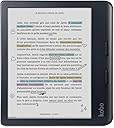
The Kobo Libra Colour is a 7-inch glare-free color E Ink eReader featuring a high-resolution Kaleido™ 3 display, IPX8 waterproof rating, and 32GB storage capacity. Designed for professionals who crave distraction-free reading, it offers ergonomic page-turn buttons, customizable fonts, and dark mode. Compatible with Kobo Stylus 2 for colorful annotations, it supports thousands of eBooks and audiobooks, making it a versatile, durable, and stylish companion for every reading journey.


| ASIN | B0CZXX465Z |
| Battery Average Life | 4 Hours |
| Battery Description | Lithium-Ion |
| Best Sellers Rank | #8,889 in Electronics ( See Top 100 in Electronics ) #30 in eBook Readers |
| Bluetooth support? | No |
| Brand | Kobo |
| Built-In Media | User Manual |
| Color | Black |
| Connectivity Technology | USB |
| Customer Reviews | 4.4 out of 5 stars 3,714 Reviews |
| Display Technology | Electronic Ink |
| File Format | Epub,Epub_3,FlePub,Pdf,Mobi,Jpeg,Gif,Png,Bmp,Tiff,Txt,Html,Rtf,Cbz,Cbr |
| Human-Interface Input | Buttons |
| Item Weight | 7.05 Ounces |
| Manufacturer | Rakuten Kobo |
| Memory Storage Capacity | 32 GB |
| Mfr Part Number | N428-KU-BK-K-CK |
| Model Name | Kobo Libra Colour |
| Model Number | N428-KU-BK-K-CK |
| Native Resolution | 1264x1680 |
| Night vision | No |
| Other Special Features of the Product | Adjustable Front Light, Anti Glare Screen |
| Processor Speed | 2 GHz |
| Screen Size | 7 Inches |
| UPC | 681495009473 |
| Unit Count | 1.0 Count |
| Warranty Description | Manufacturer Warranty |
B**S
If you know and accept the limitations of this color eink panel, then this is a great ereader
Kobo brought us the tunable backlight, meaning the color temperature is adjustable from warm to cool. This is great for evening reading and it washes evenly without causing eye fatigue. I also like the wide variation in dimming ability so you can get the brightness just right in darker reading environments, which is crucial for us evening readers who may share a bed with earlier risers. It is easy to add files from a private library of PDF or EPUB files (Calibre or drag-and-drop) and a charge can last many weeks depending on how you use it. I find the physical form-factor to be easy to hold in either hand, and it automatically changes its justification to match your rotation. For those looking for the perfect color eink display to read graphic novels with, this isn't quite it. The colors are muted and will not do the artwork justice. This is a limitation of the technology, however, and at this price point you will not find an actual eink display that will outperform all features. If you are shopping for an eink reader you likely already know the difference between a true backlit LCD display and an eink panel, so this isn't likely a surprise. That said, I do appreciate the extra color dimension when viewing the thumbnails and seeing the covers in color does bring a little more joy to my inner geek. I've owned several older Kobo ereaders that hovered in this price point and I can say that this one has been my favorite. It is responsive with font-size adjustments, page turns, book loads, and waking. While the battery life is good, it will discharge if you leave it on standby/ idle for extended periods (weeks) without use or charging. Overall, for me this has been a great product.
P**A
GET IT, YOU WON'T REGRET IT
December 2025: I have only had this thing for about one week so take my review with a grain of salt. I ABSOLUTELY love it! I think it is one of THE best purchases I've ever made. I did a lot of research on this device before I bought it (not so much on other e-readers) and I found that all the features that this thing had to offer was something I absolutely wanted! As you can see I've already added over 500 books to my reader and it still has 18.5GB still available for content! And I added a lot of manga volumes so I'm very happy there's still a lot of space left! (FYI, total storage is 32GB) I even added Sudoku books, coloring books, and crossword puzzles on this device in hopes of using it instead of bringing my Sudoku out to places since it can be written on, to be honest I don't know how well these types of books will work as I don't have a pen yet to test out the writing feature but I imagine that it'll work just fine. The only thing that might not work as well as I hope MIGHT be the coloring feature, as this isn't a coloring device it's a "mark up and annotate" device, but I figure I like to just fiddle around sometimes while I'm out and about and I don't need something perfect to color, I just need to keep my hands busy. And if the coloring doesn't work as I planned I bet the puzzles and Sudoku will work just fine for times I don't necessarily want to read. But I have hundreds of regular books and manga's I can read if all else fails! So I'm not worried! I wanted an e-reader so I don't spend so much time on my phone doom-scrolling. I also thought this might save the wallet and physical space in the long run as I won't be buying as many books and having to store them since this device connects to my local library and I can check out books! There's a couple things I don't like about this reader, when I imported my e-books all the covers were all sorts of different sizes, and it drove me absolutely nuts, so I stuck my books in Calibre and had all the covers sized as 1072x1448, if you have Calibre get the "resize cover" plugin and select all your books and set it to this size and it'll automatically set all your covers to this size and that way it'll fit perfectly on your screen and also make all the covers the same size when you are browsing your library. As for the battery life, I really need to let it drain the majority of the way down and then charge it again to actually start seeing how accurate this device is in terms of how long it'll last. Because this device is so new to me and I'm just so excited I think the device's battery drain is a bit more at the moment, for example, I've only read on it for a total of 8.5 hours and I charged it pretty much completely yesterday but the total reading time was in the span of the last few days except this morning it's already at 75% so I think I've just been doing a lot of fiddling around with it to make the battery drain. haha. So I'll update battery later. I love the physical buttons on this device and the fact that it also is a touch screen. It gives me multiple ways to turn the page. I mainly use the buttons as I'm more comfortable with those than touching the screen, I do a lot of reading in the bed and the buttons are great for lazy page turning, I just position my hand on a button and get comfortable and it works perfectly. I love the size of this thing, it's not too big and not too small either, and I can zoom in or out on books, it also remembers the zoom for each book, for example, if I zoom up really close to my Sudoku puzzle and then go to a regular book it won't be super zoomed up, which I really appreciate this small detail! Because that would be super annoying to zoom back and forth from book to book. I will come on here and update my review when I get a pen and tell you how well it works on my stuff. UPDATE (still December 2025): I got the Metapen M1 and have been using it with my Kobo, I love writing on it but the only thing I don't like is the palm action, I have switched it to "swipe to turn page" and also turned off "pinch to zoom" and my palm still reacts to the screen which is very annoying but other than that the pen with the device is great! As you can see in my images I do Sudoku on it when I don't want to read. I also have coloring books on there, just take picture of your coloring book pages and stick it in a document, I use Canva at 1072x1448 document size and then export the document as a PDF and stick it on the eReader. As you can see I colored very little of the coloring page, it is great but I don't see myself doing too much coloring as I don't have that much time on my hands but have it on there JUST IN CASE I am bored, haha. I've even added habit, gratitude journals just to help me keep track of things since I plan on carrying this device with me EVERYWHERE I go. It's almost like my new phone without all the notifications and doom-scrolling social media stuff. After using the device for a bit longer I noticed it would be nice if they added just a LOCK all rotate feature, meaning they do have a lock rotate but it only locks orientation, like if I turn the device sideways it may not rotate but if I turn it completely upside down it will rotate, sometimes I don't want it to rotate AT ALL. Also, another cool feature would be to JUST have pen usage and turn off all touch controls and only use buttons to turn page and then using the pen to do stuff and if I want my touch controls back on then a button on the pen could pull up the menu and then I can just navigate to the "turn touch back on" type of thing....but I imagine this might be hard to do, I just hate my palm reaction so much, I do have one of those drawing gloves but the material still reacts to this screen so that didn't help much and I hate writing in a hovering position, my handwriting looks awful if I have to hover. But overall I still absolutely love this little e-reader and I hope it lasts me for MANY MANY years!
K**J
I love everything about this!
I'm a long-time Kindle user, and my last three Kindles have been high-end: the Voyage, Oasis, and Scribe. The bungled release and poor handling of the Colorsoft made me look into Kobo after I decided the Scribe was a little big for casual reading (I still love it, though). I was a little concerned that after years of metal and glass Kindles, I'd be disappointed in something "less," but this was not the case once I got the Libra Colour in my hands for the first time. The build quality is excellent and I like the form factor. I love the page-turn buttons; I found I missed them after I got rid of my Oasis. Buttons aside, the form factor and curved-up edge where the buttons reside make this a joy to hold in any orientation, including landscape. While I prefer the flush screen of my Kindles to the slightly recessed screen of the Libra, it's a minor complaint, and one the page-turn buttons mitigate. The plastic feels sturdy, the device is lightweight without feeling cheap, and I like the location of the power button and USB port. The Kindle Scribe made terrible choices for power and USB, in my opinion. The fact that Kobo made this device intentionally repairable is a huge plus for me, though it feels durable enough I doubt I'll ever need to, barring major accidents. Coming from Kindle, figuring out the user interface wasn't a challenge. It's not identical, but most of the conventions are close enough that in 10 minutes of poking around I had everything set up as I wanted. I think the UI is better than Kindle, overall. Once I got my Kobo account set up, purchasing books from the device was simple. The lighting temperature (from cool to warm) has a broad range, as does the overall brightness. The color presentation is excellent. No, it's not super saturated and vivid like an OLED or LCD screen, but it's not supposed to be. I vastly prefer the color presentation on the Libra to my wife's Kindle Colorsoft. So does my wife. Text is clear and easy to read, if not quite as sharp as black-and-white eInk screens. I knew this going in; it's just how color eInk panels are currently. Again, I think the Libra's text looks better than the Colorsoft's. It does feel slightly slower than the Colorsoft, which I admit feels extremely snappy. But in practice, I don't really notice it unless I'm comparing it side-by-side. The Kobo Store experience falls behind Amazon's shopping experience, but I expected this. You won't find any books that are part of Kindle Unlimited on the Kobo store, as Amazon requires KU books to be exclusive. Otherwise, there's a vast selection, and certainly, the bestsellers and popular books are there. I find it a little harder to find what I'm looking for on the Kobo store, but part of that is my familiarity with shopping on Amazon and my newness to Kobo. Honestly, this was my biggest concern when switching devices and platforms, but overall, it was pretty painless. All in all, I love this device.
P**L
Great e-reader with physical buttons, good connectivity, and easy user interface
I bought this to replace my old Kindle Oasis, when Kindle announced there would be no more physical buttons. Physical buttons are just nicer to use, and are required if you are wearing gloves. But it's also nice that it's easy to side load my ebook library, by just connecting to my laptop with a USB C cable. The screen is great, and the resolution is high enough that maps are usually usable. While the colors are dull, they are surprisingly helpful, and most illustrations "work". The user interface is very intuitive -- I used to poke around to find how to change the font size, this is just a two-finger stretch, like most screens. The brightness control is also intuitive. I like that you can organize books, although it would be nice to have more on-device search and sort functionality. Once or twice it has crashed and I had to re-import all my books, but the interface made that easy. I've also had trouble taking out library books that I had to wait for, but my guess is that that's because my Kindle is still my primary library app, and something gets confused.
B**D
Physical Buttons and Waterproofing Sold Me
I bought this because I needed an e reader that could handle getting splashed at the pool, in the tub, or during travel, and I wanted physical page turn buttons. On those fronts, it absolutely delivers. The screen includes a color layer, but for my use, it hasn't really come into play. I mostly read black and white text, and since I keep the device in a case, even the color book covers aren't front and center. Some people might find the color useful depending on their reading habits or apps, but for me, it's not a factor either way. What I do appreciate is the backlight. It works just as well as my older generation Kindle Paperwhite, and I like that this device includes a night mode that shifts the light to a warmer tone. It makes reading in the dark much more comfortable. The display isn’t quite as sharp as the Paperwhite, and the color layer adds a slight texture that gives a faint screen door effect. It’s noticeable if you’re looking for it, but not a dealbreaker, and I got used to it quickly. Where this reader shines is in durability and daily use. I’ve taken it on plenty of trips, tossed it in bags, and finished a lot of books without issues. For the around 230 dollars I spent it’s been well worth the price. I don’t use the pen, so I can’t speak to that feature. Personally, I’d love a version of this device without the pen and color tech to cut costs and maybe improve clarity, but what’s here works fine. It’s not pocket friendly, especially in a case, but might fit in a cargo pocket if needed. I usually carry a messenger or satchel, so portability hasn’t been a problem. If you’re looking for a water resistant ereader with physical buttons, good lighting, and solid performance on the road, this one’s worth considering.
E**C
Open, featureful, lightweight, and powerful
Open: This reader doesn't lock you into any particular vendor. It supports fully offline handwriting recognition for notes. It's compatible with the metapen. It can show library books from Libby or CloudLibrary. It allows direct transfer of color PDFs, epub, and CBR files, so you can buy content from any of the open format stores including from Humble Bundle. Direct transfer is bidirectional and requires no special software: the Kobo shows up as a storage device and does all the conversion work on the device itself after you eject it. Color: The color reproduction is similar to other e-ink readers. It's muted but works fine for comics, diagrams, and illustrations. e-ink technology isn't for photographs, so set your expectations accordingly and you won't be disappointed. Accessories: get a metapen and Kobo's Notebook Cover. The third party covers are bulky, Kobo's is not. Summary: It works with open formats. It can be used with or without cloud features. The battery lasts forever. The interface is easy to use. The color display is as good as possible for e-ink. Kobo's Libra Colour better than the colorsoft it replaced is every way.
S**I
Dead Pixel Galore!
I will air my grievance early, then get into details: I’ve ordered THREE Kobo Libra Colour 2’s and all three have had dead pixels. After doing some research and reading other users’ experiences, I discovered many, MANY people experiencing the same issue. Some have ordered 5+ devices, all with dead pixels. From what I’ve gathered, there’s a set amount of dead pixels that manufacturers allow per device. If this is true, as consumers, we deserve to be told that!!! There’s only 7 inches of screen. I don’t understand why a flawless display on a NEW device is impossible to achieve. 2/3 that I ordered had large dead pixels near the center of the screen which would’ve been incredibly distracting to see while reading - ESPECIALLY if you’re a user of dark mode! Completely unacceptable. It concerns me that Kobo’s quality control is this lackadaisical. To those wondering, the pixel IS noticeable, especially in certain lighting or angles. I have not gotten used to it with time. Some days I notice it, some days I do not. But I am always aware that it’s THERE. For a new device, it’s a huge letdown. On to the good news… I am a first time e-reader. If you are new to this world as I am, be prepared for a device that feels and responds differently than a tablet. The screen looks a bit different - like a cross of an actual page of a book and a screen. This is much easier on your eyes over long periods of time than a phone. However, the smallest particle of dust or debris will cast a shadow beneath itself, making every imperfection noticeable. I don’t think this is a Kobo related flaw, it’s just a different device than a phone/laptop etc. Everything takes just a fraction of a second LONGER. Powering on/off, turning pages and so forth. The page turning buttons are effective and responsive. You can also turn by swiping or tapping, or modify your settings to only turn the page with one of the aforementioned modalities. You can also change the orientation of your display as you see fit. The device itself is comfortable to hold and fairly easy to travel with. I recommend getting a sleep cover as opposed to a screen protector, which may make the device less responsive to touch. The sleep cover puts the Kobo to sleep every time you close it while also keeping your display protected. The battery life is just okay for an e-reader. It certainly will not live up to the reports of Kindle users who go weeks without charging theirs. I believe I’ve gotten somewhat prolonged battery life by disabling wifi. You can set your bedtime and auto dimming, which automatically reduces white light as your bedtime approaches. I don’t feel guilty about reading late into the night knowing that I’m not further exciting my brain. You can also change the font itself, size, margins and more. You can even download new fonts! I have taken to finding books in epub form on my Macbook and converting them to kepubs with Calibre. It’s seamless and painless. Kepub files will show your progress percentage and hours to completion of your book. You may also subscribe to Kobo plus or use overdrive with your local library. I took to buying my own epub files, as the wait for any well known books through my library’s overdrive are 20+ weeks. I love that you can adjust brightness by sliding along the left side of the screen. It allows you to look up a word in your book without being connected to wifi. I haven’t purchased the stylus, but even without, you can highlight words. The colors are muted but still give the book life! It’s a pleasure to have color, especially in graphic books. I have had it freeze once or twice, but nothing infuriating. All in all, it’s a very capable reader and easy to use. I’m just highly disappointed with the imperfect display.
G**N
Amazing Device, bye bye Kindle!!
First - I’ve ordered 2 items from BlueProton (KLC and the Kobo Stylus) and both came earlier than expected, which is always nice. The E-reader: amazing!! The UI is a thousand times better than my Kindle Paperwhite SE. It’s fast, the quality/screen is beautiful, and best of all - you’re not locked into the amazon bs. Love the color and using the stylus for notes, highlighting, and crossword puzzles. Honestly haven’t been able to put the thing down. Yay reading!
B**G
Performance
Very good color ereader . Light weigh, the performance 2 times faster then the kobo libra 2 (b/w)
M**T
La cura del dettaglio incontra la libertà del tuo mondo di lettura
Il Kobo Clara Colour è stato una sorpresa: devo dire che, dopo averlo provato a fondo, ha superato le mie aspettative, rivelandosi un compagno di lettura eccezionale sotto diversi aspetti. Un Software che Fa la Differenza: Il vero cuore pulsante del Kobo Clara Colour è il suo software, che si distingue nettamente dalla concorrenza. Riconoscimento della Scrittura Eccellente: Una delle funzioni che mi ha più colpito è l'incredibile precisione nel riconoscimento della scrittura. Prendere appunti a mano, evidenziare passaggi o disegnare schizzi è un'esperienza fluida e intuitiva, quasi come scrivere su carta. La latenza è praticamente inesistente e la resa grafica è fedele, rendendo questa funzione non un semplice extra, ma un valore aggiunto concreto per lo studio o la lettura analitica. Interfaccia Organizzata e Intuitiva: L'interfaccia utente è un modello di chiarezza e funzionalità. Navigare tra i menu, gestire la libreria o accedere alle impostazioni è un gioco da ragazzi. Ogni elemento è dove ti aspetti che sia, e la logica di organizzazione dei contenuti è impeccabile, permettendoti di trovare rapidamente ciò che cerchi senza distrazioni. Ergonomia e Materiali di Qualità: Fin dal primo contatto, il Kobo Clara Colour trasmette una sensazione di solidità e cura nei dettagli. I materiali utilizzati sono estremamente piacevoli al tatto, conferendo al dispositivo un aspetto premium che si sposa perfettamente con l'ergonomia studiata. È leggero ma robusto, facile da tenere in mano per lunghe sessioni di lettura senza affaticamento. La parte posteriore testurizzata offre un'ottima presa, scongiurando scivolamenti accidentali. Il design compatto e bilanciato contribuisce a un'esperienza d'uso estremamente confortevole, rendendolo l'ideale per la lettura in mobilità o comodamente seduti sul divano. Libertà nell'Approccio ai Contenuti: Uno degli aspetti più apprezzabili del Kobo Clara Colour è la sua filosofia aperta per quanto riguarda l'approvvigionamento dei contenuti. Niente Ecosistemi Chiusi: Non si è costretti a un unico store o formato proprietario. Questa libertà è un enorme vantaggio, permettendoti di caricare facilmente eBook, fumetti o altri documenti da diverse fonti, senza preoccuparti di compatibilità o DRM restrittivi (ove non presenti per legge). Questo apre un mondo di possibilità, ampliando a dismisura la tua libreria digitale. Oltre le Aspettative: Cosa Rende il Kobo Clara Colour Unico Oltre agli aspetti già menzionati, ci sono altri dettagli che arricchiscono l'esperienza d'uso e confermano il Kobo Clara Colour come un eReader di punta. Il Colore: La resa del colore, pur non essendo brillante come un tablet, è sorprendente per un e-ink. Le illustrazioni di fumetti, le copertine dei libri o i grafici in PDF prendono vita con sfumature delicate ma ben distinguibili, aggiungendo una nuova dimensione alla lettura senza compromettere il comfort visivo. Batteria a Lunga Durata: La durata della batteria è eccezionale, una caratteristica fondamentale per un eReader. Puoi portarlo con te per giorni, anche settimane, senza la preoccupazione di doverlo ricaricare frequentemente, il che lo rende perfetto per viaggi o lunghe sessioni di lettura. Resistenza all'Acqua: La certificazione di resistenza all'acqua aggiunge un ulteriore livello di tranquillità. Leggere a bordo piscina, in vasca da bagno o in spiaggia non è più un problema, liberandoti dalla preoccupazione di schizzi accidentali. In sintesi, il Kobo Clara Colour è un eReader che non si limita a promettere, ma mantiene le sue promesse, offrendo un'esperienza di lettura superiore. La combinazione di un software intelligente, un design curato, materiali di qualità e la libertà nell'accesso ai contenuti lo rende uno strumento indispensabile per ogni appassionato lettore. È un investimento che vale la pena fare per chi cerca un dispositivo affidabile, versatile e veramente appagante.
M**É
geweldige e-reader
echt een geweldige e-reader. De grootte is voor mij perfect. De knopjes maken het erg makkelijk om een pagina om te slaan en de covers van de boeken in kleuren zien is erg fijn. zeker aan te raden
G**S
Best yet
I don't know why I didn't get one sooner. This is so much better than any other e-reader I've owned. Being able to read books from my local library is a game changer.
T**A
eReader puro a colori, massima flessibilità di formati, software ben fatto
È il mio primo eReader. Perché ho preso proprio questo? Perché: - Volevo uno schermo a colori (occasionalmente mi piace anche leggere qualche fumetto). - Volevo il supporto penna (occasionalmente al lavoro prendo appunti su carta, spero di portarmi dietro questo risparmiandomi il blocco note fisico). - Volevo un oggetto piccolo, leggero, di cui quasi non mi accorgessi di portarmi dietro. - Volevo farmi coccolare dal software, che in questo Kobo è abbastanza ben fatto, veloce, reattivo, con integrazioni interessanti (Dropbox e Google Drive) per inserire file senza dover collegare cavi e cavetti ai PC per passarmi i file: ha il Wi-Fi, si mette il PDF nella cartella di Google Drive e lui vede il file e può scaricarlo ed aprirlo senza alcun problema. - Volevo una gestione intelligente dell'illuminazione del pannello (regolazione automatica della tonalità dello schermo e altre chicche che non vi distruggono le retine), per massimizzare il tempo di lettura. Ha dei difetti? Sì, non è perfetto. - Lo schermo, essendo a colori, è un filo "scuro"; a meno che non sia colpito direttamente da una luce forte avrete sempre la tentazione di accendere l'illuminazione frontale. - La batteria non è eclatante: con Wi-Fi e Bluetooth spenti, la prima carica mi è durata una quindicina di giorni nei quali ho letto circa un migliaio di pagine (un romanzo da 700 e un altro libro da circa 250 pagine). Questo è a causa della retroilluminazione che, per l'appunto, avrete sempre la tentazione di tenere accesa, riducendo di conseguenza la durata della batteria. - A colori dimezza la risoluzione; è un "non problema" in quanto la risoluzione è comunque sufficiente a leggere le linee di dialogo dei fumetti, ma ad alcuni, magari con una vista non proprio perfetta, potrebbe dare fastidio. - Non chiedetegli di fare altro che non sia leggere libri, PDF o prendere appunti: il software è ben fatto ma minimale, il dispositivo non ha un browser (ha un browser ma è sperimentale e non supporta quasi nessuno standard moderno per la visualizzazione delle pagine). Per quello che deve fare sono super soddisfatto.
Trustpilot
2 weeks ago
2 months ago