Buy anything from 5,000+ international stores. One checkout price. No surprise fees. Join 2M+ shoppers on Desertcart.
Desertcart purchases this item on your behalf and handles shipping, customs, and support to Spain.
❄️ Dominate your rig’s thermals with Arctic’s liquid chill — stay cool, stay ahead!
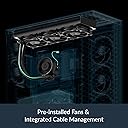
The ARCTIC Liquid Freezer III Pro 360 is a premium all-in-one liquid CPU cooler featuring a 360mm radiator with three high-performance 120mm P12 PRO fans, a PWM pump, and an integrated VRM fan. Designed for modern Intel and AMD sockets, it optimizes heat dissipation with a native offset mounting system and advanced cable management, delivering exceptional cooling efficiency and quiet operation for high-end gaming and professional builds.


| ASIN | B0DLWGG85P |
| Air Flow Capacity | 77 Cubic Feet Per Minute |
| Best Sellers Rank | #1 in Water Cooling Systems |
| Brand | ARCTIC |
| Brand Name | ARCTIC |
| Compatible Devices | Desktop, Gaming Console |
| Cooling Method | Liquid |
| Customer Reviews | 4.3 out of 5 stars 1,792 Reviews |
| Global Trade Identification Number | 04895265000249 |
| Included Components | Item |
| Item Dimensions L x W x H | 15.7"L x 4.7"W x 2.9"H |
| Item Weight | 2020 Grams |
| Manufacturer | ARCTIC |
| Material Type | Metal, Plastic, Rubber |
| Maximum Rotational Speed | 3000 RPM |
| Model | LFIII Pro 360 |
| Number of Items | 1 |
| Part Number | ACFRE00180A |
| Power Connector Type | 4-Pin |
| Product Dimensions | 15.7"L x 4.7"W x 2.9"H |
| UPC | 840033402927 |
| Unit Count | 1.0 Count |
| Voltage | 12 Volts |
| Warranty Description | 6 years |
| Wattage | 3.96 watts |
R**N
Great results! Very big so be careful with your case size.
Worked wonders swapping from a stock cooler to this for my I7-12700F To start this Aio lowered my temps by anywhere from 30 to sometimes 40 celsius on my cpu cores. Installation was not bad but this aio is REALLY big so don’t underestimate fitting it into your case. The price for performance is undefeated. I don’t need rgb for my entire setup so just the clean black was nice. This does not come with a physical manual of any kind so be prepared to look at your phone if you don’t know exactly what you’re doing. Fans are almost silent when light load and are about as load as you expect fans to be during heavy load.
W**N
Great purchase. Super pleased.
The ARCTIC Liquid Freezer III Pro 360 lands squarely in “gamer-approved beast mode” territory — it’s one of the strongest-performing AIOs on the market right now, especially for high‑wattage CPUs. Across multiple professional reviews, it consistently punches above its price class with standout thermals, strong fans, and clever engineering. 🔥 What Makes It a Gamer’s Cooler • Top‑tier cooling performance — Reviewers repeatedly highlight its exceptional thermal performance, thanks to the thick radiator, high‑pressure P12 Pro fans, and integrated VRM fan. It excels in both noise‑normalized and max‑speed tests, keeping even the hottest CPUs in check. • Built for modern high‑end CPUs — It’s praised as one of the best coolers for chips like the Ryzen 9950X3D and high‑draw Intel processors, delivering chart‑topping results at a surprisingly reasonable price. • Gamer‑friendly design — Hidden cables, long tubing, and a clean aesthetic make it easy to build with and perfect for RGB‑leaning setups. PC Gamer calls it “the new AIO to buy.” • Quiet until you push it — At normal loads, it stays impressively quiet. At max fan speed, it gets loud — but that’s expected for a performance‑first cooler. 🎮 Real‑World Gaming Experience • High FPS stability — Lower CPU temps mean fewer thermal spikes, smoother boost clocks, and more consistent frame pacing in CPU‑heavy titles. • Great for overclockers — The integrated VRM fan helps keep motherboard temps under control during long gaming or stress sessions. • No‑nonsense installation — Native offset mounting for Intel and AMD helps center the cold plate over the CPU hotspot for better heat transfer. 🧊 Quick Gamer Verdict If you’re building a high‑end rig or pushing a power‑hungry CPU, th
A**L
Very Good Product. Keeps The CPU Cool With No Hardware Problem. Great AIO.
This unit works great for me. Easy to install (just make sure your case can hold it, since it is a large item). The online manual is easy to understand and follow. I have a 5800x AMD and it keeps it around 32C (89F) idle and when gaming it hits about 50-55C (122F-131F) which is very good vs my previous fan cooling. I had a Lian Li GA Trinity Performance 360 AIO previous to this, unfortunately my Lian Li pump decided to break after 4 months and I had to get it replaced, but I got this item before I received my replacement and this performs on par with the Lian Li (although I will admit the Lian Li did cool my system a few degree's better) but this AIO does a great job and I had zero problems with it so far. It is a little loud but that is due to my fan curve that I have set, if you are less aggressive in your setting it is very quiet. This one doesnt have any lights which is fine for my purpose. For the price ($80) it is a great buy, more reliable than the Lian Li AIO, even though that unit cooled my system better and I really liked their L-Connect software, you just cant put a price on peace of mind which this gives you hands down. Just note for those looking to go into the AIO market, you have to realize the life span of these are only about 5-6 years and then will need to be replaced because it is not refillable. Still worth the buy, $80 over 5 years of keeping a system cool with little to no maintenance is a win for me and I wont go back to fan cooling anymore (these units keep the temps lower by 15C (59F) on average). Excellent product.
C**S
Excellent cooler with a couple of catches
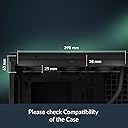
If you value function over aesthetics, the price to performance of this cooler can't be beat. Though I find the all black design without RGB lighting has a clean, sleek look, you may think differently. Compatible with most CPUs on the market, this cooler is better suited for AMD AM4/AM5 processors. When installing with Intel CPUs, it requires you to use their contact frame. This is supposed to help flatten the IHS for better contact, but their contact frame isn't that great. You may think you can just get a better contact frame, but that is not possible as the included contact frame has mounting points that no other frame offers. Both AMD and Intel use an offset mount which targets the hot spot of the CPU, helping to cool the processor more effectively. The three included P12 Pro 120mm fans are quite good. They provide ample airflow, have good static pressure and at low RPMs are near silent. Even at 1000-1500 RPMs the noise level is good. The VRM fan on the pump is also pretty quiet at low RPMs, and helps cool nearby components. The pump is near silent even at full speed. The included fan/VRM/pump cables had excellent length to them, making it easy to route and cable manage. The install procedure is where this loses a star. It was incredibly frustrating to mount, I had to take a few minutes to collect myself. There are 2 points you have to screw down, and it took me several tries to successfully install. I would get one screw started a couple turns, and go to get the other and tweak the position until I think I got it started and go back to the other side, only for it to pop out of place. I went through this a handful of times before I was able to finally get it installed. The pump mount definitely needs a rework. Another thing to consider is compatibility with your case and motherboard. The radiator is 38mm thick and with the 25mm thick fans it has a combined thickness of 63mm. This is too thick for many cases, so check your case manual/website before purchasing. Additionally, the pump can only be mounted in 1 orientation, which may conflict with other components in your PC, such as your top m.2 SSD mount. This is an easy "shut up and take my money" recommendation despite the frustrating install experience. The value of this AIO is insane for its performance, and I'm quite happy with it. If you're thinking of pairing this with an Intel CPU, you'll probably be OK; though due to the contact frame, personally, I would consider a different cooler.
T**K
Excellent water cooler, if you have the case for it
So for those that do not want to read the review, I'll just say it is an excellent CPU water cooler, and a must if you have a higher end CPU that likes to run hot. Now for those that want to read more, here's my review: Before I start with the details, I definitely need to stress that is imperative that you measure your case before purchasing this CPU cooler, since the manufacturer isn't lying, it requires a lot of space. That being said, if you have a case that can handle it, it works great and keeps the CPU nice and cool. Okay so on to the review. The reason I purchased the Artic Liquid Freezer 3 Pro is after building a new system with an Intel Core I9 processor, I found that the CPU cooler I purchased for it (Cooler Master 120L) wasn't really rated for such a powerful CPU, and under load the CPU temp was hitting 85c. Now 85c isn't a killer if it's just a quick spike, but when doing video encoding it was hitting and staying at that temp, which just isn't good for the CPU. So doing a little more research, I saw that Artic Liquid Freezer 3 Pro got great reviews, and was recommended for high end processors like the I9. Installing the Artic 3 Pro is extremely easy, unfortunately I built the system in a smaller full size tower case, and the new CPU cooler wouldn't fit the chassis. Luckily my secondary machine was in an even bigger chassis, and it turns out it had mounting holes and rubber grommets already there to mount the Artic 3 Pro. So after stripping the 2 systems bare and swapping all of the components, booted up the new system with the Artic 3 Pro and checked the temps, and my basic idle temp is 26-28c, a good 10 degrees lower than the idle with the old water cooler. I haven't had a chance to stress it out with some video encoding yet, but I've already noticed that the heat spikes I was seeing previously seem to be gone. So in summary, I love the new CPU water cooler! I did run across one issue that had me worried when I first booted it up, and that was that there was a constant low humming noise that seemed to be coming from the unit. I'd read a couple of other people comments saying there was a low hum, but I figured it was a one off for them. Of course I like my rigs to be as quiet as possible, and since the PC sits right under my desk I knew this was going to drive me nuts. Luckily I was able to figure out the problem, which was the tubes from the CPU to the radiator are long and stiff enough that they were touching the side panel, and the humming sound was the noise from the liquid moving and being amplified by the metal door. Fixed this issue with a few zip ties to move the tubes slightly inward so they didn't contact the door, and now the system is as quiet as can be. I hope this review has been helpful, cheers.
O**C
Top tier
This is without a doubt one of if not the best AIO that you can purchase for less than $100, it is very quiet and does a great job at keeping temperatures cool. For my AMD RYZEN 7 9800X3D on cinebench my temperatures were at 68C Max and on games like Star Citizen, Black ops 7 and Residents Evil Requiem all on max settings never passed 68C in temps. It looks very nice feels very durable but it is very large so make sure your case is large enough because it can easily not fit, and speaking of fitting it was a pain to set it in the CPU but if you unscrew one of the handles just a bit and raise it while you bolt down one side of the cooler you’ll be able to raise the handle just a bit and screw it and you won’t have a problem it took me about 10 minutes to install everything.
T**E
Great Cooler!
For the price, it's an amazing AIO. It's very quiet and pretty slim for a 360. I'm moving away from RGB parts so this was perfect. My only complaint is, it's a bit of a pain to install (at least it was for me). I've been building PCs for longer than I care to admit and this was probably the most difficult time I've had mounting any kind of cooler to a CPU. Buuuut, for the price, I'd buy it again 😂
J**P
Excellent performance, but would partially recommend depending on the usage
Having tried this on 12700k, 285k, 9900x, and 9950x3d, here's my honest review. This cooler performance rocks on intel CPUs. The temps go really low and the cooler is not too loud. It does get noisy at full load, but not too loud. However, I'd not recommend this for 285k because you'll be removing the Reduced Load ILM feature of the socket when you mount it with a contact frame (removing basically doesn't guarantee the factory state if you reassemble). However, for 14th gen and below (which will need a contact frame anyways), this cooler is the best cooler I'd get all the time. For AMDs though, they still cool the CPU really well, but gets really loud. This may be the case for only the 9900x and 9950x3d I've tested, so take this with a grain of salt if you're using lower gen or different AMD CPUs. At full load, this cooler is by far the noisiest cooler I've used, making a noise like a jet engine. I won't really care too much if it was just occasionally loud at higher load, but this cooler also occasionally gets extremely loud at idle state. I suspect it's from temp spikes, and AMDs of course have a smaller surface area and denser hotspot compared to intel. I noticed that I'm not the only person experiencing this, there's a famous youtube video comparing AIO performance, and this issue is exactly replicated. The video even used three Artic LF III to mitigate defective unit possibility, but all performed exactly the same for the 9800x3d, having very high noise levels. I suspect it's something to do with the mounting frame not so secure for AMD motherboards, but this needs investigation. Aside from Intel vs AMD comparison, this cooler does offer a very straightforward cabling, you can either choose to simply plug one cable to your CPU_FAN header, and it's done. Also, the fans are pre-assembled and cleanly cable-managed which is excellent. So my final verdict would be: hands down the best cooler for intel CPUs equal or below 14th gen, cant fully recommend for AMDs. This is because the cooler performance doesn't drastically differ from others (1~2C at max), and you won't really notice the difference given the environmental factors that'll affect the most. So personally, I'd rather choose the most quiet cooler, and this LC is a bit of a mix.
M**A
Il re del rapporto qualità/prezzo
Se avete seguito l'evoluzione dei dissipatori AIO, sapete che Arctic è una garanzia, ma con questa serie III hanno superato se stessi. L'ho scelto per raffreddare il mio nuovo Intel Core Ultra 7 265K e i risultati sono semplicemente sbalorditivi per questa fascia di prezzo. Una delle novità più interessanti è l'inclusione del contact frame specifico per il socket LGA 1851/1700. Invece del solito sistema a staffe, si sostituisce direttamente il meccanismo di ritenzione della scheda madre. L'installazione richiede un minimo di manualità in più, ma garantisce una pressione perfetta sul processore, eliminando i problemi di curvatura del chip. Sulla mia B860-Plus si monta perfettamente, anche se lo spazio intorno ai VRM è millimetrico. Per quel che riguarda prestazioni termiche e silenziosità l'Arctic brilla. Mantiene l'Ultra 7 a temperature incredibili: in idle siamo sui 30°C e sotto carico pesante in rendering non ho mai visto la CPU superare i 75-78°C. Il radiatore da 360mm ha una massa radiante generosa e la ventolina dedicata sulla pompa non è solo marketing: aiuta davvero a tenere fresche le fasi di alimentazione della scheda madre, cosa fondamentale se non usate una top di gamma. Il design è molto "industriale" e massiccio, deve piacere. Un enorme pro è la gestione dei cavi: le ventole sono già pre-cablate lungo i tubi e arrivano alla pompa, quindi avrete solo uno o due cavi da collegare alla scheda madre. Un paradiso per il cable management. Cosa sapere prima di comprare: - Spessore: Il radiatore è più spesso della media (38mm + ventole). Assicuratevi che il vostro case abbia spazio a sufficienza sul top, altrimenti rischiate che tocchi le RAM o i dissipatori della mobo (io ho dovuto tagliare un angolo dell'AIO per questo motivo) - Tubi: Sono belli rigidi e di qualità, ma richiedono un po' di spazio per essere piegati correttamente. Difficile trovare di meglio, anche spendendo il doppio. È potente, silenzioso e risolve alla radice i problemi di contatto dei nuovi processori Intel. Se avete spazio nel case, è la scelta definitiva per chi cerca prestazioni da workstation senza il rumore di una turbina.
B**N
İyi
Ürün sanırım yanlış sipariş etmişim 1151 soket uyumlu değilmiş ama elime ulaştı fakat ulaşırken kargoda kaybolma süreçleri felan oldu ama sonra bulundu
D**Y
360mmながらも良く冷える
購入より幾分か時間が経過しましたので詳細をば。 【CPU】 ・Ryzen 9950X(SMT運用) PPT:240W~256W EDC:232A~248A TDC:162A~192A 【Mobo】 ・ASUS TUF-GAMING B650E-Plus Wifi CPU Loadline Calibration:Level2~Level3運用 C-State Limitterの解除状態:Auto Clock Stretch(Core/L3 Cache):Disabled Spread Spectrum:Disabled [VRM for CPU] レスポンス:UltraFast VRMスイッチ速度:450kHz(MAX) 電力供給方式:Extreme(電圧バランス優先) 電流上限:100% [VRM for SoC] VRMスイッチ速度:450kHz(MAX) 電流上限:100% 【今回使用したCPUグリス】 ・ARCTIC MX-7 まず初めにファンの静音性についてですが 流石に3000RPMまで行くと結構ゴワァアアアアアアアっと音がしますね 結構ビックリするくらいな音出して来るのでなれない人は不安に思うかも知れませんね ただ、2200RPM台であれば他の360mmと比較したとしても結構静かなモンです まぁこちらは正直同社が発売しているP12 Proまんまなので そちらのレビューを参照したほうが早いですね 性能はもちろん良いです。 では本題へ。 まず9950Xを冷やしきれる、その時点でとても素晴らしいです デフォルトPBO状態はさることながら CPUに関して結構無茶な熱を加えるASUS製のMoboでも CPU電圧は1.456v PPTは256W TDCは192A EDCは240A まで耐えてしまいます 最高温度はCCD1の96.3度で 限界である115度まで11度程マージンがあります。 俺は溶損が嫌なので90℃でスロットルする設定でやってますが 最高性能を発揮させたい方にはこちらか、場合によっては当製品の上位グレードである 420mm版を購入すれば間違いないと断言しておきます。 ちなみに上記のスペックシートに記入した最小値の方のPBO設定では 最高温度がCCD1の91.3度でした こちらもまずまずの成果です スロットルが効くまでのタイムラグを減らしたいようであれば マザーボードにあるプリセット回転数に+10%程盛ってやれば ほぼほぼ指定した温度と合致する形で温度を制限しにかかってくれます。 おすすめのPBOでのTjmax値はやはりと言うべきか85℃。 この設定であればほぼ間違いなく95度には到達しないので 溶損から貴方のCPUを保護してくれるでしょう。 なお、CPUクーラーとしては言わずもがなGPUクーラーとしてもポテンシャルは高いです。 某ドイツのエンスージアストの方を筆頭に、まれに当製品をGPUクーラーとして扱う人も居る模様。 全体的に素晴らしいですが、一つ難点が。 取付が非常にしづらい… 正直ここは改善して欲しいですね、マジで 9950Xのヒートシンクにガリ傷はいっちゃいましたもん ほんっとに締め付けが難しい 今まで水冷ヘッド取り付けて慣れてる人間からしても難しい こればっかりは悪い点として言及せざるを得ないです… ですが、本当にクーラーとしてはいい製品なので-1を打ち消して★5評価にさせてもらいます。 以下、温度の大まかな概要を記載し 当レビューを終了とさせていただきます。 また何かあれば追記いたします。 【アイドル時】 ・Curve Optimizer無し:39.2℃(室温25度以上) ・Curve Optimizer無し:38.8℃(エアコン有り、室温20度) ・Curve Optimizer有り@平均-24mv:38.4℃(エアコン無し) ・Curve Optimizer有り@平均-24mv:36.8℃(エアコン有り) 【低負荷時:目測の為バラツキあり】 ・CO無し:45℃~53.4℃ ・CO有り:41.4℃~49.6℃ 【中負荷時:目測の為バラツキあり】 ・CO無し:63.2℃~66.5℃ ・CO有り:58℃~63.8℃ 【高負荷時】 ・CO無し:78~96.3℃程度 ・CO有り:73~91.3℃程度 【上記温度計測時のPBO/Tjmax/電圧各種指定値】 ※CPU温度に影響する物のみ記載 ・Tjmax:95℃ ・Boost Clock Override:+200MHz <CCD1:5950MHz> <CCD2:5650MHz> ・PBO Scalar:x2 ・電力制限:上記レビューの最上位に記載 ・VRM速度/フェーズ:利用出来る限界値/常時フルオン ・ProcHot VRM Throttling:Enabled ・Disable Peak Limitter:Disabled(つまり上限設定あり) ・CPU voltage:Auto =Default Behavior for Auto Overcloking VID. AMD Official. ・SoC voltage:1.135v 実観測値1.120v~1.125v。±10mv~15mv。 LLC設定:無。BIOS内項目が存在せず。 ・VDDG CCD Voltage min:0.900v max:0.960v ・VDDG IOD Voltage min:0.900v max0.960v ・CPU VDDIO:1.232v-1.280v(HWinfo読み) BIOS内指定値は1.200v~1.250v。 1.4vは危険と判断。 最高でも1.350vが妥当。 プラスオフセットが強めなのでIODへの損害が予想される為。
L**E
Great Cooler for High-End Machines
Wow, what an improvement over the old dual air cooler. I7 14700k cinebenched 34,000 (could only get 24,000 anir cooled) and stayed a cool 90° at full load. For those who review it as loud, take the time to set up fan curves in bios, once tuned it is really quiet, even when gaming. The only time it gets old is during bench testing.
C**N
Daje radę.
Dobrze się spisuje.
Trustpilot
1 month ago
3 weeks ago