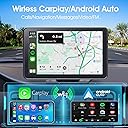
🚗 Upgrade your drive with smart, wireless freedom!
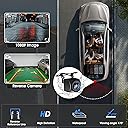
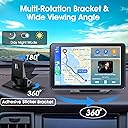
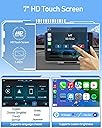
The PASLDA 7" Wireless CarPlay Screen transforms any vehicle into a connected smart cockpit with seamless Apple CarPlay and Android Auto via Bluetooth 5.2. Featuring a crisp HD touchscreen, versatile audio options including dual Bluetooth modes, and a night-vision waterproof backup camera, it offers universal dashboard mounting for easy installation across cars, trucks, RVs, and vans. Stay hands-free, entertained, and safe on every journey.


| Additional Features | Lightweight, Portable |
| Are Batteries Included | No |
| Asin | B0CTH6S8KP |
| Audio Output Mode | Stereo |
| Best Sellers Rank | #14,768 in Electronics (See Top 100 in Electronics) #19 in Car In-Mirror Mounted Video Players |
| Brand | PASLDA |
| Built In Media | Adhesive mount, Backup camera, Owner's Manual, Portable car stereo, Power cable + AUX cable |
| Compatible Devices | Smartphone |
| Compatible Flash Memory Type | SD |
| Compatible With Vehicle Type | Car, Truck, RV, Van |
| Connectivity Protocol | Bluetooth, Wi-Fi |
| Connectivity Technology | Bluetooth, USB, Wireless |
| Control Method | Voice |
| Customer Reviews | 3.9 3.9 out of 5 stars (891) 3.9 out of 5 stars |
| Display Type | LCD |
| Human Interface Input | Touchscreen |
| Item Dimensions L X W X H | 7.36"L x 0.9"W x 4.2"H |
| Item Weight | 1.6 Pounds |
| Manufacturer | PASLDA |
| Map Types | Road |
| Mfr Part Number | CAS02 |
| Model Name | CAS02 |
| Model Number | CAS02 |
| Mounting Type | Dashboard Mount |
| Operating System | Android |
| Resolution | HD |
| Screen Size | 7 Inches |
| Supported Satellite Navigation System | GPS |
| Touch Screen Type | Capacitive |
| Unit Count | 1.0 Count |
| Upc | 791137581790 |
| Warranty Description | 1 year manufacturer |
User
Great buy, works great
I can't believe this is so good for such a low price! I've been using a more expensive model for a couple years but didn't like using it because it used an aux or fm transmitter and no bluetooth to connect to the car audio. This unit was so easy to setup and connect to the car speakers via bluetooth. The screen is bright enough but in direct lighting conditions I can see the screen but wish it could be brighter. I like how the car's display shows the song that is playing. The other model I was using did not.
User
Love it!!
I love this thing. It is so convenient for me since i have a 2013, it doesn't have the features this has and it is especially good for the GPS instead of having to look at my phone. Mounting it was so simple. It's really self explanatory to use and set up.
User
DO NOT WASTE YOUR MONEY
This item is HORRIBLE. Both mounts are for show only. Only the long neck mount secured correctly. The audio glitches when there’s nothing wrong with it and is correctly connected. The screen glitches and moves slow. Calibration doesn’t work and only allows you to calibrate the top left corner of the screen. After connecting the first time to car play, it will say you’re not connected to car play on your phone but will play sound off the device/car even when your Bluetooth isn’t connected.
User
for those with amp/subs
detailed review: ok so the touchscreen itself is as simple as can be to install. to actually rotate the main swivel around at first to get it where you want it positioned, just need a screwdriver and loosen the little metal piece underneath and then tighten it back when it’s where you want it. took me a little second to figure out why the main base wasn’t moving so figured i’d share that real quick. other than that, it’s a very basic setup.the touchscreen is actually good to the touch and doesn’t lag like some slower touchscreens do (that you pay a couple hundred to have installed permanently) so that’s a big plus. it’s like punching the apps on an iphone. and connects automatically to your phone when you turn your car on (as long as you bluetooth is on on your phone)my only downfall with this is that i don’t have bluetooth in my car so i have to use the old aux chord to my phone still. i was hoping connecting the aux chord to the touchscreen while my phone was hooked up via bluetooth to it that my music would still play. which it does, but it’s not as loud. i have an amp and subwoofer in my trunk so i like my music loud as it is so that was definitely a bummer. i mean it still plays connected that way but not getting your full function. my gf noticed before i said anything to her about it when she got in my car to check it out. so it was definitely noticeable. once i plugged my aux back into my phone instead, it sounded normal again.IF UR HAVING THIS PROBLEM: plug the aux in your phone AFTER your phone connects to the touchscreen and your music will play just fine from your phone. if you plug it in before your phone connects to it, it’s not gonna play from your phone bc it connected to the touchscreen first. carplay features and everything still work perfect this way. maps, texts, calls etc.. i don’t have the backup camera plugged in yet so can’t give further detail regarding that but as for music and your car doesn’t have bluetooth, here’s a simple solution.hope my review helps.
User
Works great!
Took this on a trip in our 2013 Lexus RX350, that doesn’t have navigation in it. It worked very well. Once hook up to a phone with navigation it was like having it built-in in the car. I would’ve preferred a suction cup window mount but I was able to use tape magnets to mount it without making it permanent or leaving unwanted residue. A very nice feature is voice text. The speakers in the unit are not good. But, I didn’t expect them to be. I learned that in our car it will defer to the CarPlay unit speakers after starting the car. You have to turn the radio off and back on again to switch it to the car sound system. It made our trip with our grandson a fun and pleasurable trip! Multiple ways to connect. Look really nice easily transferable to multiple vehicles including out side by side.
User
Love portable CarPlay
Love this so much! Extremely easy set up! I drive older vehicles and love the ease of moving it from vehicle to vehicle! Portable CarPlay is epic!
User
It does work, but LOTS of heads ups -- know what you are getting.
I read through a lot of these reviews before purchasing and can confirm, what others have said is pretty similar to what I'm going to say. First of all, yes the product does work. The screen is not hard to install, it comes with a power cable that is C-type into the screen and goes into your cigarette lighter (so you can't plug anything else into it, there's no other USB ports or anything on the cigarette cable part). It also comes with an aux cable (aux into the screen AND into your car -- this is what enables the screen to connect to your car speakers). You definitely want to use the aux cable because the embedded speaker on the screen is pretty weak, but it does work.Some folks complained about not being able to get the screen to connect to their car. I drive a 2004 that has a JVC system inside of it, and what I've found is that when I try to play music from Spotify, it does automatically play through the screen speaker (which again is weak). I have to change the JVC setting to bluetooth, and then change it back to USB-phone mode to get it to play through my car speakers. I don't know why and it is a little annoying, but it does consistently seem to work so grateful there's a workaround. Of note, if I connect to the car using Libby or to listen to an audiobook, it does seem to automatically connect to my car's speakers via the screen.As for the screen itself: it is a touch screen and the display is similar to other in-car computer screens. The color is slightly desaturated no matter if you change the setting or not compared to an embedded newer-Honda's car screen, but you can absolutely see everything clearly. It does indeed have day and night mode and seems to swap back and forth as far as I can tell, which is nice. When you pull up google maps, you can have your map on the screen and go back and forth between apps with ease, e.g. if wanting to change the song playing in Spotify.As for the backup camera: as people have said here, this part is NOT straightfoward. The manual it comes with pretty much just says "connect it to your reverse light wire and plug the red negative pole into the positive pole on your car." There is a QR code on the back that links to a YouTube video that isn't particularly helpful of someone else installing everything in their car. Because different cars will have different setups/cables for their reverse wires, I would absolutely advise taking the camera to a mechanic or person who can help you unless you are very familiar with electrical wiring in a car. You could easily do this wrong. I took it to my mechanic, who even made a mistake of hooking it up to the parking lights rather than the reverse light -- what happened is that the backup camera only turned on when I turned on my headlights and wouldn't turn off until I turned the headlights off. We realized this mistake after the fact and he did fix it but it required putting all the wiring back to how it was, and reconnecting the wire from the camera to the actual reverse light wire, which was located just behind my tail light within the trunk of the car. In a 2004 Honda accord coupe, my reverse light wire was green with little white stripes on it. There were a few other wires housed within that same compartment, which again is why I would advise you have someone who knows what they're doing identify which wire that this needs to be connected to. After we got the wire identified though, it's a simple matter of clipping that wire in the middle with wire cutters to expose the wires, then use pliers to connect the two wires back together along with the positive pole (red end) on the backup camera that comes in this set. You'll need some kind of wire cap as well so that you don't just have live wire hanging out.The other issue I'll mention here for why having a mechanic is probably a good idea is that I tried to take off a plastic screw just under the plastic part of my trunk where the opening mechanism is. I wanted to feed the camera wire through the hole that I was able to create by removing that screw, but the wire end was too thick and it didn't fit. My mechanic had to use a drill to widen the hole where the screw was so that the camera wire could fit through. Additionally, there was no area to screw in the two little black screws that the kit comes with to anchor the camera. My mechanic used a smaller drill to literally drill two new small holes into the plastic part of the trunk next to the opening mechanism there so that he could put the screws in to anchor the camera. I do think he's correct that if you try to only use the little double-sided sticky piece that comes in the set, it won't last long/hold up to the elements, so you need to find a way to use the screws. I suppose if you tried to just screw them straight through the plastic of the car without drilling holes first it might work? I'm not sure though. Like I said, have someone who knows what they're doing take a look. And be sure to tell them the wire needs to be hooked up to your REVERSE light, NOT your parking lights.Last notes about the camera: you can loosen/tighten the little screws on the side of the camera to get the angle that's best for you to park. The backup lines are not perfect, but I think there's a setting where you can change them (I haven't figured that part out yet).Overall: If you only want the in-car screen, this is a reasonable buy and does work albeit it is not perfect, and the display isn't quite a seamless/pretty as it would be if you bought a car with it's own screen. If you want to use the backup camera as well, make darn well sure you know what you're doing with the light wiring in your car, or take it to someone who knows what they're doing. I'm not quite sure $40 is worth it given all the effort/trouble it took to get this set up and it still isn't quite what I'd hoped for, but the description of the product and what it does is all accurate.
User
Enjoy Seamless Connectivity and Enhanced Entertainment on the Go!
I recently installed the Newest Wireless Portable Car Stereo in my truck, and it has completely transformed my driving experience. The inclusion of Apple CarPlay, Android Auto, and Mirror Link functionality means I can seamlessly connect my smartphone and access all my favorite apps, navigation, and music directly from the touchscreen display.The dash mount touchscreen is intuitive and responsive, making it easy to navigate through menus and control various functions while on the road. The Bluetooth connectivity allows for hands-free calling and streaming music from my phone, keeping my focus where it should be - on the road.One of the standout features for me is the backup camera, which provides added safety and peace of mind when reversing. The auto-connect feature ensures that the stereo connects to my phone automatically whenever I enter the vehicle, eliminating the hassle of manual pairing.Overall, this car stereo ticks all the boxes for me - it's convenient, feature-packed, and delivers exceptional audio quality. Whether you're driving a car, truck, or RV, this is a must-have upgrade for any vehicle.
User
Audio
But audio quality doesn’t meet
Trustpilot
2 weeks ago
1 month ago