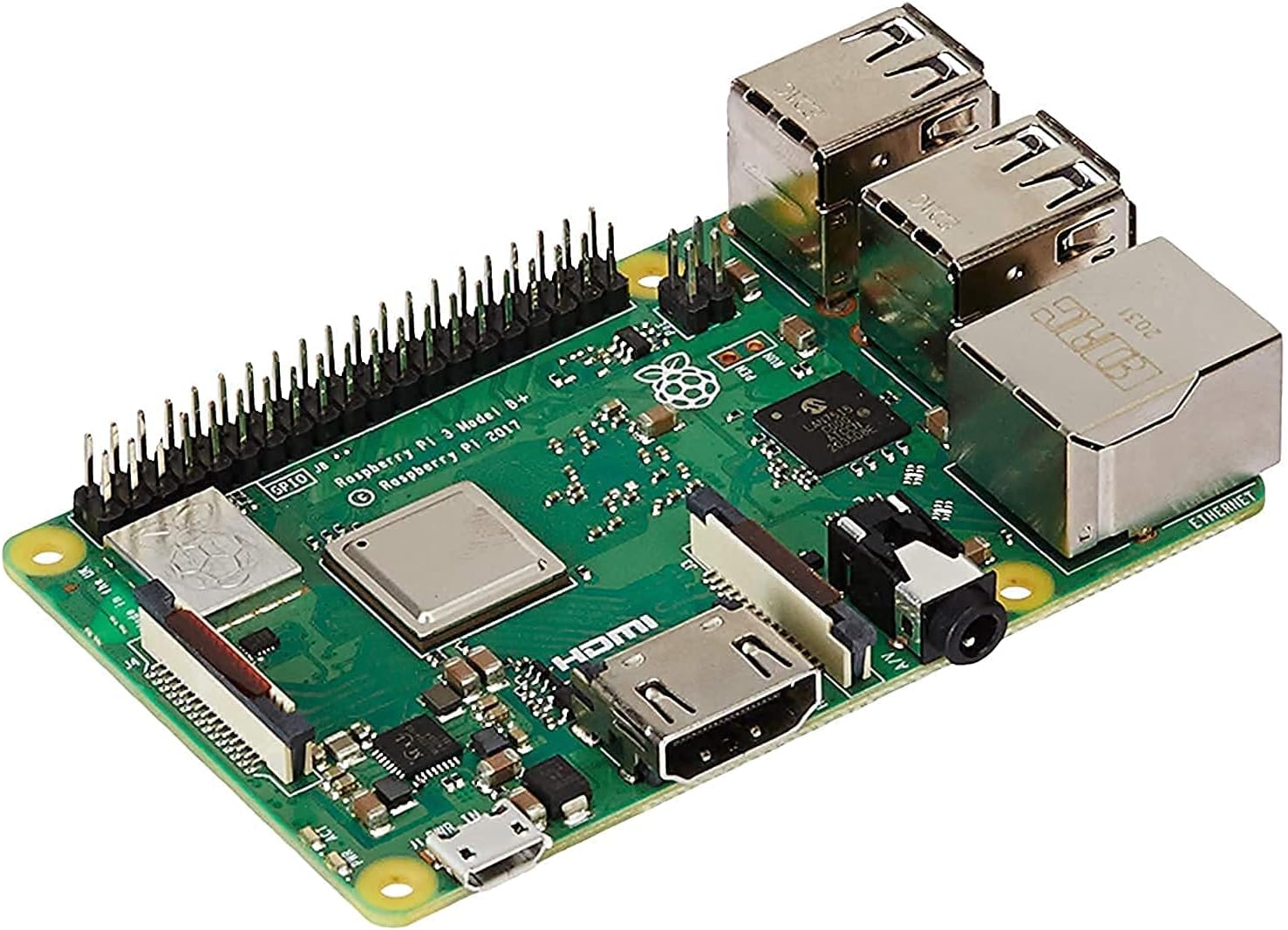


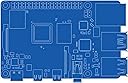

Raspberry Pi 3 B+
Product ID: 59401529
Details
- BrandRaspberry Pi
- CPU modelCortex
- CPU speed1.4 GHz
- Model nameRaspberry Pi 3
- RAM memory installed size1024 MB
⚡1.4GHz quad-core CPU
📶Dual-band WiFi 2.4/5GHz
🔌PoE support with HAT
Buy anything from 5,000+ international stores. One checkout price. No surprise fees. Join 2M+ shoppers on Desertcart.
Desertcart purchases this item on your behalf and handles shipping, customs, and support to Spain.
🚀 Unlock your DIY genius with the Raspberry Pi 3 B+ — where power meets endless possibilities!
The Raspberry Pi 3 Model B+ is a compact, high-performance development board featuring a 1.4GHz 64-bit quad-core processor, dual-band WiFi, Bluetooth 4.2, and Gigabit Ethernet with optional Power-over-Ethernet support. Designed for embedded projects, IoT, media streaming, and networking, it offers extensive connectivity and compatibility while maintaining the classic Raspberry Pi form factor.


| ASIN | B07BDR5PDW |
| Best Sellers Rank | 18,704 in Computers & Accessories ( See Top 100 in Computers & Accessories ) 84 in Motherboards |
| Box Contents | 1 x item |
| Brand Name | Raspberry Pi |
| CPU Model | Cortex |
| Compatible Devices | Mobile Phone, Personal Computer, Laptop |
| Customer Reviews | 4.8 4.8 out of 5 stars (10,709) |
| EU Spare Part Availability Duration | 7 Years |
| Global Trade Identification Number | 00713179640259, 04200477656267, 23014572458078 |
| Item Dimensions L x W x H | 6L x 2W x 9H centimetres |
| Item Type Name | The Raspberry Pi 3 Model B+ is the latest product in the Raspberry Pi 3 |
| Item Weight | 1 Grams |
| Manufacturer | CPC Farnell |
| Manufacturer Part Number | Raspberry Pi 3 Model B+ |
| Model Name | Raspberry Pi 3 Model B+ |
| Model Number | Raspberry Pi 3 Model B+ |
| Network Connectivity Technology | Bluetooth, Ethernet |
| Operating System | Raspberry Pi OS (based on Debian Linux) |
| Processor Brand | Raspberry Pi Spain |
| Processor Count | 4 |
| Processor Speed | 1.4 GHz |
| Product Warranty | 12 Months |
| RAM Memory Installed | 1024 MB |
| RAM Memory Technology | LPDDR2 |
| Total USB Ports | 4 |
| UPC | 602561998156 713179640259 |
| Unit Count | 1.0 count |
| Wireless Compability | 802.11ac, 802.11bgn |
A**D
My experience running this as a Pi Hole
Got this to run Pi Hole which turns it into a local DNS server and in turn allows it to act as a network-wide ad blocker, also blocking tracking across the internet, malware domains, software phoning home with “analytics” and “telemetry” (especially useful for any Windows 10 devices on your network), and basically any other domains you want it to block either individually or through lists. You can for example block all known domains associated with Facebook (which when my brother is out of the house, I do!) Now for the hardware itself. It’s light and compact just as the Raspberry Pi has been from the start. And as always it requires a case to be purchased separately - I went for the official white and red one, which I think looks very cool and sets it apart from the usual black ones. I didn’t get one with a fan however. Although I’d read of high running temperatures, I installed Raspbian Lite which is essentially the official server OS for the Pi. It provides only a command line without any GUI (although you can install one if you wish, but I didn’t) and only a minimal number of packages preinstalled so you can choose what software you have running. In my case I use it as a headless server with automated updates so I rarely ever need to even so much as plug in an HDMI cable. Whenever manual management is required I use the web UI of Pi Hole or I simply SSH in. As you can imagine this leads to a low CPU idle. Pi Hole’s web UI happens to measure CPU and RAM use along with running temperature. Right now it shows my Pi is running at 56.4 Celsius with barely any CPU use and 19.7% RAM use for reference. The temperature is pretty much what you’d expect from any regular computer especially considering it’s a hot summer at the moment. So temp is no concern if you aren’t using the Pi for anything heavy in my experience. However if you plan to run your Pi as more of a full-blown computer with a GUI and all the extra software Raspbian includes on the full image expect higher CPU load - in that case you may want the case with the fan. But for my use case I didn’t find it a necessary consideration. Now I’ve had this thing for about a month and in that time I’ve been pleased with it. I have it running not only Pi Hole which in turn runs FTL-DNS as it’s backend (a fork of Dnsmasq) but also Unbound, a separate project which allows me to use my Pi as a local recursive DNS server with DNSSEC enabled. My Pi Hole therefore runs my entire network’s DNS needs using barely any CPU. The best bit? I even have my Raspberry Pi powered by my desktop computer, an Intel NUC. If enabled in the BIOS settings, the front yellow USB port on an NUC will output enough power to run a Raspberry Pi, even when it’s shutdown. This is excellent as throughout the years the Pi has become more picky about the type of power source it will accept as it demands more and more power with each new generation. One note however. If you wish to run a similar setup to me with Pi Hole, Unbound, or another form of DNS server software, and you like me also have a Plex server or any frequently used server running, I recommend you use a different DNS server on that box. When I had my Plex server set to get DNS from DHCP (which served my Pi Hole) the Pi Hole was utterly taken over my Plex traffic. Everything was Plex. It made up about 95% of my network traffic and that’s no exaggeration. As a result it kept crashing. But once I did a clean install on the Pi then set the Plex box to simply use Google’s DNS (choose whatever you prefer) the Pi Hole worked as intended without any reliability issues. Overall I am very happy with this nifty little device. They continue to be as cool and open for experimenting as they’ve always been. Lovely bit of kit perfect for doing whatever little project you need to do. But do keep in mind, if coming from an older model, they do require more power with each new generation so make sure you have a power supply up for the task. If you don’t wish to plug yet another thing into a socket, see what other devices with powered USB ports you have around! I was surprised my NUC was up to the task but thankfully it was. Now I have a computer... powering a computer. Oh 21st century technology.
V**S
Excellent value for a very capable box.
This review is having to be limited in scope due to my very specific needs for this Pi. As I do not use all of its features it would be unfair to comment on them. I use this Pi 3+ as a Kodi box and nothing else. I do use the Milhouse nightly version of Kodi 18 Leia builds and it does work very very well. Previously in the same setup I had the Pi3. I hesitated about changing to this Pi as the differences seemed more incremental and perhaps a waste of money. But the small but noticeable performance jump has meant a more fluid response when navigating through the menus and faster responses when browsing through photos on my media server. I have it connected via Ethernet to my LAN. Also this Pi seems to run much cooler than the previous model. Using this Pi I can play HEVC encoded 720p files with no heat issues. Previously I would get heat warnings, especially when the weather gets warmer. As I still intend to use the other Pi I then added a case to it. I bought the FLIRC case sold here and it fits fine, but using thermal paste as the SOC is raised on this model of the Pi and the thermal pad supplied with the case is too thick. For my particular needs this Pi, with a MCE remote, USB storage, USB sound card with optical out, and USB wireless dongle for a keyboard it works very well. Yes there are limitations but for the money and lots of dev support it makes a great 1080p Kodi box. Very impressed with what this Pi has offered but, as I mentioned, my needs are specific to a Kodi box and I know that the Pi offers so much more. Just to add I did use the BT and the WiFi connections. With both I get excellent connections and I had no issues streaming, test purposes only, 1080p content via WiFi.
A**R
Best computer to work with
For Christmas, I asked for a Raspberry Pi 3B+. After borrowing previous models, I started thinking about a robotics project, and thought “Hey, with the computing power of the Raspberry Pi, and the power of the Arduino (microcontroler), what an awesome robot I could make!” Since then I not only got what I wanted, but also got a second one as a desktop computer. Here are my thoughts: Both times I got my Raspberry Pi, and it looked and worked fine. The board itself is credit card shaped and is easy to hold. All the ports seem to work fine. After using a Raspberry Pi 2B+ v1.1 I was disappointed with the microSD card slot on the 3B+, as it does not feel as satisfying to click into place. All in all, hardware wise, it is great. The GPIO pins are also fully accessible, but I found the lack of reference to the pins annoying. The Pi T-Cobbler fixes this. The thing about having the 3B+ is that literally any software should work. I have used Raspian, Retropie and Ubuntu MATE. Flashing the images was fine (I used Balena Etcher if you are wondering what software to use for that), although it took me a while to get Ubuntu MATE running. I recommend getting Bionic Beaver, not Xenial. All three operating systems that I tried worked just fine. I still have the USB booting to try out. The other thing I like about the Raspberry Pi 3B+, is that you can get cool accessories. I got a Nespi case+, which makes it look just awesome. It’s funny, because the Nespi case+ looks about the same size as a NES mini. It’s probably more worth getting a Raspberry Pi 3B+, than it is getting a NES mini. The power consumption of the Raspberry Pi 3B+ is an issue you have to put up with. You need to spend a good 10 minutes finding the right cable that lets enough power in. Or, of course, you can buy yourself a universal power supply, but I never bought one so I don’t know how good that is. All in all it’s a good product. If you ever feel like the Raspberry Pi 3B+ is being slow, remember that it is only a small board with a DVD player’s processor put onto it. It’s pretty good considering… Hope others who buy this product will enjoy it as much as I did!
B**B
Very Happy !!!
G**O
5 Stelle - Un microcomputer versatile e potente per progetti creativi ed educativi "Ho acquistato il Raspberry Pi 3 Modello B+ per sperimentare con progetti di domotica e apprendere di più sulla programmazione. Dopo diverse settimane di utilizzo, posso dire che questo piccolo dispositivo ha superato le mie aspettative, offrendo un'ampia gamma di possibilità sia per principianti che per utenti esperti. Caratteristiche apprezzate: Prestazioni migliorate: Il processore quad-core da 1,4 GHz garantisce una maggiore velocità rispetto ai modelli precedenti. Questo si traduce in un'esperienza più fluida quando si eseguono applicazioni più pesanti o multitasking. Connettività avanzata: La presenza di Wi-Fi dual-band (2,4 GHz e 5 GHz) e Bluetooth 4.2 rende facile la connessione a reti wireless e dispositivi esterni come tastiere, mouse e altoparlanti. Ho apprezzato particolarmente la stabilità della connessione Wi-Fi durante lo streaming o il trasferimento di file. Supporto Ethernet Gigabit: Anche se limitato dalla porta USB 2.0, l'Ethernet Gigabit offre velocità di rete fino a 300 Mbps, migliorando significativamente le prestazioni di rete cablate rispetto ai modelli precedenti. Versatilità d'uso: Il Raspberry Pi 3 B+ è ideale per una vasta gamma di progetti, come media center, server domestici, console di retrogaming e molto altro. La comunità attiva offre innumerevoli risorse, guide e progetti da cui trarre ispirazione. Compatibilità con accessori esistenti: Se possiedi già accessori per i modelli precedenti, come case o alimentatori, molto probabilmente saranno compatibili con il B+, riducendo i costi aggiuntivi. Difetti riscontrati: Quantità di RAM limitata: Con 1 GB di RAM, potrebbe risultare insufficiente per applicazioni molto pesanti o per eseguire sistemi operativi più esigenti. Durante l'uso del browser web con molte schede aperte, ho notato qualche rallentamento. Necessità di accessori aggiuntivi: Per utilizzare il Raspberry Pi, è necessario acquistare separatamente una scheda microSD per il sistema operativo, un alimentatore adeguato e, preferibilmente, una custodia per proteggere il dispositivo. Questo può aumentare il costo totale iniziale. Porte USB limitate: Le quattro porte USB 2.0 possono risultare insufficienti se si collegano molti dispositivi esterni. Inoltre, l'assenza di porte USB 3.0 limita la velocità di trasferimento con dispositivi di archiviazione esterni. Consigli personali: Scegli un buon alimentatore: Assicurati di utilizzare un alimentatore da almeno 5V/2,5A per garantire stabilità al dispositivo, soprattutto se colleghi accessori che richiedono energia. Ottimizzazione del sistema operativo: Esistono diverse distribuzioni di Linux ottimizzate per il Raspberry Pi. Ho trovato che Raspbian (ora Raspberry Pi OS) offre un buon equilibrio tra funzionalità e prestazioni. Esplora la comunità: Approfitta delle risorse online e dei forum dedicati al Raspberry Pi. Troverai supporto, idee per progetti e soluzioni a eventuali problemi. Conclusioni: Il Raspberry Pi 3 Modello B+ è un dispositivo straordinario che unisce potenza, versatilità e un prezzo accessibile. È perfetto per chi desidera imparare a programmare, sviluppare progetti elettronici o semplicemente esplorare le potenzialità di un microcomputer. Nonostante qualche limitazione hardware, i vantaggi e le opportunità offerte superano di gran lunga gli svantaggi. Spero che questa recensione ti sia utile nella tua decisione d'acquisto.
G**Y
Petite machine parfaite pour le retrogaming. Fonctionne parfaitement, configuration facile.
S**Y
I think raspberry pi is a great device for specific purpose only. We should not put too much pressure on it. It does wonders if used for a particular project. It's not as powerful as desktop pc. It can't be used as a full fledged desktop alternative. Although I did install raspbian os, ubuntu mate, q4os, osmc and few other oses on my pi 3b+, its performance was quite impressive for a tiny little PC. But video streaming on chromium browser was not that smooth experience. Right now I'm using my raspi as a media center (libreelec, just enough OS for kodi) for my huge collection of movies and TV series. My external HDD is always connected to pi. I purchased a wireless mini keyboard. So far so good. It converted my old led TV into smart TV. I have installed two apps on my android phone “Kore” and “web media share” both are open source apps. Kore is a grate official kodi remote app through which we can also play any YouTube videos by clicking on share and then again click on play on kodi. "Webmediashare" app as the name suggest can share online media to Kodi but the best part is that not just YouTube, we can stream any video steaming sites on kodi like hotstar, sonyliv etc to TV from android phone. I did put my raspi in official raspi case. It would be grate if they included this case with raspi board as it enhances the safety and look of the board. I don't cover my raspi with upper lid to keep it cool. I think fan and heat sink is just a “feel good factor” , doesn't make any difference if pi really heating up. My raspi's temperature never goes beyond 60 °C while playing 1080 p videos without even fan and heat sink. And again we should keep in mind that its a tiny little PC some says credit card PC, should not put too much pressure on it. Its a wonderful device to learn or play.
E**L
Prima product maar niet voor deze prijs. 1GB aan RAM is zeer weinig.
Trustpilot
1 week ago
4 days ago