Desertcart purchases this item on your behalf and handles shipping, customs, and support to Spain.
🎨 Elevate your digital canvas with pro precision and effortless creativity!
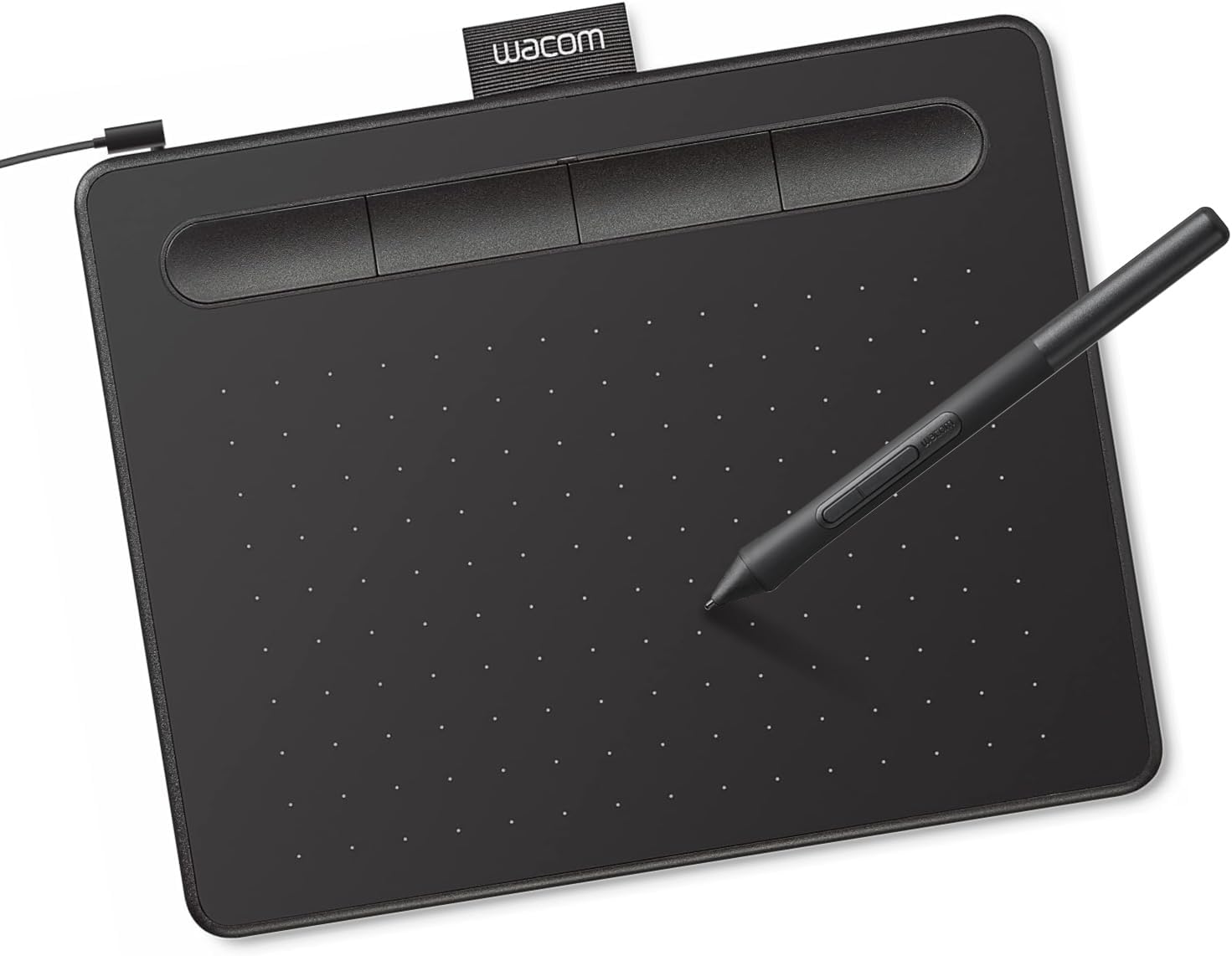
The Wacom Intuos Small is a wired graphic drawing tablet featuring 4096 levels of pen pressure sensitivity and a battery-free EMR pen technology. With a compact 6" x 3.7" active area, it offers plug-and-play USB-A connectivity compatible with Mac, Windows, Chromebook, and select Android devices. Ideal for digital artists, educators, and professionals, it includes creative software and online training, backed by Wacom’s 40+ years of industry leadership.


| ASIN | B079HL9YSF |
| Active Surface Area | 6" x 3.7" |
| Additional Features | Plug-and-play with Chromebook |
| Best Sellers Rank | #1 in Computer Graphics Tablets |
| Brand | Wacom |
| Built-In Media | Wacom Intuos Small Tablet, Wacom Pen 4k, USB-A cable with L-shaped Connector, 3 extra standard nibs and nb removal tool, Quick start guide, regulation sheet |
| Color | Black |
| Compatible Devices | Windows 7, 8.1 or 10 (excluding Windows 10 S; latest service pack/build), macOS 10.11 or later (latest update) |
| Connectivity Technology | USB-A |
| Customer Reviews | 4.6 out of 5 stars 23,942 Reviews |
| Display Type | Other |
| EU Spare Part Availability Duration | 7 years |
| External Testing Certification | Não aplicavel |
| Global Trade Identification Number | 00753218986887 |
| Item Dimensions L x W | 6.3"L x 7.87"W |
| Item Highlight | Battery-free pen, 4 ExpressKeys for shortcuts, works with Mac, Windows & Chromebook; Ideal for creators, students & teachers |
| Item Type Name | Wacom Intuos Small, Without Bluetooth, black |
| Item Weight | 8.1 ounces |
| Manufacturer | Wacom Technology Corporation |
| Mfr Part Number | CTL4100 |
| Model Name | Intuos Small |
| Model Number | CTL4100 |
| Number of Items | 1 |
| Number of Packs | 1 |
| Operating System | Works with Windows, Mac OS, Android |
| Pressure Sensitivity | 4096 levels |
| Screen Size | 7 inches |
| Software Update Supported to Date | unknown |
| Special Feature | Plug-and-play with Chromebook |
| Specific Uses For Product | Designing, Digital Art, Photo Editing |
| Target Audience | Teacher |
| UPC | 753218986887 |
| Unit Count | 1 Count |
| Warranty Description | 1 year manufacturer |
M**K
Buy wacom. it's quality.
this pad is just amazing. This was such a great find. $50 you cant go wrong. Wacom, a trusted company and a great product. the software was very easy to navigate and takes the place of a mouse. I just love this. As a notary, this is a game changer for ME. Thank you for providing such a great tablet. I was able to customize the pen as advertised to make the button as I with. I set mine to erasure. Great for Affinity photo suite.
B**T
Great!!
Easy install; I think the control center could be a little more helpful, but it’s not complicated, and works very smoothly
M**N
Excellent learning tool
Easy to connect and once the software is downloaded there are great tutorials even built into them. Using this for a beginner digital art class and no complaints
W**E
Great place to start
It's a fine tablet if you want a cheap and easy way to get into digital art. It works out of the box with most popular software (and a lot of unpopular software!), and there are settings to adjust anything you might want. The tablet itself is durable and does not scratch easily with use. It is extremely easy and intuitive to use. However, the nibs included with the pen will dull very quickly without much pressure. You should purchase nibs in bulk alongside this tablet, as the small number included do not last. Excellent value, but it's not an outstanding tablet beyond that.
J**T
Just get it it's well worth it
Just amazing I had a cheap pad that I bought for like 20 bucks and I use that for like a year but I got this one for like 40 bucks and it's a hundred times better. The pins much better than my old one. The accuracy and pressure sensitivity on this is great went ahead and got that fake paper had that makes it feel like real paper made it even better I think they sell it off their website it's pretty cool it really brings up this product like the to the next level.
F**Z
Perfect Tool for Beginners and Professionals Alike!
I recently purchased the Wacom Intuos Small Graphics Drawing Tablet, and it has been an incredible addition to my creative toolkit. Here's a detailed review based on my experience: Design and Build: The Wacom Intuos Small is compact and lightweight, making it easy to carry around and use on the go. Its sleek design is aesthetically pleasing, and the build quality feels robust. The active drawing area is adequately sized for detailed work while keeping the overall footprint minimal, perfect for small workspaces. Setup and Compatibility: Setting up the tablet was a breeze. It’s compatible with both Windows and Mac operating systems. I simply plugged it in via USB, installed the necessary drivers from the Wacom website, and was ready to go in minutes. The tablet also supports wireless Bluetooth connectivity, adding to its versatility. Performance: The drawing performance of the Wacom Intuos Small is impressive. It offers 4096 levels of pressure sensitivity, providing precise control over the thickness and opacity of the lines based on how hard you press. This feature is essential for creating detailed and nuanced artwork. The tablet also has a high report rate, ensuring smooth and lag-free drawing. ExpressKeys: One of the standout features of the Intuos Small is the customizable ExpressKeys. There are four buttons that you can program to perform various functions, such as undo, redo, zoom, or switch tools. This significantly improves workflow efficiency and allows for a more streamlined creative process. Software Bundle: The Wacom Intuos Small comes with free downloadable software. Upon registration, I had access to several creative software options, including Corel Painter Essentials, Clip Studio Paint, and others. These software options are great for beginners and professionals, providing a range of tools for digital painting, drawing, and editing. Conclusion: Overall, the Wacom Intuos Small Graphics Drawing Tablet is an excellent investment for anyone interested in digital art, whether you're a beginner or a professional. Its compact size, ease of use, and high performance make it a fantastic choice for drawing, painting, and photo editing. I highly recommend this tablet to anyone looking to enhance their creative capabilities.
P**A
Bang for your buck!
The matte finish on the surface is very pleasant to glide your pen across, and the pen itself is quite slim, way better than my previous one. It has rubber coating at the endpoint, which can help with gripping onto it, useful for the Singaporean artists that are constantly in the heat and always sweating. The refresh rate is 133hz, which is normal for a drawing tablet, with a 122-4095 pressure area, which is relatively good for the price! The quality of the material is very nice and feels very premium, despite it being 42 to 65 dollars, way cheaper than flagships from around 2014 or so. Since it's from the reputable brand Wacom, expect high compatibility with third party drivers like Hawku and OpenTabletDriver. The ExpressKeys are extremely clicky, but they are a bit thin and chunky, but it doesn't really impact the experience. The input delay is near-zero with a lower-end desktop like I have, but there is a very small bit of hardware smoothing. Overall, it's a very good tablet, especially for the price, you can consider it the modern-era CTH-480 (old version), and a great competitor to the CTL-472!
I**N
Good product
nice
S**N
Wacom CTL4100 Intuos Small Pen Tablet (Black)
Good
A**K
İYİ SATICI
SÜPER
H**G
Usability
I bought it for photo editing, it is very easy to setup and adapt to the way it work. A very good value for money product.
T**E
Great for online teaching/note taking
This tablet performs great for teaching and taking notes in onenote, which is what I purchased it for. Many other people I know use ipads or other tablets like that, but in my experience the accuracy and natural feeling when writing is much better with this, at only a tiny fraction of the price. One thing that I would note for potential buyers is that if your computer has a large screen (mine is 24 inches across), you may find it hard to write accurately when the area of the tablet is mapped to the entire screen area 1:1. Some people solve this by staying zoomed in on your document and panning around, but I would recommend mapping one of the pen buttons to "precision mode" in the wacom tablet properties. This way once you press the precision mode button, the tablet area will be mapped to a smaller box (around a quarter of your display) around the spot where your cursor was. You can then write/draw with much better accuracy in that box, then press the button again while your done so you can again move the cursor across the entire screen. While your there you can map other buttons to a variety of useful functions such pan, zoom, erase or many others. The software is pretty good and easy to use. Highly recommended.
J**S
Mesa digitalizadora com excelente custo-benefício
A mesa digitalizadora entrega exatamente o que promete: é fácil de usar (pluga, configura rapidamente e usa), boa sensibilidade, é bastante agradável o contato da caneta com a superfície, o acabamento aparenta robustez, mesmo sendo de plástico, e o tamanho é satisfatório, tendo uma boa área de contato, ainda que não seja grande. Eu a usei principalmente para fazer animação e ilustração e tive ótimos resultados, especialmente porque o tempo de resposta entre a ação na mesinha e o resultado na tela é baixíssimo, o que evita frustrações e aumenta a produtividade. Assumo que, se alguém procura ter uma primeira experiência com uma mesa digitalizadora, esta é uma ótimo opção, considerando o seu preço e o que ela entrega.
Trustpilot
2 weeks ago
3 weeks ago