Buy anything from 5,000+ international stores. One checkout price. No surprise fees. Join 2M+ shoppers on Desertcart.
Desertcart purchases this item on your behalf and handles shipping, customs, and support to Spain.
โ๏ธ Cool smarter, not harder โ master your systemโs chill with style!
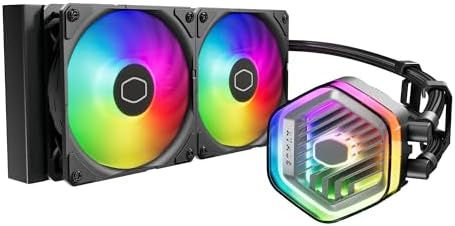
The CoolerMaster MasterLiquid 240 Atmos ARGB is a premium all-in-one liquid cooler featuring a patented dual chamber pump for targeted CPU cooling, a 240mm radiator with ultra-thin fins for superior heat dissipation, and customizable ARGB lighting with 3D design support. Designed for easy installation on AMD AM5 and Intel LGA1700 platforms, it combines whisper-quiet SickleFlow Edge PWM fans with eco-conscious materials, delivering high performance and sustainability in one sleek package.


| ASIN | B0CK564T94 |
| Air Flow Capacity | 70.7 Cubic Feet Per Minute |
| Brand | Cooler Master |
| Compatible Devices | Desktop |
| Cooling Method | Water |
| Customer Reviews | 4.6 4.6 out of 5 stars (1,628) |
| Included Components | 240 Atmos, Install Kits, Controller, Manaual |
| Item Dimensions L x W x H | 27.7L x 12W x 2.7H centimetres |
| Item Weight | 3.19 Pounds |
| Manufacturer | Cooler Master |
| Manufacturer Part Number | MLX-D24M-A25PZ-R1 |
| Material | Aluminum Copper Plastic |
| Max Rotational Speed | 2500 RPM |
| Model Number | MLX-D24M-A25PZ-R1 |
| Noise Level | 25 Decibels |
| Number of Items | 1 |
| Power Connector Type | 4-Pin |
| UPC | 884102112263 |
| Unit Count | 1.0 count |
C**O
Very good
M**I
The process of installing it was very easy, thanks to CoolerMaster instructions were very clear. You need some YouTube videos, though to be in safe side and understand exactly how RGB lights work. Very quiet all the time (sounds like a v8 engine when start only)
R**A
Nice and it have everything it needs to install and extra
P**.
Need change fans for more powerful
P**M
I bought this after my previous water cooler pump failed. I have an older computer and wasnโt sure if this would work, but it works excellently! The instructions are hard to follow as there are only titles and pictures. Each computer model requires different replacement instructions and techniques. I had to watch a lot of videos to figure out how to get my old one out and put this in. Once I realized that the brackets are for new install only and that all I had to do was put on the thermal paste and put in the proper screw mounts (you just screw them into the slots already there), it was smooth sailing. BE AWARE- if you have installed this with your computer laying on its side, you need to stand it upright after you are done and let it sit for 15-20 minutes so the cooling fluid migrates where it should be.
Trustpilot
1 week ago
5 days ago