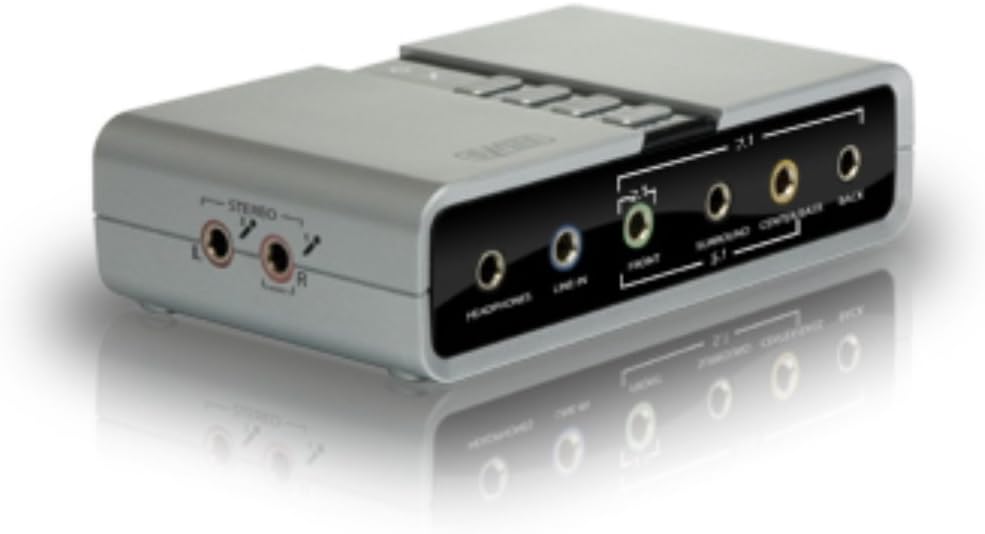
7.1 External USB Sound Card
Product ID: 56644899
Details
- Audio output modeDigital
- BrandSweex
- Compatible devicesHeadphone
- Hardware interfaceUSB
- PlatformWindows 8
7.1 External USB Sound Card Review: Simple, good quality and perfect for my mini ITX set up - I bought this as I have a mini ITX gaming pc (mini ITX is a small form factor pc which means it is about the size of a shoebox). Being a mini ITX you don't get any card slots so there is no option for an internal sound card, other than on-board. I love music and gaming and I found the on-board sound poor quality and often distorted certain sounds, especially at volume. So I wanted a cheap external sound device and bought the Sweex on the basis of reviews on desertcart. I have not been disappointed. I find the quality is much better than my on-board sound. All I had to do was plug it in, and it was ready to go. It comes with its own software which allows you to manipulate the sound equalisers which again I love as I always find the default sound settings (on every device I have ever used) to be rather lacking and bland. This is great as I can control the sound on my games, not just the music I listen to. You can also save different equaliser profiles if you want to configure it specifically for games, music etc. I did find at one point the software which provided the equalisers disappeared and I had to setup the driver software again. I don't know if this was my error that caused this but it hasn't happened since the one time. I should also add this didn't stop the sound working, just the access to the Sweex tools to use the equalisers described. Given the price I have to give this great wee device 5 stars. Review: Difficult to set up. - I bought this product to connect an Acer Revo 100RL computer (Windows 7 64 bit) to Logitech X530 speakers. This was the only way I could find to play DVDs in Dolby 5.1 surround sound, since the computer (like most laptops I think), does not have the sockets for the three speaker jack plugs. The expensive option would seem to have been buying either a decoder, a receiver or digital speakers. There are several similar sound cards available - Startech, Siig, Trust and Digiflex. I looked at the reviews for all of them and opted for this as a middle price product from a reasonable company. I'd recommend looking at the reviews for the External Sound Card USB 6 Channel 5.1 Audio by Digiflex, which I found useful when trying to set this card up. The forementioned cards all seem to be based on the CMedia CM6206 chip, and apart from the makers label, some look identical. There was no manual or instructions provided with my card, however I downloaded this from the Sweex website. It wasn't particularly informative, however I plugged the USB in, connected the speakers and loaded the software from the provided CD. That's when the problems seemed to start. I see that the previous reviewer was pleased with the stereo output from the card, and I'd agree. It produced good stereo, but only from the front speakers, nothing from the others. I then spent hours trying to get the promised Dolby 5.1 surround sound. Tried all the tips in the reviews, researched on internet etc. Finally managed to get all six speakers working and testing properly in Audio Playback, and with sound from all when playing DVD. But it wasn't the elusive Dolby surround sound, at which point I began to wonder if all the reviewers who had succeeded so easily to get 5.1 surround sound meant just that - stereo sound reproduced on six speakers. CMedia say, however, that the CM6206 chip supports Dolby sound. I emailed Sweex for advice and they kindly told me the card wasn't a receiver which I knew and was of absolutely no help. As a last resort I downloaded the CM6206 driver(Xear 3D V7-12-8-2142) from a free driver site, opened the file, double clicked on the Windows 7 folder and downloaded the software and driver. Tried the DVD sound but still no Dolby. Checked driver update (using option of search computer and internet) in Device Manager\Sounds\USB Audio Device, but informed driver is up to date. I had noticed that Windows was downloading a driver while the folder download was in progress, which I had thought was odd, but with my lack of computer knowledge thought must be right. However tried driver update again, but this time in computer only. Another driver was found and downloaded. Did sound check again, played around with speaker input/outputs on the sound panel, and finally got Dolby 5.1 surround sound.I don't know enough to try to explain this, but it seemed to work. Two final points. I see that most people set the sound card to 2 channel input and 6 channel output. I found that this would give sound to all speakers, but for the Dolby sound the input had to be set to 8 speakers and the output to six speakers. Again I don't understand nor can explain this. The whole process has seemed to rely less on logic and more on "suck it and see". For some reason at one point I had to swap the rear and the centre/sub woofer speaker plugs on the card to get correct sound - then at a later date swap them back when sound failed. Again no logical reason for this. There is an icon on the sound panel which opens a page allowing this, but it didn't seem to work for me. I don't know whether my difficulties stemmed from an intermittently faulty card, my admittedly limited knowledge, or inadequate software, but it has been problematic to get this thing operating as it should. At the moment it seems to be working, but with fingers crossed.
| ASIN | B00265L1S2 |
| Audio Output Mode | Digital |
| Brand Name | Sweex |
| Compatible Devices | Headphone |
| Customer Reviews | 3.9 3.9 out of 5 stars (183) |
| Global Trade Identification Number | 05054533685208, 08717534009790 |
| Hardware Connectivity | USB |
| Hardware Platform | Personal Computer |
| Item Part Number | SC016 |
| Item Weight | 0.55 Pounds |
| Manufacturer | Sweex |
| Manufacturer Part Number | SC016 |
| Maximum Sample Rate | 48 KHz |
| Model Number | SC016 |
| Platform | Windows 8 |
| Signal-to-Noise Ratio | 120 dB |
| Surround Sound Channel Configuration | 7.1 |
C**N
Simple, good quality and perfect for my mini ITX set up
I bought this as I have a mini ITX gaming pc (mini ITX is a small form factor pc which means it is about the size of a shoebox). Being a mini ITX you don't get any card slots so there is no option for an internal sound card, other than on-board. I love music and gaming and I found the on-board sound poor quality and often distorted certain sounds, especially at volume. So I wanted a cheap external sound device and bought the Sweex on the basis of reviews on amazon. I have not been disappointed. I find the quality is much better than my on-board sound. All I had to do was plug it in, and it was ready to go. It comes with its own software which allows you to manipulate the sound equalisers which again I love as I always find the default sound settings (on every device I have ever used) to be rather lacking and bland. This is great as I can control the sound on my games, not just the music I listen to. You can also save different equaliser profiles if you want to configure it specifically for games, music etc. I did find at one point the software which provided the equalisers disappeared and I had to setup the driver software again. I don't know if this was my error that caused this but it hasn't happened since the one time. I should also add this didn't stop the sound working, just the access to the Sweex tools to use the equalisers described. Given the price I have to give this great wee device 5 stars.
A**J
Difficult to set up.
I bought this product to connect an Acer Revo 100RL computer (Windows 7 64 bit) to Logitech X530 speakers. This was the only way I could find to play DVDs in Dolby 5.1 surround sound, since the computer (like most laptops I think), does not have the sockets for the three speaker jack plugs. The expensive option would seem to have been buying either a decoder, a receiver or digital speakers. There are several similar sound cards available - Startech, Siig, Trust and Digiflex. I looked at the reviews for all of them and opted for this as a middle price product from a reasonable company. I'd recommend looking at the reviews for the External Sound Card USB 6 Channel 5.1 Audio by Digiflex, which I found useful when trying to set this card up. The forementioned cards all seem to be based on the CMedia CM6206 chip, and apart from the makers label, some look identical. There was no manual or instructions provided with my card, however I downloaded this from the Sweex website. It wasn't particularly informative, however I plugged the USB in, connected the speakers and loaded the software from the provided CD. That's when the problems seemed to start. I see that the previous reviewer was pleased with the stereo output from the card, and I'd agree. It produced good stereo, but only from the front speakers, nothing from the others. I then spent hours trying to get the promised Dolby 5.1 surround sound. Tried all the tips in the reviews, researched on internet etc. Finally managed to get all six speakers working and testing properly in Audio Playback, and with sound from all when playing DVD. But it wasn't the elusive Dolby surround sound, at which point I began to wonder if all the reviewers who had succeeded so easily to get 5.1 surround sound meant just that - stereo sound reproduced on six speakers. CMedia say, however, that the CM6206 chip supports Dolby sound. I emailed Sweex for advice and they kindly told me the card wasn't a receiver which I knew and was of absolutely no help. As a last resort I downloaded the CM6206 driver(Xear 3D V7-12-8-2142) from a free driver site, opened the file, double clicked on the Windows 7 folder and downloaded the software and driver. Tried the DVD sound but still no Dolby. Checked driver update (using option of search computer and internet) in Device Manager\Sounds\USB Audio Device, but informed driver is up to date. I had noticed that Windows was downloading a driver while the folder download was in progress, which I had thought was odd, but with my lack of computer knowledge thought must be right. However tried driver update again, but this time in computer only. Another driver was found and downloaded. Did sound check again, played around with speaker input/outputs on the sound panel, and finally got Dolby 5.1 surround sound.I don't know enough to try to explain this, but it seemed to work. Two final points. I see that most people set the sound card to 2 channel input and 6 channel output. I found that this would give sound to all speakers, but for the Dolby sound the input had to be set to 8 speakers and the output to six speakers. Again I don't understand nor can explain this. The whole process has seemed to rely less on logic and more on "suck it and see". For some reason at one point I had to swap the rear and the centre/sub woofer speaker plugs on the card to get correct sound - then at a later date swap them back when sound failed. Again no logical reason for this. There is an icon on the sound panel which opens a page allowing this, but it didn't seem to work for me. I don't know whether my difficulties stemmed from an intermittently faulty card, my admittedly limited knowledge, or inadequate software, but it has been problematic to get this thing operating as it should. At the moment it seems to be working, but with fingers crossed.
L**O
Almost perfect
The hardware itself is very compact and easy to use. The signs are clear and you know which input goes where, all buttons work flawlessly. It even works on Windows 8 just straight out of the box, but I'd recommend downloading the correct drivers for a better experience. Hardware aside, the software itself is a little clumsy and it 'breaks' if you set your input wrong. Nothing that turning it off and on again won't fix, but still annoying. The main purpose of making this review is to give a quick tip about the specific case that happened to me: I tried plugging the soundcard on a USB Hub along with a gaming 5.1 surround sound headset, and for the whole thing to work properly it's best to keep them separated on different USB plugs. Even if you plug one of them in a USB Hub, it's fine. Just don't feed headset and the soundcard on the same USB 2.0 port.
M**S
Good value for the money.
Having ordered this sound card through Amazon, I was anxious as to whether it would work with my Windows 7 32bit software because the product description did not say so. Using Media Player, my desktop's inbuilt sound card had failed, and I knew it was fine with my previous Windows XP. I sent a message to Gasteiner Technologies Ltd. (the seller}, but while awaiting an answer,I decided to try it out. I need not have worried. It worked first time on the plug and play basis. I ran the installation disc anyway but it looked as if Windows 7 had already accepted it. External twin speakers worked fine from the 2.1 jack socket. Trying the headphones from the proper socket,I only got sound on one side; having reconnected in the 2.1 socket I found that both left and right headphones worked well. A quick adjustment of volume brought sweet music to my ears. For the price, I consider it good value, also it arrived with 48 hours of having placed the order, which is well up to Amazon standards. Verdict: highly satisfactory thank you. The above comments were published 23Aug but on 03Sep I add a comment: You need to be gentle when fitting jack plugs; ram the plug in and it won't work. Having used this card for over a week now, it's perfectly adequate for private listening with headphones, and works brilliantly with my speakers. In my small room that's all I need.
K**R
Jetzt ist es schon einige Zeit im Einsatz, sowohl im Studio als auch Live. Ich bin auch Live mit einem Dolby5.1-Digitalverstärker unterwegs und wollte deshalb eine SDIF-Schnittstelle für mein Notebook. Außerdem brauchte ich einen Kopfhörerausgang zum Vorhören im Livebtetrieb. Diese kleine Box ist eine Schnittstellen- und Klangrevolution. Die Installation unter Windows 7 war problemlos (erst Treiber installieren, dann anschließen) und wurde sofort von sämtlicher Software erkannt und angesteuert. Die Box ist sehr klein und passt zur Not auch in die Hemdtasche. Es gab bisher noch keinen einzigen Ausfall.
E**S
Pero eso sí, tienes que ir a configurar Audio Midi.. y seleccionar multicanal, porque por defecto solo sonará en dos canales y pensarás que no funciona. Perfecto para la salida 5.1 digital de los mac. Puedes aprovechar tus altavoces 5.1 analógicos y no tener que comprarte un sistema digital mucho más caro (aunque obviamente con mejor calidad de sonido).
G**B
très bien
G**9
J'ai branché mon ensemble 5.1 Creative sur cette carte son externe sans soucis. Attention cependant à bien choisir cette carte son par défaut dans les périphérique de lecture
E**E
Die Karte kann wirklich einen 5.1 Sound (da ich kein 7.1-Surround System habe, konnte ich nur 5.1 ausprobieren) und zwar korrekt ausgeben ! Die Karte ist v.a. zu empfehlen für Windows XP-Besitzer, da an meinem Vista-Rechner hat es mir trotz wohl einer korrekten Audio-Einstellung (das Manual kann man übrigens von Hersteller-Seite als PDF unkompliziert runterladen) nicht gelungen, Subwoofer und die hinteren Lautsprecher über SPDIF-Ausgang (hier als optischer Ausgang angelegt)zu aktivieren, bei Windows XP lief es aber einwandfrei ! Außerdem bietet die Karte auch andere Funktionen an, z.B. wohl Karaoke, dies ist für mich aber nicht so wichtig, daher habe ich es nicht getestet. Ein Stern abgezogen wegen SPDIF-Probleme unter Vista. Wie gesagt, kleine Investition hat sich gelöhnt !
Trustpilot
2 weeks ago
1 month ago