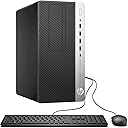
🚀 Elevate your workspace with power, speed, and seamless connectivity!
The HP ProDesk 600G4 Tower is a renewed powerhouse desktop featuring a 3.4 GHz 8th Gen Intel i7 Hexa-Core processor, 32GB DDR4 RAM, and a 500GB SSD for ultra-fast performance. Equipped with Windows 11 Pro, it supports 4K displays and multitasking for professional content creators. Connectivity includes Wi-Fi 5G and Bluetooth via USB dongles, plus a rich array of USB 3.0, USB-C, and DisplayPorts. Ideal for home or office use, this refurbished PC combines premium specs with sustainable value.
| ASIN | B0CH4N1VWK |
| Best Sellers Rank | #1,766 in Computers & Accessories ( See Top 100 in Computers & Accessories ) #36 in Tower Computers #135 in Renewed Computers & Accessories |
| Brand | HP |
| Card Description | Integrated |
| Chipset Brand | Intel |
| Color | Black |
| Computer Memory Type | DDR4 SDRAM |
| Customer Reviews | 4.2 4.2 out of 5 stars (419) |
| Date First Available | September 2, 2023 |
| Graphics Card Ram Size | 128 MB |
| Graphics Coprocessor | Intel HD Graphics 630 |
| Hard Drive | 500 GB SSD |
| Hard Drive Interface | Solid State |
| Hardware Platform | PC |
| Item Dimensions LxWxH | 13.3 x 3.9 x 12.1 inches |
| Item Weight | 14.67 pounds |
| Item model number | 600G4 |
| Max Screen Resolution | 3840x2160 |
| Number of Processors | 6 |
| Number of USB 2.0 Ports | 4 |
| Number of USB 3.0 Ports | 6 |
| Operating System | Windows 11 Pro |
| Optical Drive Type | DVD |
| Power Source | AC |
| Processor | 3.4 GHz core_i7 |
| Processor Brand | Intel |
| Product Dimensions | 13.3 x 3.9 x 12.1 inches |
| RAM | 32 GB DDR4 |
| Screen Resolution | 3840 x 2160 |
| Series | ProDesk |
| Wireless Type | 802.11n |
T**R
Full sized, impressive, fast HP desktop
This is one of many reconditioned products I have purchased from Amazon. And this desktop computer is outstanding. I did run into a couple of issues setting it up. So let me fill you in. First thing, there are 3 wireless USB adapters that must be plugged into the back of the tower. One for the wireless ability for the tower, one for the mouse and one for the keyboard. I found the wireless adapter for the mouse inside the battery compartment. The next issue I ran into is the keyboard was defective. It took some time for me to figure that problem out. My monitor screen, on whatever website I was on, kept flickering with a yellow cursor box everywhere. It acted like a virus was in the computer. Yet, thanks to Gemini, he helped me diagnose the issue. A defective keyboard really didn't matter to me, I had all the parts I needed to hook up two towers to one keyboard, one mouse and one monitor. The photo on Amazon's description of the rear of the tower is not accurate. I have attached a photo so you can see the rear. Just know that the output for a monitor is a display port. So, I had to order an adapter that converted display port to HDMI. This is a very inexpensive part that works great. My current desktop is Windows 7. I have had this tower since Windows 7 was released. So changing to a Windows 11 tower was frighting to me. Well, let me tell you this. Windows 11 is awesome. Very intuitive and takes some time to get to where want to go. Mainly because it looks nothing like Windows 7. I found the best thing for me was to PIN the most used features along the bottom of the toolbar. The setup was super easy. Although when it wants you to choose a PIN number for Microsoft, that number is the lock code number you enter every time to open your desktop . DON'T FORGET THIS NUMBER! Last thing, this is a full size tower. Not a compact. Full size! It works great, and it is super fast. I hope this information helps. Enjoy, this computer is worth every penny, I absolutely recommend it 👌.
T**R
Great Buy and Windows 11 might be your culprit
I was skeptical buying a refurbished computer and only did so after reading reviews. I was replacing an older HP desktop that would not support Windows 11 and this is a fantastic upgrade! After noticing negative reviews about packing, I was pleasantly surprised at how well my machine was packed. Everything listed online was included and like all the other reviews, the mouse and keyboard are so cheap they probably shouldn't be included...lol. But, I'm sure they work if you are indeed in need of a set. Luckily I only needed the computer because my current devices are pretty rad! Plugged it in and right away pretty much everything worked. The WIFI and Bluetooth dongles came attached and plugged into USB ports...ready to go! Pay attention to the back of the computer because it is slightly different than the pictures but not significant enough to cause problems. Main issue is the computer to a modern display attachment. I used VGA but had a HDMI adapter cord/unit that I could have used also. If you've been using Windows 10, Windows 11 is a snap to figure out. Actually you shouldn't have any problems coming from any of the older Windows systems either...11 is very intuitive. The only negatives were the frustration with not being able to connect my HP laser mf277 printer and the sluggish performance in the morning from waking up from sleep mode. It recognized the printer but could not update the drivers which would allow it to print. Went online and to the HP website and discovered that my printer is discontinued/not supported and found many community support sites with people who found workarounds by downloading and installing drivers from a more recent version of my printer. Also noticed that the Windows 11 updater had two older updates that refused to install. After about a week of this, I got online in a chat session with Microsoft Windows support and I gave them remote control of my computer. They discovered that my Windows needed a repair installment! It was downloaded, installed and everything worked instantly. Whole process took about 10 minutes!! Printer worked, Windows update is completely up to date and the morning lag is gone. Btw, if Windows is indeed the culprit, remote control from Microsoft is probably not necessary. I watched as they just went to their site, download Windows 11 pro (to repair) and it automatically started the installation right after. It's a really fast machine, very quiet and so far I'm pleased.
T**Y
UPDATE - BLUETOOTH DONGLE IS USELESS - MUST CONTINTUALLY UNPLUG AND RE-PLUG FOR IT TO WORK. PLAN ON HAVING TO BUY A REPLACEMENT. Have only had this for a week but so far so good and am happily surprised. I hope there are no long term issues down the road. As an aside. and not their issue but, Windows 11 is a pain to set up and has, in my opinion, much less practical functionality than Win 10. I see nothing to recommend Win 11 over their previous operating system and several reasons to dislike it. In setting it up, Microsoft wants everything but your blood type - probably will see that in Win 12? Unit looks like new, shipped quickly and packed carefully. I have never bought a used PC. so was a sceptic. Every new PC I looked at, and I looked at dozens, were all geared to gaming and not for the casual user. however, this was the only one had all the exact specs I wanted (except for NO HDMI ports so you are going to have to get after market patch cables to hook up such devices). Such cables are listed with the 'also frequently bought together" recommendations. Bluetooth and WIFI require the two included external dongles which will take up two USB slots, but the unit has several, so do not think this is a major issue.
R**M
I thought we could set up my new computer and use my external hard drive... but will only give me partial ... it must be having troubles.... I don't have a wifi icon nor a blue tooth icon and not sure what is going on with my renewed HP... Lesson to be learned........... don't let family think they can do the transfer, use a tech. I will let you know how it works out or if I need to return my tower.
Trustpilot
2 months ago
3 weeks ago