✨ Elevate Your Typing Game with the Keychron K13 Pro! ✨
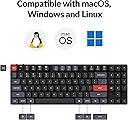
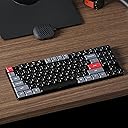
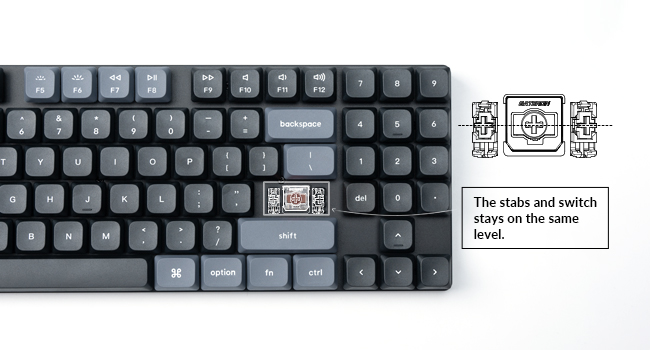
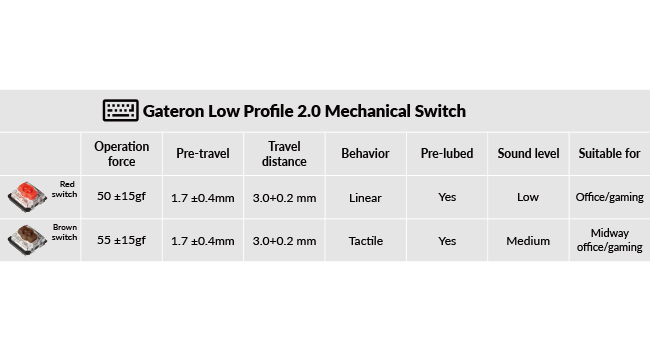
The Keychron K13 Pro is a versatile, ultra-slim wireless mechanical keyboard featuring a tenkeyless layout with a numpad. It supports QMK/VIA for customizable key mapping, Bluetooth 5.1 for connecting up to three devices, and is compatible with macOS, Windows, and Linux. With low-profile Gateron Brown switches and customizable white backlighting, it combines functionality with a sleek design.


| ASIN | B0BVLHKRHG |
| Additional Features | North-facing White Backlit Ergonomic Remap every key and create macro with QMK/VIA |
| Antenna Location | Office |
| Best Sellers Rank | #45,306 in Video Games ( See Top 100 in Video Games ) #245 in Mac Gaming Keyboards #2,186 in PC Gaming Keyboards |
| Brand | Keychron |
| Built-In Media | Low-profile spherical-angled keycaps |
| Button Quantity | 90 |
| Color | Low-Profile Gateron Brown Switch |
| Compatible Devices | macOS, Windows, Linux, Smartphones, Tablets, Laptops |
| Compatible Operating System Family | Windows |
| Connectivity Technology | Bluetooth |
| Customer Reviews | 4.4 out of 5 stars 37 Reviews |
| Enclosure Material | Acrylonitrile Butadiene Styrene, Aluminum |
| Generation | 2nd Generation |
| Hand Orientation | Ambidextrous |
| Keyboard Backlighting Color Support | Single Color |
| Keyboard Description | Wireless Custom Mechanical Keyboard |
| Keyboard Layout | QWERTY |
| Manufacturer | Keychron |
| Mechanical Keyboard Switch Model | Low-Profile Gateron Brown |
| Mfr Part Number | K13P-A1 |
| Model Name | Keychron K13 Pro |
| Model Number | K13P-A1 |
| Number of Batteries Required | 1 |
| Number of Keys | 90 |
| Number of Sections | 4 |
| Power Source | Battery Powered |
| Recommended Uses For Product | Office |
| Special Feature | North-facing White Backlit Ergonomic Remap every key and create macro with QMK/VIA |
| Style Name | Low-Profile Gateron Brown Switch |
| Switch Type | Tactile |
| Theme | Mechanical Keyboards or Customizable Keyboards |
| Unit Count | 1.0 Count |
D**Z
Checks Every Box!
So far i’m digging it! Before this keyboard I had a 60% for gaming and a full sized keyboard for work. This was one of the very few keyboards that fits all the criteria I was looking for: Mechanical, Low Profile, Compact, and has a Numpad. Ever since I plugged this into my PC I haven’t switched back to any other keyboards whether it’s for work or if I’m playing games. The build is nice, and it sounds/feels good though I’m not that much familiar with higher end keyboards so my opinion on that may be quite different from keyboard enthusiasts. Nonetheless, I love this keyboard. It was all that I was looking for and it wasn’t too bad on my wallet which was a plus.
D**A
Great product
I was hesitant to buy this due to it not having many / any reviews I could see. However I decided to give it a shot and this keyboard is amazing! It came with a key cap puller and the frame is made of metal so it has a solid build.. the keys feel smooth to press and it overall just looks amazing and sleek.The only thing I somewhat dislike about it is that I have to press the fn key to use any of the F keys. I’ll eventually get over it or I could possibly try remapping but other than that I highly recommend this keyboard
P**A
I like it!
I like slim keyboards, but wanted a mechanical keyboard, so this fits what I wanted. I love the unique layout. I have all the keys I need without any extras. I love being able to customize the keyboard. Its very easy. I changed my right side windows key to be a screenshot button. I wish there was a "open media player" button though.
B**N
Great keyboard with only one drawback
This keyboard was basically the exact one I was looking for. I move locations a lot for work so I wanted something that was easy to move around and still had a numpad. This is one of the few that I’ve found and Keychron is a brand I’ve used before. I keep the backlight off because it doesn’t have shine through key caps and that nets me around 3 weeks of battery life in Bluetooth mode with constant use. The only draw back I’ve found with it is the time it takes to reconnect on Bluetooth when it disconnects from inactivity. My other keyboards take >1 second to reconnect. This keyboard is around 5 seconds with a decent charge but it can get up to around 10 when the batteries low. I’ve never tested it with a stopwatch but that’s what I would consider a pretty good guess on time for a reconnect. Honestly, 75% of the time, it’s just an annoyance when I am at a desk. When I am working on external equipment like switches or routers and I need to catch a screen for a break key, that time frame can get in the way. I would 100% recommend this keyboard and the drawback I have with this keyboard is a bit specific. Overall, I am happy with this keyboard and I would by a V2 version in a heartbeat if they added quick reconnect with Bluetooth on it.
W**T
Low Profile and Almost Silent Red Switches
This keyboard was to replace my Logitech MX Mechanical keyboard because some of the keys would require multiple presses to respond. The low profile means I do not need a hand rest and it is so quiet when a key is pressed. Also, it is almost 1/2 the price the the Logitech one I purchased over a year ago. This keyboard is for my desktop and I purchased another Keychron to use with my laptop many years ago and it runs perfectly fine too. I will only purchase in the future Keychron keyboards.
S**5
Nice keyboard but you'll need QMK or VIA to get the number pad keys working...
If you're looking for a low-profile, 75%-ish mechanical keyboard, the Keychron K13 Pro is a good option with one major or minor drawback (depending on how familiar you are with programming keyboards). The keyboard is thin and light but the key presses are satisfying with just a little bit of what keyboard snobs call "thoc." I've used the K13 Pro for several days, writing several hundred to several thousand words per day without problem. Bluetooth connection has been stable with no random disconnections, no double-pressed keys, etc. Fortunately, none of those long typing sessions needed me to use the number pad - as, well, you can't, at least not straight out of the box. You see, unlike every other mechanical keyboard I own (I may have a problem with so, so many keyboards in my home office...), Keychron, for whatever weird reason, is selling the K13 Pro without the number pad enabled. At least, not on my unit (and an internet search reveals I'm not alone here). Seriously. One of the "selling points" on this keyboard is that you get a TKL 75%-ish board with a stripped down number pad (no tall enter key, no dedicated +/- keys, just the numbers). But THEY DON'T WORK OUT OF THE BOX! UGH! To get them to work, you have to connect the K13 Pro to your computer via (sorry, pun incoming) a USB-C cable, then launch keyboard key remapping software such as VIA or QMK, and then program the number pad keys to their corresponding numbers. Keychron, if you're reading this, why couldn't you do this from the factory? Heck, why not have other keys that can enable the number pad such as pressing "Fn" or "Alt" or something? Maybe a Num Lock key as there's plenty of empty space here to fit one? Regardless, not everyone out there who might buy the K13 Pro knows about how to reprogram a keyboard's key mapping so I imagine this is leading to more than a few unnecessary returns. That's weird Keychron, just weird, and keeping me from giving anything higher than 3 stars for this keyboard.
N**E
Compact, responsive and aesthetic
Full disclosure, I do not game on this Keyboard at the moment. I use it specifically for work in my clinic where I have to write numerous patient encounter notes and clinical presentation documentation. I wanted something compact and low profile to go with my setup, 24in Lenovo monitor and a red dragon mouse, so the aesthetic is all black and red tones. Computer mat is also 13X31 inches so everything is very clean and minimal but build for comfort and efficiency. I find the Keyboard very responsive for my purposes, I use it on Bluetooth mode and only charge it when battery is low to keep cords out of the picture. I did not need RGB lighting but the white backlight does help if I am here late at night charting. Overall I enjoy this keyboard and see myself getting another Keychron, maybe a 100% layout that is not something portable that I will use for gaming or my home office setup sometime in the near future.
R**T
Great when it works
Was loving the keyboard in it's short life. Great low profile keys, nice customization via web app instead of bloatware, and just solid layout overall. However, after six months of regular use the keyboard is already failing. This is ABYSMAL longevity for a keyboard. Missed keystrokes that require some hard presses to "fix" temporarily. Cleaning has not helped and at some point soon the keyboard will just end up in the garbage once it affects productivity too much.
Trustpilot
1 week ago
2 weeks ago