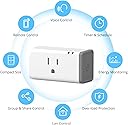
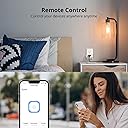
๐ Power up your smart home with effortless control and energy smarts!
The SONOFF S31 Smart Plug is a 15A WiFi-enabled outlet that offers real-time energy monitoring and scheduling via the eWeLink app. Compatible with Alexa, Google Home, and IFTTT, it requires no hub and connects exclusively to 2.4GHz WiFi. ETL certified for safety, this 4-pack lets you automate and optimize your home appliances with voice control and group management.


| ASIN | B0C9ZBCJMC |
| Amperage | 15 Amps |
| Best Sellers Rank | #463,868 in Tools & Home Improvement ( See Top 100 in Tools & Home Improvement ) #536 in Electrical Outlet Switches |
| Brand | SONOFF |
| Brand Name | SONOFF |
| Color | white |
| Connector Type | Plug in |
| Customer Reviews | 4.6 out of 5 stars 151 Reviews |
| Included Components | plug |
| Manufacturer | SONOFF |
| Material | Copper |
| Material Type | Copper |
| Model | 4PCS TPB |
| Number Of Poles | 2 |
| Number Of Wires | 3 |
| Number of Poles | 2 |
| Part Number | 4PCS TPB |
| Plug Type | Type B |
| Smart Home Compatibility | Smart Home Compatible |
| Specification Met | ETL |
| Unit Count | 4.0 Count |
| Voltage | 120 Volts |
C**Y
Perfect for Home Assistant or ahy other Home Automation
These are the โbees kneesโ for anything you want to control by timer or schedule, etc. They work with the Chinese app or with other apps like Home Assistant. Wish I had a hundred of them! Definitely recommend for anyone looking to automate their home.
J**N
Good energy monitoring plug
For a long time, I got these because they could be flashed to ESPhome with little effort. I wanted them for home energy monitoring in home assistant. Taking them apart and flashing them wasn't difficult but it was time consuming and you needed to have some know-how. Now, these are natively supported in home assistant, so you no longer need to flash them to get them to work, they just work, and you get all the energy monitoring and remote control you need. Overall, if you are looking for remote control of outlets and want energy monitoring, they are a decent choice for the price.
C**T
Tasmota-compatible Smart Plug as of December 2023. Hard to fit two side-by-side
Sonoff has been a longtime reliable vendor of Tasmota-compatible devices. Unfortunately, some of their newer devices such as the S40, make it more difficult to install Tasmota firmware. This S31 though is great, with one or two minor gripes. Firstly, it's wonderful in that there's no adhesive or ultrasonic welding in sight, and it's assembled in multiple pieces held together with screws. One other major positive is that it does power monitoring with the CSE7766 which is a calibration-free electric energy measuring chip, accurate to +- 1%. It's easy to disassemble it and put it back together again without breaking any plastic. Once inside, there are easy to access pads to solder or use a BDM frame and a jig. Then it's a simple matter of connecting a serial programmer to your computer (another ESP8266 works, a Raspberry Pi works, or a dedicated FDTI USB dongle works), then going to the Tasmota Installer ESP Web Tools website, and hitting connect/upload. That flashes the Tasmota firmware onto the ESP inside the Sonoff S31 and then you're done! As for my minor gripes about this product, one is that it's slightly too large to fit two side by side in our outlets. The S31s are larger on the edge near the wall compared to the front, probably to make the molding process easier, but it's a millimeter or two too large to have two sit comfortably next to one another. My other gripe only came about after experiencing the SwitchBot Smart Plug Mini, and it's that the S31 power button is actually pretty small. All in all though, the S31s have been my go-to Tasmota smart switch for years, and while I'll probably buy SwitchBots as long as they're still flashable, this is a known good backup.
T**E
Not as easy to connect to WiFI but pretty flexible overall
I primarily bought this since it is reported to have a chipset that can be flashed with Tasmota so if the company goes out of business or I decide I want complete autonomy, I can reflash the devices and go off line. I have not done this yet but at least have the choice. I have done it on other Sonoff devices with no issues. Anyway, this product is not easy to connect at all .. especially with iOS, many people will find it frustrating to use the App to connect. Sonoff should either fix this issue or just direct everyone to what they call "compatible mode" where you have to put the device in hotspot mode and type in a password. The password really is not necessary and with the difficulties in setting up in normal mode, they should just default to this and make it easier to connect. It does work but unless you are a tinkerer (enjoy the challenge of setting up home automation), I do not recommend this product and expect that Sonoff would see a lot of returns or at least customer support issues. I certainly don't recommend the newer version (S40) which has the same issues but also cannot be re-flashed with Tasmota. I would recommend to Sonoff that you really try to understand your customer base ... most of your customers buy due to the flexibility to be able to flash different firmware on to the device ... OR expect it to work properly out of the box. Right now I use it with Ewelink and connect with Homebridge so I can run it with HomeKit. It's a good alternative to paying a premium for HomeKit certified devices.
M**S
Nice units that can be re-flashed with Tasmota fairly easily
I flashed these immediately with Tasmota before I even plugged them in since I didn't want to use a proprietary app or have the devices connecting to servers around the world just to turn-on lights. They work perfectly with the base tasmota.bin and when you select the correct device in the configuration, you can see the power monitoring features. The pads for the serial connection on the PCB are on the edge of the board, so they're easy to get to. Just keep in-mind that they used lead-free solder for these, so it doesn't melt nicely right away (don't overheat the board and melt it). Physically, these are very nicely made and I have no concerns about durability. I'll definitely buy them again when I need more.
H**N
Great Home Assistant smart plug
I custom flashed these to work with my Home Assistant environment. Easily accessible internal components. Great for either out of the box use with Sonoff, or can be custom flashed with other software. After flashing with new software, I can monitor live power usage remotely. A great product for those who want a smart power plug and/or DIY smart automations.
D**D
Great for Home Assistant / ESPHome, ETL Certified, 15A capable
Of the Home Assistant / ESPHome capable smart plugs out there, this is the only one I've found that doesn't feel like a code violation waiting to happen. Inside, it's basically a 16A relay attached to an ESP-01 microcontroller with a push button and a couple of LEDs. It's capable of running ESPHome, but there's no serial header, only solder pads. You'll need some sort of USB-Serial bridge rigged up with clip-on leads and a bit of patience for the initial flash of the firmware. After that, it's over the air updates. Love these things!
L**.
2.4 Ghz only - good value, but...
Don't even bother going into pairing mode (waste of time) - use Compatibility mode at 2.4 Ghz (your phone or network must allow you to switch to 2.4 Ghz... ). If you can't switch to 2.4 Ghz -- one trick is to get far away from your router to force your phone to 2.4 Ghz. Next, "Compatibility Mode" is hidden on the bottom of the screen where you add a device using Sonoff's eWeLink program. You literally have to scroll down to find it. See attached picture. It's a little tricky to navigate from your 2.4 Ghz network to the Sonoff device that will appear in your list of networds available as ITEAD***** . Once you link to the new network called ITEAD****, the linking will get done very quickly, then, there is a pause as your phone links back up to your original network. Confusing? Yes, it is! However, once you get it working, you will be pleased as you can control devices locally and remotely AND see how much power is consumed.
Trustpilot
3 weeks ago
1 month ago