⚡ Power up your workspace with speed, security, and style!
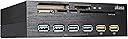
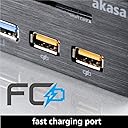
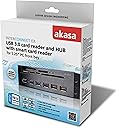
The Akasa Interconnect EX AK-HC-07BK is a multi-functional internal card reader and USB hub designed for 5.25-inch front PC bays. It features USB 3.0 speeds, 5 card slots, 4 USB ports including 2 fast-charging ports, and a secure USB 2.0 smart card reader, all housed in a sleek brushed aluminum panel for professional setups.
| ASIN | B00MXR6MVY |
| Best Sellers Rank | 430,104 in Computers & Accessories ( See Top 100 in Computers & Accessories ) 2,969 in External Memory Card Readers |
| Brand Name | Akasa |
| Colour | Black |
| Compatible Devices | pc |
| Customer Reviews | 3.8 3.8 out of 5 stars (57) |
| Data Transfer Rate | 480 Megabits Per Second |
| Global Trade Identification Number | 04710614534841 |
| Hardware Interface | Memory Stick, MicroSD, Secure Digital Card, USB, microSDXC |
| Item Weight | 1.06 Pounds |
| Manufacturer | Akasa (Europe) Ltd |
| Manufacturer Part Number | ZUCR-058 |
| Media Type | SD Card |
| Model Name | AK-HC-07BK |
| Model Number | ZUCR-058 |
| Network Connectivity Technology | USB |
| Operating System | All operating systems |
| Product Features | USB 2.0 electronic ID and smart card reader, Two high performance USB fast charging ports |
| Slot Count | 5 |
H**D
Very useful product.
I was a little apprehensive after reading about the difficulties some people had had. I fitted the box just below the optical disc drive in the front of my tower case and was able to connect all of the cables to my motherboard. Everything worked with no problems. I now have all the functionality in a convenient position to access 4 USB sockets, 2 high current USB charging outlets and slots for SD and other cards. No more searching around for a USB SD card reader or a USB charger. I wish I had bought this or something similar earlier.
B**N
I've bought this to replace my old Akasa Interconnect Pro AK-HC-05BKV2 front hub which died after just 18 months and except the
Big incompatibility issues ! I've bought this to replace my old Akasa Interconnect Pro AK-HC-05BKV2 front hub which died after just 18 months and except the outstanding Amazon customer service i had only a very bad experience with this Akasa Interconnect EX AK-HC-07BK. The main issue was the very low seq read/write transfer through any of the 4 USB 3.0 ports at max seq read of 30MB/s and max seq write of 16MB/s using a Kingston 64GB USB 3.0 DataTraveler Ultimate G3 DTU30G3/64GB memory stick capable of read speed up to 150MB/s and write speed up to 70 MB/s. I did the following tests without success : - i switched the internal USB 3.0 motherboard connector from Akasa hub to the front case hub and i got the full speed, meaning it was nothing wrong with my motherboard usb 3.0 connector, usb 3.0 driver or the memory stick used to test the speed. - i installed the latest usb 3.0 driver 1.0.10.255 fron Intel - i installed the original chipset driver 9.3.0.1019 from 06.12.2011 - then i installed back the latest chipset driver 10.0.20 from 18.06.2014 - in uninstalled the Intel(R) 7 Series/C216 Chipset Family USb Enhanced Host Controller 1E2D and 1E26 both from device manager. - i tested my Kingston DataTraveler Ultimate USB 3.0 64 GB Flash Drive,DTU30G3/64GB on a 3.0 port on my Acer laptop and got amazing speeds ( 89MB/s read speed...wow) - i disconnected all connectors from Akasa hub and restart the pc then connect everything back and restart again - my system config: os: Windows 7 Ultimate x64 case: Corsair Carbide 500R cpu: Intel i5-3570k stable OC @ 4.4 Ghz memory: Corsair 16GB DDR3 1600 hard drive: Samsung 840 SSD graphic: Gigabyte Nvidia GTX 660 motherboard: Asus P8Z77-LX V - i have even tried the driver from their website and nothing changed - i test the speed on the rear motherboard USB 3.0 ports and again i got max speed The only things i haven't done were to test the Akasa hub on another motherboard and to update the BIOS (which is not recommended as long as everything works perfectly ... well except this Akasa hub...plus i would have lost the overclocking setting in the BIOS) And after all this testing work i decided to get a replacement from Amazon that arrived on Sunday ( like i said amazing service from Amazon) and guess what...i got exactly the same problem reason for me to return the second one too for refund. The Akasa customer service is somehow helpful but no too much and it takes days to arrive to a solution if ever. One last thing to say is that Akasa forget to mention on the instruction manual to connect both the sata power cable and moles power cable to your PSU (logically one can think to use one of them depending on your PSU...i mean they could have made both connectors sata or molex to give a hint that both need to be connected). So the molex power connector if for the 4 blue USB 3.0 ports and the sata power connector is for the 2 orange charging usb ports...at least this is what Akasa customer service told me in the email. Anyway i always had concerns about Akasa products quality but now when i actually test them all i can say is: DO NOT BUY AKASA PRODUCTS ! I doubt they are properly testing their products before release on the market.
V**R
Windows 8.1 strangely ejecting the whole hub rather than just one device!
Bought this to upgrade previous Akasa AK-ICR-16 USB 2.0 / 3.0 card reader as I'm needing more USB 3.0 ports and the extra charging ports are also handy as devices are becoming more power hungry. The device appears well built and made of solid steel that there's no movement or give from the casing. I mention this point because it was very difficult to fit into a standard 5.25" bay. No matter how I tried it just would not fit so I had to slightly deform the aluminium chassis of a Silverstone case for it to fit. As one previous review mentioned - snug. All seemed well at first but then strange things started happening at first but now I think I've fathomed what was happening and a workaround. Whenever I tried to safely remove a USB device using the Windows notification area icon to eject a device the whole Akasa hub would be ejected by Windows (8.1 x64)!!! Not just the one device, the whole hub! Device Manager would show a yellow triangle on the Akasa (known by Windows as a "Generic Superspeed USB Hub" followed by the message: "Windows cannot use this hardware device because it has been prepared for "safe removal" but it has not been removed from the computer. (Code 47). To fix this problem, unplug this device from your computer and then plug it in again." I would have to reboot Windows in order for the Akasa USB hub to be usable again! All well and good if you're just using it on a day to day PC and not on a server or media centre or something running permanently but even then it seems a bit counterproductive to lose a whole hub when you only want to remove a USB stick. If I have other USB devices in use at the same time like USB to SATA dock or anything, it was impossible to eject one without ejecting the whole hub and everything else that was plugged into it! I'm not sure if it's just an issue with Windows 8.1 x64 or whether it's fine with Windows 7 or 10 as I've not tried it in any other OS but if it's simply using a USB 3.0 motherboard header for the hub and it was fine with the previous Akasa AK-ICR-16 I'm not so sure to point the finger at the OS just yet but I am due a reinstall so will see... Have emailed Akasa Customer Support but they've not had the courtesy to reply or simply don't have a clue. USB 3.0 speeds aren't great either as mentioned by other reviewers but I'm not troubled by that, just the fact that I can't eject one device without affecting the others. Thankfully as a workaround, there are USB apps that do the same as Windows safely remove / eject but better. With a third party app I can eject one device without losing the whole hub! I do like the layout of this Interconnect bay and the connectors it needs as well as the card reader otherwise it would have been returned same day. I've got until next month to return so will do some more troubleshooting and see if a fresh Windows reinstall works as I'm due to do it soon so will update review if anything changes. Perhaps too it may be a one off faulty hub. Will know soon enough but would be interested to hear if anyone else has experienced the curse of the missing hub too? There's no mention of it in the reviews so I guess not.
R**T
This is a replacement for the Akasa AK-HC-05U3BK, I ...
This is a replacement for the Akasa AK-HC-05U3BK, I have used since 2015, with a USB 3-socked failing causing damage to the interface. This replacement AK-HC-07BK has the same build quilty, the other differences is eSATA socket gone. Now has four USB3 + two High-speed USB charger Sockets. All card slots remain the same. The USB3 sockets and card slots are within USB3 Spec.
A**R
A bit more expensive but for now has full fast functionality and great charging capabilities.
C**.
Tres bien / bon produit
S**A
Adorei e uso no computador
B**G
Bisher hatte ich drei verschiedene Kartenleser unter Windows 10 im Einsatz, die entweder sofort oder nach einieger Zeit irgendwann nicht mehr erkannt wurden. Wie sicher vielen bekannt, hat Windows 10 völlig unverständlicher weise erhebliche Schwierigkeiten mit dem Anschluß (und den Treibern) von USB 3.0 Ports! Der Unterschied dieses Cardreaders mit den 4 USB 3.0 Anschlüssen gegenüber den (bisher bei mir) nicht funktionierenden ist seine separate Stromversorgung. Ob es daran liegt, dass er nun schon wochenlang ohne Schwierigkeiten seinen Dienst tut, kann ich nicht beurteilen, jedenfalls ist er der erste, der unter Windows 10 gut funktioniert (habe davon 2 im Einsatz). Übrigens taten die anderen unter Windows 7 auch problemlos ihren Dienst! Vielleicht für manchen eine Einschränkung (nicht für mich), dessen Ursache aber am Mainbord liegen sollte: Die beiden orangefarbenen Ports liefern bei einem heruntergefahrenen PC KEINEN Strom, um etwa ein Handy aufzuladen!
V**S
Prodotto eccellente.montato su un PC datato ma ancora performante con windows 10, subito riconosciuto senza bisogno di alcun driver. Ogni lettore di scheda e pienamente funzionante, così come le porte USB3 e quelle USB per la ricarica del cellulare. Il lettore di smart Card anch'esso va benissimo, la lettura della tessera sanitaria viene letta senza alcun problema. Prove alla mano, facendo un trasferimento di file tra una scheda SD da 16 Gb (SanDisk Extreme da 60Mb/s) la velocità di scrittura risulta di circa 35 Mb/sec; la lettura invece copiando su un HD SATA interno è di circa 57 Mb/s, mentre su HD USB3 collegato allo stesso pannello è di circa 40 Mb/s. velocità veramente ragguardevoli. la velocità di trasferimento dati, invece, sulle porte USB3 collegando un HD esterno da 2,5" risultano: 1) Copia tra HD usb sulle stesse porte, circa 35-37 Mb/s 2) Copia tra HD usb e HD interno Sata, circa 88-90 Mb/s 3) Copia tra HD interno Sata a HD usb, circa 80-82 Mb/s 4) Copia tra HD usb del pannello e HD USB su un altra porta USB3 del PC, circa 52-54 Mb/s Impressionante! E tutto mentre era in carica anche il telefonino sulla porta USB adatta allo scopo. Che dire di più..., costa un pochino, ma vale tutti i soldi spesi, e forse non sono nemmeno tanti, perchè con 50 € ti porti a casa anche il lettore di smart card..
Trustpilot
1 day ago
1 month ago