🌬️ Master your airflow, own your cool — the future of fan control is at your fingertips!
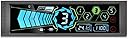
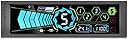
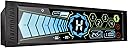
The Thermaltake Commander FT is a pioneering 5.5-inch touchscreen fan controller that manages up to five fans independently, delivering up to 10W per channel. It offers real-time temperature and RPM monitoring with customizable Celsius or Fahrenheit display. Designed for easy installation without motherboard dependency, it ensures efficient cooling and quiet operation, perfect for gamers and PC enthusiasts seeking precise thermal management.

| ASIN | B00V80IQTS |
| Anti-Tick Material | Plastic |
| Batteries required | No |
| Best Sellers Rank | 83,528 in Computers & Accessories ( See Top 100 in Computers & Accessories ) 1,244 in Fans & Cooling |
| Customer Reviews | 4.1 4.1 out of 5 stars (1,007) |
| Date First Available | 28 Mar. 2015 |
| Display type | touchscreen |
| Global Trade Identification Number | 00841163060926, 04717964401113, 07727002566855 |
| Included components | Camera Body |
| Item model number | AC-010-B51NAN-A1 |
| Item weight | 336 g |
| Manufacturer | Thermaltake |
| Product Dimensions | 17.02 x 6.1 x 11.18 cm; 335.66 g |
| Specification met | No |
| UPC | 841163060926 |
| Warranty description | 2 year manufacturer |
T**.
Working great so far
This was exactly what I needed. This is a great product. One of the fan connections felt a little on the delicate side but the whole thing has come together nicely. It is a little loud with three fans at full speed, but it does cool the system down which is the main reason I bought it. When not gaming and running on the lowest setting it can be heard, but it isn't intrusive - I can't hear it at all as soon as anything else starts making any noise in the room. For those new to using controllers or messing around with fans: I bought a new case for my PC after buying a new-to-me graphics card and power supply, whilst it all did fit in the old case, it was cramped and getting quite hot when gaming so I bought a new case. After installing everything in the new case I plugged the new fan in (supplied with the case) rather than using the smaller old fan. The motherboard didn't like this and the PC wouldn't boot up (long story short - the new, more efficient fan ran at a slower speed than the old inefficient fan, so the MB couldn't detect it). I was going mad trying to find a solution - where was the point changing the case and fan if I couldn't use them to cool my over heating components? My plan was to use a controller and three fans. I plugged all this info into three different forum's and none of them gave me any help at all. Some of the "experts" evan called me an idot for not researching properly, that it was impossible to make it work and told me to put everything back into my old case. Turns out, the controller and the fans don't even have to plug into the MB. I plugged the old fan back in and set it up as an exhaust at the back of the case. I then bought this controller, plugged the three new fans into it and plugged it into the power supply, you do not need to plug any of it into your MB. I hope this helps someone out there, because the forum's were driving me insane.
B**2
No fitting instructions.
No fitting instructions but it's pretty easy the only problem I had was finding a hot spot on the CPU for the sensor, the hottest place I found was 40c when the CPU was in fact 60c at that point I had it set to turn the fans up and the alarm would sound. the fans would then cool the CPU to below 40c, then the fans speed would reduce until it hit 40c again, and again the fans would start and alarm would sound. In short I had to turn of the sounder from the rear of the display. Don't be put of by this it's a lovely item it dose the job well the screen is large and easily viewable and controllable. Im pleased with it, I have a near silent PC when not playing games. UPDATE :: I bought this in 2015 the screen is so dim now 2021 I will have to buy New one. £30 sigh still buying the same one. I have bought a replace the same item, took all the old wiring out and used the new, the LED is bright on even on the low setting much bright I can see again. I'm using the auto setting I see under load the temp went 51c on the sensor, I have the sensor stuffed in between two fin blades on the GPU with the plastic sheath, I have set the high limit temp to 57c, It now cuts in nicely when the GPU goes over 65c and drops back when the game is closed down. Hope this one last.
A**Y
Excellent product !!
I was dubious if this product could actually do what it said and control 4 pin PWM fans when it doesn’t have the 4th pin or wire, BUT I’m absolutely made up with it, not only does it easy control all 5 PWM fans at what ever speed you like it also shows a fairly accurate fan speed, and give warning if a fan fails, which as I bought this for a custom built home server to slow the fans in the winter month is excellent as I quite often don’t notice if a fan dies !! Temp indicator via a probe you can position is also very useful, only complaint is it needs that horrible moles connection to feed it :(, they are just not good connectors and I have to add another lead to my module PSU for it, shame it can not use either so you may want to consider a converter lead when you buy this. Excellent product wish I bought it years ago!!
T**H
it connected up to all the fans easily enough and after turning on the PC everything looks ...
------ Adding an edit: nearly 3 years on and i've noticed the display has significantly faded. I can barely read it any more. The speed not reporting looks like a contact issue. The cables aren't always easy to connect properly (as in, they are generally quite loose) so managing the cables to prevent that is important. It sets off an alarm if the fan speed stops reporting. ------ Fitted today and tested with 5 separate case fans in a Corsair Spec-03. Fans all 3-pin and 1 of them had a molex too. Fitting it was simple enough, although I had to remove the toolless clip to screw the thing in as it wouldn't click in place. Once in, it connected up to all the fans easily enough and after turning on the PC everything looks good. Some things I think they could improve: * You can't configure all fans in one go. You select each channel and configure if it's auto or manual, and how powerful to be * Can't turn a fan completely off. It has a "Silent" mode which is under 40 (% I think). * If the fan is set to Auto, pressing the arrow keys or using the slider do not automatically switch it to manual mode. Other: Not sure why but after 1 reboot one of the fans stopped reporting fan speed. I set the power to it manually though and it sped up/slowed down so seems its still being controlled. Overall a piece of kit that does what you expect and was easy enough to fit.
K**S
Very good and acurate device, I suggest it.
J**E
Normal brauchte ich diese Steuerung nicht, weil mein Tower eine ganz einfache Steureung via Schieberegler hat. ABER nachdem ich das Teil in dem Rechner meiner Tochter eingebaut habe fand ich die Optik soooo geil, das ich mir das auch bestellt habe. Es macht was es soll: 1. Man kann PWN (4Pin) und normale Lüfter (3Pin) ansteuern. 2. Zwei Modi gibt es. Einmal den Manuellen und den Automatikmodus. 3. Es ist ein Sensor für die Temperaturmessung dabei, damit der Automatikmodus die Lüfterdrehzahl steuern kann. 4. Das Touchdisplay ist für den Preis ganz ok. Da drückt man ja nicht die ganze Zeit drauf herum. 5. Optik ... Was soll ich sagen ... HAMMER GEIL :-) Getestet mit Arctic Cooling, Nanoxia und BeQuiet Lüftern (120mm & 140mm). Alle Lüfter, außer den 140mm Silent Wings3 (Version: bis 1800 u/min.) von bequiet liessen sich super regeln. Bei dem bequiet erkennt die Steuerung nicht die niedrigste Drehzahl (fängt bei 800 u/min erst an) und somit ist dieser einfach zu laut. Den steuere ich nun über den PWN-Anschluß meines Mainboards und halte den für die zusätzliche CPU-Kühlung schön im ruhigen Drehzalbereich so bei 200 - 600 u/min. Die Kabel sind lang genug und man kann die Überflüssigen einfach abziehen. Von mir gibt es eine ganz klare Kaufempfehlung !!!
J**Y
Hi !, tous mes fans fonctionnent très bien, ajustable et indépendant l'un de l'autre (fit 3 ou 4 pins) , à ne pas confondre la sonde, qui sert uniquement pour le boitier, et non pour le processeur. Jean Guy
A**X
Degelijke bouw maar ondersteunt geen PWM. De 4 pins stekkers zijn maar 3 pins aangesloten.
V**.
Works nice for my Zalman case.
Trustpilot
3 weeks ago
2 months ago