Desertcart purchases this item on your behalf and handles shipping, customs, and support to Spain.
๐ Elevate your desk game with precision, speed, and style โ because your workflow deserves the best.
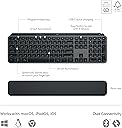
The Logitech MX Keys S Combo pairs a premium wireless keyboard with a high-precision MX Master 3S mouse, featuring fast fluid typing, MagSpeed electromagnetic scrolling, multi-OS Bluetooth connectivity, adaptive backlighting, and ergonomic designโall powered by rechargeable batteries and built with sustainable materials for professionals who demand performance and style.


| ASIN | B0BKVY4WKT |
| Antenna Location | Office |
| Best Sellers Rank | #28 in Computer Keyboard & Mouse Combos |
| Brand | Logitech |
| Built-In Media | 1 product |
| Color | Graphite |
| Compatible Devices | Laptop |
| Compatible Operating System Family | Windows, iPadOS |
| Connectivity Technology | Bluetooth |
| Customer Reviews | 4.6 out of 5 stars 1,166 Reviews |
| Global Trade Identification Number | 00097855187963 |
| Hand Orientation | Ambidextrous |
| Item Weight | 3.6 pounds |
| Keyboard Description | Membrane |
| Keyboard Layout | QWERTY |
| Manufacturer | Logitech |
| Mfr Part Number | 920-011889 |
| Minimum Required Operating System Version | Android 13.0, ChromeOs 134, Mac OS 13 Ventura, Ubuntu 22.04 Jammy Jellyfish, Windows 11, iPadOS 17 |
| Model Number | 920-011889 |
| Movement Detection | Optical |
| Number of Batteries | 1 Lithium Polymer batteries required. (included) |
| Number of Keys | 104 |
| Operating System | Multi-OS |
| Other Special Features of the Product | Rechargeable |
| Power Source | Battery Powered |
| Special Feature | Rechargeable |
| UPC | 097855187963 |
| Unit Count | 2 Count |
| Warranty Description | 1 Year Limited Hardware Warranty |
B**.
Best Keyboard/Mouse combo I've ever used
Although this is a pricey keyboard and mouse setup, I'm a little over a month in and decided to drop in for a review. This is the best mouse and keyboard combo I've ever owned, hands down. The battery life has been great so far (over a month of daily use for 3-8 hrs) and both are still holding strong. I use the same monitor for my gaming PC and for a work-from-home setup, so my work laptop is paired with a dock to use the same monitor. Paired to the included USB receiver on my PC, and with bluetooth for my work laptop. Switching from one computer to the other is as simple as a button push. The keyboard keys are very low profile, similar to a laptop's keys. The backlight is very handy for a darkly lit room. It also includes button short cuts for screen grab and several Fn options for media controls and emoji keyboard. It is also marked for PC/Mac with Start, Alt, Ctrl, Fn, Opt, cmd. The mouse is very comfortable and ultra precise. The high speed scroll function is very handy for quickly scrolling long pages. The side scroll wheel is a little awkwardly placed, and the native left/right directions are the opposite of what I think they should be (this can be reversed using the Logi Options app for the combo). Overall, an expensive set, but well worth it in ease of use, comfort, and convenient multi-computer support. Highly recommend.
C**N
Great combo for mouse and keyboard
Great keyboard and mouse combo. While pricy and you can get cheaper combos, I feel this was a worthy purchase. Once I got the feel of the hand position on the mouse it is a good fit. I donโt have all of the buttons programmed yet but will soon. The scrolling wheel is great and you can really get through pages quickly. The keyboard has a good feel with low profile keys and quiet action. Easy to connect via Bluetooth or USB bolt. I feel this has also made me more productive overall.
R**4
Quality product. Bonus that it seamlessly syncs with Mac and PC with click of a button.
Excellent product! The keyboard, mouse and palm rest are all very comfortable and feel like quality construction. The keyboard and mouse work well, no delays between typing and/or clicking and what shows on my screens. I love that I can easily sync them to a Mac and a PC with just the click of a button. I highly recommend this product! It's worth the cost.
S**K
Worth every penny
I am a UI Engineer and work on both PC and Mac. For the longest time Iโve been working on a PC keyboard and mouse, but when my mouse finally started giving me issues, I landed on this combo and decided to try it out. Unboxing, I was surprised by the weight and quality of both the keyboard and mouse; they feel solid and well built..not cheap. It comes charged and ready to go and set up was a breeze. When swapping between my Mac and PC, a simple command key (fn+o) will swap the control/win/alt keys to control/opt/cmd and vice-versa. The feel of the keys fantastic-soft yet tactile (a step above the MacBook feel) and while both the keyboard and mouse are โsilentโ, you still feel the clicks. The mouse has a great shape and gets fantastic reviews. When I looked at user pics, I thought it looked a bit bigger than I would prefer, but it fits nicely in the hands and I can still โdrawโ with it when it comes time to dive into photoshop or illustrator. The weight of the mouse is a touch more than your standard mouse, but it honestly gives it a great feel and I have no issues zooming around. The side scrolling wheel also comes in very handy in design apps and clicking the center button will toggle the scroll wheel from a notch indexed feel to smooth, which allows it to act a little more like a Magic Mouse because you can flick your scrolling and let it roll ( Mac users should understand that). I thought the price was a bit steep at first, but itโs worth every penny once you feel how well built these devices are and start using them. No regrets at all.
C**R
Plug & Play works with Win 7 AND 10 AND 11
I was using three PCs side by side, with three separate keyboards and three mice. All I wanted was one keyboard to take the place of three keyboards. What I got was so much more. Love the mouse which I hadnโt expected. Mice donโt take up a lot of room, so whether or not a mouse replaces three mice at first didnโt mean a lot to me, but when I discovered how comfortable and smooth this mouse is, I was thrilled to be able to use it with three PCs by the press of a button under the mouse. -So while I still have the original mice connected in case I donโt want to take the 5 seconds it takes to pick up the Logitech mouse and push a button to share the Logitech mouse, because I enjoy using the Logitech mouse so much more, I doubt the old mice will get much use! -So this keyboard and mouse work with up to three PCs, via LogiBolt or via Bluetooth. I wanted to connect the keyboard and mouse via LogiBolt on each PC. The set only comes with one LogiBolt that is pre-programmed to pair with the keyboard and mouse as computer#1/mouse1. More specifically, straight out of the box I could plug in the included โLogi Boltโ into the USB port of any of my three PCs and it worked with each of Win 7, Win 10, and Win 11 PCs. HOWEVER, I didnโt want to have to keep switching the one LogiBolt among three PCs (and I didnโt want to rely on Bluetooth) so โฆ I found two more LogiTech LogiBolts for sale on Amazon and bought two more LogiBolts. IMPORTANT: Unlike the LogiBolt that comes with the set, the additional two LogiBolts arenโt plug and play - a few simple steps needed to be done to pair each LogiBolt with the keyboard and mouse. So because this info is surprisingly hard to find, hereโs the bottom line: 1) I used the pre-programmed LogiBolt USB Receiver that was included with the keyboard and the mouse on the Windows 7 PC, and it worked plug and play. Both the mouse and the keyboard pair (work with) that original LogiBolt USB receiver as computer 1 and mouse 1. 2) Next I wanted my Windows 10 PC to pair with the keyboard and mouse as computer 2. Since the LogiBolt purchased separately isnโt plug and play, for my Windows 10 PC, I had to use my pre-existing mouse and keyboard to navigate to logiwebconnect.com; and once at logiwebconnect.com website, then I inserted one of the new additional Logibolt USB Receivers (that I bought separately on Amazon) into the Windows 10PC and on logiwebconnect.com site the site recognized the LogiBolt receiver and gave me prompts to โadd a new deviceโ to that LogiBolt receiver. Then I pressed the โcomputer2โ key on the new keyboard for 3 seconds to make the new keyboard discoverable by that particular Logibolt, and thatโs what pairs the PC with the keyboard as computer2. So now that particular Logibolt USB Receiver sees the keyboard as belonging to computer 2 whenever computer 2 button is pressed on the keyboard. Then on that same logiwebconnect.com website, I was given the opportunity to add another device to that LogiBolt USB receiver, and so this time on the underside of the Logitech mouse I pressed the button until the number 2 appeared and the logiwebconnect.com website found the mouse and is now paired with that mouse when 2 is chosen underneath the mouse. So those are the steps to program the keyboard and the mouse to know theyโre connected as computer2/mouse2 with that particular USB Receiver. FYI, in order to do all this, I still needed my pre-existing old keyboard and mouse to navigate the website, etc. 3) For the Windows 11 PC, IF I had had a pre-existing mouse/keyboard for that Windows 11PC, I would simply have used the pre-existing keyboard/mouse to navigate to logiwebconnect.com and follow the same steps I wrote in 2 above, except instead of choosing to pair as keyboard 2/mouse2, I would have chosen keyboard 3/mouse 3. -BUT I didnโt have a pre-existing keyboard/mouse for the Windows 11PC, so I actually โborrowedโ the LogiBolt from the Win7 PC and plugged it temporarily into the Windows 11 PC, and so the Windows 11PC immediately recognized the LogiTech mouse and keyboard on a plug and play basis as computer 1/mouse 1. I then went to the Logiwebconnect.com website and PLUGGED IN A NEW LOGIBOLT I HAD JUST BOUGHT ON AMAZON. The Logiwebconnect.com website then indicated that the Windows11 PC had two LogiBolts in it, so I had to choose which of the LogiBolts I wanted to add new devices to. (To make sure I chose the correct LogiBolt to program, I unplugged the original LogiBolt that came with the keyboard and mouse and paid attention to which LogiBolt disappeared from the list. Then I plugged the original LogiBolt back into the same USB slot in the Windows 11PC AND MADE SURE I CHOSE THE OTHER LOGIBOLT TO ADD DEVICES TO.). In other words, I used the original LOGIBOLT that comes pre-programmed with the mouse & keyboard as the #1 option in order to navigate through the logiwebconnect.com website to add that same keyboard/mouse as the #3 option to the new LogiBolt that I bought separately on Amazon. -and amazingly that worked! So if two Logibolts are connected to the same PC, the PC can be paired both as keyboard#1/mouse#1 and as keyboard#3/mouse#3 on the same keyboard/mouse! Once the Windows 11 PC was paired on the new LogiBolt as PC#3 for the mouse & keyboard, I simply unplugged the original LogiBolt and put it back in the Windows 7 PC, with the automatic and immediate result that the Windows 7 PC was once again computer#1/mouse1. In other words, once you pair a LogiBolt USB Receiver with this keyboard and mouse, the Logic bolt USB receiver REMEMBERS THE PAIRING AND WHATEVER COMPATIBLE PC YOU PUT THAT LOGIBOLT INTO WILL PLUG AND PLAY WITH THE KEYBOARD AND MOUSE. The pairing apparently happens at the Logibokt level, not in the PC itself. Conclusion: I only bought this because I wanted one keyboard that worked with three PCs easily. This set totally does that, once itโs set up (& I purchased two more LogiBolts rather than use Bluetooth to get up to three PC connections). I was delighted to find that this keyboard and mouse are very well made and EXTREMELY comfortable to use. Mouse is particularly nice - nicest mouse I have ever had. Who knew any mouse could be so superior, but this one really is. As a result of all this, after buying the keyboard/mouse set (that comes with one LogiBolt), PLUS BUYING TWO MORE LOGIBOLTS, I am able to easily use this keyboard and this mouse with three different PCs. I never downloaded any LogiPlus software onto any of my PCs, and probably wonโt, since the reviews on that software are so mixed. The keyboard lighting is very nice and easy to read. Highly recommend if you have more than one keyboard cluttering your space - and the mouse is so nice Iโm so glad I bought the full set. I hope this review is helpful to you :)
J**I
Not Great on Linux, Especially if You Need to Switch Computers Frequently
The feel of the keyboard and mouse are great. I like the keys, and the weight and ergonomics of the mouse are very good. Unfortunately, there are a couple of deal killers for me. The lights come on randomly. I was hoping that there was a proximity sensor making them come on but, no, they come on, go to sleep, then turn on in a seemingly random pattern which I found much too distracting. The other thing is switching computers. The keyboard has 3 buttons that are placed well. The mouse has a button on the bottom of the mouse for switching. I switch back and forth between my Linux and Windows computers quite often, sometimes a couple of times in a minute. Having to lift the mouse up and use my free hand to switch computers is just something that I can't imagine ever getting used to. I ended up returning this and getting an M720 mouse which is what I had before and has a very nicely placed button for switching computers.
T**S
Really good quality and quick pairing.
Lot's of good things to say about the keyboard. Super quick pairing between devices, plus the wireless dongle that you can keep fixed on your desktop, switch ti laptop and to tablet/phone. The keys are silent and feel great to touch. Build quality is really good. It is pricey but the quality is so good it is a good value for your money.
C**Y
Thee best wireless keyboard Iโve ever owned
I was hesitant on buying this because of the price. I tested the mouse only at the store and loved the way it felt in my hand. The keyboard is smooth and the simplicity of the backlit keyboard is pleasing. I have issues with my wrists so I caved and bought it. BEST DECISION. This is literally the best wireless mouse and keyboard combo I own (and I own several). I love the quiet click of the mouse, the shape is perfect within my hand and eases the pain in my wrist. The pad that comes with it is a nice bonus. Iโve owned the plastic, the foam, the gel wrist rest and they are all bulky and uncomfortable to use. This one is nice and easy. My wrists are sitting uncomfortable over the rest while I type. It has a nice weight to it so this doesnโt slide around my larger mouse pad. The charging cables and light feature let you know when itโs charging and when itโs done. This does charge pretty fast using my PC. I do own a few off brand mouse and keyboard combos, but the quality in this Logitech brand is unmatched by far. Definitely worth the price. I also purchased the keyboard and mouse travel case for when I go into the office.
L**N
Office and efficiency improved!
This product has been on my wish list for five years and I finally purchased at a great price, very happy and impressed with the quality and the functionality of the product features including charging, battery life, and multiple Bluetooth capabilities.
E**D
Would recommend
Works perfectly, nice clicking from the keys, mouse feels good in the hand, Bluetooth connection is flawless, battery has a long life.
D**N
Would recommend
The mouse is an upgrade from a roughly 10 year MX mouse. Feels familiar but overall the ergonomics feel improved, softer touch, wheel feels way better, much quieter clicks and more customizable overall with the buttons. The keyboard I wanted to check out for quite awhile and like the feel of it. I have already made use of several of the hotkey buttons and having a function lock (fn+esc) makes them easier to use. Typing feels smooth with a decent soft sound--not clicky like mechanical keyboards. I would have liked to have adjustable legs on the back to adjust the angle, but with the bonus of the wrist pad it feels comfortable overall.
J**T
Using this with three computers on my desk ... I didn't know what I was missing!
Okay, so I am cheap and this keyboard/mouse combo seemed extremely overpriced, until I used it! I have a Macbook pro and windows laptop from work and my own personal Windows desktop all connected. The simple button to switch is amazing. I also have an LG monitor which auto switches to the active machine too which is helpful. In all honesty... game changer. I've added a bunch of personal macros, like complex things I need to do all the time with the logitech software. It's got to be the most intutive system I have ever worked with! Also, not having to change from Mac to windows keyboard all day, with three on my desk had been nice. The mouse is awesome... the scroll wheel is weighted, so you can send it and scroll at mach speed, and it keeps going like like a spin bike wheel. It also has a pile of buttons and toggles which are all customizable. So yeah, I should have bought this a long time ago! Expensive YES, but do I see why? YES!
Y**E
Comfortable, and affordable
Good simple product, not very durable though, accident bent it a bit and it snapped. But it still works.
Trustpilot
1 week ago
3 weeks ago