Buy anything from 5,000+ international stores. One checkout price. No surprise fees. Join 2M+ shoppers on Desertcart.
Desertcart purchases this item on your behalf and handles shipping, customs, and support to Spain.
โก Power up your productivity with Rosonwayโs ultimate USB hub!
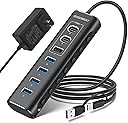
The Rosonway 7-Port Powered USB Hub combines cutting-edge USB 3.2 and USB-C technology to deliver blazing 10Gbps data transfer speeds across 7 versatile ports. Its robust aluminum design features individual LED switches for each port, allowing precise control without unplugging. Equipped with a 12V/2A power adapter and built-in surge protection, it ensures stable, safe connections for multiple devices simultaneously. Compatible with Windows, Mac, and Linux, this hub is the perfect desk upgrade for professionals craving speed, style, and control.


| ASIN | B0BXRY4QZ5 |
| Additional Features | USB-A 3.2+2 USB-C 3.2 +4 USB-A 3.0 ports, 2 in 1 USB cable |
| Best Sellers Rank | #106 in USB Hubs |
| Brand | Rosonway |
| Cable Length | 3.3 Feet |
| Color | black |
| Compatible Devices | Cameras, Gaming Consoles, Laptops, Macbook, Tablets |
| Customer Reviews | 4.1 out of 5 stars 1,067 Reviews |
| Data Transfer Rate | 10 Gigabits Per Second |
| Enclosure Material | Aluminum |
| Hardware Interface | Thunderbolt , USB, USB Type C |
| Item Dimensions L x W x H | 5.7"L x 1.8"W x 0.9"H |
| Manufacturer | Shenzhen Rong Sheng Hui Electronics Co., Ltd |
| Minimum Required Operating System Version | Windows 10 |
| Number of Ports | 7 |
| Operating System | Linux, Mac OS, Windows |
| Special Feature | USB-A 3.2+2 USB-C 3.2 +4 USB-A 3.0 ports, 2 in 1 USB cable |
| Total USB Ports | 7 |
| Total Usb Ports | 7 |
| Warranty Description | 18 months warranty for non-human damage |
M**L
My 1-Year Review: The Rosonway 7-Port Powered USB 3.2 Hub (RSH-A107C)
My 1-Year Review: The Rosonway 7-Port Powered USB 3.2 Hub (RSH-A107C) Since purchasing the [Rosonway 7-Port USB 3.2 Hub]in February 2025, it has served as the reliable backbone of my home office for the past year. When managing a dual-PC docking station setup, the biggest challenge is often port exhaustion and the physical clutter of switching peripherals. This hub hasn't just solved that; it has done so with a level of build quality that is rare in todayโs accessory market. --- The "Docking Station" Solution My primary use case was to consolidate a variety of essential USB devices into a single node that connects to my 2-PC docking station. This includes: * **Audio/Visual:** My webcam and conference speakers. * **Inputs:** Wireless mouse and keyboard dongles. * **Miscellaneous:** Various thumb drives and charging cables. The hub has worked **perfectly and without fail** throughout my entire year of ownership. In a setup where I frequently switch between a work machine and a personal PC, the stability of this hub is its greatest asset. I haven't experienced any of the "ghost" disconnections or hardware handshake issues that often plague lower-end USB expanders. Build Quality: Sturdy and Tight The physical construction is where the Rosonway truly differentiates itself. The aluminum chassis isn't just for showโit gives the unit a weight and "tightness" that feels professional. * **No Rattling:** There is zero sense of looseness in the internal components or the ports themselves. * **Reliable Connections:** After a solid year of daily use, the ports remain snug and secure. High-Speed Performance Because this is a **USB 3.2 Gen 2** hub, it offers up to **10Gbps** data transfer speeds. While my mouse and keyboard don't need that bandwidth, having the 10Gbps USB-A and two USB-C ports available means that when I need to move large files from an external SSD, Iโm not throttled by the hubโs architecture. Why the 12V Power Adapter Matters One of the reasons this hub is so "very reliable" is the included **12V power adapter**. Many hubs try to draw power solely from the host PC, which leads to failure when you connect power-hungry devices like conference speakers or external hard drives. By providing its own power, the Rosonway ensures that every device stays online and performing at its peak. --- Key Takeaways My Experience | **Reliability** | 100% uptime over 1 year of daily use. | | **Build** | Industrial-grade aluminum; sturdy and durable. | | **Utility** | Consolidates complex peripheral setups into a single connection. | | **Control** | Individual switches allow for easy "hard-killing" of webcams for privacy. | Final Verdict If you are looking for a high-quality aluminum USB port expander to streamline a multi-PC or complex home office setup, this is a five-star investment. After 12 months of testing, it has proven itself to be a durable, high-performance solution for anyone dealing with the "port drought" of modern computing.
S**N
Nice unit. (Updated.. still happy with it)
Only had this 1 day. It wouldn't install on my Desktop to the USB-C 10Gb ports but after some investigation, discovered that's a driver issue on my motherboard and Win-7. It did however install perfectly on the USB-A 5Gb port. That's not a problem as I'm using USB-A 3.0 Drive Devices. I attached 4 drives to the 5Gb ports on the hub and everything powered up and attached without any problems. I also tested doing a backup from one of the now Hub mounted drives to another external USB drive and that all seemed to work flawless at speeds comparable to what I normally see when doing backups. Overall, very nice unit, solidly made, switches a nice feature, comes with PSU. I like the unit for its sturdiness. I like the ability to turn the ports off/on individually It works fine on a USB 3.1 port even though I have a USB-C device plugged into the 10Gb port so no issues there. I like it came with a separate PSU which I'm using Overall, pleased that it's working fine just disappointed to discover that my Motherboard is using an ASMedia 3.2 processor which doesn't appear to support external Hubs.. or at least ASMedia does have not care to provide a Driver for Win-7. The Hub appears to install ok but after much testing and powering OFF/ON, every time I connect it, Windows gives a loud Beep (The one that indicates a device has been attached/detached) every 1.5 SECOND!!!! even if there's no devices plugged into the Hub. Fortunately the 3.1 ports on my Motherboard use an Intel USB support chip so that seems to handle an external Hub without issue and it more than satisfies my current USB speed devices I'm using. UPDATE 02/13/25 ~~~~~~~~~~~~~~ I had a quirk occur which is NOT a defect but in case you hit the same. I had a USB port "Enabled" (Blue light lit) on the Hub but had no device actually configured on it. Every time I booted I would "lose" the last Internal Hard Drive. It just would not show up. This happened 4-5 times in a row. Once I realized and Disabled the port and I've never had a problem again. This could easily be a quirk of my Motherboard during it's hardware scan so I'm not blaming the hub at all. Just thought I'd mention it. As for the USB drives now connected to the Hub, they all continue to work flawlessly. Really pleased with the Hub as it provides the additional USB devices I needed in one nice easily locatable place (rather than having to keep scurrying behind the server on my hands and knees :-) Speed is great (Copying to and from devices on the Hub).
A**A
Highly Recommended - just works!!! And lays nicely on desk!
As someone whoโs gone through testing way too many hubs over the years, I finally found one that actually gives me both performance and reliability. Itโs an absolute game-changer for my setup. If you who works with multiple peripherals daily or simply need an efficient way to manage devices without having to reach back behind your PC, this hub is an excellent investment. From build quality to functionality, it checks all the boxes and outperforms many other hubs Iโve used in the past. For me the main feature is actually lays flat on my desk and I can easily use it ๐ This is more of an essay of the pain points other have had but short version is Iโve yet to find a better hub in this price range. Build Quality / Weight / Feel First thing I noticed when unboxing this hub was its premium build quality. Unlike many plastic hubs that feel lightweight and flimsy, this one has a sturdy aluminum housing that gives it a solid and durable feel and probably also help with heat dissipation, preventing the hub from overheating -- something I have def seen in others Additionally, the hub is compact but a good weight, making it easy to place on my desk without it shifting or sliding around. Some hubs are so lightweight that they move every time you plug in a device, but this one stays put, thanks to the rubber feet on the bottom that provide extra grip. Also, and I donโt know WHY others donโt do this, is the computer and power connections are on the same side (top). Others have them on opposite sides which for desktop use just makes my desk ugly as anything and it actually can ley flat very easily. Connectivity The main frustration Iโve had with other USB hubs is unreliable connection stability. Many cheaper hubs tend to randomly disconnect devices or throttle speeds, especially when multiple peripherals are plugged in. Iโm happy to report that Iโve experienced none of those issues with this hub. Regardless if USB3 or 3.2 or however the naming work now, data transfer speeds were incredibly fast. I frequently transfer large files between my external SSDs and my computer, and this hub handles those transfers effortlessly. Thereโs no noticeable lag or drop in performance compared to directly connecting the devices to my computerโs built-in USB ports. And no backward compatibility issues with plain USB 2.0 devices . Main reliability comes drome a dedicated power adapter. Relying on the computerโs USB port for power often leads to instability, especially with using high-power devices like external hard drives or gaming controllers. Iโve connected multiple external hard drives, flash drives, keyboard, mouse and printer at the same time, and everything works flawlessly. There are no random disconnects or underpowered devices, which is a common issue with non-powered hubs. Lower-quality hubs is that the whole hub sometimes โresetโ when too many devices are connected, leading to random disconnections of EVERYTHINg which is beyond frustrating especially when transferring files or trying to edit documents on drives. Thankfully, Iโve had no such problems with this hub. It still remains stable even when all ports are in use, months later, a testament to its solid engineering. Also of note a less common issue but still can be is general electronic interference, which can cause wireless mice or keyboards to lag. No noticeable interference here. On/Off Ports The LED indicators for each port are also a nice tough, not too bright to be distracting but clear enough to let you know which ports are active. I love having individual buttons for turning ports on and off. This might seem like a small detail, but itโs incredibly useful for me and I dislike that other donโtโ have it. Mainly once Iโm done with an external drive and I want to make sure it stays disconnected so instead of unplugging them, I can simply turn off their respective ports, which not only conserves power but maybe? reduces wear and tear on my drives. This feature is also useful for managing devices that I donโt always want active, such as a printer or a gaming controller. I also like these buttons on the side rather then in between where they are hard to get to. The buttons just FEEL good and are easy to press but slightly recessed so they are harder to press accidentally. You can see in the video how easily I can turn them on/off with barely moving my finger, but still have clear control on their state Size / Spacing Other hubs suffer from poor port spacing. Some hubs cram the USB ports too closely together, making it difficult to plug in bulkier USB drives or devices with larger connectors. This hub, however, has just enough well-spaced ports that allow easy access without obstruction, but doesnโt end up gigantic. Features Having both USB-A and USB-C ports is a major plus. Many hubs still focus solely on A or C leaving dongle mess everywhere. I just want quick mix on my desk. Also the supported speed is clearly labeled for which ports give that. Also Iโm a big fan of the actually attached USB C/A male option to the computer rather then a flimsy dongle that barely stays on, or lightly held on by tiny piece of rubber. It looks ugly, but its going on the back of my PC and I know its there when I need it. Far superior for a USB hub. So many people ask for a โquick good hubโ so im just writing my response here so I can copy/paste in future. For Gamers: Easily connect different gaming peripherals / controllers and headsets without worrying about limited USB ports. For Creators & Office work: Seamlessly manage external hard / flash drives, microphones, webcams, and anything else (that Ive tried). For General Users: Keep all your essential devices, such as printers, keyboards, and storage devices, connected in an organized manner. Or get 2 and have one on your desk handy and one behind the PC for the stuff youll generally leave connected Complaints While this hub is fantastic, thereโs always room for improvement. 1) USB length is a little shorter then I would like, but I know its harder to go longer at high speeds. That said is the longest by far offered by any โpremiumโ hub in this price range so itโs still a win. (Power length is fine in my opinion) 2) Non swappable USB cable isnโt fun to see. 3) Would rather see a USB-C power then generic barrel plug, but I can understand they donโt want people complaining about using their own not good charger. 4) Some sort of locking on the barrel plug would be nice, not that Iโve had it got pulled out but I can see that being an issue for some usages. 5) I would also rather another design then a wall wart. 6) USB-C looks a bit recessed but I havenโt had any issues with my devices and cables 7) More ports!!! I mean can you ever have enough? These are all beyond minor things, especially if itโs just sitting at a desk but hey thatโs why we write these things up. Bottom line: Highly Recommended After using this hub extensively for months, I can confidently say that itโs one of the best powered USB hubs on the market (that I have found). Iโm just so excited to have finely found one that eliminated all random disconnects, power limitations, poor build quality of others, give me high-speed, and the stuff listed, and actually looks normal on my desk without having cables coming off opposite ends, AND is a normal price. If youโre in need of a reliable and well-constructed USB hub that offers both convenience and performance, that you want to just plop on your desk and have work this is an excellent choice. Iโve tried too many hubs that I just want people to know this one seems to bloody โjust workโ.
T**E
Excellent Powered USB Hub, nice build and features, cords a bit short
Using this to connect devices in my racing simulator to my PC. Some of those devices are things like external soundcards or devices with many child-devices so power draw on the aggregate is too high for a passive hub. This powered hub works excellent. I really like the ability to toggle ports on and off without needing to unplug them. I have an additional 4 port hub hanging off this for a group of low power devices that I treat as a single "thing" and that works excellent too, plenty of power and bandwidth to handle that. One note to the buyer, the power and USB cord are both fairly short so plan to use a USB 3 extension cable + powerstrip if this will be more than a few feet from the PC. On that note, if you actually need USB 3.1 speeds make sure you're getting a compatible cable of appropriate length (I don't). This is an excellent hub and a super value. I was impressed with the build-quality, nice and tactile buttons per port, and reliable functionality. I definitely recommend it.
N**R
Excellent product - Build quality and Versatility
I have used this product for about 2 weeks at this point and so far this is definitely a step or two above my previous USB hub. So far, I have used 5 devices connected to the hub at the same time and I have not run into any issues or experienced any lag. Instead of trying to list all the features of this product, I will call out specific things about this product that I think should be considered when buying this product. Build Quality: The first thing that I noticed taking out the USB hub from the box was its excellent build quality. The aluminum construction, seamless design and good weight gives a solid confidence about the product even before plugging it in. This is also a lot more compact than the previous product that I had (see pic for comparison) Versatility: This provides 4 USB-A ports and 3 high-speed USB-C ports giving a wide range of options to plug in. It also has a USB-C to USB-A adapter built into the side that connects to your computer (see pic). This has helped me with using the hub on both my new macbook and the old one which does not have usb-c. The ability to do both USB-A and USB-C on both sides of the hub was the main reason I was in the market for a new hub. On/off switch for each port: My previous hub had an on/off switch for each port. But the improvement that I see is that this hub requires a long press to turn off the port. This is a great design since I have accidentally bumped into the toggle switches and turned off devices on my previous hub. Turning the port on is just a short press on this device. This is a small feature and I am sure it is not something someone would decide on a product, but this to me shows an eye for detail on the product design which gives me confidence about the product. Con: My external monitor (via usb-c) did not work when I plugged into the hub. It works when I plug it in directly to my laptop. At this point I am not sure if this is a limitation of the hub. This is something that I am planning to test a bit more. For now I am directly connecting the monitor to my laptop. Devices I have tried on the hub: webcam (logitech), keyboard (kinesis freestyle pro), wireless mouse (logitech), scanner (epson), usb storage sticks.
K**E
Compact, versatile, and fast
I'll start off my review with the reasons to consider this specific USB hub vs. some others: -Includes external 12v power for charging devices. -Has both USB-A and USB-C ports (and plenty of them). -Has a long cable for connecting to a computer (39" by my measure). -Can connect to either a USB-A or USB-C port on the computer. -Is CE and FCC certified. As for the device itself, it includes minimal packaging and includes the two basic elements - the hub itself and the power adapter (which also has a long cord for placement flexibility). The hub is pretty compact, with a sturdy aluminum housing. Importantly to me, though, the unit is well balanced, and with the rubber feet on the underside of the unit, it sits flush on my desk and doesn't shift around. This may not sound like a big deal, but hubs that aren't sturdy enough to stay in place when you plug multiple USB cables into them really bug me. Each USB port has an individual on/off button with an indicator light. I like the implementation of these buttons because they are digital, so you only have to press them for a moment to turn on, but you have to press and hold for a couple seconds to turn off. This prevents you from accidentally turning one port off while trying to turn another on. It's a nice little feature that avoids the inevitable turning off of the wrong port. Aside from that, there really isn't much to the device itself, it's minimalist and sleek and should blend in well with most setups. Performance-wise, I had no issues. I was able to charge an iPhone 13 Pro Max while powering a MacBook Pro. Do note it will POWER a MacBook Pro but not CHARGE it, that requires more power than what the hub supplies). I had no issues with devices disconnecting randomly, and speeds to an external SSD were as expected. Three of the 7 ports support 10GBPS transfer speeds, but I don't have any devices that come anywhere near that level of speed. They all worked perfectly fine for me and maxed out the transfer speeds of connected devices (and the limitations of my PC). Overall, this is a very nice package at a good value. Enough juice to power multiple devices, plenty of ports of both common standards that function well, and in a housing that takes up very little space and looks nice on your desk. I really can't ask for anything more than that.
T**G
Minor issues fixed with power cycling
Worked great for about 2 years, then suddenly was providing 4.2v and not charging devices. Luckily power cycling has seemed to clear it up for now. Does what it says, good data speeds and 7.5w of charging
J**T
Easy to use and good amount of ports, sometimes shocks you
After approximately four months of continuous use, the Rosonway 7-Port Powered USB Hub (RSH-A107C) continues to function as expected, handling connections from various devices across all its ports without issue. The convenience of individual power switches for each port is a practical feature, allowing for easy management of connected devices. The hub also boasts select ports offering a shared 10Gbps connection speed, providing a high-speed option for compatible devices. However, a notable concern has arisen regarding the device's safety. I have experienced instances of feeling minor electrical shocks when touching the base of the USB hub. While the device remains functional, this issue is concerning and could potentially be a sign of underlying complications developing over time. So far, the hub has maintained perfect functionality despite constant use with all USB ports occupied. The ease of turning ports on and off is a positive aspect of its design. The inclusion of specific ports capable of a shared 10Gbps connection speed is a valuable feature for users needing faster data transfer rates.
F**S
Nรฃo funciona USB 3.0, apenas USB 2.1
Apesar de ser anunciado como um hub USB 3.0, essa funcionalidade nรฃo funciona - mesmo nas portas onde estรก escrito USB 3.0. Elas apenas funcionam no modo USB 2.1. Nรฃo compre se espera velocidades USB 3.0.
A**G
Speedy hub.
Works well, have used it for a long time now. The speed matches what it is promised.
B**A
Pleasantly Surprised
WOW was I pleasantly surprised when I opened the box! This USB Hub is awesome and is approximately 5 3/4" long and 1 3/4" wide and a 1/2" deep. Perfect for my desk space and for travel. I also like the on/off switch (on is a click and off is a held click). A previous review said it ... make sure the cord clicks into the unit or it does not work. I am very Very happy!
M**E
Compatible with Windows 11
Multi USB outlets to expand my single USB port on my laptop.
A**R
Works as described
I recommend if you want to add extra ports
Trustpilot
1 month ago
1 day ago