๐ Capture Every Adventure with Style!
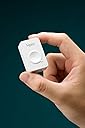
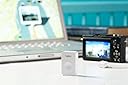
The i-gotU GT-120 USB GPS Travel Logger is a cutting-edge device designed for outdoor enthusiasts. It features water-resistant hardware, compatibility with various GPS software, and the ability to work seamlessly with digital cameras and smartphones. With versatile export options and an easy-to-use blogging feature, it allows users to document and share their adventures effortlessly.
| ASIN | B001IMJV0E |
| Are Batteries Included | No |
| Best Sellers Rank | #2,715 in GPS Trackers #27,209 in Camera & Camcorder Batteries |
| Brand | Mobile Action |
| Compatible Devices | Smartphone |
| Compatible with Vehicle Type | Car |
| Connectivity Technology | USB |
| Control Method | App |
| Customer Reviews | 3.9 out of 5 stars 59 Reviews |
| Display Type | LCD or LED |
| Human-Interface Input | Buttons |
| Manufacturer | Mobile Action |
| Map Type | Worldwide |
| Map Types | Worldwide |
| Memory Storage Capacity | 100 MB |
| Mounting Type | Wrist Mount, found in image |
| Resolution | 480 x 272 |
| Screen Size | 7 Inches |
| Sport Type | Camping & Hiking |
| Supported Satellite Navigation System | GPS |
| UPC | 887586656346 182167000670 887586553768 |
| Unit Count | 1 Count |
| Vehicle Service Type | Car |
D**N
A perfect little logger
I am very happy. I use this with a Mac and use the software available in appstore called m y t r a c k s , you will need 2.3.8 which is almost ready to ship to erase the tracks stored on the device, but 2.3.7 works fine and it'll be awhile before you need to clear memory. I use it for photo logging gps, and that works perfectly with ORF files and JPEG files that I have tested. Might work with other format, not tested. This is small, so fits either on the camera strap, or just tossed in a pocket or bag. It will acquire the GPS very quickly when it is outdoors in the open, has a hard time if you try and turn it on inside a building. I have tested postion and altitude functions, and it seems spot on. Couldn't be happier for a modest investment, it will make tracking my photos on trips and hikes an absolute pleasure. The auto sync feature to the date and time stamps in the m y t r a c k s software works perfectly too. Recommended ++++
D**L
Great for Geotagging
Geotagging images is important to me. I know where they were taken, but it's an issue of public access to the where and when of an image. We're not at the point of having all cameras equipped with built in GPS. It's just a matter of time before this happens. In the meantime, if you want to geotag an image, you either find a GPS unit that works with your specific camera, or you do it manually. What I've noticed is that doing it manually is a lot of trouble for most folks(I know it's time consuming for me), so a lot of people will just indicate what city, or state, or maybe just the country they were in at the time a particular photo was taken, or the indicate nothing at all and leave you guessing. For me, this just doesn't work. In fact, even though I manually tag all of my photos on a map after they've been uploaded to flickr, and carry around a GPS unit on trips to areas I'm not completely familiar with, I want a better and more accurate way of geotagging images, that lets me cut down on the time it takes. The problem is that I've got several digital cameras, going the route of getting a GPS unit for each camera doesn't work. Not all the cameras will support this. What to do? Well, I did some research and found the i-gotU unit which will support any camera, provided the images are shot in jpg format. It's a little stand alone GPS device, very simple and in fact the only button it has is to turn it on, and it's about the size of a matchbox. I tried it for the last few days, and have been very impressed with it. I made sure that my camera's clock was set the same as that of the i-gotU (which is how this thing works) and then went out and took some pictures. After returning home, I downloaded the images I took, and plugged in the I-gotU GPS device and had it map my images. It was spot on. It even saved the info to the EXIF data. I'm going to love this thing. I wish it worked with camera RAW files, but for the time being it doesn't and it's not too much trouble for me to work around this limitation. In fact, I've already found a freeware solution that uses the gpx data and will work with RAW images. Still, I can't wait for the day when this doesn't have to be done and cameras come equipped with built in GPS. I do wish this had a little case that I could clip to my belt or camera strap, but that's a minor issue.
L**Z
user unfriendly
i downloaded the software on my home computer, only to find for starters that it picks up the language of the computer and so far I have been unable to find a way to switch it to English. Since I have been using Windows and Office in spanish for several years and the tutorials have a dropdown box to sellect the language for the tutoial, I trudged ahead for an hour or so and got nowhere. If i travel to a country that speaks neither English or Spanish it will be worthless. Switched to my laptop which is in English and I could then see how poorly written the instructions are. Use of terms like `long press`and fuzzy mapping`` make me think the program was not edited by a native or fluent English-speaker. The roundabout manner of explaining things make me think the author has no skills in technical writing for the public. It seems that somebody realized how bad their convoluted instructions were but instead of fixing them they went back over them and highlighted stuff in purple to make it even more jumbled up. My need for a datalogger is very simple--to tag field work photos with locations for scientific verification. It is amazing how this software takes the simple and makes it complex! Charged up the device and took it to the field the next day. Got absoluely nothing. Most likely case scenerio is that the button was pushed accidently while in the day pack and completely discharged the battery. Next day I charged it again and took it downtown on errands and got numbers I think are correct. Need to improvise some sort of container to carry this in the day pack and not press button by accident. Another thing I discovered is that the lights that are used to control it are not visible in sun light. Also, you have to memorize 11 possible combinations of red and blue lights. It would be much better if they would include a little pocket card with this info. Next, i found that it does not tag my photos on my computer. It tags fotos that it has somewhere out there in cyberspace. If I want to tag my fotos I have to hand copy the numbers onto my software one by one which is tedious and leaves much room for human error. Also, data is useless in the field or temporary camp if I don`t have both computer and internet. I`m looking for a way to cut and paste these numbers, but so far have not found it. I rated it a 2 because it works in getting the numbers, but can`t reccommend it very strongly because of the bad instructions, confusing software, lack of a protective container, and lack of choice of language.
J**S
Clarify how to use on a Mac (and iOS)
I really appreciate the suggestions of those that have gone before - here are a few clarifications. I am using this for the GPS tracking. I wanted a device to allow route tracking and cataloging, but I didn't need real time and I didn't want to buy a SIM card. For 50 bucks, this seemed to be a device worth trying out. Outside, I had no trouble picking up a GPS signal. It took a minute or two, and seemed to hold the signal well, even inside the car. I didn't use the device for more than a couple of hours, so can't yet comment on prolonged battery life. So you take the device on its flimsy and slightly terrifying cable (all the clicky parts are plastic) and you plug it into the Mac. Nothing will happen, which is why you need a program called igotu2gpx. This is and open source project designed to act as an interface to the device which will allow you to download the gpx file from the device. That is all it does. You can then take this file and drop it in another program like GPSBabel. This program translates the file into other usable formats. If you have some Garmin software, or other proprietary program, you should be able to transcode your gpx file into that. In my case, I used GPSBabel to open the gpx file and save as "Google Earth Keyhole Markup" or kml file. You then can open My Maps in Google Maps and import this file. This is where you will see your route. GPSBabel is free. I have no doubts there are programs for OS X that can read gpx files directly. This will save you a couple of steps and may be worth it if you are looking at a lot of data. I also have an older MotionX GPS app for iPhone. You can actually just drop the gpx file into this and see your route. Lastly, I used VirtualBox and a Win7 installation that I had to use the included software. There is some convenience to this. First, it works will in visualization. I didn't have any trouble with mounting the device and getting the maps to download. For my purposes, the @trip pc program was pretty nice and gave a very clear and detailed map. You can also delete the prior log files from the device, which I don't think you can do from the mac port of the program. So there you go - you need an interface program (igotu2gpx) and you need a program that can read gpx files or translate them (or virtualization). But the device itself is pretty easy to use.
J**M
Great geotagging device, has worked flawlessly for a year so far
I can't say enough good things about this GPS. It is pretty accurate and is great for all different types of traveling. I set it to 20 seconds when over 30mph and 10 seconds when below 30mph for a recent cross country road trip and I had more than enough room (used for two weeks without dumping the data). I only used 35,000/60,000 available waypoints. The @trip software is good....once you get used to it. It is now easy for me to geotag my photos and it adds a cool feature when I look at the photos in Picasa or on Flickr. I highly recommend buying this if you are interested in mapping your travels and/or geotagging your photos.
J**N
Junk waste of time.
Junk. Would not give any waypoints when plug in to PC. Waste of time. Lights indicated it was on but PC software would not download data saying data error (win7)
N**S
I love it, but I also hate it
I have had this device for almost a year now. I have had good days with it and I have had bad days. Here's what is great about it: - Excellent battery life. You can decrease the intervals of GPS tracking to extend the battery by A LOT. Supposedly, the software says that it can go to 24 hours at the settings I have set (scan every 6 seconds). I have not tested it, but it has never died on me on full day trips. - Takes no room. It is very small and light. - Easy to use. Hold to turn on. Hold to turn off. - Very accurate. I have had no problems with incorrect geotagging. Even works indoors often times. - You can use it while charging the device. Here's what makes it so much terrible: - Failed to turn on once; had to connect it to my PC to fix it. (ok one time, not so big of a deal) - Often times, on long trips (few days), software fails to geotag photos. An error keeps popping up stating some kind of error with an error number I don't know who would be familiar with. I keep trying it every few days and usually eventually I get lucky and it starts working. Same error when trying to erase data. - Often times, cannot be detected by the PC. Software will keep saying "Please connect GPS". Usually, on a random day when I plug it back in, it will start working. I have tried it on 2 of my PCs. Conclusion: This GPS is great...when it works. Too often do I have problems with it, which renders this device useless. Much work needs to be done to improve the stability and consistency of the software. Hardware in general is good, and I don't really have any complaints (except where it wouldn't turn on once).
M**L
Fun!
Been using this for over a month now. I like it a lot. I just charge it up and turn it on and go (running, biking, traveling). Tagging photos with geodata works fine for me. Exporting the KML or KMZ or GPX files works. I was worried about how well it would work when I ordered it but now I'm glad I did. Can't wait to go somewhere else and then get home and see where I've been on the map (having just moved to South Korea everywhere I go is pretty much new to me)
Trustpilot
2 months ago
2 months ago