Buy anything from 5,000+ international stores. One checkout price. No surprise fees. Join 2M+ shoppers on Desertcart.
Desertcart purchases this item on your behalf and handles shipping, customs, and support to Spain.
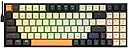
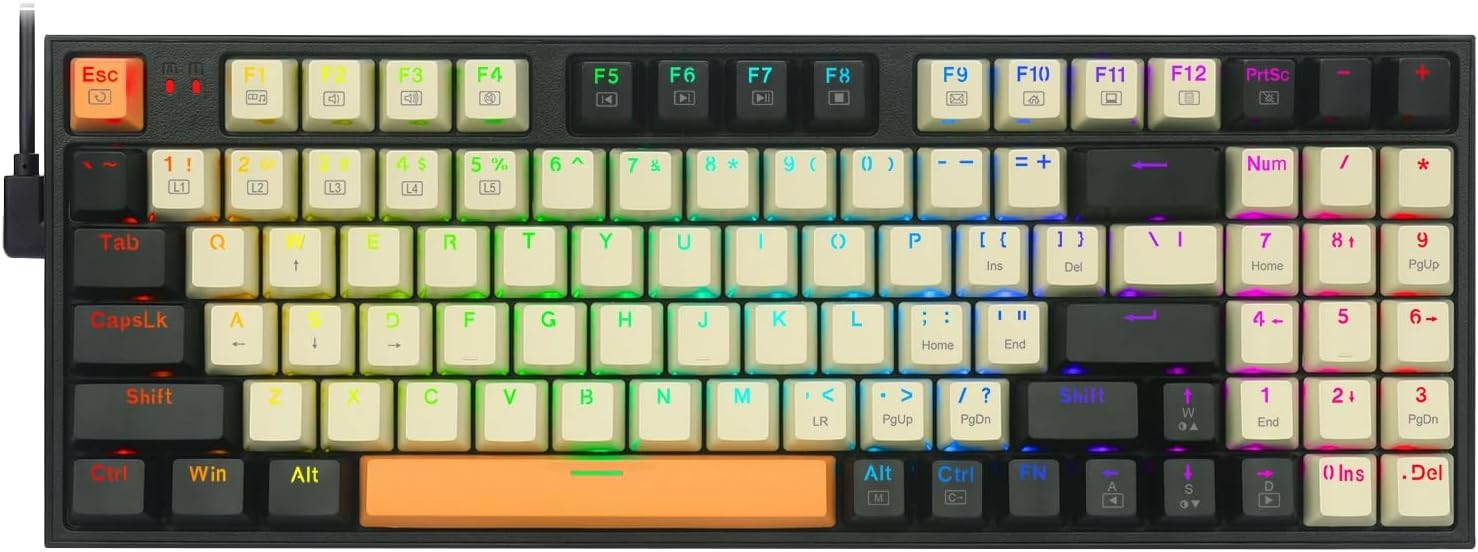
⌨️ Level up your desk game with compact power and dazzling RGB flair!
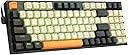
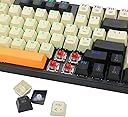
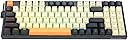
The Redragon K636CLO is a wired mechanical keyboard featuring a space-saving 94-key layout with a numeric pad, vibrant RGB backlighting with 20 preset modes, and smooth red linear switches. Fully programmable for macros and key customization, it offers seamless plug-and-play compatibility with PC, Mac, and iOS devices—ideal for professionals and gamers seeking efficiency and style in a compact form.


| ASIN | B0BP11JXFK |
| Additional Features | Ergonomic |
| Antenna Location | Gaming, Office |
| Best Sellers Rank | #11,643 in Video Games ( See Top 100 in Video Games ) #752 in PC Gaming Keyboards |
| Brand | Redragon |
| Built-In Media | USB Cable |
| Button Quantity | 94 |
| Color | Black-Beige-Orange |
| Compatible Devices | PC |
| Compatible Operating System Family | Windows |
| Compatible Tablet Computer Models | Samsung Galaxy Tab S7 FE 12.4" |
| Connectivity Technology | USB |
| Customer Reviews | 4.5 out of 5 stars 1,939 Reviews |
| Enclosure Material | Plastic |
| Global Trade Identification Number | 06950376715241 |
| Hand Orientation | Ambidextrous |
| Item Dimensions L x W x H | 12.13"L x 4.72"W x 2.05"H |
| Item Weight | 500 Grams |
| Keyboard Backlighting Color Support | RGB |
| Keyboard Description | Mechanical |
| Keyboard Layout | QWERTY |
| Manufacturer | Redragon |
| Mfr Part Number | K636CLO |
| Minimum Required Operating System Version | Windows 7 |
| Model Name | K636CLO |
| Model Number | K636CLO |
| Number of Keys | 94 |
| Number of Sections | 3 |
| Power Source | Corded Electric |
| Recommended Uses For Product | Gaming, Office |
| Series Number | 6 |
| Special Feature | Ergonomic |
| Style Name | Compact |
| Switch Type | Linear or Tactile |
| Theme | Video Game |
| Unit Count | 1.0 Count |
| Warranty Description | 1 year |
G**G
Fantastic Keyboard
Great little compact keyboard, especially for the price! I was originally going to send it back because I meant to buy a wireless one (for a different PC), but I ended up keeping it because I liked it so much, and just replaced my current one with this one. So now I have two Redragon keyboards and I love them! Pros: Light-weight, compact, RGB lighting, still has the numpad so great for productivity as well as gaming, hot swappable keys/switches, great price Cons: While it says the switches are hot swappable, I was too afraid to remove them. The amount of force I was pulling on the switch (using the included tool), I really felt like it was going to break so I stopped. I watched a YT video and the guy just plucked it out like it was nothing. So I'm not sure why these are so difficult to remove. Others were also commenting on the video talking about how difficult they were to remove. I tried two different switches and they were both incredibly hard to remove so I just stopped trying. So that might be something to consider if you are wanting to change out the switches. Other than that, it's a great little keyboard!
D**S
After months of HEAVY office use, perfect quality and reliability! Buy one now!
I have been using this keyboard for months now in a high volume office setting. Really great for the price! I have not had any issues with it and trust me, it’s getting lots and lots of use. The keys light up as you press them on the correct mode. Key tap sounds are GREAT and tactile feedback is great! You should buy this, when if ever, it fails I will buy the same one!
S**Y
Lifetime of 4-5 Months!
THIS YEAR: It's been a year since I've bought and reviewed this keyboard so I thought I'd change my review up a bit. The reason being is that I still use this keyboard. But, the only reason I am still using this keyboard is because my brother helped me solder and swap the two shift keys. Since then, it has been working great. No problems whatsoever. I do sometimes miss my numpad, since it's much easier to type numbers down that way, but I don't think I can ever go back to dome keyboards even if it had the best numpad in the world. But I just got lucky and you might not be so lucky. If another key malfunctions again, I'll leave another review about it but so far all the keys work fine, except the shift key that I swapped, like I mentioned previously (which I never use right shift key anyway). If you can afford to get a much more durable mechanical keyboard at a higher price, definitely go for that instead of this one. Of course, not all of us can afford a keyboard at those crazy prices so if you do purchase one of these, keep in mind that a key might malfunction--which is the risk you pay when you buy anything below it's normal price. LAST YEAR: It's pretty good, for a cheap mechanical keyboard. I noticed a major difference when switching form my mechanical keyboard back to my dome one. I typed a lot faster on this keyboard and Osu was a lot easier as well. If you're looking for a really cheap mechanical keyboard get this. But wait. Only if it's temporary. It's only been about 4-5 months and one of the keys are unresponsive. The "shift" key to be exact. I use that key a lot, and it wasn't until it stopped working that I realized this. I received it on December 22 and this problem showed up around April, maybe even before that. Right now I'm only using it to play Osu, since it's switching back to dome keys is nearly impossible for this game, but for everything else--like typing this review--I'm using my old keyboard. Just buy it as a backup or something, not as a main keyboard. ps. No light, means no backlight. Meaning, the keys won't light up. The Redragon I'm typing on right now--the dome keyboard--has backlight but they died a while ago. So I came to the conclusion that Redragon shouldn't be trusted in this area.
T**S
Nice cheap mechanical board
5 stars but because of the price point. I was looking at this and it went on sale so I snagged it for like 37 bucks with tax. This is a cheap keyboard but honestly higher end than the price point IMO Pros: it took me a minute to get use to but I love the trimmed down footprint of it. It eliminated all the extra buttons I don't need but will keeping the number pad. Switches are liniar red that seem responsive and quiet. I prefer clicky blues but the sound of these are a nice change. Hot swap is easy (others saying it sucks must not know what they are doing? I had no problem while testing) RGB software is easy to use and very customizable. I really enjoyed being able to color mach all of my gear with ease. Cons: some of these are very subjective but worth noting The supplies power cable is nice that it is right angle and can utilize type c on the mobo but for my set up it was about a foot short. I used a different one that I had in a drawer and it works fine. I loathed the orange space and esc keys. I swapped out a few various caps on the board to fit me. The caps it came with really are not very bright to let the RGB shine through. The room has to be semi dark to really appreciate it. The plastic frame is very flexible. I would of paid a few extra bucks for an aluminum top frame half. Overall it's a decent budget trimmed down keyboard that is comfortable to use. I wouldn't pay full price for it but it was worth the cost all day on sale at 22% off.
B**T
Compact Powerhouse: The Ultimate Keyboard for Gaming and Efficiency!
As someone who values both gaming performance and workspace efficiency, finding this K636CLO mechanical keyboard was a game-changer. Its innovative 90% compact layout, which includes a numeric pad and arrow keys, strikes the perfect balance between functionality and space-saving design. This 94-key setup retains all the essential keys while being more compact than standard 87 or 104-key keyboards, ideal for tight setups. The RGB backlighting is nothing short of spectacular. With 20 preset effects and over 16.8 million colors to choose from, customizing the look of my keyboard to match my setup or the specific games I play has never been easier. The brilliant color illumination makes each key stand out, which is incredibly helpful during late-night gaming sessions. Functionality-wise, this keyboard is fully programmable and highly configurable. The ability to design my own keys, light effects, and macros has streamlined my workflow and enhanced my gaming. The macros are especially useful, allowing for the combination of multiple functions into one key, which is a significant advantage in both work and play. The responsive red switches are the real star here. They offer a satisfying clicky sound and linear feedback, which is gentle on the fingers and smooth, making each keystroke a pleasure. This feature is particularly beneficial for playing RPGs and MMOs, where quick and repeated key presses are common. Compatibility is broad, with plug-and-play functionality for Windows and MacOS systems via a dual-head detachable Type-C cable. This makes the keyboard a versatile choice for nearly any PC, laptop, or Mac setup. Overall, I highly recommend the K636CLO mechanical keyboard to anyone who wants a blend of compact design, superb customization, and responsive performance. Whether you're a gamer or a professional, this keyboard is designed to elevate your experience.
N**K
great cheap mechanical keyboard
Ive had this keyboard for 1 day now and so far I am impressed. It is heavy for how small it is, and has virtually no flex to it. It feels like a solid sheet of metal. The keys are loud but that is to be expected. I have only ever used cherry mx browns as well as knockoff browns so these outemu blues are definitely the loudest switches I have ever owned. I can't compare them to genuine cherry blues but these switches feel about how I expected them to. Slightly heavier than browns and the tactile bump is more pronounced and louder. The bottoming out sound is actually relatively quiet, it seems like the majority of the sound comes from the tactile bump (so putting o-rings on this keyboard probably would not make much of a difference in the sound). The only think I do not like about this keyboard is the keycaps. I got the version with no backlighting and the keycaps feel cheap. You can feel the legends on the keys very easily when youre typing or gaming and it feels like they will peel off over time. You can replace the keycaps with standard cherry mx ones so I will probably look into that. Overall this is a great keyboard for the price.
A**R
Great little mechanical keyboard
Not an expert when it comes to keyboards, but I will see I absolutely love the way this feels. The keys feel nice “thocky”, the size is perfect for my retro gaming setup while still maintaining all the keys. The RGB lighting looks great at night, with plenty of presets built in. Only wished the USB C input was located above the keyboard versus the side. Definitely recommend for looks, build quality, and the sound the keys make!
F**.
Cheap but loud—sounds like someone I know lolol
I am not a gamer, I just wanted an inexpensive first-timer mechanical keyboard for typing for work. This one works well and is a great value, but for being incredibly loud, even over noise cancelling headphones! Still, compared to much more expensive mechanical keyboards with fancy lights and switches, this one gives you 90% of the functionality for 20% of the price. That’s a score in my book. Pros: —inexpensive —great for typists, positive feedback with audible clicks on blue switches —easy to remove key caps and switches if modifying —surprisingly heavy, gives a nice, solid, quality feeling vs membrane plastic keyboards. Ideal for desktop vs mobile use. Cons: —very loud! —some kind of “ringing” noise when typing fast, possibly springs or something reverberating against metal base plate? Conclusion: basically the best value in mechanical keyboards, sans lights. Update: after installing two 1.5mm silicone o-rings per key, the noise is somewhat improved, but still quite loud for extended typing sessions. Will update after I install more quiet switches. Update 2: with silent brown switches, the sound is much improved, great for typing!
K**9
Excellent feedback, tenkeyless ergonomics, light touch
The audible and tactile feedback the K552-N is a resounding improvement over most membrane keyboards. The ambient noise level at my office desk is 60 dB (due to the HVAC) so I don't mind the keys clicking at all. Hitting a single key, such as Enter, hard causes a clack from the solid base plate inside the keyboard. It's quite satisfying that the keyboard doesn't flex on the desk. The keys have a very light feel despite the clicking and clacking. The keys indeed offer less resistance than HP and IBM vintage, membrane-backed, workstation keyboards that I still use and like. I miss the startup resistance of those keyboards, yet I suspect the light feel of the K552 promotes faster typing. The overall sensation has the lightness of a laptop keyboard, coupled with much longer travel, a light click on the way down, a solid clack at the bottom of the stroke, and immensely better key spacing and shape. The 87-key layout is perfect for me. For a long time, I had been struggling with the standard 101-key layout because I always wanted to put the mouse where the number pad resided. The tenkeyless design finally allows the mouse to sit comfortably on my keyboard tray with room to move around within arms reach. With my particular seating position and body geometry, my shoulder feels better, and I feel more productive already. A little more than two weeks after my keyboard was delivered, I am enjoying its audible tactile feedback, tenkeyless ergonomics, and appreciating its light touch. The keyboard is not perfect, however. When the two front legs are not extended, the front left plastic foot (bump) does not touch the desk like the other three, or the keyboard rocks. This problem persists when I move the keyboard to a different surface and does not affect other keyboards placed on the same surfaces. Extending the keyboard legs eliminates the issue, but I like keeping the keyboard flat. The plastic bumps appear identical so I think the bottom of the keyboard has a slight twist. I fixed the problem by covering the left front foot with a tiny strip of duct tape. I like having no lights on this K552-N version of the keyboard. Minor improvements in other areas would still be welcome though. When I type and make mistakes, I feel the edges of the key tops are a little sharp compared to some keyboards which are more forgiving. I am convinced the keyboard would have a more premium feel if the key tops were more rounded on the edges. Despite being a tenkeyless design, the keyboard can be a direct replacement for a 101-key office keyboard. My muscle memory only fumbled reaching for the non-typing cluster of arrow keys and the control keys above them (Insert, Home, Page Up, etc). The distance of the non-typing keys from the rightmost edge of the typing key tops is barely 12mm compared to almost 15.5mm on an office keyboard. Increasing that gap would make the keyboard feel roomier like a "work" keyboard. I have mostly used old school keyboards without the Windows and Menu keys. It's nice the K552 can disable Windows by pressing it with the Fn key. I wish it could do the same for Menu. Fortunately, I can nullify Menu by software so this is no big deal. To nitpick a bit more, the key tops do wiggle around. Many keyboards have less wiggle, but I don't mind the K552-N as it is. The white lettering on the frequently used A, S, E, I, and N keys has become less bright. Redragon evidently inks the key tops and assembles the double shot keys using translucent and black plastic. While ink may wear off, I expect the two kinds of plastic in the keys to always be discernible. Apart from little issues with balance without legs extended, somewhat sharp key edges, the non-typing key cluster being closer than usual to the typing keys, the K552-N is an excellent mechanical keyboard in other respects that matter. I recommend it if the feedback and feel of a keyboard are important to you and you want to reclaim desktop space from a number pad. Update 2018-05-23: My Linux PC was showing USB disconnect messages for the keyboard after I placed the keyboard cable near others under my desk. Wrapping and shortening the cable with the provided cable tie resolved the issue. Update 2019-07-10: All keys are working perfectly, no USB disconnection issues have occurred since tying up the cables. Despite white keytop ink having worn off the most used keys, the underlying letter injections are still easily readable. The keyboard continues to give 5-star performance in daily office use.
J**O
Magnífico primer teclado mecánico
Para gente que no sabemos si lo de los teclados mecánicos es una moda o de verdad se notan y se agradecen, es un muy buen producto y una oportunidad para probar un mecánico real sin dejarnos 80 o 100€ de una vez. La construcción es muy buena.
I**B
amazing for the price
its very nice to use very impressive considering the price love the RGB lighting effects
S**R
Great value
Especially for the price it's great!
M**S
Increible
Me encanta como se siente y el sonido que tienen las teclas
Trustpilot
2 days ago
5 days ago