
Buy anything from 5,000+ international stores. One checkout price. No surprise fees. Join 2M+ shoppers on Desertcart.
Desertcart purchases this item on your behalf and handles shipping, customs, and support to Spain.
❄️ Stay cool, perform hotter — the thermal upgrade your gear deserves!
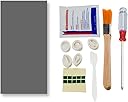
The PTM7950 Thermal Pad is a cutting-edge phase change material designed for high-performance CPUs and GPUs. Measuring 40x80x0.25mm, it boasts an impressive thermal conductivity of 8.5 W/m.K and activates at 45°C to optimize heat transfer. Engineered for longevity, it withstands over 1000 hours at 150°C and 1000 thermal cycles, maintaining ultra-low thermal impedance. The included professional-grade kit ensures easy, clean installation, making it the go-to solution for gamers and professionals seeking reliable, silent cooling upgrades.


| Best Sellers Rank | #17 in Silicon Grease |
| Customer Reviews | 4.4 out of 5 stars 757 Reviews |
T**D
Reduced my temps significantly at a great cost to performance ratio.
Great value thermal pad/paste. PTM is a phase change material that allows it to be applied as a thermal pad and with heat it will change into a paste. I have bought a few sets of these, and applied to 3 gpus, 2 laptops, a handheld, and my main computers CPU (did not delid, just used it in place of regular paste). I will mention, there is some talk on reddit about the JOYJOM PTM7950 not actually being true PTM7950. I am not that experienced that I would be able to tell the difference, but overall sentiment was that it still performs similarly enough that you will see good results. Adding that with the value of this brand being much cheaper than trying to go through other channels to get the guaranteed stuff, this is a no brainer for most. I noticed huge temperature drops in my Asrock RX 6900 XT and EVGA RTX 3080. I didn't use my i7 13700k without the JOYJOM PTM paste so I can't compare there, but I have not experienced any throttling and the temps are better than I expected with all the issues on the chip. My MSI GE66 Raider 11UE, my partners old Razer Blade 16, and my GPD Win 4 all also saw major temperature drops using these pads on their CPU and GPU's. This resulted in less noise as the fans didn't have to ramp up as high, and better performance. The kit these come with is also handy. I don't really use the finger gloves, but I could see them being nice if you have nice nails and don't want to get paste on them. The cleaning wipes and little brush are a nice touch as there is a good chance you will be cleaning off old paste with the install and these will help you clean up easily. I can safely recommend this to anyone looking to re-paste their computer/parts. I plan to continue buying this as needed myself as its performed well in my tests.
R**O
100% will buy again
This product works really well.On my gaming laptop with the original thermal paste that it came with from factory, I would see my CPU temperatures usually around 180F-200F. I did not like this at all and it’s very bad for your components. When I bought this product, I cut it up into two small squares and wiped off the old thermal paste and put each square on my GPU and CPU. I am really surprised the difference it made. Now when I use my laptop, the CPU temperatures are usually around 155-175F and my CPU doesn’t thermal throttle. I would 100% buy this product again in two or three years when it’s time to replace it.
M**Z
Creating a Permanent Phase Change Thermal Bridge to Survive Extreme Desert Heat.
I ordered this JOYJOM PTM7950 thermal pad for a friend's older ASUS laptop running an Intel Core i7 8750H processor. The computer was idling in the 70s and instantly slamming into its 88 degree thermal throttle limit the moment it was put under any real load. Traditional thermal paste is practically useless for these older gaming chassis out here in the brutal Indio summer heat. It just dries into chalk and pumps out over a few months of heavy thermal cycling. I was tired of applying standard grease just to have my friends asking me to redo their laptops every year and sounding like jet engines. The phase change material is totally different because it acts like a custom molded wax seal. It stays completely solid at room temperature which makes it incredibly easy to cut to size and peel the plastic film off with the included tweezers. The magic happens when the silicon hits 45 degrees Celsius. The pad actually melts into a highly conductive liquid that fills every microscopic scratch on the bare processor die. Once I applied over the direct die, the copper heatsink was perfectly seated against the chip before screwing it down with the provided screwdriver. You have to use a crisscross pattern to slowly squish the material down so you get maximum contact. To properly cure the material you have to run a heavy multi core benchmark for ten minutes to force the processor to maximum temperature. After three full cycles of heating the pad into a liquid and letting it cool completely off the laptop sat securely at 71 degrees under maximum load. That gave the processor a massive thermal buffer and stopped the fans from constantly screaming. It was so stable that I was able to leave the machine rendering and remote back into my home server to check on my own projects without worrying about the laptop overheating. The included cleaning wipes and brush made prepping the bare dies a breeze and the 40x80mm sheet gave me plenty of leftover material for future repairs. FYI, I used UPSIREN UTP-8 14.8w/mk Thermal Putty for the VRMs and VRAM chips, For the pictures, I show what it looked like after I took the heatsink off. There was way too much paste and putty everywhere. It even had thermal putty applied over two VRAM chip locations that weren't even installed (6GB instead of 8GB VRAM installed). I then show the PTM7950 and Upsiren thermal putty applied. Another shows Cinebench running and averaging only 71 degrees (HWiNFO64) Celsius when before the redo was idling in the 60s and 70s. I'll eventually redo my desktop with this. The last picture was Speccy showing the laptop only idling at 32 degrees after. This is night and day from what the laptop was doing before. PTM7950 is amazing and will outlast the silicon itself.
N**N
Good thermals, seems legit to me. Cheap.
Cannot speak for long term performance. Applied for a week or so. Previous thermal compound was liquid metal in an asus g14 2023 laptop. temps have dropped 15 degrees on load + a 1ghz increase in sustained clock speed. So it made quite a huge difference. if you have a device using liquid metal or a regular thermal paste I highly reccomend ptm7950. With my results I would say that this is a legit ptm7950 - but it is hard to know. Costing much less than the honeywell ptm7950 this is really worth trying out. deducting one star for lack of description of included items. Genuinely did not know what some of these items are for and I just used them creatively.
C**T
6900 XT with much better temps!
I have the air cooled version of the 6900 XT Toxic. Stock temps were acceptable, but I knew there was room for improvement. I typically use GELID GC Extreme as it has a lower viscosity and isn’t as prone to pump out over time as other pastes are. Temps were better and I ran that for about a year without issue. I came across this PTM7950 craze and thought I would give it a shot. I have no idea if this seller is selling legit Honeywell PTM, but this stuff is actually incredible. I am shocked at how much better it is than the top pastes. Through testing and locking fan speeds for before and after testing, I am seeing a reduction of 7-10c hotspot and 2-3c on core. Hotspot is the big factor here. I am now able to push another 50w into this card for some additional overclocking and the card still runs about 200rpm lower on the fan speeds. These pads are a PITA to handle and install. Peeling the plastic is painful as this compound is super fragile. IT WILL tear if you peel the film back incorrectly. If it tears, you needs to measure a cit another piece. I highly recommend tweezers and placing the pad in the freezer for a few minutes before cutting, then refreezing, then peeling the film. Happy modding!
A**R
Seems like the real thing or close enough!
At this point I've bought this multiple times for refurbishing laptops and repasting desktop CPUs and GPUs. It might be a little overkill for the latter two tbh but this has worked great every time! No complaints and honestly it's not even that difficult to apply.
E**D
Beats stock EVGA thermal compound
TLDR; A controlled test saw improved cooling of 6-7C. Now for the too long part... A "Break In" process of repeatedly heating the GPU to >80C then letting it cool to room temperature was done periodically for 5 days (per my research the phase change temperature is only 45C so 80C was just because thats the minimum my GPU gets to when gaming). My original test was run immediately after installing the PTM7950 and running the GPU at 91C for 5 mins. I was under the impression that just getting this stuff to phase change is enough to break it in. This is NOT the case; you must repeatedly heat and cool the material so that air can escape from the gaps that result during the installation process. My first test showed NO differences, with virtually identical results with the PTM7950 as with the stock thermal compound. After using my computer for 5 days, I reran the test and observed the following results: Test set up: EVGA RTX 3080ti FTW Manually locked GPU fans to 70% Set Power limit to 75% Set temp limit to 91C (highest setting in Afterburner) Kombuster to stress the GPU until stable state (over an hour for both tests) Note for power limit: For the tests, I set the power limit to below 100% so that I could get a stable reading of temps without hitting the thermal throttle at 91C. This stable state temperature reading allowed for a controlled temp per power draw comparison. Results: Stock thermal compound (baseline): After 1.5 hrs of kombuster running, I saw a stable temperature of 84-85C (it repeatedly bounced between the two the whole time, so likely 84.5 but afterburner rounds to the nearest whole number). PTM 7950 After a run time of over 4 hours, the temperature stabilized at 78C, a 6-7C temperature reduction from the stock tests. Side note: While the installation is a bit more tedious than normal thermal compound (or even liquid metal), after the first few installs, I got quite a bit better. I found cutting the size of the "pad" to larger than the surface of the IHS (or whatever you are applying it to) helped. I would place the pad on the IHS, then with the back protective plastic still on the material, use the spatula looking tool to slide down the corners of the IHS. That would let the outside corners of the IHS to cut through the pad to the outer plastic. Then when I lifted up the protective plastic, only the extra material would lift off with the plastic. This makes it easier to lift it off without starting to pull up the pad that you want to actually stay on the IHS.
J**S
impossible to remove the second piece of plastic.
I tried twice with no success. The product has clear plastic on both sides. It was difficult to remove the first pieces of plastic. I managed to remove it and cover the GPU. It's impossible to separate the other piece of plastic from the other side. I rip them both off, crumpled them up, cleaned my GPU and used the spatula that came with this order to spread a thick coating of KPx. Basically, I bought a expensive spatula for my thermal grease. I do not recomend PT7950. Good luck to you if you want to try. If anyone can get it to work, please post a video of how you did it.
Trustpilot
3 weeks ago
2 weeks ago