Buy anything from 5,000+ international stores. One checkout price. No surprise fees. Join 2M+ shoppers on Desertcart.
Desertcart purchases this item on your behalf and handles shipping, customs, and support to Spain.
🖤 Magnetize Your Setup with Corsair’s Sleek 4-Port USB Hub!
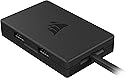
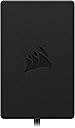
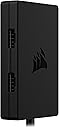
The Corsair Internal 4-Port USB 2.0 Hub delivers high-speed 480Mbps data transfer across four additional internal USB ports. Its innovative magnetic design allows effortless installation inside any PC case, including compact Mini-ITX builds. Compatible with most Intel and AMD motherboards, it supports a variety of internal devices like RGB controllers and AIO coolers, while built-in power safeguards ensure reliable, overload-free operation.


| ASIN | B0BGWPP23D |
| Additional Features | Portable |
| Best Sellers Rank | #1,073 in USB Cables |
| Brand | Corsair |
| Built-In Media | 1 package |
| Color | Black |
| Compatible Devices | Desktops |
| Customer Reviews | 4.8 out of 5 stars 926 Reviews |
| Data Transfer Rate | 480 Megabits Per Second |
| Enclosure Material | Magnet |
| Global Trade Identification Number | 00840006661276 |
| Hardware Interface | USB 2.0 |
| Item Dimensions L x W x H | 1.97"L x 3.35"W x 0.63"H |
| Item Type Name | USB Hub |
| Item Weight | 2.7 ounces |
| Manufacturer | Corsair |
| Mfr Part Number | CC-9310002-WW |
| Model Number | CC-9310002-WW |
| Number of Ports | 4 |
| Operating System | Windows, Linux, macOS |
| Special Feature | Portable |
| Total USB Ports | 4 |
| Total Usb Ports | 4 |
| UPC | 840006661276 |
| Warranty Description | 2 year manufacturer |
T**.
works Very well
So I have 9 argb fans, an argb reservoir, an argb GPU waterblock, an argb 18 rgb light strip on my lian li evo XL case, and 2 NVME 3 light each water blocks all plugged into this (daisy chained the two nvme blocks with the GPU block and the 9 fans are daisy chained 3 each. This works great. No weird colors or dim/ugly white colors even with everything turned to maximum brightness white (of note the front panel case argb might have its own power supply I'm not sure as the front panel in general has a power plug). If you are new to this maximum bright white color is what will stress a controller the most and this handles it fine. All 6 ports are independent so you can change the color however you like which is different compared to cheaper ones. My only con is it uses molex. This is actually good for me as my water pumps are also molex and I already have 4 things plugged into my SATA but i despise molex and I have no idea why they went with that. also be aware you need a usb 2.0 connector on your board as it does not have any way to connect to the argb header on your mother board (that I have seen at least). The razor software seems perfectly servicable. I have not played with it much but it is easy and not annoying to do basic things and looks like it can do some pretty custom stuff if you want to. It also plays well with signal rgb as long as you close down razor synapse (and kill it in task manager) though I do have some slightly weird colors with signal rgb at the very end of my fan daisy chains for some reason that are not an issue when using synapse. It also will protect itself so if you plug in to many things it will just throw up a warning and shut itself down and tell you to unplug things and restart which is great especially at 40 bucks. Overall highly recommend as long as you have molex in your rig and a usb 2.0 port on your motherboard. Very happy with purchase
R**L
Love the extra USB’s!
Works well used it for the extra usb hub on the front of my motherboard and it was really easy to setup. Allowed me to connect my other Corsair hubs to it for power.
R**S
This product saved my build by giving me the additional USB 2.0 Ports I needed.
This little hub is a life saver when your motherboard does not have enough USB 2.0 Ports and you need more for devices such as an LED Controller, Water Pump, Front Panel, etc... It is not a splitter it actually creates 3 new ports from 1. The reason its 3 instead of 4 is because you need to plug this into the original port on your motherboard. So basically it takes one port and converts it to 4, but since the original port is in use by this hub you really get 3 for 1. So if you need more than 3 additional USB 2.0 Ports be sure to purchase 2 of these instead of 1. Please be aware that this Hub is powered by a SATA Power Cable. So be sure to have one available and long enough to reach this. I actually had to purchase a SATA Power Extension Cable for mine to reach. It does have a fairly strong magnet inside to hold it to your computer chassis without need for any wire ties. As you can see in the image I am only using the magnet to hold it in. I have been using this for over a month now and it works great. I highly recommend it.
J**N
It works!
I tried a generic brand internal USB 2.0 Hub with the same features (4 ports / SATA powered) but devices connected to it would keep disconnecting at random. The Corsair Internal 4-Port USB 2.0 Hub simply works, no disconnections and the magnet on the back makes it easy to find a place for it on the case.
B**N
Worth it!
Def makes things way more convenient. I find it better for cable management the the nzxt hub. Would def buy again
M**K
Good internal USB Hub
The corsair 4 port USB hub works as it should. The device is fairly small, and is a good value for what it is. Installation is simple. The device magnetically attaches so it is easy to cable manage around. All in all a good device at a good value.
D**Y
Works great!
Needed this to hook up AIO cooler and PSU. Worked like it should with no issues.
J**Z
It is not for RGB
It is not for RGB. You need the comander Duo.
L**.
Perfect for a USB header connected internal display
I have an internal display showing pc details. It connects to a motherboard USB2 header. To improve reliability of the screen, ideally needs additional power. I could have bought a SATA power adapter but thought I'd give this a go, as it would also give me more headers (if needed). Installation is a breeze, connect to the USB header and a SATA power connector. It's built in magnet allows you to install wherever you want, even upside down.
N**Y
Sehr praktisch und sauber gelöst
Der interne USB Hub von Corsair ist eine echte Erleichterung, vor allem wenn man viele interne Geräte wie AIOs, RGB Controller oder Netzteile anschließen möchte und auf dem Mainboard die USB Anschlüsse knapp werden. Der Einbau ist simpel und selbsterklärend, anschließen, platzieren, fertig. Besonders gut gefällt mir die magnetische Befestigung. Der Hub hält zuverlässig an Metallflächen im Gehäuse und kann flexibel positioniert werden, ohne Schrauben oder Kabelbinder. Auch in kleineren Gehäusen findet er problemlos Platz. Die Verarbeitung wirkt hochwertig und typisch Corsair, alles sitzt fest und macht einen langlebigen Eindruck. Alle angeschlossenen Geräte wurden sofort erkannt und funktionieren stabil ohne Verbindungsprobleme. Für mich ein unverzichtbares Zubehör bei modernen Builds mit viel RGB und Zubehör. Klare Kaufempfehlung, wenn man Ordnung und Funktionalität im PC haben möchte.
K**T
جودة عالية
جودة عالية شكرآ للشركة المصنعة
M**O
USB GESTIONADO Y CON ALIMENTACIÓN INDEPENDIENTE
📝 DESCRIPCIÓN Concentrador interno Corsair de 4 puertos USB 2.0, con conexión magnética y alimentación SATA, ideal para ampliar la conectividad en tu PC. 🖥️🔌 Modelo similar en Amazon pic para conversión a 19 pines: https://amzn.to/419WSqY 🧾 ESPECIFICACIONES - Puertos: 4 x USB 2.0 - Velocidad de transferencia: 480 Mbps - Conexión: USB 2.0 de 9 pines + alimentación SATA - Compatibilidad: Placas base Intel y AMD - Instalación: Magnética (se adhiere a superficies metálicas) - Dimensiones: 5 x 8.5 x 1.6 cm 📦 CONTENIDO 1 - Concentrador interno Corsair 1 - Cable de conexión USB 2.0 de 9 pines 1 - Cable de alimentación SATA 💶 PRECIO - 27 de Enero de 2025: 27,90€ 🟢 PROS • Amplía la conectividad USB 2.0 en tu PC con 4 puertos adicionales. • Conexión magnética para una instalación fácil y segura. • Alimentación SATA independiente, ideal para dispositivos que requieren más energía. • Compatible con la mayoría de placas base Intel y AMD. • Diseño compacto, perfecto para chasis pequeños como Mini-ITX. 🔴 CONTRAS • Solo compatible con USB 2.0, no soporta USB 3.0 o superior. • Requiere una conexión SATA para la alimentación, lo que puede limitar su uso en algunos sistemas. 8️⃣ VALORACIÓN Cogí este concentrador interno de Corsair para ampliar los puertos USB 2.0 en mi PC, y ha sido una solución práctica y eficiente. Lo primero que destaco es su facilidad de instalación: la conexión magnética permite fijarlo a cualquier superficie metálica dentro del chasis, que lo hace ideal para organizar cables y mantener el interior del PC ordenado. En mi caso, lo tengo dentro de la zona inferior de la fuente y me queda muy cerca de la fuente y de la conexión a la placa usb. La alimentación SATA independiente es una ventaja, ya que te permite conectar dispositivos que requieren más energía, como refrigeradores líquidos AIO o controladores RGB, sin sobrecargar la placa base. Esto lo diferencia de los divisores USB simples, que no tienen alimentación independiente y pueden causar problemas de estabilidad al conectar varios dispositivos. En cuanto a la compatibilidad, funciona perfectamente con placas base Intel y AMD. Yo lo tengo con un AMD, para poder tener el visor de temperatura de la refrigeración y una tarjeta pci con bluetooth, a parte de los usb frontales de la caja. 🔍 DIFERENCIA CON DIVISORES USB SIMPLES - Divisor USB simple: No tiene alimentación independiente, lo que limita su capacidad para conectar dispositivos que requieren más energía. Además, puede causar inestabilidad con las comunicación si se conectan varios dispositivos a la vez y requieren velocidad de datos. Ejemplo en Amazon: https://amzn.to/3WWqHJ9 - Divisor USB gestionado. Estos divisores tiene un control electrónico de gestión de datos, pero coge la alimentación directamente de la placa, por lo que puede ser un problema para dispositivos que necesitan algo más de potencia. Ejemplo en Amazon: https://amzn.to/3EtSxX7 - Concentrador Corsair: Tiene alimentación SATA independiente, lo que permite conectar dispositivos más exigentes sin sobrecargar la placa base. Además, su conexión magnética facilita la instalación y organización dentro del chasis. ✅ CONCLUSIÓN Es una solución práctica y eficiente para ampliar los puertos USB 2.0 en tu PC, especialmente si necesitas conectar dispositivos que requieren más energía. Aunque solo soporta USB 2.0, su diseño compacto y alimentación independiente lo hacen ideal para builds organizadas y funcionales. 👍 RECOMENDABLE. ✳️ Espero que mi comentario ✍️ te haya podido servir de ayuda 😃
P**2
Ocupa adaptadores para solucionar problemas de estabilidad de USB interno en placas AM4
Lo compré como solución o alternativa preventiva ante un problema común en tarjetas madre AM4 relacionado a estabilidad de energía en puertos USB 2.0 (9 pin) internos. El hub parece tener una protección si detecta una conexión inestable, por lo que no pude utilizarlo para solucionar mi problema. Pude utilizarlo usando un adaptador de USB 9 pines macho a USB A externo macho, por lo que actualmente lo conecto usando los puertos USB externos de mi MB, y conectando mis dispositivos RGB/pantallas USB al hub de Corsair.
Trustpilot
2 weeks ago
1 day ago